Affordable Alternatives to Codex and Claude Code: A Practical Guide to Open-Source Tools

How to build a low-cost AI coding workflow using Aider, Cline, Continue, and OpenRouter as alternatives to Codex and Claude Code.
Monthly subscription fees for Codex and Claude Code strain individual developers' budgets. This article breaks down open-source alternatives like Aider, Cline, and Continue, combined with OpenRouter's pay-as-you-go model and cost-effective open-source models, to help you build an efficient AI coding workflow at a fraction of the cost.
Why We Need Affordable AI Coding Tool Alternatives
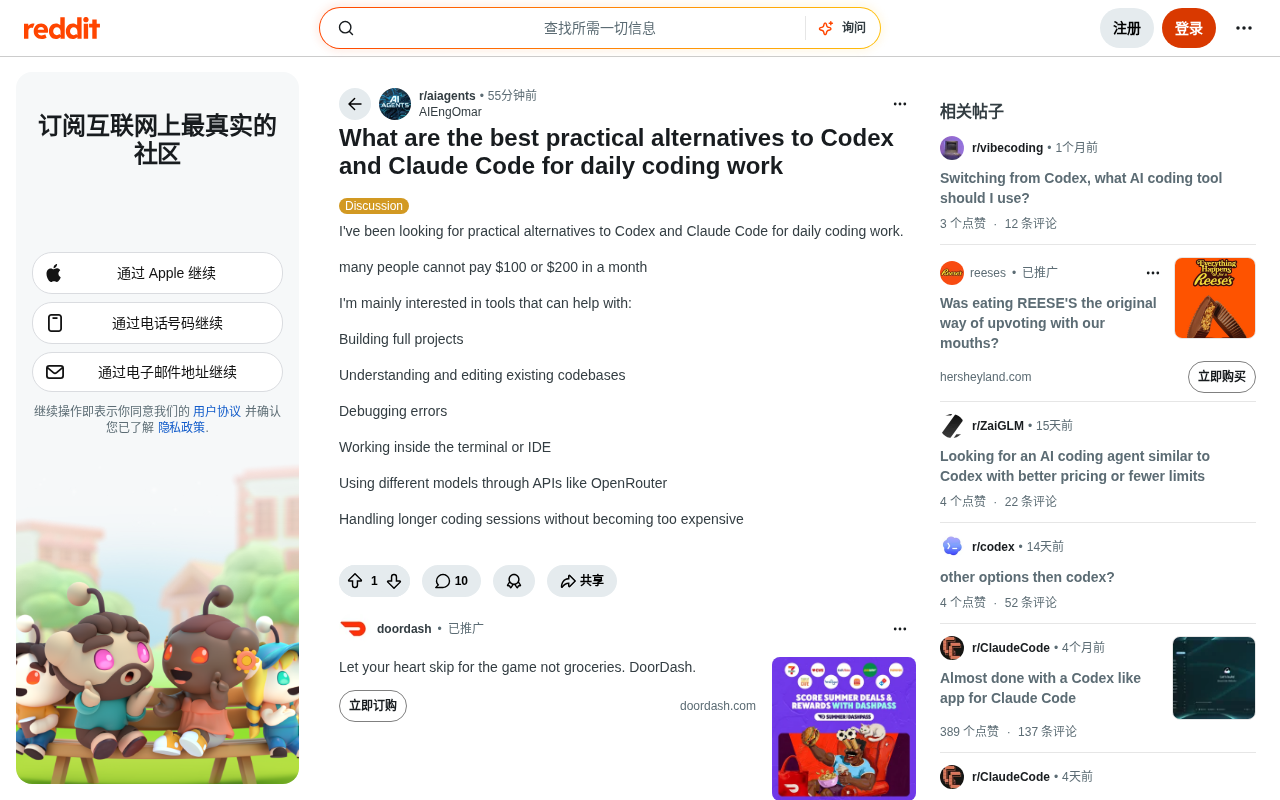
As AI-assisted coding becomes a daily necessity for developers, there's no doubt about the value of flagship tools like Codex and Claude Code. However, monthly subscription fees of $100 or even $200 are no small sum for individual developers, students, and independent entrepreneurs. As one Reddit user put it in a community discussion: "A lot of people simply can't afford $100 to $200 per month."
This post struck a chord with many and revealed a genuine market gap—how to get an AI coding experience close to flagship tools on a limited budget. Users' core demands center around the following dimensions:
- Building complete projects: Not just completing code snippets, but building runnable applications from scratch
- Understanding and editing existing codebases: The ability to grasp context when working with complex projects
- Debugging errors: Quickly locating and fixing bugs
- Seamless work in the terminal or IDE: Integrating into existing development workflows
- Flexibly calling different models via API: For example, switching between multiple models through OpenRouter
- Keeping costs under control during long coding sessions: The pain point that price-sensitive users care about most
Analysis of Mainstream Open-Source and Low-Cost Tools
To address these needs, the community has already produced a batch of mature alternatives. What these tools have in common is that they are either completely open-source and free, or use a "bring your own key" (BYOK) pay-as-you-go model that puts cost control back in the hands of developers themselves.
Command-Line Tool: Aider
Aider is a popular choice for terminal-oriented developers. As an open-source command-line AI coding assistant, it works directly within Git repositories and automatically generates commit records. Aider's biggest advantage is its model-agnostic nature—you can connect to OpenAI and Anthropic APIs, or use OpenRouter to call cost-effective open-source models like DeepSeek and Qwen.
On the technical side, Aider employs a mechanism called a "repo map," which statically analyzes the structure, function signatures, and module dependencies of the entire codebase, then dynamically compresses and passes the most relevant context to the language model. This means that even when facing projects tens of thousands of lines in scale, Aider doesn't need to stuff all the code into the context window—saving token consumption while significantly improving response quality. Its Git auto-commit feature generates semantic commit messages for each AI change, making code review and version rollback convenient during team collaboration.
For users who want to "code for long hours without worrying about runaway costs," pairing Aider with low-cost models like DeepSeek-V3 can bring hourly costs down to a few cents—an order of magnitude difference compared to fixed subscription plans.
IDE Integration Options: Cline and Continue
If you're more accustomed to working within graphical IDEs like VS Code, Cline (formerly Claude Dev) and Continue are two open-source plugins worth serious attention. Both support the BYOK model and offer capabilities such as understanding the entire codebase context, performing file edits, and running terminal commands—functionally on par with Claude Code.
The two differ significantly in architectural design, making them suitable for different use cases. Cline adopts an "agentic" architecture, where the AI can proactively invoke tool chains—autonomously reading and writing files, executing terminal commands, and recursively searching the codebase—forming an autonomous closed loop for multi-step tasks, making it better suited for complex engineering tasks requiring extensive automation. Continue, on the other hand, leans toward an "enhanced completion" positioning, deeply embedded in the editor's code completion, inline chat, and context reference workflows, with a gentler learning curve, suitable for individual developers or teams looking to gradually introduce AI assistance.
The core shared advantage of both is flexibility: you can assign different models to different tasks—use a low-cost model for daily completions, then temporarily switch to a more powerful model when facing complex architectural problems—achieving a fine balance between cost and effectiveness.
OpenRouter: The Key Hub for Cost Control
The original post specifically mentioned "using different models via OpenRouter," which actually gets at the core logic of affordable solutions. OpenRouter is a unified model API aggregation platform where developers only need a single key to access dozens of models and freely switch based on price and performance.
From an architectural perspective, OpenRouter is essentially a unified inference gateway that intelligently routes requests to inference clusters from different providers through a standardized, OpenAI-compatible API interface. Its backend integrates major vendors such as Anthropic, Google, Meta, and Mistral, as well as third-party inference services like Together AI and Fireworks. Developers don't need to manage multiple SDKs and authentication keys—they can freely switch between providers simply by using a model name string, greatly reducing the engineering complexity of multi-model experimentation and production deployment.
Why OpenRouter Can Change the Cost Structure
The problem with traditional subscription models is that they're "one-size-fits-all"—whether you write 1 line of code today or 1,000, the fee stays the same. Under the pay-as-you-go model, costs are strictly tied to actual usage. For developers with highly variable usage frequency, this model can often save more than 50% in expenses.
More importantly, the OpenRouter ecosystem includes a large number of cost-effective open-source models. The DeepSeek series and Qwen Coder series already perform quite close to the top tier on coding tasks, but at a fraction of the price of flagship models. By connecting these models through tools like Aider and Cline, users can dramatically reduce spending with almost no loss in experience.
How to Choose the Right Tool for Your Needs
Faced with so many options, the key is matching your work habits and budget boundaries. Here are selection recommendations distilled from community discussions:
Heavy Terminal Users
If most of your work is done in the command line, Aider + a low-cost OpenRouter model is the most economical combination. Its native support for Git workflows makes both "building complete projects" and "editing existing codebases" smooth, while keeping costs under control.
Those Heavily Reliant on IDEs
Developers accustomed to graphical editors are recommended to choose Cline or Continue. These two plugins provide good visual interaction for "understanding existing codebases" and "debugging errors," and combined with the BYOK model, can deliver an experience close to Claude Code without paying a fixed monthly fee.
Pursuing Maximum Cost-Effectiveness
Users extremely sensitive to cost can consider local deployment options. Using tools like Ollama to run open-source models locally achieves zero API cost. Ollama wraps the llama.cpp inference engine and combines it with quantization techniques—compressing model weights from FP16 to 4-bit or 8-bit integers—reducing VRAM usage to a quarter of the original at an acceptable precision loss. A consumer-grade GPU with 16GB of VRAM (such as the RTX 4080) can smoothly run code models with 13B to 34B parameters, such as CodeLlama and Qwen2.5-Coder, which is more than enough for high-frequency scenarios like daily code completion and simple debugging—with data processed entirely locally and privacy under control.
Conclusion: Building Your Own Low-Cost AI Coding Workflow
The trend toward "affordability" in AI coding tools is accelerating. Codex and Claude Code represent the ceiling of the experience, but they are not the only options. Through open-source tools like Aider, Cline, and Continue, combined with OpenRouter's model aggregation and pay-as-you-go mechanism, ordinary developers can absolutely build an AI coding workflow that meets daily needs on a monthly budget well below $100.
The entire approach can be summarized in three points: replace subscription software with open-source tools, replace fixed monthly fees with pay-as-you-go APIs, and replace flagship models with cost-effective open-source models. This combination not only significantly lowers costs but also grants developers greater autonomy and flexibility—and that is precisely the most valuable part of AI tools becoming accessible to all.
Key Takeaways
Related articles

Claude Paid Subscription Down for Over a Week with No Response: The Pain Points of AI Service Support
Claude AI paid subscription down for over a week with no support response, exposing systemic gaps in AI service customer support. Analysis of impact, industry shortcomings, and user strategies.

Older Google Home Gets Gemini Live Upgrade: Conditions and Experience Fully Explained
Google is rolling out Gemini Live conversational AI to older Google Home speakers, but subscription or plan requirements may apply. Here's what you need to know.

Older Google Home Gets Gemini Live Upgrade: Complete Breakdown of Requirements and Experience
Google is rolling out Gemini Live conversational AI to older Google Home speakers, but subscription or plan restrictions may apply. Full breakdown of the upgrade details and impact.