Agent Loop in Practice: A Guide to Building Self-Improving Automation with Guardrails

How to design production-ready Agent automation loops with guardrails using Claude Code and Codex.
This article breaks down a battle-tested methodology for building autonomous Agent loops that run safely in production. It covers Loop Contracts as a constitutional framework, four trigger types and their cost tradeoffs, a three-phase Schedule–Execute–Verify architecture with Git worktree isolation, Verifier design using Playwright, and Evolve Sessions that let the loop improve itself over time.
At midnight, the codebase keeps receiving new PRs — not because the team is burning the midnight oil, but because an Agent wakes up automatically every 30 minutes to scan for bugs, check server logs, submit PRs with verification evidence attached, and even auto-merge low-risk fixes. This kind of automated loop has been running stably in production for several months. Based on a deep practitioner walkthrough, this article breaks down how to build verifiable, self-evolving agent workflows using Claude Code and Codex.
Assembling a Loop Is Only 5% of the Work
Many people assume that once they understand the Loop concept, they can use Claude Code or Codex to build a functional automated loop. But that's only 5% of the challenge — the real work lies in designing Guardrails that let the Agent operate autonomously with confidence.
The core goal of a Loop is to let the Agent independently select tasks, execute them, verify results, and continuously improve. A script that simply calls itself in a cycle is nowhere near enough. You need a complete system architecture to ensure it delivers results safely and reliably — without falling into the same pitfalls over and over.
Every Loop the author's team builds follows a similar structure: a Markdown file that holds the Loop Contract, tracks state, and logs activity — essentially the living documentation for that Loop — plus a Trigger layer responsible for waking the Agent at the right moment. This structure works across a wide range of real-world scenarios: engineering tasks, CRM user segmentation, multilingual customer support tickets, and more.
Loop Contract: The "Constitution" of the Loop
The Loop Contract is the centerpiece of the entire system — think of it as the "constitution" of that loop. Its design philosophy draws from Design by Contract, a concept introduced by computer scientist Bertrand Meyer in 1986, which requires software components to explicitly declare preconditions, postconditions, and invariants to ensure predictable interactions. Applying this idea to AI Agents is fundamentally about solving the LLM "goal drift" problem: a model's tendency to deviate from its original intent during long autonomous runs. By requiring the Agent to validate its behavior against the contract before each execution, the Loop Contract transforms abstract "intent" into machine-interpretable operating procedures.
A Loop Contract covers three things:
- Intent: What exactly counts as success? Is there a clear endpoint?
- Boundary: What can the Agent decide on its own, and what requires human confirmation?
- SOP: The standard procedures and operating principles the Agent follows on each run.
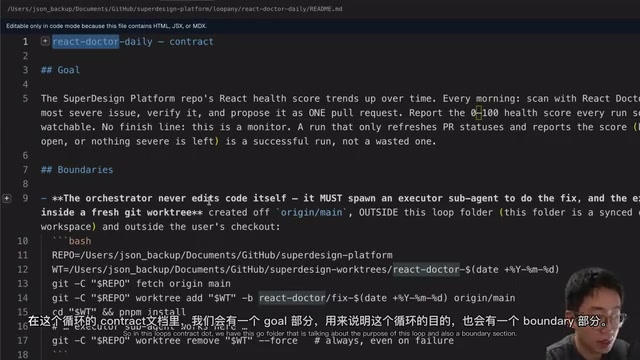
Take the React Doctor Check Loop from the author's codebase as an example: this Loop runs the open-source CLI tool React Doctor against the codebase once a day, automatically scans for critical issues, compiles them into a scored checklist, and then picks the most important issue to fix automatically. Its Contract explicitly defines the Goal, the Boundary (including how to spawn sub-Agents to perform fixes in isolated worktrees), the full verification process, and which changes can be auto-merged versus which require human review first.
State and Log: Giving the Agent a Memory
A contract alone isn't enough — the Agent also needs to remember what it has tried before and what it has learned. This is typically split into two parts:
- State: Like a long-term snapshot, recording the Agent's current assessments, assumptions, backlog, and delivered items that need follow-up. This part should be deliberately kept lean — don't dump everything in here.
- Log: Recorded in Append-Only fashion for each run.
The Append-Only log design is a classic pattern in databases and distributed systems, widely used by Apache Kafka, Event Sourcing architectures, and others. Its core advantages include: immutability guarantees the completeness of historical records, and any system state at any point in time can be reconstructed by replaying the log; it also avoids data race conditions during concurrent writes. In Agent workflows, Append-Only logs also address an LLM-specific problem — "hallucinatory repetition": without a persistent execution history, the model starts each wake cycle with no memory and is highly prone to retrying approaches already proven ineffective. The log essentially builds an external long-term memory for the Agent, compensating for the inherent limitation of finite LLM context windows.
Without this record, the Loop might wake up every time and fall into the same trap again, repeatedly chasing noise and errors it has already tried. For small Loops, the Contract, State, and Log can all be combined into a single Markdown file.
Four Trigger Types: Choosing Right Can Dramatically Cut Costs
Part of why many people find Loops hard to implement comes down to trigger type selection. The author breaks triggers into four categories:

1. Go Command (Continuous Loop)
Both Codex and Claude Code support Go Command, where you set conditions and a goal, and the Agent runs round after round until the task is complete or a round/token limit is hit. It's essentially a While Loop, particularly well-suited for scenarios with immediate feedback — such as fixing a bug or implementing a complex piece of logic against a clear spec.
2. Scheduled (Schedule)
Tools like Codex Automation or Claude Code Schedule follow straightforward logic: wake the Agent at a set interval. The main difference from a Go Loop is that one runs in the cloud while the other continues running within the same session.
3. Event-Driven
This triggers the Agent to react immediately to specific events — for example, when a new email arrives or a server Incident occurs. The Webhook mechanism that event-driven triggers rely on is a core integration protocol in the modern SaaS ecosystem. Compared to polling, Webhooks use a "push" model: when an event occurs in the source system, it proactively sends an HTTP POST request to a target URL, rather than having the consumer query periodically — offering significant advantages in latency and resource consumption. This type of trigger is ideal for scenarios requiring immediate handling, but neither Claude Code nor Codex natively supports it — because it requires the runtime to have persistent listening capability, which creates architectural tension with the stateless LLM API call model. You typically need to run your own local Daemon process that exposes a URL for Webhooks to call into.
4. Combo / Workflow (The Most Practical)
This is the category the author considers most valuable. A timer still fires, but instead of immediately waking the Agent, it first runs a script to fetch data and check whether there's new work to do. Take a support inbox triage Loop as an example: the team uses JavaScript to first pull data from Intercom, check whether there are any new pending updates in the past 30 minutes, and only triggers the Agent if there's actually work to do — otherwise it skips entirely.
This approach consumes fewer tokens and resources, batching up work before handing it to the Agent for unified processing. Choosing the right trigger type for your Loop can meaningfully reduce operating costs. The latter two trigger types require building your own local scripts and Daemon — the author's team has open-sourced dedicated tooling to run these kinds of triggers.
Agent Execution: Three Phases — Schedule, Execute, Verify
The Agent that actually does the work typically moves through three phases: collect signals, identify pending tasks, and prioritize → execute tasks → for complex, high-risk tasks (such as engineering tickets), have a Verifier check quality.
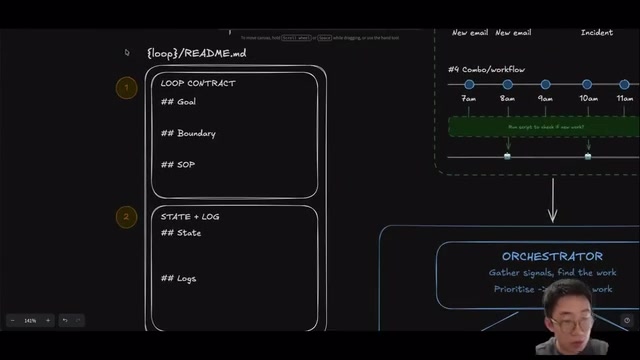
For simple tasks, a single Agent can handle all three; for complex tasks, they split into three roles: a Scheduler Agent receives the prompt, does research and planning, then spins up multiple Executor sub-Agents to work in parallel in isolated WorkTrees — and once each executor finishes, a Verifier runs tests, checks results, and attaches evidence to the PR.
The WorkTree here refers to Git's git worktree feature — which allows the same repository to have multiple branches checked out simultaneously in different directories on the filesystem. Each directory has its own working area and index but shares the same .git object database. This mirrors the isolation philosophy of Docker containers: multiple Agents can work on different tasks in the same codebase in parallel without interfering with each other, and ultimately converge to the main branch through the PR mechanism — bringing the distributed systems concept of Shared-Nothing Architecture into AI coding workflows, and serving as the key engineering decision that enables truly parallel Agent tasks without file conflicts.
This makes human review much easier, and all updates are written back to the Loop Contract document.
Verifier: A Prerequisite for Touching Production Code
Whenever production code is being modified or customer messages are being sent, a Verifier is essentially a prerequisite. The Verifier's design philosophy aligns closely with Test-Driven Development (TDD) and Continuous Integration (CI) systems, yet differs in a fundamental way: traditional CI pipelines rely on human-authored test cases, making the validation logic static; AI Verifiers have dynamic reasoning capabilities and can adaptively determine "what counts as verified" based on task context.
The core goal is to make the entire process easy to run while producing verification evidence that's easy for humans to review. Practical approaches include: using Playwright CLI to let the Agent verify its own work and record videos/screenshots as evidence — borrowing from acceptance testing principles, not just checking whether the program runs but proving whether business goals are met, so reviewers don't need to reproduce the scenario themselves and can judge the fix from the recording alone; running tasks in remote Sandbox environments to avoid being constrained by how many DevServers your local machine can run simultaneously. The author has also packaged these practices into a Skill called Verifier Setup, which can be handed directly to Claude Code or Codex to set up a verification system in a real codebase.
Evolve Loop: Letting the Loop Improve Itself
Most Loops start out imperfect. How to design triggers more cost-efficiently, how to turn repetitive SOPs into scripts — these optimizations can actually be delegated to a larger model, as long as you give it the Agent's current configuration, past run data, logs, and original conversation history.
The approach is simple: every 5 to 10 Loop runs, kick off a dedicated Evolve Session. In this session, the Agent gets the current configuration and historical logs, then judges which changes are most worth prioritizing. Changes might be to the Loop Contract itself, cleaning up stale state, or writing Trigger Scripts to handle repetitive actions. The Support Loop mentioned earlier started building its programmatic Trigger during an Evolve Run — waking the Agent only when there's actually work to do.
Start with the Smallest Viable Loop

The best entry point is the Documentation Maintainer Loop. Most teams have READMEs, CLAUDE.md files, codebase context documents, and similar — but these easily go stale. This Loop wakes an Agent once a day to check what shipped in the past 24 hours and what diffs exist in the code, then compares them against the README, installation guides, and Runbooks. When inconsistencies are found, it verifies whether the code or the documentation is correct; if no stale content is found, it simply ends the session; if issues are found, it makes quick fixes and opens a PR.
One detail worth noting: Agents have a default tendency to want to do something even when nothing needs to be done. In AI alignment research, this is known as "Sycophancy / Over-helpfulness Bias," rooted in the RLHF (Reinforcement Learning from Human Feedback) training process: human evaluators tend to give higher scores to responses that "look productive," causing the model to learn to generate seemingly useful additional output even when the task is complete or no action is needed. In automated Loop scenarios, this bias can directly lead to documentation being rewritten for no reason or code being unnecessarily refactored. So the Contract should explicitly include rules like "don't rewrite accurate documentation just to look busy" — this is essentially an alignment intervention at the System Prompt level, overriding the model's default behavioral tendencies to ensure outputs are genuinely valuable.
The team has also built internal tooling to coordinate and configure these Loops, with a built-in Dashboard to track which PRs are open, which have been merged, and how health scores are improving — with Evolve behavior built in by default (the blue dots appearing every few sessions on the Dashboard are Evolve Runs). The tooling is open-sourced and includes ready-to-use templates for Documentation Maintainer, react-doctor-loop, tech-debt cleanup, and more.
Summary
From the constitutional definition of the Loop Contract, to the cost tradeoffs of four trigger types, to the three-phase Schedule–Execute–Verify Agent structure, and the self-improving Evolve Loop — this methodology has been validated in production for several months and represents not a demo, but a practical engineering framework.
The core insight is this: the value of agent automation isn't in whether it "can run" — it's in whether the guardrails are solid enough, whether the verification evidence is rigorous enough, and whether the system can improve itself over time. For engineering teams looking to bring Agents into real production environments, this framework is worth studying and implementing piece by piece.
Related articles

Disaster and Glory of the Apollo Program: The History We Must Revisit Before Returning to the Moon
From the fatal Apollo 1 fire to Apollo 8's daring lunar orbit to Apollo 11's successful landing—revisiting the disasters, fears, and compromises of the Apollo program and their lessons for today's return to the Moon.
Netflix Trust Exercise Turns Into Firing Trap: Where Are the Boundaries of Corporate Trust?
A Netflix employee was fired after sharing private info in a trust exercise. We analyze the risks of corporate trust exercises and how employees can protect themselves.

AMD CDNA5 Architecture Deep Dive: Technical Evolution and the AI Computing Competition Landscape
Deep analysis of AMD's CDNA5 architecture covering Chiplet packaging upgrades, HBM memory evolution, and low-precision compute optimization, examining how AMD challenges NVIDIA's AI chip dominance.