Bernini Tile-Based Generation: An Engineered Approach to Video Super-Resolution in ComfyUI

Bernini solves ComfyUI video super-resolution tiling problems with three nodes and live stitching.
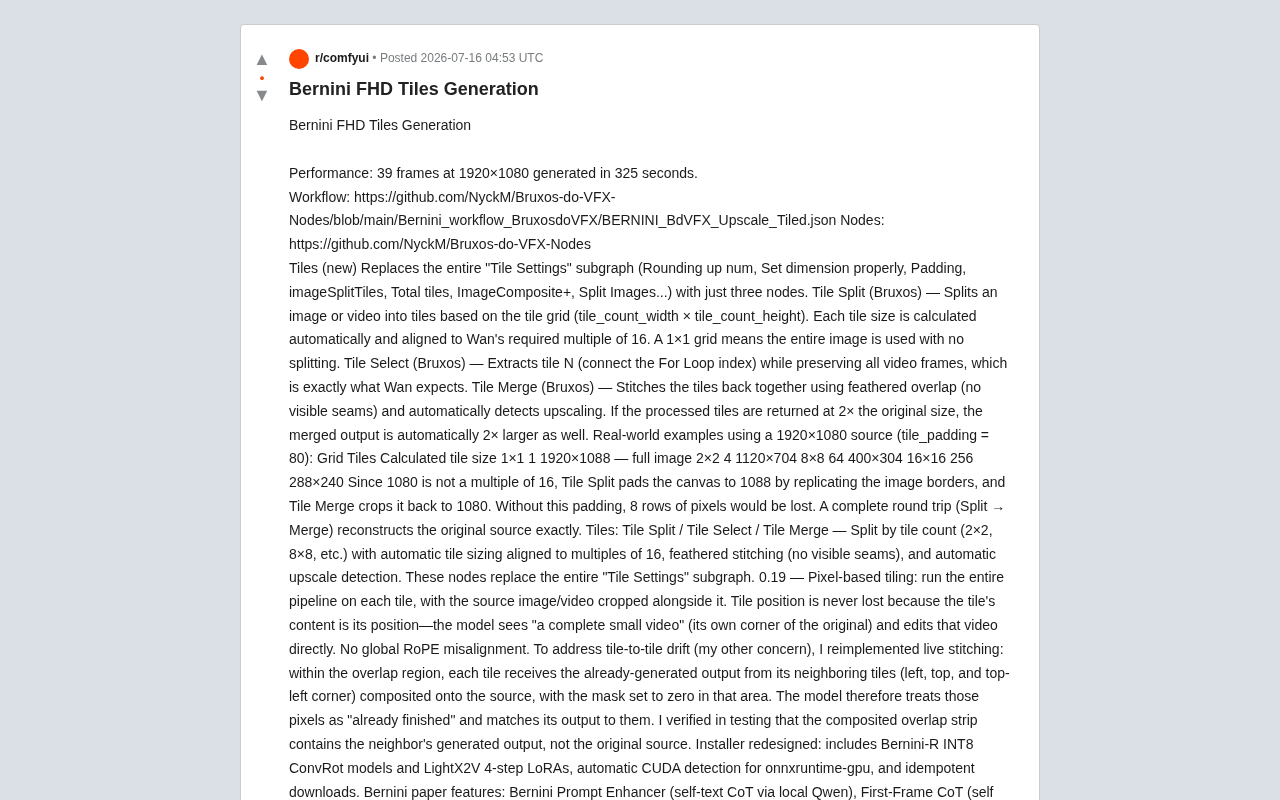
Bernini is a ComfyUI node package that tackles the core challenges of tile-based video super-resolution — seams, content drift, RoPE misalignment, and VRAM overflow. Its three-node design (Tile Split/Select/Merge), pixel-based tiling, and live stitching mechanism enable seamless high-resolution video processing, benchmarked at 325 seconds for 39 frames at 1920×1080.
The Tiling Problem in Video Super-Resolution
In AI video generation and super-resolution, VRAM remains an unavoidable bottleneck. The root cause lies in how deep learning model inference requires the entire computation graph and intermediate activations to be held in GPU memory simultaneously. At 1920×1080 resolution, a single frame contains roughly 2 million pixels — and once you factor in the KV cache required by attention mechanisms, VRAM demand can grow quadratically. Attempting high-quality processing on a 1920×1080 video often results in out-of-memory errors, or forces you to sacrifice image quality.
Tiling is a common workaround — splitting a large image into smaller patches, processing them individually, then reassembling the result. The tradeoff is spatial locality in exchange for VRAM feasibility. However, traditional tiling approaches suffer from two persistent problems: visible seams at patch boundaries, and content drift between adjacent tiles.
Recently, a developer shared a ComfyUI node package called Bernini on Reddit, offering a systematic engineering solution to these issues. According to the published performance data, the approach can complete 39 frames of 1920×1080 video generation in 325 seconds — a genuinely practical result.
Three Nodes, Rebuilt: Workflow Design That Embraces Simplicity
Replacing an Entire Subgraph with Three Nodes
ComfyUI uses a node graph-based visual workflow paradigm, where each node encapsulates an independent computation unit and nodes connect via data flows (tensors, masks, configuration parameters, etc.). This design lets users compose complex AI processing pipelines without writing code — but it can also lead to node sprawl and hard-to-maintain "spaghetti" subgraphs.
Bernini's most immediately visible improvement is compressing the previously bloated "Tile Settings" subgraph — which spanned rounding operations, dimension setup, padding, image splitting, compositing, and more — into three semantically clear core nodes that each follow the single responsibility principle:
- Tile Split: Splits an image or video into tiles based on a grid setting (
tile_count_width × tile_count_height). Tile dimensions are auto-calculated and aligned to multiples of 16 as required by the Wan model. A 1×1 grid means no splitting — the full image is used as-is. - Tile Select: Extracts the Nth tile (connected to a For Loop index) while preserving all video frames — exactly the input format Wan expects.
- Tile Merge: Reassembles tiles seamlessly using feathered overlap and auto-detects the upscale factor. If the processed tiles return at 2× their original size, the merged output is automatically 2× as well.
This design dramatically reduces workflow complexity and significantly improves long-term maintainability.
Alignment to Multiples of 16: A Detail That's Easy to Miss
Wan is an open-source video generation foundation model from Alibaba's Tongyi Lab, built on the Diffusion Transformer (DiT) architecture. DiT processes video frames by dividing them into fixed-size spatiotemporal patches (typically 16×16 pixels), which means input resolution must be an integer multiple of 16 — otherwise, dimension mismatch errors occur. This constraint is equally common in mainstream diffusion models like SDXL and Flux.
Since 1080 is not divisible by 16 (1080 ÷ 16 = 67.5), Tile Split pads the canvas to 1088 (68×16) by replicating edge pixels, and Tile Merge crops it back to 1080. The developer specifically notes: without this padding step, 8 rows of pixels would be lost. Testing confirmed that a complete split → merge round trip precisely reconstructs the original source material with zero information loss.
Using a 1920×1080 source with tile_padding=80 as an example, tile sizes for different grids are as follows:
| Grid | Tile Count | Calculated Tile Size |
|---|---|---|
| 1×1 | 1 | 1920×1088 (full image) |
| 2×2 | 4 | 1120×704 |
| 8×8 | 64 | 400×304 |
| 16×16 | 256 | 288×240 |
Core Innovations: Systematic Solutions to Seams and Drift
Pixel-Based Tiling: Position Information Is Never Lost
Bernini version 0.19 introduced the concept of pixel-based tiling. The core idea: run the full processing pipeline on each tile, with the source image/video cropped alongside it.
Understanding why this matters requires knowing how Rotary Position Embedding (RoPE) works. RoPE is a technique that injects positional information into Transformer attention mechanisms via rotation matrices — applying position-dependent rotations to Q and K vectors so that dot products naturally carry relative position information. In traditional tiling schemes, feeding a tile to the model in isolation causes it to assume the tile spans global coordinates starting at (0,0), resulting in misaligned positional encoding — one of the root causes of drift.
The developer offers an elegant insight: a tile's content is its own position. The model sees "a complete short video" (the corner of the original scene that belongs to that tile) and edits it directly. There is no global RoPE misalignment, eliminating positional information loss at the source.
Live Stitching: Actively Suppressing Inter-Tile Drift
To address content drift between tiles, the developer reimplemented a live stitching mechanism. This differs from conventional post-processing feather blending — feathered overlap only performs weighted averaging over overlapping regions after generation is complete (with weights tapering from tile center to edges). Live stitching, by contrast, feeds already-completed neighboring tile outputs back as conditioning for the current tile during generation.
Specifically, within the overlap region, each tile receives the generated output from adjacent tiles (left, above, upper-left), composites it onto the source image, and sets that region's mask to zero. This causes the model to treat those pixels as "already done" and match its own output to them. The developer confirmed in testing that the composited overlap strips contain the neighboring tile's generated output — not the original source frame. This mechanism fundamentally ensures visual continuity between adjacent tiles.
Processing Modes in Detail: sequential and context_window
Bernini provides two primary processing modes, each suited to different scenarios:
sequential Mode
Processes tiles in order, advancing chunk_size − overlap steps at a time. This mode is more VRAM-efficient and, combined with tail_memory, achieves good temporal consistency. It's best suited for very long videos or VRAM-constrained setups. Note: in this mode, mask_mode: bbox falls back to inpaint.
The developer also flags an important practical consideration: a small chunk_size combined with a large overlap dramatically increases the number of processing passes. For example, chunk_size=17, overlap=16 results in up to 61 passes. In practice, use the largest chunk_size and smallest overlap that your setup allows.
mask_mode and bbox Performance Optimization
Mask mode offers three options:
- off: Regenerates the entire frame
- inpaint: Edits only the masked area
- bbox: Crops the masked region and generates at a smaller resolution — delivering a real performance boost (only available in context_window mode)
Additionally, bbox_compose provides two compositing methods: silhouette (uses the mask contour as an alpha channel for compositing) and rectangle (feather-composites the entire bounding box to eliminate visible contour seams), accommodating different post-processing needs.
Supporting Ecosystem and Engineering Details
Beyond its core nodes, Bernini also redesigns the installer with a built-in Bernini-R INT8 ConvRot model and LightX2V 4-step LoRA, supports automatic CUDA detection for onnxruntime-gpu, and uses idempotent download logic (avoiding redundant downloads to improve deployment efficiency).
INT8 quantization compresses model weights from 32-bit or 16-bit floats to 8-bit integers — reducing model VRAM footprint by roughly 50% with acceptable precision loss, while accelerating inference via the INT8 tensor cores in modern GPUs (NVIDIA Turing and later architectures). ConvRot is a joint optimization approach combining structured pruning and quantization for convolutional layers. LightX2V is a lightweight LoRA (Low-Rank Adaptation) adapter designed specifically for video super-resolution, requiring only 4 diffusion sampling steps for inference — and is one of the key enablers of the 325-second, 39-frame benchmark.
Research-level features are also noteworthy: the Bernini prompt enhancer implements self-text CoT (Chain-of-Thought) via a local Qwen model — a technique that guides language models to output intermediate reasoning steps for richer, more structured prompts. First-frame CoT introduces a vision-language model into the pipeline, letting the model first "understand" the visual content of the input first frame before reasoning about scene characteristics for subsequent frames, achieving dual visual-linguistic conditioning. Advanced features like Bernini multi-guidance (experimental) are also in active development. The prompt guide has been expanded to cover all 22 Bernini-Bench tasks with 35 presets.
From production logs, the full pipeline executes in two stages: 4 iterations taking approximately 2 minutes 25 seconds (~36.35 seconds each), followed by 2 iterations taking approximately 1 minute 13 seconds — completing 39 frames of 1920×1088 video in a total of 325.19 seconds.
Summary
The Bernini project reflects the engineering maturity the open-source community has reached in AI video processing. Rather than settling for "it works," it provides a systematic solution to the classic challenges of tile-based processing: seams, drift, positional encoding misalignment, and VRAM consumption.
Consolidating complex subgraphs into three semantically clear nodes represents a meaningful improvement to ComfyUI workflow usability. The "tile content as position" design philosophy and the live stitching mechanism demonstrate the developer's deep understanding of underlying mechanisms like RoPE positional encoding and conditional diffusion model generation. For creators who need to process high-resolution video on constrained hardware, the value of tools like this is self-evident. That said, as a rapidly iterating open-source project, some features remain marked experimental — real-world effectiveness still awaits broader community validation and feedback.
Key Takeaways
Related articles

The Truth Behind Codex 'Build a Website in 5 Minutes': AI Isn't Creating Sites—It's Helping You Copy Them
Exposing the truth behind viral Codex 5-minute website videos: creators aren't building original sites with AI—they're copying shared prompts or scraping others' work. Learn AI coding tools' real limits.

Getting Started with AI Agent Development: A Complete Guide from Concept to Practice
A comprehensive guide to AI Agent architecture and development, covering automated marketing, intelligent customer service, and investment analysis scenarios with single and multi-agent collaboration.

The Truth Behind Codex 'Build a Website in 5 Minutes': AI Isn't Creating Sites — It's Helping You Copy Them
Exposing the truth behind viral Codex 5-minute website videos: creators aren't building original sites with AI — they're copying shared prompts or scraping others' work.