Breaking Down the AI Agent Execution Flow: How Tools and Skills Work Together

Breaking down how AI Agents work: the roles of Tools and Skills, and the eight-step task execution flow.
This article explains the two core concepts behind AI Agents—Tools (specific actions) and Skills (reusable working methods)—using a kitchen analogy. It then reconstructs the complete eight-step execution flow, from understanding the goal to delivering results, revealing how Agents handle complex, multi-step tasks.
When we give an AI Agent a simple instruction—say, "Help me collect recent industry hot topics and compile them into a report"—what kind of thinking and execution process actually happens behind the scenes? Many people still perceive Agents as nothing more than "smarter chatbots," but to truly understand their value, you need to break down the complete chain from receiving a task to delivering a result.
Based on a Bilibili creator's demonstration and explanation of how an Agent actually operates, this article systematically covers the two core concepts of Agents—Tool and Skill—and reconstructs the eight-step execution flow of a task from assignment to completion.
Tool and Skill: The Two Foundational Concepts Behind Agent Operations
To understand how an Agent "gets things done," you first need to distinguish between two easily confused concepts: Tool and Skill.
A Tool represents a specific action—it's the Agent's "hands and feet" for interacting with the outside world. Just as tightening a screw requires a wrench, when an Agent performs a web search, it invokes the WebSearch tool. The data a tool retrieves might be an HTML web page, a PDF document, or other file types, and the Agent needs to read from and write to the file system before understanding and processing it.
A Skill, on the other hand, is a set of working methods—it defines how complex tasks should be broken down, how tools should be invoked, and what conditions and standards the results must meet. What a Skill decides includes: which tool to use and when, what steps the workflow should follow, how to retry on failure, and what output standard must be reached before it stops running. In short, a Skill is the solidified accumulation of experience and methodology.

Understanding the Tool–Skill Relationship Through a Kitchen Analogy
If we compare an Agent to a chef, this relationship becomes very intuitive:
- Tool = knives and pots: the instruments in the kitchen that handle the actual hands-on work
- Skill = the complete recipe and cooking method: the coordination of the entire process, from prepping ingredients to plating the dish
Tools handle the specific actions of "cutting" and "stir-frying," while the Skill governs "how the whole dish should be cooked."
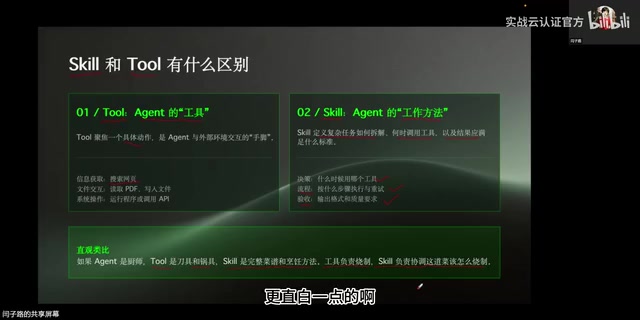
In the demonstration, the creator installed a "web search skill" onto the Agent. In terms of the kitchen analogy, this is like adding a matching set of knives and pots to the kitchen—essentially, it grants the Agent a reusable search working method. This is crucial: the value of a Skill lies not in one-time use, but in solidifying the experience of handling a category of tasks, so that when the Agent encounters similar needs, it can invoke the Skill automatically without having to "figure things out" all over again.
The Complete Eight-Step Flow of an Agent Executing a Task
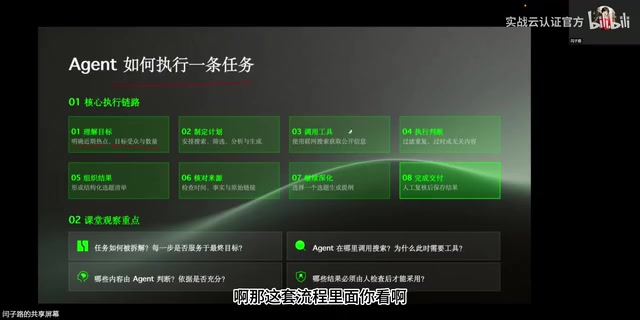
With the concepts clarified, let's look at how things actually work under the hood once an Agent receives a task. Take the instruction "collect recent hot topics and compile a report" as an example. The Agent first needs to clarify the scope of "recent hot topics," who the target audience is, and how many are needed. Then it makes a plan, arranges searches, and performs filtering and analysis.
The entire execution process can be broken down into the following eight steps:
- Understand the goal: parse the true intent behind the user's instruction
- Make a plan: break down the complex task into executable sub-steps
- Invoke tools: select and execute the appropriate tool (such as WebSearch)
- Evaluate execution: assess whether the current results meet the requirements
- Organize results: structure the raw data into coherent content
- Verify sources: validate the reliability of the information
- Deepen further: if information is insufficient, repeat searches to gather more data
- Deliver the task: output the final result to the user
Reconstructing the Agent's Thought Process from Actual Execution Logs
This flow isn't just theoretical. By examining the Agent's execution history, you can clearly see its actual operating trajectory.
During the thinking phase, the Agent first analyzes: "The user is asking me to collect certain content. This is a task that requires internet access, so which skill should I invoke?" At this point, the newly installed web search skill comes into play. The Agent clarifies, "Let me first search for these two hot topics," and provides the user with an analysis note—an outward manifestation of its complete chain of thought.
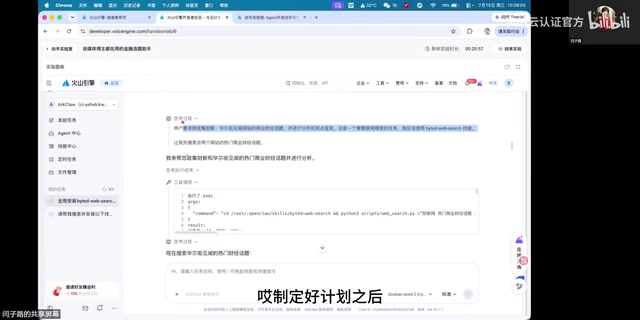
Once it enters the execution phase, the first step is tool invocation. After the plan is set, the Agent issues a search command and retrieves the first batch of results. But it doesn't stop there—if it determines the amount of information is insufficient, it will continue invoking tools to search more deeply, even across multiple iterations, until enough content has been accumulated. This is precisely the real-world embodiment of the "evaluate execution" and "deepen further" steps in the flow.
Once the Agent confirms that it has "gathered enough information," it begins compiling a complete analysis report and ultimately delivers the result to the user. The entire chain—from understanding the goal, making a plan, invoking tools, evaluating execution, organizing results, verifying sources, and deepening further, to the final delivery—is logically complete and forms a closed loop.
The Practical Significance of Understanding the Agent Execution Flow
A complete Agent task must contain at least the core stages described above. This flow explains why Agents can handle open-ended, multi-step complex tasks rather than just giving one-off answers.
For anyone who wants to truly make good use of Agents, understanding this mechanism offers two practical insights:
First, Skills are reusable capability units. Configuring the right skills for an Agent is equivalent to instilling in it a standard method for handling a category of tasks. The more reasonably its skills are configured, the stronger and more stable its ability to complete tasks autonomously.
Second, Agents possess self-judgment and iteration capabilities. An Agent doesn't mechanically perform a single search and call it done—it actively evaluates whether the results are sufficient and decides whether to deepen further. This "execute–evaluate–re-execute" loop is exactly what distinguishes an Agent from traditional script-based automation.
You may not have noticed, but during the actual execution in the demo, the "verify sources" step was handled by the Agent on its own and was not explicitly displayed in the interface. This also reminds us that different Agent implementations vary in how transparently and how rigorously they carry out each stage of the flow. When relying on their output, users still need to maintain a necessary awareness of manual verification.
Related articles

The Truth Behind Codex 'Build a Website in 5 Minutes': AI Isn't Creating Sites—It's Helping You Copy Them
Exposing the truth behind viral Codex 5-minute website videos: creators aren't building original sites with AI—they're copying shared prompts or scraping others' work. Learn AI coding tools' real limits.

Getting Started with AI Agent Development: A Complete Guide from Concept to Practice
A comprehensive guide to AI Agent architecture and development, covering automated marketing, intelligent customer service, and investment analysis scenarios with single and multi-agent collaboration.

The Truth Behind Codex 'Build a Website in 5 Minutes': AI Isn't Creating Sites — It's Helping You Copy Them
Exposing the truth behind viral Codex 5-minute website videos: creators aren't building original sites with AI — they're copying shared prompts or scraping others' work.