Building a Full-Stack Website from Scratch with AI: A Cursor + DeepSeek Hands-On Tutorial

A complete tutorial on building and deploying a serial number query system from scratch using AI tools.
This article uses a "Serial Number Query System" as a practical example to demonstrate how non-programmers can leverage DeepSeek and Cursor to complete the entire workflow—from MySQL database design, Node.js backend API development, and Vue frontend interface building to deployment via BT Panel. The core philosophy: describe requirements in natural language, let AI generate executable code, and developers only need to understand the basic architecture to ship a product.
When a product idea flashes through your mind but you lack programming skills, AI coding tools can now turn your ideas into reality. This article uses a "Serial Number Query System" as an example to document the complete process of leveraging DeepSeek and Cursor—from MySQL database design to Node.js backend development, Vue frontend interface building, and finally deploying through BT Panel (BaoTa Panel).
Understanding the Basic Architecture of a Website
Before getting started, you need to understand the three core components of a web application:
- Database: Responsible for storing and managing all data, such as serial number information and admin accounts.
- Backend: Acts as a "relay station" connecting the database and frontend, handling business logic and providing API endpoints.
- Frontend Interface: The part users directly see and interact with, including input fields, buttons, and data displays.
The collaboration flow is straightforward: the user initiates a request on the frontend → the frontend sends the request to the backend via API → the backend queries the database and returns results → the frontend displays the results to the user. Understanding this chain gives you a clear roadmap for the development steps ahead.
Architecture Background: This "frontend-backend separation" architecture is the mainstream pattern in modern web development, rising to prominence in the mid-2010s. Before this, traditional "monolithic" approaches (like PHP directly rendering HTML pages) mixed business logic with presentation, making maintenance costly and collaboration difficult. With separation, the two ends communicate through REST APIs (an interface specification based on the HTTP protocol), with data transmitted in JSON format. The benefits of this architecture include: the frontend can iterate on the interface independently, the backend can serve multiple clients simultaneously (web, mobile apps, mini-programs), and responsibilities are clearly delineated. API endpoints are essentially a set of agreed-upon "data exchange contracts" that define the request address, method (GET/POST/PUT/DELETE), and the structure of returned data.
Designing the MySQL Database with DeepSeek
The database is the foundation of the entire project. First, you need to install MySQL Community Edition (free). During installation, pay attention to a few key configurations: the port number (default 3306; change to 3308 if occupied), the root password (you can set it to 123456), and whether to start with the system.
Once installed, configure the environment variables and you can operate the database through terminal commands.
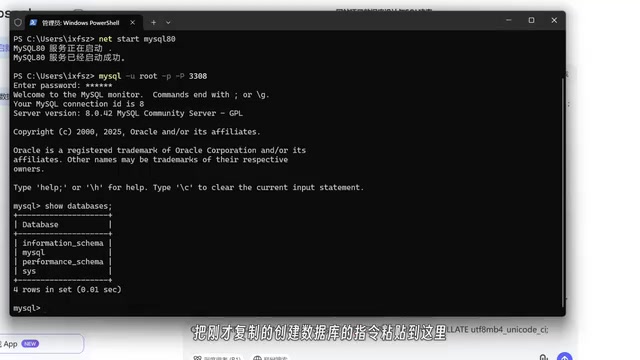
MySQL Background: MySQL is the world's most popular open-source Relational Database Management System (RDBMS), developed by Swedish company MySQL AB, acquired by Sun in 2008, and later absorbed into Oracle. The core idea of relational databases is organizing data into "tables," with relationships between tables established through "foreign keys"—like references between Excel spreadsheets. The language used to operate databases is called SQL (Structured Query Language), which contains four core operation types: DDL (defining table structures), DML (inserting, updating, deleting data), DQL (querying data), and DCL (permission control). MySQL listens on port 3306 by default—this is its "address number" on the network, through which other programs establish connections to the database. For personal projects and small-to-medium applications, MySQL's performance and stability are more than sufficient, which is why it became a core component of the classic LAMP (Linux+Apache+MySQL+PHP) tech stack.
Next, describe your development requirements to DeepSeek: "I want to build a serial number query system that needs a serial numbers table and an administrators table." DeepSeek quickly provides a database design:
- Serial Numbers Table: Contains fields for ID, serial number, validity status, activation time, holder name, etc.
- Administrators Table: Contains fields for ID, username, password, etc.
If you find certain fields unnecessary (like creation time that you don't need yet), just tell DeepSeek to remove them. It will output a simplified SQL CREATE TABLE statement—copy it to the terminal and execute it, and your database is set up.
The core value of this process: You don't need to learn SQL syntax. Just describe your requirements in natural language, and AI generates database commands ready for execution.
Developing the Node.js Backend with Cursor
Backend development requires two tools: Node.js (JavaScript runtime environment) and Cursor (AI coding assistant). Cursor's free tier provides 150 requests per account with a daily limit of 50. Once exhausted, you can register again with a new email.
Node.js Background: Node.js was born in 2009, created by Ryan Dahl. Its revolutionary aspect was bringing JavaScript from "only runs in the browser" to the server side. Node.js is built on Google Chrome's V8 engine and uses an event-driven, non-blocking I/O model—simply put, it doesn't "freeze" while waiting for database queries or file operations. Instead, it continues processing other requests and handles results when they come back, making it ideal for high-concurrency network applications. In the Node.js ecosystem, the most commonly used backend framework is Express.js, which provides core features like route management and middleware mechanisms, enabling developers to quickly build REST API services. Node.js also includes npm (Node Package Manager), the world's largest open-source package registry with over 2 million reusable code packages, allowing developers to directly leverage existing functional modules and dramatically improve development efficiency.
After creating a project in Cursor, send it your complete development requirements: use Node.js for the backend, provide the database name, username, password, port number, and CREATE TABLE statements, and ask it to develop the necessary API endpoints.
Cursor's biggest advantage over DeepSeek: it can directly generate and modify files in your project folder, rather than having you manually copy and paste code. In just one request, Cursor completed the entire backend program, generating the following API endpoints:
| Endpoint Function | Request Method | Authorization Required |
|---|---|---|
| Admin Login | POST | No |
| Add Serial Number | POST | Token Required |
| Query Serial Number | GET | No |
| Update Serial Number Status | PUT | Token Required |
| Get All Serial Numbers | GET | Token Required |
| Delete Serial Number | DELETE | Token Required |
Testing Backend API Endpoints with Postman
After backend development is complete, you need to verify that each endpoint works correctly. This is where Postman, a professional API testing tool, comes in.
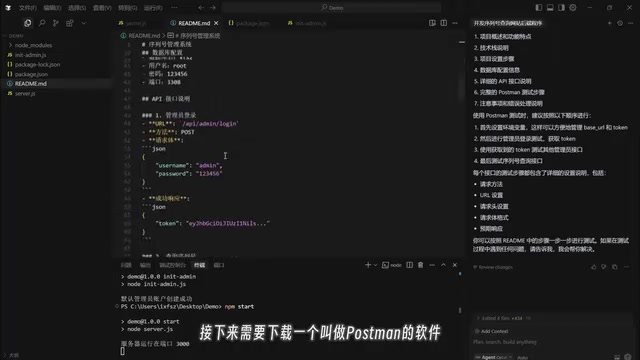
The core logic of the testing flow: first obtain a Token (authentication token) through the login endpoint, then include this Token in subsequent requests that require authorization. For example, when adding a serial number without a Token, the server returns an "authentication token not provided" error—this confirms the authorization mechanism is working correctly.
JWT Token Background: The Token here is typically a JWT (JSON Web Token), an open standard (RFC 7519). Traditional authentication relies on server-side Session mechanisms: after a user logs in, the server stores a session record in memory and gives the client a Session ID. This approach encounters "session sharing" challenges in distributed environments with multiple servers. JWT instead encodes user information directly into the token itself. A token consists of three parts: Header (algorithm declaration), Payload (user data), and Signature, connected by dots in the form
xxxxx.yyyyy.zzzzz. The server signs the token with a private key, and any tampering causes signature verification to fail, eliminating the need to store state on the server side. The client includes the JWT in theAuthorization: Bearer <token>field of the HTTP request header with each request, and the server can confirm identity after verifying the signature. JWT's downside is that once issued, a token cannot be actively revoked (unless a short expiration time is set), requiring additional handling for scenarios like "forced logout."
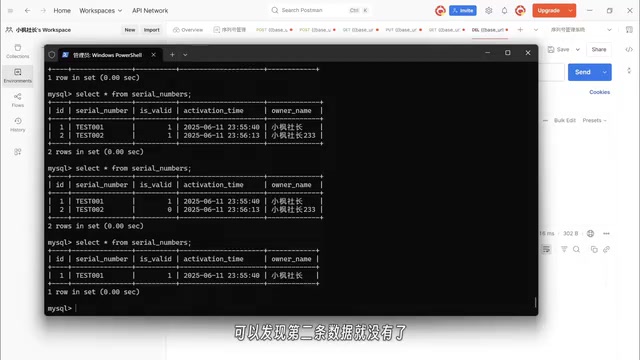
Test all endpoints one by one (add, query, update status, get list, delete), verify data changes through the database, and confirm the backend program runs correctly.
Building the Vue Frontend Interface with Cursor
With the backend ready, continue having Cursor develop the frontend. Tell it to use the Vue framework and create a new frontend folder. Cursor will guide you through framework and language selection, then automatically generate the frontend code.
Vue.js Background: Vue.js was created in 2014 by Evan You, a former Google engineer, and is one of the three major frontend frameworks globally (the other two being React and Angular). Vue's core concept is reactive data binding: when data changes, the interface updates automatically without developers manually manipulating the DOM (web page elements). Vue adopts a component-based development pattern, splitting pages into independent
.vuefiles, each containing a template (HTML), logic (JavaScript), and styles (CSS) for easy reuse and maintenance. For engineering purposes, modern Vue projects typically use Vite as the build tool, providing ultra-fast hot module replacement during development. For production,npm run buildbundles and minifies the source code into static files (HTML/CSS/JS)—this process is called "building" or "bundling," and the generateddistfolder is what gets deployed to the server. Vue has a relatively gentle learning curve with comprehensive Chinese documentation, making it especially popular in the Chinese developer community.
The first version of the frontend is very minimal—just an input field and a button. But the functionality is complete: enter a serial number, click query, and get correct results; the admin panel supports login, viewing lists, and CRUD operations.
After several rounds of iterative optimization, the final version includes many practical features:
- Data Filtering: Supports search, status filtering, and time-based sorting
- Site Settings: Modify title, theme color, case sensitivity, copyright info, and logo
- Color Picker: Offers preset colors and custom parameter adjustments
This iterative process demonstrates another advantage of AI-assisted programming: You can continuously submit requirements like a product manager, and Cursor will keep optimizing based on existing code without requiring you to understand the underlying code logic.
Deploying with BT Panel (BaoTa Panel)
After local development is complete, you need to deploy the project to a cloud server for public access. The deployment process uses BT Panel and involves three main steps:
Cloud Server and BT Panel Background: A cloud server (also called VPS, Virtual Private Server) is an independent computing resource virtualized from a large physical server. Users can rent one monthly, obtaining a fixed public IP address that allows users worldwide to access services deployed on it. Major domestic cloud providers include Alibaba Cloud, Tencent Cloud, and Huawei Cloud, with entry-level configurations (1 core, 2GB RAM) costing around tens of yuan per month for personal projects. BT Panel (BaoTa Panel) is the most popular server management panel in China.
Related articles
 Tutorials
ChatGPT Plus Subscription Guide: Are GPT-5.5, image-2, and Codex Worth the Upgrade?
A detailed look at ChatGPT Plus features — GPT-5.5, image-2, and Codex — with a Plus vs Pro comparison and a complete step-by-step subscription guide for users outside the US.
 Tutorials
Harness AI Engineering in Practice: Using Claude Code to Master Enterprise-Level E-Commerce Development
Deep dive into Harness AI Engineering: master enterprise e-commerce development with Claude Code using the Rules, Skills, Wiki, and Changes framework.
 Tutorials
Cursor + Codex Dual-IDE Collaboration: A Practical Methodology for Open-Source Project Customization
A complete methodology for open-source project customization based on real-world experience, detailing the Cursor+Codex dual-IDE workflow, seven-stage process, MVP validation, and AI source code reading techniques.