Building a Website for $30: Using AI Multi-Round Generation to Create 28 Consistent Design Mockups

Using an AI tool chain to quickly generate 28 style-consistent website design mockups on a $30 budget
This article covers the design mockup generation phase of a $30 website-building series: by breaking 28 pages into multi-round single-page tasks, first anchoring the visual style with the homepage, then using ChatGPT to batch-generate design prompts for subsequent pages and feeding them into an AI design tool round by round. While minor imperfections exist, the results are sufficient for functionality confirmation on a tight budget, and mockups can be automatically exported as frontend code.
Delivering Professional Design Mockups on a Tight Budget
Can you build a complete website for just $30? It sounds impossible, but with the right combination of AI tools, this challenge is being conquered step by step. This article is the second in the $30 website-building series, focusing on a critical step — how to quickly generate a set of website design mockups with a unified visual style.
The core idea is simple: use ChatGPT to batch-generate prompts, then use an AI design tool to generate mockups page by page, ultimately producing 28 pages with a consistent style.
The Core Challenge: Maintaining Style Consistency Across 28 Pages
When designing a website with 28 pages, the biggest challenge isn't generating a single page — it's keeping all pages visually consistent.
Current AI design tools can't yet generate an entire website from a single prompt. If you ask AI to generate 20+ pages at once, each page's color scheme, layout, and icon style will likely differ, resulting in a chaotic patchwork.
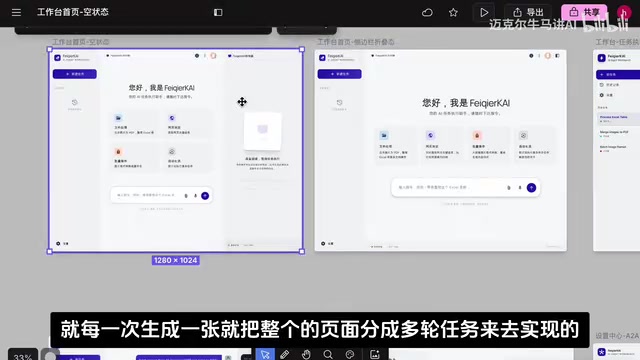
The solution is a pragmatic strategy: break the entire design task into multiple single-page generation rounds, generating only one page per round and explicitly requiring "continuation of the previous round's design style" in each prompt.
Multi-Round Prompt Strategy: From Style Anchoring to Batch Generation
Round One: Anchoring the Overall Visual Style
The first round generates just one page, but this page is crucial — it serves as the "style anchor" for the entire website.
In the first round's prompt, you need to describe the desired design style in detail, including:
- Color scheme (primary color, accent colors, background color)
- Layout structure (sidebar, top navigation, content area)
- Font style and overall visual tone
Once this page is confirmed, all subsequent pages use it as the baseline.
Round Two Onward: Expanding Feature Modules Page by Page
From the second round onward, each prompt contains two key elements:
- Style continuation instruction: Explicitly require "based on the previous round's design style, use the same style to design this page"
- Feature description: Detailed explanation of the specific functionality and content the current page needs to display
Each round's prompt is quite long because it needs to precisely describe the page's functional details. Writing all of these manually would be extremely time-consuming.

Using ChatGPT to Batch-Generate Design Prompts
This is where the key efficiency tool comes in — ChatGPT acts as a "prompt production line":
- Organize all the website's feature modules and hand them to ChatGPT
- Have ChatGPT generate design prompts for each page based on the feature list
- ChatGPT outputs 20+ rounds of prompts, each corresponding to one page
In practice, you simply copy and paste ChatGPT's generated prompts round by round into the AI design tool, hit enter, and a page is generated. The entire workflow becomes a simple "copy → paste → enter" cycle, making it extremely efficient.
A Pragmatic Delivery Strategy: Trade-offs on a $30 Budget
The 28 design mockups generated through this method do maintain an overall unified style, but some imperfections remain in the details.
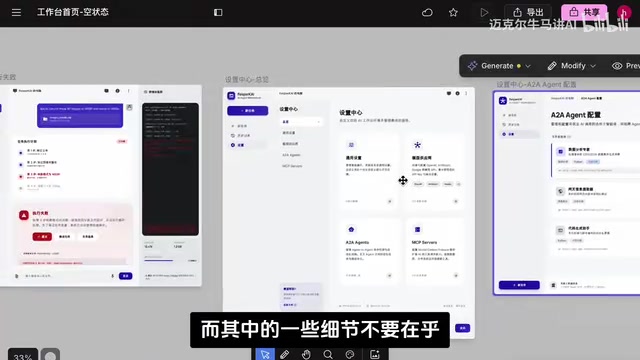
Common Issues with AI-Generated Design Mockups
- Inconsistent logos: Different pages may generate different logo styles
- Navigation bar style differences: Some pages' navigation designs aren't aesthetically ideal and need later adjustment
- Icon style deviations: Sidebar icons may vary between pages
Core Principle for Low-Budget Projects
With a limited budget, the core purpose of design mockups is to let the client confirm whether the overall functionality is correct, not to achieve pixel-perfect precision.
If the budget were $300 or more, you'd absolutely bring in a professional designer to polish the UI. But under $30 constraints, AI-generated mockups are sufficient for functionality confirmation and directional communication. Focus on what matters most and spend the limited budget where it counts.
Automated Handoff from Design Mockups to Frontend Code
After the design mockups are confirmed, the next step is frontend development. AI design tools typically support multiple export options:
- Export to Figma: Convenient for designers to further refine details
- Export to AI Studio and similar tools: Can directly generate frontend interface code
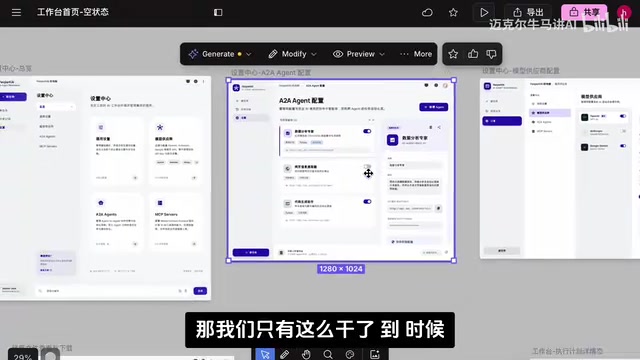
After exporting, only minor adjustments are needed, and the website's functional interface is essentially ready. This automated handoff from design mockups to code further compresses development costs and time.
Summary: AI Collaboration Chains Make Low-Cost Website Building Possible
This workflow of "ChatGPT generates prompts + AI design tool generates pages one by one" is essentially an AI collaboration chain in practice:
- ChatGPT: Understands requirements, breaks down tasks, generates structured prompts
- AI design tool: Transforms prompts into visual design mockups
- Humans: Set the overall strategy, maintain quality control, adjust details
Building a website for $30 isn't impossible — the key is leveraging AI tool chains effectively and finding the balance between efficiency and quality at each step. This multi-round prompt approach isn't just applicable to low-budget website projects; it's worth adopting for any scenario requiring rapid prototype validation.
Related articles
 Tutorials
ChatGPT Plus Subscription Guide: Are GPT-5.5, image-2, and Codex Worth the Upgrade?
A detailed look at ChatGPT Plus features — GPT-5.5, image-2, and Codex — with a Plus vs Pro comparison and a complete step-by-step subscription guide for users outside the US.
 Tutorials
Harness AI Engineering in Practice: Using Claude Code to Master Enterprise-Level E-Commerce Development
Deep dive into Harness AI Engineering: master enterprise e-commerce development with Claude Code using the Rules, Skills, Wiki, and Changes framework.
 Tutorials
Cursor + Codex Dual-IDE Collaboration: A Practical Methodology for Open-Source Project Customization
A complete methodology for open-source project customization based on real-world experience, detailing the Cursor+Codex dual-IDE workflow, seven-stage process, MVP validation, and AI source code reading techniques.