Building an AI Auto-Editing Workflow with n8n: Parallel Processing, Date Filtering, and Scheduled Triggers — A Full Dev Log

How one creator built a fully automated weekly AI video roundup using n8n, with parallel processing, date filters, and scheduled triggers.
This article documents the real development process behind an n8n-powered AI auto-editing pipeline designed to produce a weekly AI news video. It covers the Merge node's role as a synchronization barrier for parallel sub-workflows, using Luxon expressions for date filtering, a classic date-direction bug, and setting up a weekly Schedule Trigger — all illustrated with honest debugging notes and the final video output.
From Automation to Intelligent Editing: The Birth of a Real Workflow
Automatically curating, aggregating, and editing a weekly AI news roundup into a video sounds like science fiction — but with automation tools like n8n and the help of large language models, a single creator can build a complete auto-editing pipeline. This article reconstructs the full development process behind just such a workflow, based on the real dev log of a Bilibili content creator. It covers everything from data scraping and conditional filtering to final video output, and doesn't shy away from the bugs encountered along the way.
n8n is an open-source workflow automation tool launched in 2019. Its name is shorthand for "nodemation" (node automation). Compared to commercial platforms like Zapier or Make (formerly Integromat), n8n's core advantage lies in its support for self-hosted deployment — user data never passes through third-party servers — along with more flexible programmable extensibility. n8n uses a node-based visual interface where each node represents an operation unit (e.g., an HTTP request, data filter, or conditional branch), and nodes pass JSON-formatted data to each other via directed connections. This makes it naturally well-suited for handling complex, multi-branch logic.
The core goal of this workflow is clear: produce a weekly "AI Evolution" video summary series. To do that, three key problems needed to be solved — how to handle multiple data streams in parallel, how to filter content by date to keep only the past week's material, and how to trigger the entire pipeline automatically on a fixed schedule.
The Merge Node: A Necessary Sync Mechanism for Parallel Workflows
Building on an existing workflow, the creator duplicated the core loop node three times, letting each sub-workflow run through its own loop logic independently. There's an easy-to-miss trap here: if you point all four sub-workflow nodes directly at a downstream "topic aggregation" node, the data won't be properly consolidated.
The reason lies in n8n's execution model, which is fundamentally a DAG (Directed Acyclic Graph): node execution order is determined by topological dependencies, and a node is only scheduled to run once all its upstream nodes have completed their output. Without a Merge node, the workflow won't wait for all three other sub-flows to finish before moving forward — instead, it runs the first branch all the way to the end, then goes back to handle the next one. The aggregation node therefore always receives incomplete data.
The correct approach is to introduce a Merge node to consolidate the results of all four sub-workflows before passing them on to the topic aggregation node. The Merge node acts as a "synchronization barrier": it collects the output from all upstream branches and only passes the combined result downstream once everything has arrived. This mechanism is common across distributed computing frameworks (such as Apache Spark's stage boundaries and AWS Step Functions' parallel states), and reflects a universal principle in automation workflow design: parallel branches require an explicit synchronization point at their convergence — otherwise data will be lost due to execution ordering.
Using AI to Help Write Date Filtering Logic
A key feature added in this iteration was "date filtering" — the creator needed to discard data older than seven days and keep only the past week's content.
Faced with the question of how to implement batch date-condition filtering in n8n, the creator simply asked an AI. The AI not only provided a solution using a Filter node with a Luxon expression (now.minus), but was also able to read the canvas context and point out directly: "There's already a date filter node on your canvas — you can reference that existing configuration."
Luxon is a modern JavaScript date-time library developed by core members of the Moment.js team. n8n has Luxon built into its expression engine, allowing users to leverage its chainable API for date arithmetic directly. An expression like now.minus({days: 7}) returns a DateTime object precise to the millisecond, and automatically handles edge cases like daylight saving time transitions and timezone offsets — significantly reducing the chance of date logic errors compared to manually computing Unix timestamps.
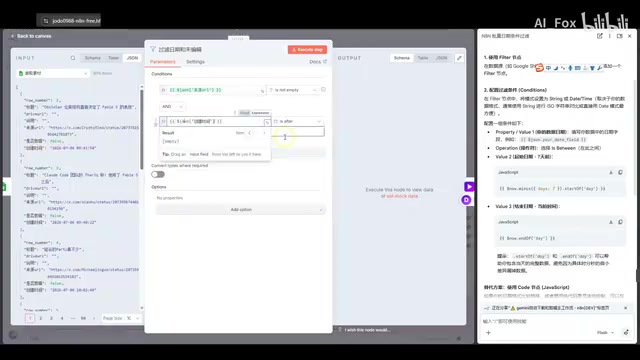
This is a textbook example of modern AI-assisted development: AI is no longer a passive Q&A tool, but a "pair programming partner" that can sense the working environment and offer targeted, context-aware suggestions. The creator ultimately used the isAfter condition combined with an expression that computes "current time minus 7 days" as the filter's starting point.
A Classic Bug: Getting the Direction Backwards
Real development never goes smoothly. During the first test run with real data, the workflow stopped passing data after hitting the "date filter" node.
The creator was puzzled: "Is the creation time after today — did I get it backwards?" After investigating, the problem turned out to be exactly that — the direction of the date condition was reversed. The goal was to filter for content from "within the last 7 days," but the before/after logic had been written the wrong way.
This mistake has a clear cognitive root: "filter content from the last 7 days" intuitively reads as "created before today, within a 7-day window," but the correct code logic should express "creation time isAfter (current time minus 7 days)" — meaning the timestamp must be greater than the reference point 7 days ago. Writing isBefore instead of isAfter completely inverts the filter logic, and because test datasets are often small, this type of error tends to only surface at real-world data volumes. The same mistake commonly appears in SQL scenarios like WHERE created_at > DATE_SUB(NOW(), INTERVAL 7 DAY) and is worth flagging explicitly in code review checklists. After correcting the condition to isAfter (creation time is after the point 7 days ago), data flowed through normally.
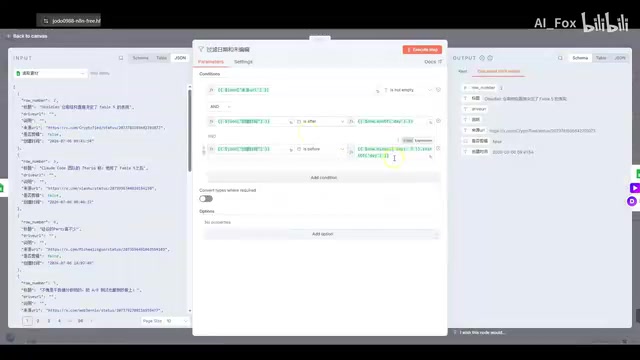
This episode is highly representative: the directionality of time comparisons is one of the most common low-level errors in automation scripts. Even with AI assistance, final logic verification still requires human testing and debugging.
Scheduled Triggers: Making the Workflow Run Automatically Every Week
Once the data pipeline was working, the creator configured a Schedule Trigger, changing the frequency from "once a day" to "once a week" — specifically set to run automatically every Sunday at 7:00 AM.
Scheduled triggers rely on the Cron scheduling protocol under the hood — a protocol originally designed at Bell Labs in the 1970s for Unix systems, and still the de facto standard for server-side task scheduling today. "Every Sunday at 7:00 AM" corresponds to the standard Cron expression 0 7 * * 0, which n8n translates into a visual configuration interface. It's worth noting that scheduled tasks in a self-hosted n8n instance depend on the server's system timezone — if the timezone is misconfigured, the actual trigger time may be offset. This is an operational detail that should be verified before going into production. With this in place, the entire "AI Weekly" collection and editing pipeline was fully unattended.
Data routing also passed successfully through a Switch node, distributing data across four sub-workflows with two data items each — and the execution speed was surprisingly fast. The creator also shared a practical validation strategy: use the success or failure of downstream nodes to infer upstream data quality. If the video data fetched earlier has issues, the subsequent "get video duration" node simply won't run — making it an implicit quality check for upstream data.
The Final Cut: A Weekly AI Roundup, Edited by AI
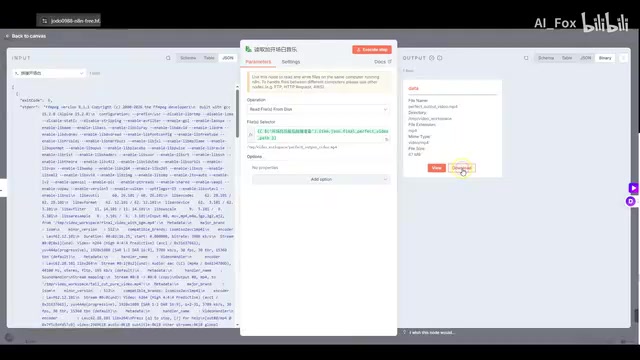
Once all sub-workflows completed, the data was merged via the Merge node, processed through topic aggregation and editing commands, and ultimately produced a video file of approximately 67 MB. The content of this AI-auto-edited weekly roundup was itself quite compelling, covering several major AI topics from that week:
- Context quality matters more than the model itself: One developer used Fable 5 to process an Obsidian vault, and after adding a clear Index file, task completion time dropped from two minutes to 10 seconds — with no change to the model. The takeaway: knowledge structure is the agent's map, and the accessibility of context is more critical than model capability.
- Shifting how we work with AI as a thought partner: Moving from "watching AI do the work" to "letting AI do the right things" — get involved early when requirements are unclear, let AI "interview you" to clarify goals, and use workflows that allow AI to self-verify.
- Karpathy on agent timing: Andrej Karpathy — a leading deep learning researcher, former Tesla AI Director, and two-time OpenAI alumnus — noted that OpenAI tried building agents as early as 2016, but it was too soon. The pure reinforcement learning approach of that era required massive environment interaction samples and could barely generalize on language understanding or tool use — it failed directly. Today, LLMs combined with function calling, retrieval-augmented generation (RAG), and long-context memory have finally given agents the "cognitive foundation" they need to reach the frontier of practical capability.

- Reflecting on bloated app sizes: A calculator app that packages to nearly 150 MB and consumes 800 MB of memory on launch was called out as "fake lightweight," with a call for developers not to let their products die buried in Electron's bloat.
- Google CEO Pichai on the AI bubble: He stated plainly that "part of it is a bubble" — even Google isn't immune — drawing a parallel to 1999's internet era: bubbles and revolutions have always coexisted.
Imperfect, But the Direction Is Set
The creator honestly noted two remaining flaws in the final output: some subtitles are too long and weren't properly split, and there is audio overlap at transitions between clips. These are issues planned for future iterations.
The value of this honest dev log lies precisely in the fact that it doesn't sugarcoat the difficulty of automation. From the execution-order trap with the Merge node and the low-level date direction bug, to the fine-tuning of subtitles and audio — a "fully automated" workflow is built on a foundation of extensive debugging and iteration. But the truth is this: when data scraping, content aggregation, and video editing can all be orchestrated into a single automatically running pipeline, the productivity ceiling for individual creators is being fundamentally rewritten.
Key Takeaways
Related articles

The Truth Behind Codex 'Build a Website in 5 Minutes': AI Isn't Creating Sites—It's Helping You Copy Them
Exposing the truth behind viral Codex 5-minute website videos: creators aren't building original sites with AI—they're copying shared prompts or scraping others' work. Learn AI coding tools' real limits.

Getting Started with AI Agent Development: A Complete Guide from Concept to Practice
A comprehensive guide to AI Agent architecture and development, covering automated marketing, intelligent customer service, and investment analysis scenarios with single and multi-agent collaboration.

The Truth Behind Codex 'Build a Website in 5 Minutes': AI Isn't Creating Sites — It's Helping You Copy Them
Exposing the truth behind viral Codex 5-minute website videos: creators aren't building original sites with AI — they're copying shared prompts or scraping others' work.