Building an AI Second Brain: The Complete NotebookLM + Obsidian Workflow

How to combine NotebookLM and Obsidian into an AI second brain that gets smarter the more you use it.
A complete workflow pairing NotebookLM's AI research and cross-document reasoning with Obsidian's long-term, linkable knowledge storage. Learn the CODE and PARA methods, bidirectional linking, and the closed-loop technique for building a second brain that compounds in value over time.
The articles you've read and the ideas that flash through your mind are often scattered across various apps, or exist only in your head—forgotten completely within a week. When you're actually working on a project and want to recall a key insight from an article, you find it buried in some corner of a note-taking app, impossible to dig out.
This is precisely the core pain point that the "Second Brain" aims to solve. The concept of the "Second Brain" was systematically introduced by productivity expert Tiago Forte in his 2022 book Building a Second Brain. Its core theory is built on a solid foundation of cognitive science: psychologist George Miller proposed the famous "7±2" rule in 1956, arguing that working memory capacity is about 7 chunks. However, Nelson Cowan's revised research in 2001 compressed this number to 4, with each chunk lasting no more than 15–30 seconds.
It's worth noting that working memory is not just a limited-capacity "scratchpad"; its neural basis is primarily located in the prefrontal cortex. Neuroimaging studies show that when working memory is overloaded, the activation patterns of the prefrontal cortex change significantly, leading to a decline in decision quality. This explains why knowledge workers are prone to making basic mistakes under information overload—it's not a lack of ability, but a depletion of neural resources. This limitation gave rise to Cognitive Load Theory, proposed by John Sweller in 1988: when the demand for processing external information exceeds working memory capacity, both learning efficiency and decision quality decline sharply. The core value of externalized memory systems lies precisely here—freeing cognitive resources from "remembering information" to focus on "processing information." Yet the volume of information a modern knowledge worker must handle daily far exceeds this limit. Forte proposed using external digital systems as an extension of the brain to Capture, Organize, Distill, and Express knowledge—the CODE methodology. The addition of AI upgrades this system from "passive storage" to "active reasoning," giving the second brain truly human-like abilities of association and induction. This article will break down a complete workflow composed of NotebookLM and Obsidian—the former handling research and reasoning, the latter handling storage and connection—which together form a knowledge management system that gets smarter the more you use it.
Why a Single Tool Can't Build a Second Brain
The problem with traditional note-taking apps is that they're just "warehouses." Once information goes in, it's entirely up to you to remember to retrieve it. Collection has never been the hard part; many tools can do that. The real difficulty is—when you need it, can you precisely recall it?
A truly useful second brain system needs to possess two capabilities simultaneously:
- The ability to analyze, compare materials, and answer your questions: not just storage, but cross-document reasoning.
- The ability to preserve for the long term, in a format that's linkable, searchable, and owned by you: not locked into any single platform.
A single tool often satisfies only one of these. NotebookLM excels at AI research but isn't suited for long-term storage and knowledge linking; Obsidian is an extremely powerful knowledge-linking tool but lacks built-in AI for cross-document reasoning. Connecting the two completes the entire puzzle.
Research Layer: Turning Materials into Insights with NotebookLM
NotebookLM is a free AI research tool launched by Google in 2023, built on the Gemini large language model. But its core differentiating design lies in the "Source Grounding" mechanism. This mechanism is essentially a practical application of Retrieval-Augmented Generation (RAG) technology—RAG was proposed by the Meta AI Research team in 2020, with the core idea of introducing an external knowledge retrieval step during the generation phase: first retrieving relevant passages from a document library provided by the user, then injecting the retrieved results as context into the model's generation process.
In terms of technical architecture, RAG has two core phases: first is the "indexing phase," where documents are split into semantic chunks and transformed into high-dimensional vectors via an embedding model, then stored in a vector database; second is the "inference phase," where the user query is likewise transformed into a vector, and the most relevant document fragments are retrieved using algorithms like cosine similarity, then injected into the prompt context of the large language model. NotebookLM's "Source Grounding" mechanism is precisely the productized expression of this architecture—all of the AI's answers are strictly limited to the scope of the documents the user has uploaded, rather than drawing on the internet or model training data. This design fundamentally solves the "hallucination" problem of large language models—the root of "hallucination" lies in LLMs predicting the next word based on statistical probability rather than retrieving answers from a factual database, whereas RAG anchors the model's "imagination space" to verifiable source text. Every answer comes with a traceable citation of the original text, allowing users to verify the information source. This makes NotebookLM especially suitable for handling sensitive research materials, internal corporate documents, or academic scenarios requiring high-credibility citations. Its role is not to store knowledge, but to process raw material into insights and then feed them into your permanent knowledge base.

One Topic, One Notebook
The first principle of use is "one topic corresponds to one Notebook." Stuff all materials from the same research direction into the same Notebook, and only then will the AI's answers stay tightly focused on the current topic. Source materials can be PDFs, Google Docs, Slides, YouTube videos, web pages, or audio. The free version supports 50 sources per Notebook, 50 conversations per day, and 3 Audio Overviews.
What Determines Output Quality Is "How You Ask"
Most people's usage is to upload documents and have it summarize them, but any AI can give an ordinary summary. The truly valuable use is cross-source comparative reasoning, for example:
- Upload 5 articles on the same topic and ask "where do they disagree?";
- Ask "which viewpoint from Source A is refuted by Source B?";
- Ask "which source has the strongest evidence?".
NotebookLM can also toggle sources on and off to precisely control which materials the AI references. If you only want to reference internal documents, turn off the industry articles; if you want to specifically compare two sources, keep only those two.
Audio Overview: The Most Time-Saving Way to Get Started
The Audio Overview feature is essentially a form of Multi-Agent Dialogue Synthesis technology. NotebookLM first performs topic extraction and argument identification on the documents, then has two AI agents playing different roles simulate a host-and-guest dialogue structure, presenting core findings, points of contention, and knowledge gaps in a conversational manner. This format draws on the cognitive advantages of podcast storytelling—narrative information is more easily encoded into long-term memory (episodic memory) than list-based information. From a learning science perspective, "dual-task" scenarios like listening while exercising actually aid deep information processing, because simple aerobic exercise doesn't consume the cognitive resources used for language comprehension.
With one click, NotebookLM generates a two-person AI podcast based on your Notebook, organizing key findings and summarizing patterns across sources. Practical experience shows: after uploading a batch of industry papers and generating an Audio Overview, you can listen to it while out for a run, and by the time you return—despite not reading the papers word for word—you've already grasped the entire field's context and know which findings are worth preserving long-term.
Storage Layer: Preserving and Connecting Knowledge with Obsidian
NotebookLM handles thinking; the next layer handles remembering. Obsidian is built on a core philosophy: knowledge should be stored in a "future-proof" format. All of its notes are plain-text Markdown files stored on the user's local device. Markdown was designed jointly by John Gruber and Aaron Swartz in 2004, and its design philosophy was deeply influenced by early plain-text writing conventions in email. The "future-proof" advantage of plain text lies in this: ASCII and UTF-8 encoding can be read natively on nearly all operating systems over the past half-century, while proprietary formats often face compatibility crises within a few years after software stops updating—digital historians call this phenomenon "digital rot." This stands in sharp contrast to tools like Notion and Evernote, which use proprietary data formats or heavily depend on the cloud—the latter carry the risk of "vendor lock-in," where a service shutdown or price change makes knowledge migration prohibitively expensive for users. Obsidian's local-first strategy makes knowledge ownership truly belong to the user; even if Obsidian itself disappeared, you could still open all your content with an ordinary text editor.

The Bidirectional Linking System Is the Core Value
Obsidian's bidirectional linking has deep historical roots. When Ted Nelson proposed the concept of "hypertext" in 1965, his envisioned Xanadu system included two core features: cross-document bidirectionally visible references (transclusion) and permanent links. However, when Tim Berners-Lee, the father of the World Wide Web, actually built the Web, he adopted only one-way hyperlinks, meaning a web page only knows "who I point to" but cannot know "who points to me"—the contextual relationships of knowledge have thus remained long opaque across the entire internet. Obsidian's bidirectional linking is precisely a compensation for this historical regret: you can know "who this note references" and also "who references this note," thereby automatically gaining context when writing new notes.
Type double square brackets plus a title, and it auto-completes and establishes a bidirectional link. As notes accumulate, these links gradually weave into a personal knowledge graph—from a complex systems theory perspective, this knowledge graph exhibits the classic characteristic of "emergence": once link density exceeds a certain critical point, the entire knowledge network takes on properties that no single note possesses, such as automatically revealing knowledge blind spots and predicting research paths. This resembles the internet's "small-world network" structure—the larger the network, the easier cross-domain insights are actually discovered. From a neuroscience perspective, this is precisely a digital simulation of how memory indexing works in the brain's hippocampus—memories are not stored in isolation but are mutually activated through a multidimensional network of associations; retrieving one memory often automatically evokes other memories associated with it, i.e., the "associative memory" mechanism. Open a note, and you can see who references it, so the context of an idea is not easily lost.
Organizing Your Personal Knowledge Base with the PARA Structure
The PARA method, proposed by Tiago Forte, is revolutionary in that it breaks the traditional habit of "classifying by topic." Traditional classification methods (such as by discipline, by source, by time) are effective when the volume of information is small, but as notes accumulate into the hundreds or even thousands, the problems of "can't find it" and "don't know where to put it" worsen dramatically. The core insight of PARA is: classify by "actionability" rather than "content similarity", organizing the knowledge base into four categories of folders:
- Projects: tasks with clear deadlines, such as product launches, team recruiting, project deliveries.
- Areas: long-term responsibilities, such as team management, personal finance, career development—remaining active as long as the responsibility persists. The key difference between Projects and Areas is whether there's a deadline; the difference between Areas and Resources is whether you bear ongoing responsibility for them.
- Resources: topics of interest but not currently being advanced, such as industry trends, methodological frameworks, tool lists.
- Archives: completed or discontinued content.
This structure can be set up in 5 minutes and is highly compatible with the GTD (Getting Things Done) methodology, usable uniformly across tools—even if you accumulate thousands of notes later, it won't get out of control, because PARA classifies by "the actual usefulness of the material to you" rather than by creation time or source app.
The Complete Workflow: From Research to Knowledge Base
After running through it a few times, the entire process becomes very smooth.
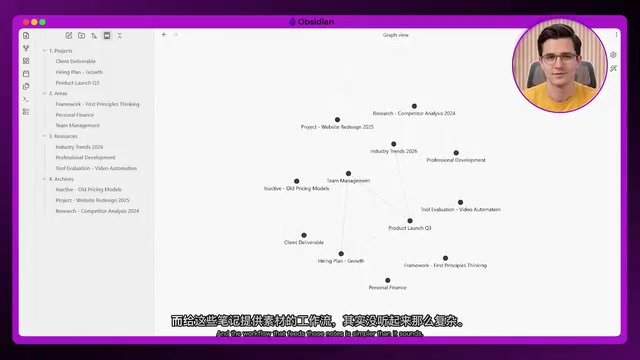
A typical AI knowledge management workflow is as follows:
- Open NotebookLM and upload the materials for your current research;
- Based on a limited set of high-quality materials, have the AI dig out key insights;
- Don't directly copy and paste the AI's answers, but instead organize the insights into a concise note in your own words—there's a profound cognitive science basis behind this: the Levels of Processing Theory proposed by cognitive psychologists Fergus Craik and Robert Lockhart in 1972 found that the depth of processing, rather than the number of repetitions, determines the durability of memory, and actively rewriting in your own language is precisely the key action that triggers "elaborative encoding"—only by writing it down according to your understanding will you still comprehend and be able to use it six months later;
- When creating notes in Obsidian, write the insight itself as the title, not the source (a title like "Notes on So-and-So Article" will leave you forgetting what it was about in three months);
- Link the new note to all relevant older notes in your Vault.
Here's a concrete example: to prepare a presentation on "How AI Is Changing Recruiting," create a NotebookLM, upload 6 materials, then ask three key questions—what is the biggest disagreement, what is the commonly recognized trend, and which is the strongest data point. After NotebookLM provides answers with citations, distill three insights and rewrite them as notes, place them in the Obsidian presentation project folder, and link them to two notes, "AI Workforce" and "Talent Strategy." The entire process takes about 25 minutes, yet the output is far more solid than forcing yourself to read through 6 reports and then piecing things together.
The Compounding Effect of the System: Getting Smarter the More You Use It
The value of links isn't obvious on day one, but it grows exponentially over time. This "gets smarter the more you use it" effect has a solid basis in cognitive science; its essence is the principle of "elaborative encoding": when a piece of new knowledge is actively connected to existing knowledge, the number of nodes it has in the memory network increases, and so do its retrieval paths, significantly lowering the probability of forgetting. German psychologist Hermann Ebbinghaus's forgetting curve research showed that un-reviewed information loses about 70% within a week; and spaced repetition has been proven by subsequent research to be the most effective means of combating forgetting—the note-linking system, through the mechanism of "every time you open a related note it triggers associated content," inadvertently achieves a kind of natural spaced repetition effect, compensating for the knowledge decay caused by the forgetting curve.

- After one week: The Vault has roughly 10–20 connected notes, the links are still relatively sparse, and it might even feel like an extra step compared to jotting things down casually.
- After one month: Having accumulated 50–100 connected notes, the system begins to feed back to you—when you open a project note, something you noted elsewhere three weeks ago may come in exactly handy, and many unintended associations get automatically surfaced by the link structure.
- After three months: The Vault becomes a searchable personal knowledge base that matches your thinking, with research records, meeting summaries, and strategic insights gathered together and interconnected, retrievable in seconds. At this point the "progressive summarization" effect also begins to manifest—as you continually distill the core of notes over time, the signal-to-noise ratio of the knowledge base keeps improving, and a linear growth in the number of notes doesn't bring a linear growth in cognitive burden.
The Closed-Loop Technique: Feeding Obsidian Notes Back into NotebookLM
A key step that many workflows miss: export your Obsidian notes as Markdown and upload them back into NotebookLM. This way you can build a Notebook using your entire knowledge base and ask the AI questions about "everything you've written."
As an experiment with three months of trend notes: have NotebookLM read through all the content, then ask "what important patterns have I not connected yet," and the AI pointed out a hidden relationship between two trends—a connection that later became the core argument of a talk.
This is the closed loop of the entire system: NotebookLM distills insights → Obsidian preserves and connects them long-term → then the notes are put back into NotebookLM to let the AI build new associations across all of your knowledge.
Final Thoughts
The charm of this system lies in its compounding nature—the longer you use it, the smarter it becomes, and it won't forget. But the prerequisite is: put high-quality knowledge into it from day one. Garbage in, garbage out; only insights that you've personally distilled, rewritten in your own language, and actively linked will still serve you six months later.
If you're troubled by information scattered all over the place, this NotebookLM + Obsidian combination is worth setting up today.
Related articles

Transformer²: Achieving Co-Design of Robot Morphology and Control with a Unified Architecture
Deep dive into how Transformer² uses a unified Transformer architecture to integrate robot morphology design and motion control into one model, enabling task-driven end-to-end co-design for embodied AI.

Tutorial: Installing Tailscale on a Jailbroken Kindle to Create a Private Network Node
Learn how to deploy Tailscale on a jailbroken Kindle, turning an idle e-reader into a private network node. Covers cross-compilation, power optimization, and risk considerations.
Tutorial: Installing Tailscale on a Jailbroken Kindle to Create a Private Network Node
Learn how to deploy Tailscale on a jailbroken Kindle to turn an idle e-reader into a private network node. Covers cross-compilation, power optimization, and risk considerations.