Building an LLM Wiki with Agents: Let AI Automatically Manage Your Knowledge Base
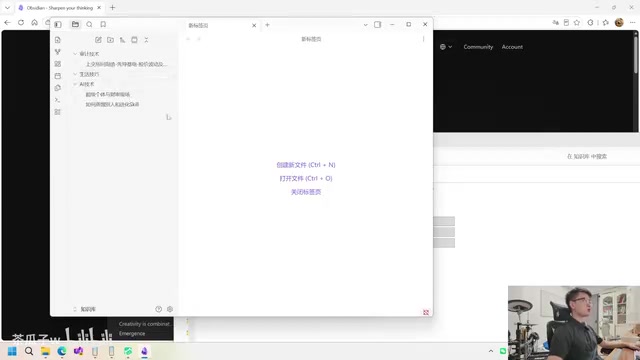
Use AI Agents to auto-index and link knowledge, building an efficient LLM Wiki for large knowledge bases.
This article explains Andrej Karpathy's LLM Wiki concept: letting AI Agents automatically build indexes and bidirectional links to solve the slow, error-prone, Token-heavy retrieval of large local knowledge bases. It breaks down the three-layer structure (Raw / Wiki / config) and ties it to RAG, knowledge graphs, and Zettelkasten.
Starting with a Simple Local Knowledge Base
The principle behind building a local knowledge base is actually quite simple: create a folder, drop in a handful of Markdown (.md) documents, and you have the most basic local knowledge base. From there, you can ask questions directly within various Agents, such as "Based on the knowledge base, tell me how to consult others."
Since the documents reside in a designated folder, the Agent can search all files in that directory, read the text within them, then summarize, synthesize, and output the results to you. The entire process is transparent: first locate the relevant files, then open and read them, and finally summarize and output. You don't even need to organize things manually—just convert the original text to Markdown, drop it in, and it works.
The biggest advantage of this approach is its extremely low barrier to entry—all you need to do is have the AI organize the knowledge you need. But its drawbacks are equally obvious, and this is precisely the core problem this article aims to solve.
Where Is the Bottleneck in the Simple Approach?
When there are very few documents (say, just two or three), the Agent's search is almost instantaneous. But imagine when your knowledge base swells to 200 or even 2,000 documents—the situation becomes entirely different.
When the AI blindly searches through these documents, it consumes a great deal of time, and it may not necessarily find the right one. If four or five documents describe related content, the AI is likely to look at the wrong one. The entire search and judgment process not only slows down response time but also consumes a large amount of Tokens.
Here it's worth explaining the deeper cause of the Token consumption problem. Large language models have a fundamental constraint—the Context Window. Mainstream models like GPT-4o have a context window of about 128K Tokens, and the Claude 3.5 series can reach 200K Tokens, but even so, when a knowledge base contains hundreds of documents, stuffing all the content into a single request is still impossible. More importantly, the number of Tokens directly corresponds to API call costs and response latency: for every 1M Tokens processed, mainstream commercial models charge roughly between $1 and $15, and response time also grows linearly with Token volume. Therefore, "blind full-text scanning" is an extremely expensive practice from an engineering standpoint.
In other words, as the scale of knowledge grows, the retrieval efficiency and accuracy of the simple approach decline sharply. At this point, we need a more structured knowledge management method—which is precisely the value of the LLM Wiki concept proposed by Andrej Karpathy.

The Core Philosophy of the LLM Wiki
Andrej Karpathy is a highly influential researcher in the AI field, having served as Director of AI at Tesla and a research scientist at OpenAI, and is widely known for his deep learning course Neural Networks: Zero to Hero. His starting point for proposing the LLM Wiki concept was the observation that existing note-taking systems (such as Notion and Roam Research) see maintenance costs rise sharply as the volume of knowledge grows. His core insight is that large language models are naturally adept at handling structured text and establishing semantic associations, and can fully take on the role of "knowledge organizer"—a task traditionally performed by humans. This concept shares a common thread with the Zettelkasten method in the knowledge management field—the latter likewise emphasizes atomizing each piece of knowledge and creating explicit links, with the difference being that the LLM Wiki replaces the human maintainer with AI.
Why are traditional knowledge bases so hard to sustain? The core reason is that humans absolutely hate tagging and indexing. Every time you add or modify a piece of knowledge, you need to manually link it to other pieces of knowledge. This is manageable when the volume is small, but when the knowledge network grows large, a single new piece of knowledge might need to be linked to dozens or even hundreds of existing entries, making pure manual maintenance nearly impossible.
The essence of the LLM Wiki lies in handing off these tedious tagging and indexing tasks to the AI. The AI can automatically analyze the overlap between new knowledge and existing knowledge, automatically establish bidirectional links, and thereby maintain a vast and well-ordered knowledge network.
It's worth mentioning that the retrieval efficiency problem the LLM Wiki addresses is essentially the core challenge in the field of RAG (Retrieval-Augmented Generation). RAG is an architecture that combines an external knowledge base with a large language model, allowing the model to dynamically retrieve relevant documents when generating answers. Traditional RAG solutions typically rely on vector databases (such as Pinecone and Chroma), slicing text into chunks and converting them into high-dimensional vectors for storage, then matching the most relevant chunks via cosine similarity during retrieval. However, vector retrieval suffers from a "semantic drift" problem—similar vectors do not necessarily represent logically related knowledge. The LLM Wiki chose a different path: replacing implicit vector similarity with structured indexes and explicit bidirectional links, making the retrieval path transparent and interpretable to both humans and AI.
Introducing Obsidian as a Visualization Tool
Before putting the LLM Wiki into practice, it's recommended to first install Obsidian (official site obsidianmd). It's essentially a Markdown editor, but it additionally provides several key capabilities:
- Bidirectional links (backlinks): Type
[[document name]]in a document to create a navigable link; - Knowledge graph: Visualizes the links between knowledge as a network diagram;
- Whiteboard feature: Lets you freely assemble notes to build a knowledge canvas.
The bidirectional link (Bidirectional Links) mechanism used by Obsidian originates from early conceptions in hypertext theory. Unlike the one-way links of the World Wide Web, a bidirectional link, while document A points to B, also automatically displays the reference from A in the "backlinks" panel of document B. In terms of technical implementation, Obsidian parses the [[document name]] syntax in Markdown files to build a Directed Graph in memory, and its knowledge graph view is the visual rendering of this graph. For the LLM Wiki, the value of this mechanism lies in the fact that every time the AI establishes a link for new knowledge, it adds an "Edge" to this graph. As knowledge accumulates, the graph's density continuously increases, and during retrieval the AI can perform "semantic walks" along the graph's edges, quickly jumping from one concept to related concepts without needing to rescan the full set of documents.
When opening Obsidian, choose "Open local vault" and set the knowledge base folder as the vault. Hidden directories starting with a dot (such as .obsidian and .workbuddy) are automatically ignored—these are usually software configuration files, so there's no need to worry about them.
One point worth emphasizing here: these Wiki structures are not meant for humans to read, but for the AI to read. So even if you can't immediately understand the English concepts in the graph, there's no need to be anxious—the AI relies on these indexes for precise retrieval when answering questions.
Hands-on: Initializing an LLM Wiki with an Agent
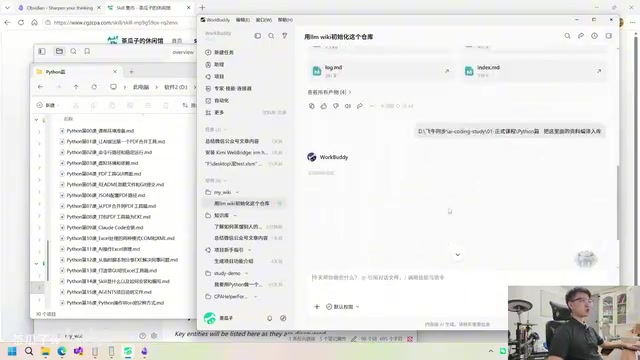
Putting the LLM Wiki into practice is very simple. Search for "Wiki" in the Skill marketplace, find the LLM Wiki Skill designed by Karpathy, click install, and copy the instructions into the Agent you're using (such as WorkBuddy). The Agent will then automatically download and install the Skill from the website.
Once installation is complete, create a new folder (for example, named MyWiki), bind it as the workspace, then tell the Agent "Initialize this repository with the LLM Wiki." The Agent will initialize the folder according to the Skill's rules, generating a standard directory structure.
Breaking Down the Three-Layer Knowledge Base Structure
After initialization, the knowledge base presents a clear three-layer structure:
Layer One: The Raw Document Layer (Raw) This is the data source, storing your articles, papers, notes, data, and even resources like images, audio, and video. The core principle is that original files are preserved as-is, and the AI must not modify them. It is the ultimate source of all knowledge.
Layer Two: The Wiki Layer (Wiki) This layer is entirely maintained by the large model and contains several key components:
source: A brief summary, basic information, and core knowledge points for each source;entity: Entities—abstracting out specific technologies, products, people, etc., by dimension;concept: Concepts—individually distilling each concept within the knowledge;index: Content index—recording where each piece of knowledge is stored;overview: A comprehensive overview—introducing what the entire knowledge base contains and what its core throughline is.
Among these, the entity layer and concept layer correspond to the classic paradigm in the Knowledge Graph field. A knowledge graph organizes knowledge using the "entity–relation–entity" triplet (Triplet) as its basic unit—products such as the Google Knowledge Graph and Wikidata all adopt this structure. Building a traditional knowledge graph requires extensive manual annotation or dedicated NLP pipelines (named entity recognition, relation extraction, etc.). The advent of LLMs has greatly simplified this process: large models have out-of-the-box entity recognition and relational reasoning capabilities, and can directly extract structured triplets from unstructured text. Microsoft adopted a similar approach in its GraphRAG project, using LLMs to automatically build local knowledge graphs of documents, then performing community detection and summarization, which significantly improved the accuracy of cross-document reasoning—this aligns closely with the design philosophy of the LLM Wiki, both replacing flattened vector retrieval with a graph structure.
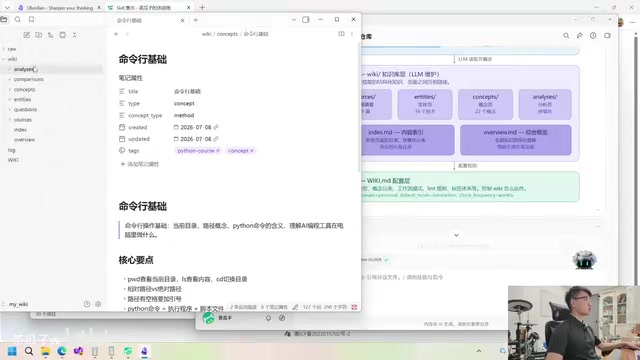
Layer Three: The Configuration Layer (wiki.md) This is the core file that controls how the Wiki operates. It tells the AI the current structure of the knowledge base, how to compile and maintain new knowledge as it comes in, how to establish bidirectional links, what tags to apply to old knowledge, and even includes "health check" steps for periodically reviewing knowledge quality and handling conflicting knowledge.
The Complete Process of Ingesting Knowledge
Take a Python lecture handout as an example: download the original document to your local machine, have the AI read the path, then say "Ingest the content in here." So-called ingestion means having the AI read all the documents according to the LLM Wiki's rules, compile them, and transfer them into the knowledge base.
After ingestion is complete, the Raw directory retains the complete original Markdown, while the Wiki directory generates structured content such as summaries, concept cards, and entity indexes. When the AI subsequently answers questions, it will first check the index and the overview—for example, if you ask a question about Excel processing, it can directly locate the corresponding article without blindly searching through hundreds of documents. If the index information is still insufficient, it then returns to the Raw data source to consult the original text.
This retrieval strategy is a classic example of Lazy Loading thinking in engineering: first use the lightweight index and overview (typically only a few thousand Tokens) to locate the target, and only recall the original document when necessary. This is exactly the same idea as loading images on demand on mobile, or a database query going through the index first before fetching the full table—using a small amount of structured metadata to greatly reduce the resource consumption of each retrieval.
This makes retrieval both precise and fast. Of course, this approach has its costs: every time a new piece of knowledge is ingested, it must be linked to existing cards, entities, and concepts, and the linking process is relatively tedious—but this is precisely where the AI shines.
Summary and Practical Recommendations
The essence of the LLM Wiki is replacing blind full-text retrieval with structured indexing, and replacing manual tagging with automatic AI maintenance. It specifically addresses the pain points of the simple knowledge base after scale expansion: slow retrieval, proneness to errors, and heavy Token consumption. From a broader perspective, it represents an actionable path for personal knowledge management to evolve from "stacking folders" to "semantic graphs," integrating the essence of multiple fields such as RAG, knowledge graphs, and the Zettelkasten method, with AI serving as the fully automated maintenance engine.
For users, understanding the three-layer structure (Raw data source / Wiki knowledge layer / configuration layer) is very important—this way, when the AI produces output, you have a clear sense of how it ingests, queries, and performs health checks.
It's recommended to try it hands-on once: if you don't have suitable material at hand, just ingest a course handout. When actually putting it into practice, you should build a dedicated knowledge base tailored to your own business scenario. Remember one core insight—the Wiki is not meant for humans to read, but for the AI to read. Humans need only browse the results in the graph and whiteboard.
Key Takeaways
Related articles

The Truth Behind Codex 'Build a Website in 5 Minutes': AI Isn't Creating Sites—It's Helping You Copy Them
Exposing the truth behind viral Codex 5-minute website videos: creators aren't building original sites with AI—they're copying shared prompts or scraping others' work. Learn AI coding tools' real limits.

Getting Started with AI Agent Development: A Complete Guide from Concept to Practice
A comprehensive guide to AI Agent architecture and development, covering automated marketing, intelligent customer service, and investment analysis scenarios with single and multi-agent collaboration.

The Truth Behind Codex 'Build a Website in 5 Minutes': AI Isn't Creating Sites — It's Helping You Copy Them
Exposing the truth behind viral Codex 5-minute website videos: creators aren't building original sites with AI — they're copying shared prompts or scraping others' work.