ChatGPT Sites: Build and Deploy Web Apps Directly from the Chat Window

ChatGPT Sites lets you build and deploy full web apps through natural language — no dev environment needed.
OpenAI's new Sites plugin turns ChatGPT into an end-to-end web development platform. Users can describe an app in plain language, iterate with built-in visual annotation tools, and publish instantly — with hosting and storage included. No servers, no deployment pipelines, no leaving the chat window.
OpenAI is evolving ChatGPT from a conversational tool into a full-featured development and deployment platform. In a recent demo, users never had to leave the chat window — they described what they wanted in plain language, generated code, iterated on the design, and published a fully functional web app in a single workflow. Powering this is a new plugin called Sites, which bundles hosting and storage directly into the experience, making the entire journey from idea to live app possible without leaving ChatGPT.
Sites: Hosting and Deployment Built Into the Conversation
Sites' biggest value proposition is closing the "last mile" of web development. Even when AI generates code, developers traditionally still need to configure servers, set up deployment pipelines, and bind domain names. Sites eliminates all of that by building hosting and storage directly in — once an app is generated, it can be published immediately, with no third-party services required.
Architecturally, Sites essentially wraps traditional PaaS (Platform-as-a-Service) capabilities inside a conversational interface. Traditional PaaS platforms like Heroku, Vercel, or Netlify have already dramatically simplified deployment, but developers still need to understand concepts like Git pushes, environment variable configuration, and build commands. Sites abstracts away that entire layer, turning infrastructure operations into invisible background tasks. When a user says "deploy this for me," container orchestration, CDN distribution, HTTPS certificate provisioning — all of it happens silently, completely transparent to the user.
The demo workflow is remarkably straightforward: just type your requirements into the chat window. The first prompt given was: "Build a launch page for a design conference with speaker cards, a filterable schedule, and a clean minimalist editorial style." Sites immediately kicked off project initialization and code generation in the background, running until the first version was ready.

This "describe it and it's built" model lowers the barrier to programming down to the level of natural language. Users don't need to understand HTML, CSS, or JavaScript implementation details — they just need to clearly articulate the product shape and visual style they're after.
Natural Language Iteration: Visual Annotation Solves the Ambiguity Problem
After generating the first version, the true test of the product experience lies in iteration. The demo presenter asked for refinements — wanting the schedule layout to be easier to scan at a glance, and the Keynote sessions to be more visually prominent. He simply expressed this feedback in everyday language, and ChatGPT handled the implementation details in the background.

Even more noteworthy is the built-in Annotation Tool. Users can open their site in an in-app browser and directly circle or mark specific elements on the page, precisely telling the AI what needs to change and where. This visual feedback mechanism completely solves the "unclear reference" problem inherent in purely text-based communication — instead of struggling to describe "that button in the top-right corner," you just click on it.
This tool reflects an important direction in the evolution of large language models toward multimodal interaction. Vision models like GPT-4V can already understand image content, and the annotation tool goes further by converting a user's spatial pointing intent ("change what I'm pointing at") into structured input the model can understand — resolving the spatial ambiguity that pure text descriptions inherently carry. From a cognitive science perspective, humans naturally rely on gestures and pointing when describing visual-spatial relationships. The annotation tool digitalizes this intuitive behavior, bridging the gap between what you see and what you can say.
This dual-channel feedback mechanism — combining natural language with visual annotation — allows non-technical users to iteratively refine product details with the same fluency as collaborating with a designer.
One-Click Publishing and a Plugin Ecosystem
Once a version feels ready, publishing is equally simple: click the Publish button, or just tell ChatGPT "deploy this for me" — the entire launch action is compressed into a single step.
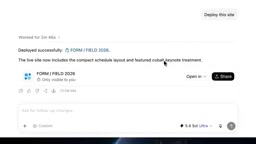
Sites doesn't operate in isolation — it can work together with other plugins to extend its capabilities. The Build Web Apps plugin mentioned in the demo introduces specialized Skills covering design, implementation, and testing, further improving the quality of generated sites. Different plugins each handle their own domain, forming a composable development capability stack. This plugin-collaboration architecture mirrors the "microservices" philosophy in software engineering: each plugin focuses on a single responsibility (design, coding, testing, deployment), combined through standardized interfaces, while ChatGPT itself acts as a unified orchestration layer, dynamically dispatching the right capabilities based on user intent.
To stress-test the capability boundaries, the presenter issued a more ambitious prompt: "Build a colorful early 2000s 2D side-scrolling game with a cartoon hero, animated scenes, vibrant pixel art, responsive controls, and fun effects." The result was again a fully runnable web app.
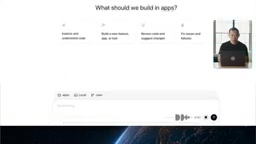
From a static conference website to an interactive game with animation logic, Sites demonstrates coverage across a wide range of web application types.
An End-to-End Development Platform: Redefining the Bar for Software Creation
Integrating the full workflow — development, iteration, hosting, and publishing — into a single conversational interface is a pivotal step in AI coding tools moving toward truly end-to-end experiences. Looking at the broader AI coding tool market, a clear generational progression emerges: GitHub Copilot represents the first generation — line-level and function-level code completion inside an IDE. Cursor, Replit, and similar tools represent the second generation — project-level AI collaboration within a complete development environment, where developers still manage file structures and runtime environments. ChatGPT Sites represents a third generation that attempts to eliminate the development environment itself, making the chat interface a direct production tool. The underlying pattern is a continuous increase in the level of abstraction — each generation internalizes the complexity that the previous generation left for humans to manage manually.
For now, these tools are best suited for lightweight use cases: prototype validation, marketing landing pages, event websites. For production systems requiring fine-grained architecture and long-term maintenance, the controllability, scalability, and security of AI-generated code still warrant careful evaluation. Built-in hosting also means that data and deployments are tied to the platform ecosystem, and migration flexibility remains to be seen. This "vendor lock-in" risk is well-known in the PaaS world — the lesson from when Parse shut down and took countless apps with it serves as a reminder that developers should consider data sovereignty and migration strategies even while enjoying the convenience.
But this trajectory has already dramatically compressed the time from inspiration to launch. When a single person can independently complete in minutes what once required collaboration between designers, frontend developers, backend engineers, and DevOps teams, the barrier to software creation is being fundamentally redefined.
Related articles

The Truth Behind Codex 'Build a Website in 5 Minutes': AI Isn't Creating Sites—It's Helping You Copy Them
Exposing the truth behind viral Codex 5-minute website videos: creators aren't building original sites with AI—they're copying shared prompts or scraping others' work. Learn AI coding tools' real limits.

Getting Started with AI Agent Development: A Complete Guide from Concept to Practice
A comprehensive guide to AI Agent architecture and development, covering automated marketing, intelligent customer service, and investment analysis scenarios with single and multi-agent collaboration.

The Truth Behind Codex 'Build a Website in 5 Minutes': AI Isn't Creating Sites — It's Helping You Copy Them
Exposing the truth behind viral Codex 5-minute website videos: creators aren't building original sites with AI — they're copying shared prompts or scraping others' work.