Cherry Studio + MCP: A Practical Guide to Building AI Agents with Local Deployment

Build a customizable AI agent with Cherry Studio, MCP, and local models — no coding expertise required.
This guide shows how to use Cherry Studio — a free, open-source AI desktop client — combined with the MCP protocol and locally deployed models to build an automated AI agent. It covers connecting to DeepSeek, setting up MCP tools for web scraping and file operations, and creating a private knowledge base using Ollama and BGE-M3 embeddings via RAG.
Why Cherry Studio Is the Ideal AI Agent Hub
As large model capabilities evolve rapidly, the barrier to building a personalized AI assistant has dropped significantly for everyday users. This guide walks through — based on hands-on experience — how to use the open-source client Cherry Studio, combined with the MCP protocol and locally deployed models, to build an AI agent capable of automating tasks and running a private knowledge base.
Cherry Studio is a free, open-source AI desktop client that runs on Windows, Mac, and Linux — truly cross-platform. Its biggest highlight is that the latest version introduces native support for MCP (Model Context Protocol), making it easier than ever to connect AI to external tools.
The setup process is straightforward: visit Cherry Studio's GitHub page, download the installer for your OS, and install it. On first launch, click the settings button in the lower-left corner to access the model configuration interface.
Connecting to DeepSeek
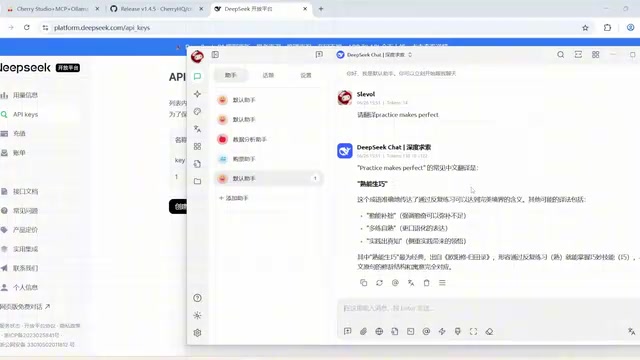
The client defaults to SiliconFlow's model service — registering an account and entering a referral code gets you 20 million free tokens. For this guide, we'll connect to DeepSeek: find "DeepSeek" in settings, head to the DeepSeek open platform to create an API key, paste it back into the client, and click "Test Connection."
A quick note on model naming: DeepSeek Chat is DeepSeek V3, and DeepSeek Reasoner is the DeepSeek R1 reasoning model. Once both show a successful connection, test with "Please translate: Practice makes perfect" — the model correctly returns "熟能生巧," confirming basic conversation is working.
MCP: From "Can Talk" to "Can Act"
MCP is an open-standard protocol officially open-sourced by Anthropic in November 2024. Built on JSON-RPC 2.0, its core purpose is to give large models a standardized way to connect with external data and tools. Think of MCP as the USB port of the AI world — a universal interface that lets AI access various services and resources in a consistent way.
MCP defines a clear client-server architecture: the AI application acts as the "Host," the MCP client maintains one-to-one connections with servers, and MCP servers run as independent processes that expose three types of capabilities: tools, resources, and prompt templates. This design allows the tool ecosystem to evolve independently — developers write an MCP server once, and it can be called by any MCP-compatible AI client, eliminating the fragmentation of building platform-specific plugins.
In short, MCP is a "smart adapter" that lets AI not only understand problems but also autonomously handle tasks — querying databases, calling APIs, reading and writing files — dramatically expanding what AI can do. This modular, composable capability is the core of automated agents.
Environment Setup: UV, Bun, and Node.js
Before configuring MCP, you need to set up the runtime environment. Most MCP servers are written in Python and TypeScript, so two tools are required:
- UV: A Python environment manager. Built by Astral in Rust, UV resolves dependencies 10–100x faster than traditional pip, and supports automatic downloading and isolated management of Python versions. It has quickly gained traction in the AI toolchain space.
- Bun: A runtime for JavaScript and TypeScript. Built on the JavaScriptCore engine with a built-in package manager, bundler, and test framework, Bun installs npm packages roughly 25x faster than Node.js's official npm. Both tools reflect the recent trend of "rewriting performance-critical paths in systems languages."
One important quirk: Cherry Studio only uses its own built-in versions of UV and Bun — it won't reuse system-installed versions. So even if you already have these tools installed, you must install them again within the client. Since the packages download from GitHub, speeds may be slow; refer to the official documentation to manually download the files and place them in the designated path. Restart the client after installation for changes to take effect.
Some MCP services are also built on Node.js, so install the latest stable version from the Node.js website and verify with node -v and npm -v in the terminal.
Two Ways to Configure MCP
Cherry Studio offers two MCP configuration methods:
- Quick Create: Command-based configuration, similar to Cline's approach
- Import from JSON: Similar to Claude Desktop's configuration method
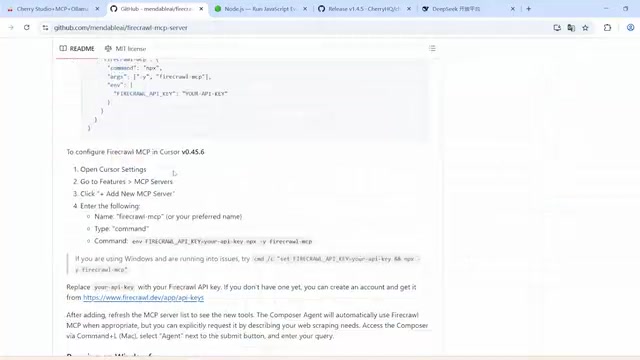
Take the File System MCP server as an example: copy its JSON config from GitHub, paste it into the client, and update the path parameter to point to your local directory to limit what MCP can access. For data-fetching tools like Firecrawl, you'll first need to get a token from the official site and replace the API key in the config.
For shell-control services, use the Quick Create method: set a custom name, select STDIO as the communication method, choose NPX or UVX as the command, and fill in the startup arguments. Manually activate after configuration — a green button indicates success.
Three Real-World Tasks to Validate Automation
Back in the chat interface, click the MCP option to select which servers to enable. One critical note: the native DeepSeek R1 model does not support Function Calling, and Cherry Studio relies on the model's Function Calling capability to invoke MCP servers.
Function Calling is the core mechanism through which large models invoke external tools — first introduced by OpenAI in the GPT-4 era and now an industry standard. Here's how it works: the request includes structured descriptions of available tools alongside the prompt; if the model determines during inference that a tool needs to be called, it outputs a structured JSON call instruction; the client executes the actual operation and returns the result to the model to continue reasoning. DeepSeek R1, focused on math and logical reasoning, was trained for long-chain thinking rather than tool use and isn't optimized for Function Calling. DeepSeek V3, as a general-purpose conversational model, has full tool-calling support. So when using MCP, you must switch to DeepSeek V3. In testing, R1 hung indefinitely and threw an error when asked to "create a TXT file," while V3 completed the task without issue.
Task 1: Scraping Web Data to CSV
The request: scrape an AI model leaderboard from a webpage and format it as CSV. The AI called Firecrawl's scrape tool, fetched the page content, and quickly produced structured CSV data — validating the web scraping MCP.
Task 2: Generating a GPU Analysis Report
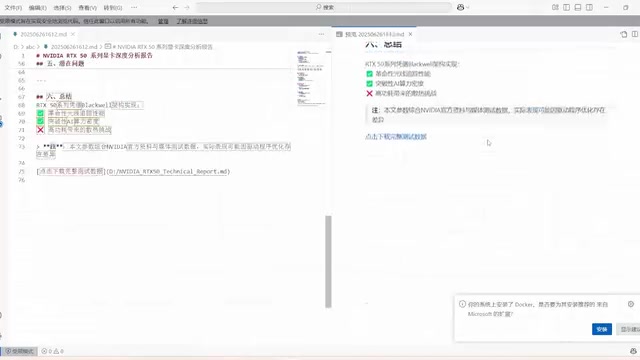
The request: search for information on NVIDIA's RTX 50 series GPUs and write a Chinese analysis report in Markdown format, saved locally. The AI used Firecrawl's search tool to gather information, then used the file system capability to create a Markdown document. The generated report covered the RTX 50 series architecture, core technologies, and performance specs — a thorough and well-organized result.
Task 3: Shell Command Execution
The AI was asked to check the Docker version. It successfully ran docker version and returned the version number. However, a word of caution: when using shell-based MCP, always enforce strict permission limits — only execute predefined tasks to avoid accidentally killing running processes or causing data loss.
Local Model Deployment + Private Knowledge Base
Beyond cloud-hosted models, Cherry Studio can also integrate with locally deployed models to build a private knowledge base — especially valuable when handling confidential documents and sensitive data.
Deploying Local Models with Ollama
Ollama is an open-source tool designed specifically for running large language models locally. Under the hood, it leverages llama.cpp for cross-platform inference acceleration, wrapping model downloads, VRAM management, and API serving into a unified command-line interface — so regular users can run open-source models on consumer hardware without needing to understand CUDA programming or model quantization. Download the appropriate version from the Ollama website, install it, verify with ollama version in the terminal, and you'll see the "llama" icon in the system tray.
Ollama defaults to quantized models in GGUF format. Quantization compresses model weights from 32-bit floats down to 4-bit or 8-bit integers, reducing model size by 60–80% with minimal accuracy loss, and simultaneously lowering VRAM usage. For example, Qwen3's flagship version has 235B parameters and weighs around 142GB — far beyond most personal computers. But the quantized small versions require only a few GB to run, which is why local deployment of large models on consumer hardware is even possible. It's recommended to start with smaller versions for a better balance between performance and resource usage. This demo uses the smallest Qwen3 0.6B model.
Adding an Embedding Model
Building a knowledge base also requires an embedding model. The principle: text segments are mapped to points in a high-dimensional vector space, where semantically similar texts are closer together. When building the knowledge base, the system first splits documents into chunks, converts each chunk into a vector via the embedding model, and stores them in a vector database. At query time, the user's question is also converted to a vector, and cosine similarity is used to quickly retrieve the most relevant chunks, which are then passed as context to the language model to generate an answer. This pipeline is called RAG (Retrieval-Augmented Generation).
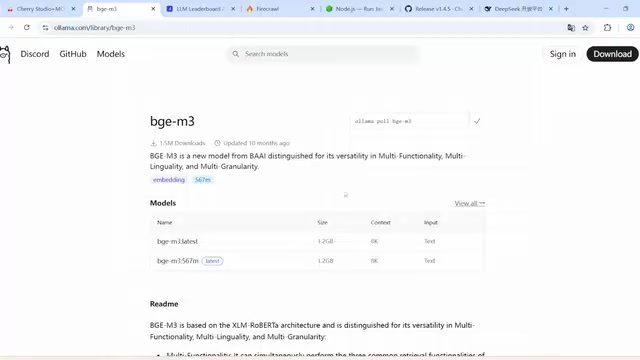
For this guide, we use the BGE-M3 model — a multilingual embedding model developed by BAAI (Beijing Academy of Artificial Intelligence) that supports 100+ languages and inputs up to 8,192 tokens, with particularly strong performance on Chinese semantic retrieval. Download it via the Ollama command.
Creating and Validating the Knowledge Base
Back in Cherry Studio's model service settings, enable Ollama and enter the exact names of both models (check with ollama list). Then create a new knowledge base in the Knowledge Base section, selecting the locally deployed BGE-M3 as the embedding model. The knowledge base supports multiple data formats: files, directories, URLs, notes, and more.
In the demo, a pet cat knowledge document was uploaded — a green checkmark confirms it loaded successfully. In the chat interface, select the local model, link the knowledge base, and ask "When did Xiaohua get vaccinated?" The AI accurately returned the correct date. Removing the knowledge base link and asking for the birth date, the AI couldn't answer — confirming that the knowledge base retrieval is working as expected.
The Trade-offs of Local Deployment
Local deployment offers two core advantages:
- No internet required: Works fine even in offline environments
- Data privacy: All operations run locally, and sensitive information never leaves the machine
This matters greatly when dealing with confidential company documents or personal data. Of course, local deployment has a clear downside — performance is generally lower than cloud-based large models. When choosing a deployment approach, weigh your actual needs, available hardware, and how you prioritize performance versus data privacy.
Summary
With the Cherry Studio + MCP + local model deployment stack, everyday users can build highly customized, automated AI agents like assembling building blocks: use MCP to let AI automatically handle web scraping, report generation, and command execution; use local models with an embedding model (RAG architecture) to build a privacy-controlled personal knowledge base. This flexible, modular approach dramatically lowers the bar for agent development — automating tedious tasks so you can focus on what truly matters.
Key Takeaways
Related articles

Disaster and Glory of the Apollo Program: The History We Must Revisit Before Returning to the Moon
From the fatal Apollo 1 fire to Apollo 8's daring lunar orbit to Apollo 11's successful landing—revisiting the disasters, fears, and compromises of the Apollo program and their lessons for today's return to the Moon.
Netflix Trust Exercise Turns Into Firing Trap: Where Are the Boundaries of Corporate Trust?
A Netflix employee was fired after sharing private info in a trust exercise. We analyze the risks of corporate trust exercises and how employees can protect themselves.

AMD CDNA5 Architecture Deep Dive: Technical Evolution and the AI Computing Competition Landscape
Deep analysis of AMD's CDNA5 architecture covering Chiplet packaging upgrades, HBM memory evolution, and low-precision compute optimization, examining how AMD challenges NVIDIA's AI chip dominance.