Claude Code AutoDream Feature Explained: AI Memory Organization Mechanism and How to Enable It

Anthropic launches AutoDream to simulate REM sleep for organizing Claude Code's memory system.
Claude Code has a structural flaw in cross-session memory: memory files accumulate contradictions, redundancies, and outdated information over time. Anthropic quietly released AutoDream to solve this problem, designed after the brain's REM sleep memory consolidation mechanism. It runs in the background between sessions, automatically organizing and optimizing AI memory through a four-stage process: scanning and mapping, high-value signal extraction, intelligent consolidation, and more.
The Root Problem: Why AI Memory Degrades Over Time
If you're a heavy Claude Code user, you've probably noticed a frustrating phenomenon: as usage time increases, Claude seems to become increasingly "forgetful." You've clearly corrected a mistake, explained your preferences, or fixed a problem, but three sessions later, it's as if none of that ever happened.
This isn't a problem with how you're using it—it's a structural flaw in Claude Code's memory system itself. To understand this flaw, you first need to understand the Context Window mechanism of large language models. The context window is the maximum number of tokens a model can process in a single inference, approximately 200K tokens for the Claude 3 series. However, this window is stateless—each new session starts from scratch, with no automatic inheritance of content from the previous conversation. To simulate cross-session memory, engineers typically write key information to external files that get injected as context at the start of each session. The flaw in this approach is that over time, these external files accumulate contradictions, redundancies, and outdated information, ultimately becoming noise rather than signal.
After using Claude Code for weeks—conducting 20, 30, or even 50 sessions—memory files start piling up contradictions: outdated relative dates, debugging notes about deleted files, duplicate entries. The memory system originally designed to help Claude retain context ends up confusing it instead. The longer you use it, the worse the problem gets.
Anthropic quietly released a feature called AutoDream to address this problem—no blog post, no launch event. Developers discovered it when they noticed a toggle button labeled "AutoDream Off" while checking Claude's memory menu.
AutoDream's Design Philosophy: Simulating the Brain's REM Sleep
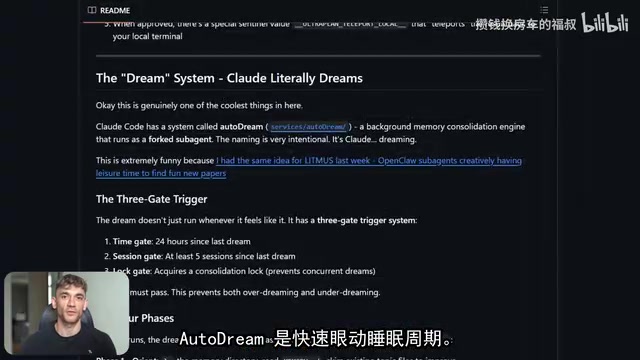
The name AutoDream wasn't chosen randomly. Anthropic explicitly designed it based on the mechanism by which the human brain consolidates memories during REM (Rapid Eye Movement) sleep.
REM sleep (Rapid Eye Movement sleep) is a critical phase of the human sleep cycle, accounting for approximately 20-25% of total sleep time. Neuroscience research shows that during REM sleep, the hippocampus transfers short-term memories formed during the day to the neocortex for long-term storage—a process called "Memory Consolidation." Research published in Nature Neuroscience in 2019 further confirmed that REM sleep is also responsible for selectively deleting irrelevant information, preventing the brain from being overwhelmed by redundant data. People who can't get adequate REM sleep struggle to retain information long-term—information gets inputted but never properly organized.
The analogy to Claude Code's memory system: AutoMemory is Claude's daytime brain, recording information during work sessions; AutoDream is the REM sleep cycle, running in the background between sessions to organize and optimize all memory information. The AutoDream naming directly borrows from this mechanism: just as humans need sleep to organize their daytime information inputs, AI systems similarly need an "offline organization" phase to maintain memory quality.
AutoDream's Four-Stage Working Mechanism
Understanding how AutoDream specifically operates helps you better leverage this AI memory organization feature.
Stage 1: Scanning and Mapping
AutoDream first scans your memory directory, reads the Memory Index file, and generates a complete map of current stored content—what exists, how it's organized, and its baseline state. It achieves a holistic understanding before touching any content.
Stage 2: High-Value Signal Extraction
It examines recent session logs (stored locally in JSON format), but doesn't read every file from start to finish. Instead, it searches for specific high-value signals:
- Moments when you corrected Claude
- Moments when you said "remember this" or "that's wrong"
- Themes that recurred across multiple sessions
- Important decisions (such as architecture choices or tool changes)
Stage 3: Intelligent Consolidation (Core Step)
This is where AutoDream truly shines, and what distinguishes it from simple memory cleanup tools. AutoDream performs the following operations:
- Merges new information into existing topic files
- Converts relative dates to absolute dates: Transforms "yesterday we decided to use Redis" into "On March 15, 2026, we decided to use Redis"
Related articles
Deep Dive into AI Agent Skill Design: …
Deep Dive into AI Agent Skill Design: Engineering Practices from Anthropic and Perplexity
A deep dive into Skill design philosophy from Anthropic's Claude Code team and Perplexity's Agent team, covering the Tax Test, Gotchas Flywheel, progressive disclosure, and Eval-First practices for building high-quality AI Agent skill systems.
Deep Dive into OpenAI's Official GPT-5…
Deep Dive into OpenAI's Official GPT-5.6 Prompting Guide: The Shift from Manual to Automatic
A deep dive into OpenAI's official GPT-5.6 Sol prompting guide: conciseness-first, outcome-oriented design, autonomy boundaries, tool routing, and reasoning intensity tuning.
 Deep Dives
Deep Dive into How OpenClaw (Open-Source Crayfish) AI Agent Works
Deep analysis of OpenClaw AI Agent internals: System Prompt, tool calling, SubAgents, Skill system, memory, and Context Engineering explained.