Claude Code Getting Started Guide: Installation & Configuration Tutorial with Mainstream AI Coding Tool Comparison

Claude Code is Anthropic's CLI-based AI coding assistant, leading competitors with full project understanding and automated programming.
Claude Code is a command-line AI programming assistant from Anthropic that differs from traditional AI chat-based coding by reading entire projects, automatically debugging and correcting code, and deeply integrating with IDEs like VS Code and Cursor. Compared to Copilot, Cursor, and Trae, Claude Code achieves top-tier code accuracy thanks to the Sonnet model's outstanding performance on programming benchmarks. Users in China need a VPN for installation but can configure domestic models for daily use.
Introduction: A New Benchmark for AI Programming Assistants
Claude Code is a command-line AI programming assistant launched by Anthropic that has recently generated widespread attention in the developer community. Unlike traditional web-based AI conversations, Claude Code can be installed directly on your local machine, deeply integrated into your development environment, enabling truly automated programming.
The Command-Line Interface (CLI) is a way of interacting with computers through text commands. Compared to graphical interfaces, CLI has natural advantages in developer tools: it can seamlessly connect with shell scripts, Git version control, package managers, and other toolchains. Claude Code's choice of CLI as its primary interaction method means it can directly invoke system commands to compile code, run test suites, manipulate the file system, and more—capabilities that web-based AI simply cannot achieve. This design philosophy is similar to the Unix philosophy of "combining small tools to accomplish complex tasks," making AI a true part of the development workflow rather than a consulting tool that exists outside of it.
This article will walk you through Claude Code's core advantages, comparisons with mainstream programming tools like Cursor, and installation considerations for users in China, helping you quickly determine whether this tool is worth adopting.

What Is Claude Code? How Does It Differ from Traditional AI Conversational Programming?
Claude Code is essentially an AI programming assistant, but it fundamentally differs from the ChatGPT web conversations we use daily.
Pain Points of Traditional AI Conversational Programming
When you have programming conversations on ChatGPT or other AI platforms, the typical workflow looks like this:
- You describe your requirements, and the AI gives you a code snippet
- You copy the code into your project and test it
- You find it doesn't work, so you go back and continue the conversation
- After multiple rounds of dialogue, you might finally get working code
The more critical issue is that these web-based AIs cannot read through your entire project. Your project might have hundreds of files, and the AI simply cannot see the content and contextual relationships of these files—you have to manually explain the project structure and dependencies. This information asymmetry causes AI to frequently generate code that's inconsistent with the project's existing code style, creates naming conflicts with existing modules, or ignores project-specific configurations, forcing developers to spend significant time on manual adaptation.
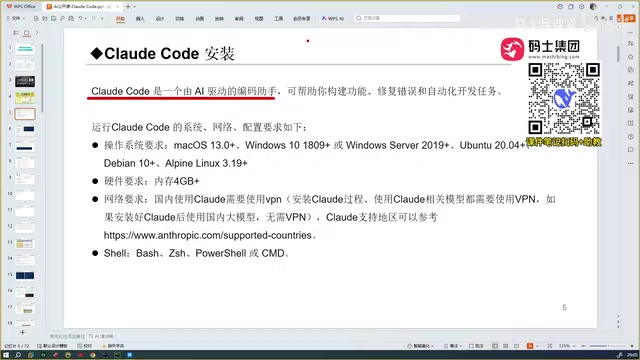
Claude Code's Three Core Capabilities
Claude Code is completely different, possessing the following key capabilities:
- Reads entire project content: Automatically scans and understands all files in your project, providing the complete context to the large language model
- Automatic debugging and correction: Not only generates code but also automatically runs, tests, and debugs it until delivering a correct, error-free version
- Deep IDE integration: Can be used directly in familiar IDEs like VS Code and Cursor without switching tools
Claude Code's ability to "read entire project content" relies on the Context Window technology of large language models. The context window refers to the maximum text length a model can process at once. Claude's Sonnet model has an ultra-long context window of 200K tokens, meaning it can simultaneously "see" hundreds of thousands of characters of code content. Claude Code uses intelligent indexing and Retrieval-Augmented Generation (RAG) technology to first scan the project directory structure, then dynamically load relevant files into the context based on the current task, maximizing project information utilization within the limited window. This fundamentally differs from traditional conversational AI that can only see code snippets you manually paste.
In simple terms, Claude Code is an automated development programming tool capable of full-process automation from understanding requirements to delivering runnable code.
Mainstream AI Coding Tools Comparison: Copilot, Cursor, Trae, and Claude Code
Before Claude Code, there were already many excellent AI programming tools on the market. Let's analyze their pros and cons to help you make a choice.
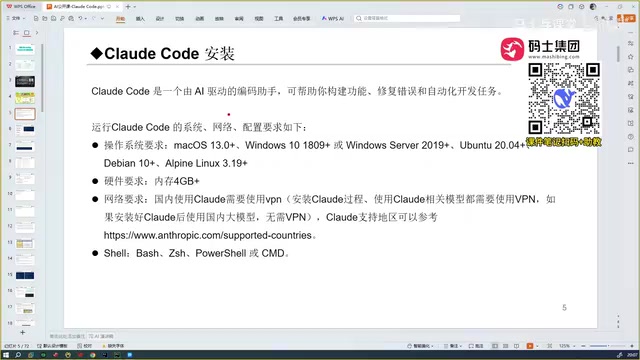
GitHub Copilot: The Pioneer of AI Programming
GitHub Copilot was one of the earliest widely-used AI programming assistants, gaining popularity around 2023. It exists as a VS Code plugin, with its core function being automatic code completion. Copilot was initially based on OpenAI's Codex model (a code-finetuned version of GPT-3), predicting upcoming code by analyzing the current file's context and comments. At the time, this experience of "you write comments, AI writes implementation" amazed developers, but from today's perspective, its capabilities are relatively limited, primarily staying at the code completion level without the ability to perform complex cross-file refactoring or automated debugging.
Cursor: A Quantum Leap in Intelligent Coding
Cursor brought an explosive improvement in experience—it can not only complete code but also automatically code and generate code. Cursor is essentially a deeply customized IDE based on VS Code, with AI capabilities natively integrated at the editor level. It supports multi-model switching (including GPT-4, Claude, etc.) and innovatively introduced a "Composer" feature that allows AI to modify multiple files simultaneously. Compared to Copilot, Cursor is significantly more intelligent, particularly excelling in Chinese language understanding, which makes it an excellent experience for developers in China. However, Cursor is a paid product (Pro version ~$20/month), which budget-conscious individual developers need to consider.
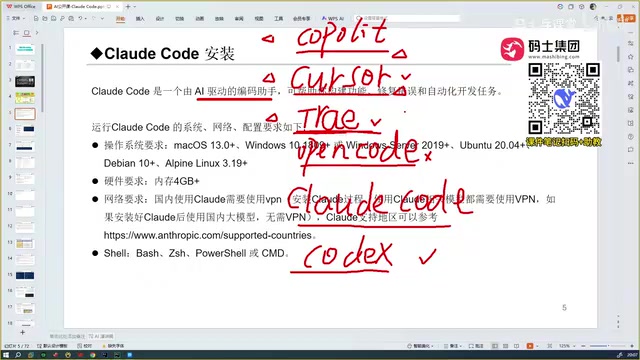
Trae China Edition: Free but Limited
Trae comes in international and China editions. For users in China, the domestic version is directly accessible, with its biggest advantage being completely free. Trae is also built on VS Code architecture, launched by ByteDance, with the China edition powered by the Doubao large model. However, in terms of code accuracy, when encountering niche tech stacks (such as new version APIs of specific frameworks, idiomatic patterns of obscure programming languages, etc.), the generated code quality drops noticeably. It's suitable as an entry-level AI programming tool.
OpenAI Codex: A Formidable Competitor
OpenAI's Codex (referring to the new Codex Agent launched in 2025, not the earlier code completion model) is also a very powerful programming tool that supports API configuration. Based on actual testing feedback, it's on par with Claude Code in capability. Codex Agent can autonomously execute code, install dependencies, and run tests in a sandbox environment, with a working mode similar to Claude Code. If you're already in the OpenAI ecosystem, Codex is also a worthy option to consider.
Claude Code: The Strongest Overall Performance
After comprehensive comparison testing of various tools and models (including China's Trae, Qwen, Gemini, etc.), the consensus among multiple developers is: Claude Code's code accuracy is currently in the top tier.
The core reason behind this is that all programming assistants' capabilities ultimately depend on the level of their underlying large model, and Claude Code's Sonnet model truly excels in the programming domain.
Claude Sonnet is Anthropic's mid-to-high-end model with outstanding performance in programming benchmarks. In SWE-bench (Software Engineering Benchmark), Claude 3.5 Sonnet achieved the industry's highest score. This test requires AI to solve real GitHub issues, including understanding codebases, locating bugs, and writing fix patches—a complete workflow. Sonnet's advantages stem from Anthropic's deep expertise in training data quality control, RLHF (Reinforcement Learning from Human Feedback), and Constitutional AI technologies. Particularly in code reasoning, multi-step problem decomposition, and handling complex dependencies, Sonnet demonstrates capabilities that surpass models at the same level.
Claude Code Installation and Configuration: Complete Walkthrough
First, Be Clear: Claude Code Is Not an IDE
This is a point that many beginners easily confuse. Cursor and Trae are both standalone IDEs (Integrated Development Environments)—download them, double-click to install, and they're ready to use. But Claude Code is not an IDE; you can't just download and double-click to run it.
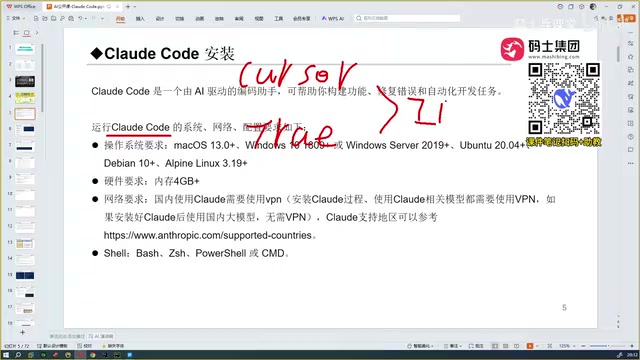
Claude Code is more like a plugin that can be integrated into various development tools. It can be embedded in:
- VS Code
- Cursor
- Trae
- PyCharm and other JetBrains IDEs
The advantage of this design is that you don't need to switch from your familiar development environment—you can enjoy Claude Code's powerful capabilities directly within your existing tools. From a technical architecture perspective, Claude Code's ability to integrate into multiple IDEs is enabled by the extension architectures commonly adopted by modern IDEs. VS Code is built on the Electron framework and provides rich Extension APIs that allow third-party plugins to access editor content, terminals, file systems, and other core features. The JetBrains IDE series provides similar capabilities through its Plugin SDK. When Claude Code runs as a plugin, it can access the currently opened file, cursor position, project structure, and other information, writing AI-generated code directly into the editor for a seamless editing experience. This design philosophy of "enhancing tools rather than replacing them" significantly reduces the migration cost for developers.
System and Hardware Requirements
Claude Code has excellent system compatibility, supporting all mainstream operating systems:
| Operating System | Support Status |
|---|---|
| macOS | ✅ Fully supported |
| Windows | ✅ Fully supported |
| Linux | ✅ Fully supported |
Regarding hardware, your computer needs at least 4GB of RAM or more, which is essentially a non-issue for modern computers. It's worth noting that since Claude Code's core computation (model inference) happens on cloud servers, the local machine is primarily responsible for code editing, file indexing, and network communication, so local hardware requirements are far lower than scenarios involving local deployment of large models.
Critical Installation Notes for Users in China
This is the most concerning issue for developers in China and the most common pitfall during installation:
- A VPN is required during the installation phase: The Claude Code installation process needs to access overseas servers (including npm repositories and Anthropic's authentication services). Installation cannot be completed without a network proxy tool.
- VPN is optional during the usage phase: Once installation is complete, if you configure a domestic large model (rather than Anthropic's official model), you can use it normally without a proxy.
Regarding configuring domestic models, this is achieved through OpenAI-compatible API interfaces. Currently, mainstream Chinese large models (such as Tongyi Qwen, DeepSeek, Zhipu GLM, etc.) mostly provide interfaces compatible with the OpenAI API format, meaning you only need to modify the API's Base URL and key to switch Claude Code's backend model to a domestic service. However, note that after switching models, programming capability will be limited by the chosen model's own level and may not achieve the performance of native Claude Sonnet. This flexible architectural design embodies the modern AI application development philosophy of decoupling tools from models.
In other words, you only need to solve the network issue once during installation, and subsequent daily use can be done entirely within the domestic network environment.
Conclusion: How Should Different Developers Choose Their AI Coding Tool?
Claude Code represents a new height for AI programming assistants. It not only understands your complete project context but also automatically debugs and corrects code, truly achieving the leap from "assisted programming" to "automated programming."
Here are specific recommendations for developers with different needs:
- Pursuing ultimate code quality: Claude Code is the top choice, with the highest code accuracy currently available
- Budget-conscious developers in China: Start with the free Trae China edition to familiarize yourself with AI programming workflows
- Users already comfortable with Cursor: You can integrate Claude Code within Cursor—they don't conflict and can actually complement each other
- Heavy OpenAI ecosystem users: Codex Agent offers comparable capabilities and is bundled with ChatGPT Plus subscriptions at no additional cost
AI programming tools are reshaping how programmers work, and Claude Code is undoubtedly one of the most noteworthy products in this transformation. From Copilot's code completion in 2023, to Cursor's intelligent coding in 2024, to Claude Code's fully automated programming in 2025, this evolutionary path clearly demonstrates the paradigm shift in AI coding tools from "prompt-driven" to "Agent autonomous execution." Whether you're a frontend, backend, or full-stack developer, getting familiar with these tools early will bring a qualitative improvement to your development efficiency.
Related articles
 Tutorials
ChatGPT Plus Subscription Guide: Are GPT-5.5, image-2, and Codex Worth the Upgrade?
A detailed look at ChatGPT Plus features — GPT-5.5, image-2, and Codex — with a Plus vs Pro comparison and a complete step-by-step subscription guide for users outside the US.
 Tutorials
Harness AI Engineering in Practice: Using Claude Code to Master Enterprise-Level E-Commerce Development
Deep dive into Harness AI Engineering: master enterprise e-commerce development with Claude Code using the Rules, Skills, Wiki, and Changes framework.
 Tutorials
Cursor + Codex Dual-IDE Collaboration: A Practical Methodology for Open-Source Project Customization
A complete methodology for open-source project customization based on real-world experience, detailing the Cursor+Codex dual-IDE workflow, seven-stage process, MVP validation, and AI source code reading techniques.