CodeBurn: The 8.4K-Star Open-Source Tool That Tracks Every Cent of Your AI Coding Spend

A local, privacy-friendly tool that tracks and breaks down your AI coding costs across 31 tools.
CodeBurn is an open-source tool with 8.4K GitHub stars that helps developers understand exactly where their AI coding budget goes. It reads local conversation logs — no API keys or data uploads required — and analyzes spending across four dimensions: tool, model, project, and task. It also surfaces hidden waste like redundant file reads and unused MCP services.
When you're using Claude Code for one chunk, Codex for another, Cursor for edits, and Gemini for a few quick questions, your monthly bill keeps growing — but you can't quite pinpoint which tool or model is burning through your budget. That's exactly the problem this open-source project, which has earned 8.4K stars on GitHub, was built to solve. It's a local ledger designed specifically for AI coding tools — one that breaks down a vague lump-sum expense into a clear, line-by-line account of where every dollar went.
Industry Context: The Cost Management Challenge in a Multi-Tool Era
Between 2024 and 2025, the AI coding tool market entered a highly fragmented phase. Research data suggests it's now common for professional developers to maintain active subscriptions to two to four AI coding tools simultaneously. This trend exists because different tools excel in distinct scenarios — code completion, multi-file refactoring, terminal command generation, code review — and the layered structure between model providers (OpenAI, Anthropic, Google) and tool providers (Cursor, GitHub, etc.) adds further complexity. This fragmentation creates a blind spot in cost management: each tool only shows its own usage stats, and a consolidated cross-tool view is virtually nonexistent. On the enterprise side, AI token costs are claiming a growing share of software engineering budgets. Analysts like Gartner predict that by 2025, AI API spending will be an unavoidable operational cost for mid-to-large tech teams — driving demand for horizontal aggregation tools like CodeBurn.
A Local Tool Built Purely for Accounting
This project has iterated to version 0.9.14 and has a laser-focused purpose: it doesn't intercept your requests, doesn't act as a proxy, and simply reads the conversation logs already stored on your machine, then recalculates everything across four dimensions — tool, model, project, and task.
This design delivers one critical benefit: your data stays entirely local. You don't need to enter a bunch of API keys, and you don't have to worry about your conversation history being uploaded to an external server. It just reads the logs already on your computer and reorganizes them into a clear, structured bill. For developers who care about privacy but also want to understand their AI coding cost structure, this is a remarkably restrained and user-friendly technical choice.
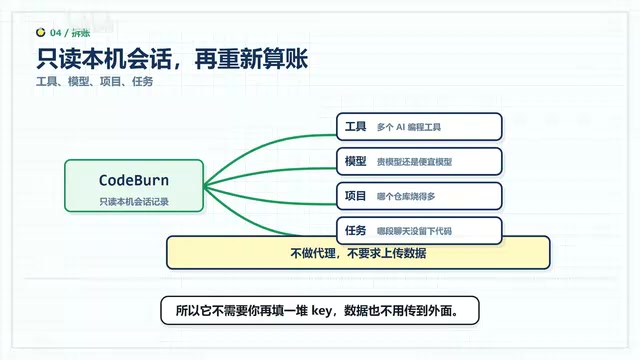
From Overview to Detail: Four Dimensions to Understand Your AI Spend
When you open the tool, you're first greeted with a summary view: how much you've spent in a given period, how many API calls were made, and how much context quota was consumed. If you're using Claude Code, Codex, and Cursor simultaneously, it breaks them out separately — so you can see at a glance whether the spending is concentrated in one tool or spread across all of them.
Comparing Model Cost-Effectiveness
Even more valuable is the model-level analysis. In practice, two types of waste tend to appear: expensive models being used for simple tasks, or a small job being retried multiple times unnecessarily. CodeBurn puts different models side by side on the same bill — success rates, retry counts, cost per edit, and cache hit rates, all in one view.
This means you no longer have to guess which model gives you better value. You have hard data to back your decisions. Sometimes a pricier model genuinely saves time — but sometimes it's simply being used inefficiently. This bill helps you tell the difference.
How Token Billing Works
Tokens are the basic unit of measurement for how large language models process text — they don't map directly to word count. In English, one word is roughly 1–2 tokens; in Chinese, each character is typically 1–2 tokens. The billing logic for mainstream models splits into input tokens (what you send to the model) and output tokens (the model's response), with different per-unit prices — output tokens are generally more expensive. Take Claude 3.5 Sonnet as an example: input is priced at roughly $3 per million tokens, output at around $15 per million. A seemingly simple "help me refactor this function" request can quietly carry the context of an entire file, consuming thousands of tokens — which is why the ratio of input to output tokens in a billing analysis often tells a more revealing story than the raw totals.
Surfacing Hidden Token Waste
Beyond bookkeeping, CodeBurn proactively helps you identify waste. It recognizes several common cost black holes:
- The same set of files being repeatedly read by the AI, consuming context redundantly
- A command generating large amounts of useless output, burning tokens for nothing
- MCP services, agents, or skills listed in your config that are barely used, yet continuously occupying resources
What Is the MCP Protocol?
MCP (Model Context Protocol) is a standardized protocol that Anthropic open-sourced in late 2024 to solve the problem of connecting AI models to external tools and data sources. Think of it as the "USB port" of the AI world. Before MCP, every AI tool needed its own custom integration to connect to databases, code repositories, or file systems — an extremely high-maintenance approach. MCP abstracts this into a unified server-client architecture: MCP Servers expose tool capabilities (like reading files or executing commands), and MCP Clients (i.e., AI coding tools) call them via a standard protocol. Claude Code, Cursor, and other leading tools all support MCP. However, MCP Servers running in the background continuously consume context resources. If you've configured a large number of MCP services that rarely get used in practice, you're left with a silent cost black hole — resources occupying space without doing anything useful.
Each of these issues can seem minor in isolation, but over time they quietly drain large amounts of context quota and money. CodeBurn lists them one by one and tells you which to prioritize cleaning up.
Prompt Caching: The Cost-Saving Mechanism Most Developers Overlook
Cache hit rate is a critical metric in billing analysis that's easy to miss. Prompt caching is a cost optimization mechanism introduced by major AI API providers in recent years: when consecutive requests share the same prefix content (such as system prompts or a fixed codebase context), the provider stores the KV cache of that content server-side. Subsequent requests that hit the cache only pay a much lower cache-read fee. Anthropic's Prompt Caching can reduce input costs for cached content by roughly 90%, and OpenAI has introduced a similar mechanism in its API. For AI coding tools, codebase context often accounts for the vast majority of tokens in a request — so cache hit rate directly affects your actual bill. By tracking cache hits, CodeBurn helps developers assess whether their tool configuration is fully leveraging this savings mechanism.

Did Your Spending Actually Turn Into Code?
For teams, there's a more fundamental question: did the AI costs you incurred actually translate into real code output? CodeBurn offers a clever correlation analysis — aligning AI conversation records with code commits on a shared timeline.
If a conversation is closely followed by a commit, and that commit was merged into the main branch, then the spending looks more like an "effective investment." Conversely, if a conversation has no corresponding commit nearby, or if the code was later reverted, you at least become aware — this particular spend is looking a bit questionable.
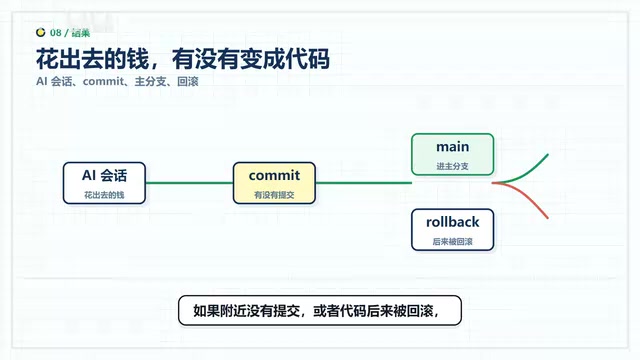
It's worth noting that this kind of assessment isn't rigorous and shouldn't be used as a formal audit report. But for internal team retrospectives and refining AI usage habits, it's more than useful enough.
Multiple Views and Broad Tool Support
In terms of user experience, CodeBurn provides a local web interface where you can browse charts, project rankings, and model rankings in your browser. macOS users also get a menu bar version for quick glances at how much they've spent today, this week, or this month — ideal for day-to-day monitoring.
On tool compatibility, the project officially claims support for 31 AI coding tools, including Claude Code, Codex, Cursor, Gemini, Goose, OpenCode, Kilo Code, Roo Code, GitHub Copilot, Gemini CLI, and other mainstream options. Put simply: the more tools you use, the more value this ledger delivers.
Knowing Its Place: It Accounts, It Doesn't Decide

What's worth appreciating is the tool's restraint. It will not automatically modify any of your configurations. Once it lays out the bill, the decisions are yours: which area costs the most, which model keeps retrying, which configs are just sitting there taking up space. After reviewing the breakdown, you'll have a much clearer picture of your AI usage patterns — but whether to change anything, and how, is entirely up to you.
Who Should Use This, and Who Can Wait
From a setup perspective, it runs via the command line with a straightforward installation — provided you have Node.js on your machine and have already used one of the supported AI tools, generating conversation logs in the process. If you just installed a tool and haven't actually used it yet, there's nothing for this ledger to calculate.
The ideal target user is therefore pretty clear: developers who already use AI as a daily coding tool, use it every single day, and find their monthly bills growing longer and longer. For these heavy users, a clear AI coding cost breakdown can unlock real, actionable savings. If you only ask AI a question occasionally, there's no rush to install this.
Closing Thoughts
As AI coding tools enter an era of multi-tool, multi-model usage, cost management is shifting from "vague awareness" to "precise accounting." Token billing, prompt caching, MCP service overhead — these technical details that once only concerned platform engineers are gradually becoming foundational knowledge that every developer using AI coding tools needs to understand. CodeBurn's value isn't in flashy features; it's in answering an increasingly pressing question — in a local, privacy-friendly, and restrained way — about whether your AI coding budget is actually being well spent. For engineers and teams who take their AI development costs seriously, tools like this are becoming indispensable.
Related articles

The Truth Behind Codex 'Build a Website in 5 Minutes': AI Isn't Creating Sites—It's Helping You Copy Them
Exposing the truth behind viral Codex 5-minute website videos: creators aren't building original sites with AI—they're copying shared prompts or scraping others' work. Learn AI coding tools' real limits.

Getting Started with AI Agent Development: A Complete Guide from Concept to Practice
A comprehensive guide to AI Agent architecture and development, covering automated marketing, intelligent customer service, and investment analysis scenarios with single and multi-agent collaboration.

The Truth Behind Codex 'Build a Website in 5 Minutes': AI Isn't Creating Sites — It's Helping You Copy Them
Exposing the truth behind viral Codex 5-minute website videos: creators aren't building original sites with AI — they're copying shared prompts or scraping others' work.