Complete Guide: Connecting DeepSeek and Other Chinese LLMs to Codex

How to connect DeepSeek and other Chinese LLMs to Codex without a ChatGPT account using Codex++.
This guide walks through how to use the Codex++ Management Tool to connect Chinese large language models like DeepSeek and Doubao to OpenAI's Codex programming Agent — bypassing the ChatGPT account requirement. It covers installation, provider configuration, API Key setup, token top-up, and launch steps, with notes on why this tool-model decoupling architecture matters.
Article Content
OpenAI's Codex has become an indispensable AI coding tool for a growing number of developers. Codex is a programming Agent fine-tuned from the GPT series specifically for code generation tasks. It was first released as a standalone API in 2021, trained on top of GPT-3 using large amounts of public code (primarily from GitHub), and later became the underlying engine powering GitHub Copilot — helping millions of developers with automatic code completion.
Having evolved from an early standalone API, to the backbone of GitHub Copilot, and now to a standalone desktop application, the latest version of Codex has completed a paradigm shift from "code completion assistant" to "autonomous programming agent." This is no mere feature upgrade — it's a fundamental architectural transformation. Early code completion tools were essentially "single-turn predictors": given the context before the cursor, predict the most likely next few lines of code, passively responding to user input. Agent mode, by contrast, introduces a Perception-Planning-Action Loop: the system can proactively read the entire project structure, decompose multi-step subtasks, invoke external tools (file system, terminal, browser), and dynamically adjust subsequent actions based on intermediate results. The technical foundation for this shift includes the expansion of LLM context windows from the early 4K tokens to today's 128K or beyond — allowing the model to "see" a much more complete codebase — as well as the maturation of Agent reasoning frameworks like ReAct (Reasoning + Acting).
Positioned as a programming Agent with autonomous planning and multi-step execution capabilities, Codex can understand natural language requirements, break down task steps, invoke file system and terminal tools, and complete the full loop from requirements analysis to working code. However, for users in China, there's an inherent barrier: by default, it requires a ChatGPT Plus account to log in, which involves account registration, paid membership, and network access challenges. This article provides a systematic guide on how to connect Chinese LLMs like DeepSeek and Doubao (豆包) to Codex without a ChatGPT account, using a third-party management tool to run Codex on a domestic model backend.
Two Integration Routes: Official Login vs. Chinese LLM Alternative
Before getting started, let's clarify one thing: there are two completely different paths to integrating with Codex, depending on the resources you have available.
Route 1: Official ChatGPT account login — suitable for overseas users or those who already have a ChatGPT Plus account. Simply download the Codex installer, open it, select "Sign in with ChatGPT," and follow the prompts. No additional configuration needed.
Route 2: Chinese LLM API alternative — for the majority of users in China who have no ChatGPT account, no Plus subscription, and unreliable network access to OpenAI. In this case, we need a third-party tool called Codex++ Management Tool. Its core function is simple: change the login method without modifying any of Codex's core functionality, allowing you to connect via a Chinese LLM's API instead.
It's worth emphasizing that Codex itself is just a "tool shell" — the actual reasoning capability comes from the underlying model. So whichever model you choose to connect, you'll need to purchase tokens from that provider. That's an unavoidable step.
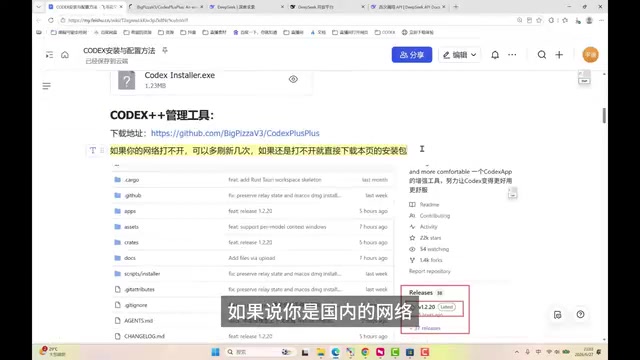
Step 1: Install Codex and Codex++ Management Tool
Download Codex
Windows users can open the Start menu, search for "Store" (Microsoft Store), then search for Codex and click "Get" to download for free. Mac users follow the same process in the App Store. The entire installation is done online, just like any regular application.
Important reminder: Do NOT open Codex directly after installation. Opening it directly will prompt you to log in with a ChatGPT account — which is exactly what we're trying to bypass.
Download Codex++ Management Tool
After installing Codex, you'll need to separately install the Codex++ Management Tool. The latest version can be found on its GitHub Releases page. If GitHub is inaccessible from your network, you can use the pre-packaged installers prepared by the author (one for Windows, one for Mac).
Once installed, you should be able to find three related programs on your system: Codex, Codex++, and Codex++ 管理工具 (Codex++ Management Tool). Make sure to open "Codex++ Management Tool" — don't accidentally open either of the other two.
Step 2: Configure a Chinese LLM in the Management Tool
After opening the Codex++ Management Tool, the interface has many features, but we only need to focus on one: model provider configuration.
Add a Provider
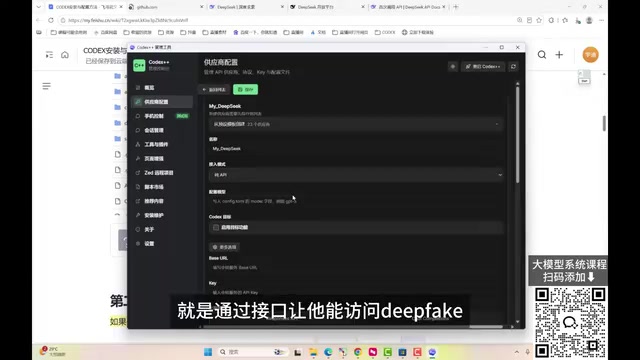
Click "Provider Configuration" in the left sidebar. By default, there's usually only one entry. Click "Add Provider" and fill in the Chinese LLM details (this guide uses DeepSeek as an example; the process is identical for Doubao and other models):
- Name: Enter anything for identification purposes, e.g., "My DeepSeek"
- Access Mode: Make sure to select "Pure API Access," since we're calling the model via API
Get the Base URL and API Key
To call DeepSeek, you need two pieces of information:
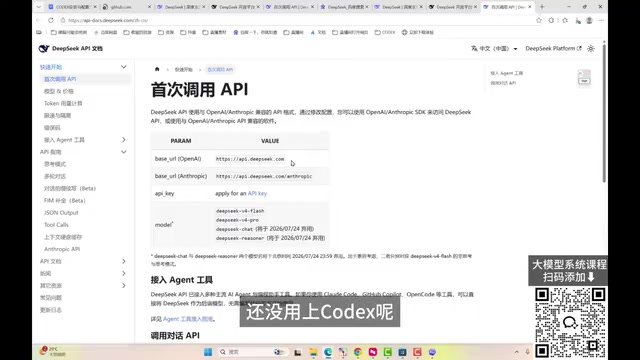
Base URL: https://api.deepseek.com — this tells Codex where to find DeepSeek. Copy and paste it directly to avoid typos.
The reason DeepSeek, Doubao, and other Chinese LLMs can seamlessly replace OpenAI for use with Codex is that they all implement an "OpenAI-compatible interface" — a critical interoperability standard in today's Chinese LLM ecosystem. OpenAI's /v1/chat/completions interface specification has effectively become the industry standard for large language models. Its design follows REST API best practices: the request body is JSON, with required fields including model (model identifier) and messages (an array of message objects, each with a role field (system/user/assistant) and a content field); optional fields include temperature (controls output randomness, range 0–2), max_tokens (maximum output length), stream (whether to enable streaming), and more. The response body also follows a fixed structure: the choices array contains model-generated content, and the usage object records the input/output token counts consumed in the request for billing purposes. DeepSeek, Doubao (ByteDance), Qwen (Alibaba), and other Chinese models have all proactively implemented full compatibility with this interface specification — essentially an "ecosystem parasitism" strategy that rapidly expands market penetration by lowering developer migration costs (no client-side code changes required). This means any client that supports a custom Base URL can seamlessly switch to these Chinese models simply by changing the address and key, with no changes to the calling logic.
API Key: An API Key is a credential issued by the model provider to developers — essentially an encrypted string used to authenticate the caller's identity and track usage with each API request. Go to the DeepSeek official website, click "API Open Platform" in the top-right corner, find the "API Keys" section, and click "Create" to generate a new key.
Important detail: The API Key is only shown in full once. After you close the window, you can no longer view it — you'll have to create a new one. Copy and save it to a local file immediately after creation.
Fetch Models and Save
Enter the Base URL and API Key in their respective fields, and leave the protocol option at its default (the chat option on the right). Click "Fetch from Upstream" — the tool will automatically test whether the configuration is valid. If a model list is successfully retrieved, the connection is working.
DeepSeek currently offers several available models, with the Pro version offering relatively stronger performance — it's recommended for most use cases. After confirming a successful fetch, scroll up and click "Save." The newly configured provider will appear in the provider list. Hover over the right side and click "Use" — when the status shows "In Use," the switch is complete.
Step 3: Top Up Tokens and Launch Codex
Why You Need to Top Up
Completing the configuration doesn't mean you can use it right away. Codex calls your DeepSeek account, and running tasks consumes tokens. Tokens are the smallest semantic units that LLMs use to process text, produced by a tokenizer that segments text using statistical patterns. In GPT's BPE (Byte Pair Encoding) algorithm, for example, high-frequency character pairs are iteratively merged to build a vocabulary. English text averages roughly 1 token per 4 characters. Chinese, however, has a much larger character set than Latin script, and individual Chinese characters are often encoded as separate tokens, resulting in a lower compression ratio — typically 1 Chinese character corresponds to approximately 1.5–2 tokens. This means Chinese text of equivalent information density consumes more tokens. LLM billing is split between "input tokens" (the prompts and context you send) and "output tokens" (the content the model generates), with output tokens typically priced higher.
Chinese models like DeepSeek use a pay-as-you-go billing model based on token consumption, which is more flexible than ChatGPT Plus's fixed monthly subscription. In terms of pricing, flagship models like DeepSeek-V3 are priced at roughly 1/30 to 1/50 of GPT-4o for equivalent input — a difference that comes from two factors: lower domestic computing costs (electricity, server depreciation), and DeepSeek's MoE (Mixture of Experts) sparse activation architecture, which activates only a subset of parameters per inference pass, significantly reducing per-token compute cost. For light users, the cost is extremely low. According to the author, even with intensive daily use and multiple tasks running in parallel, the monthly bill comes out to around 100 RMB. For typical learning purposes, a 10 RMB top-up is usually sufficient to complete most exercises. Simply go to the "Top Up" page on the DeepSeek Open Platform.

Launch Codex via the Management Tool
Again, do not launch Codex directly. Instead, click "Restart Codex++" in the top-right corner of the Codex++ Management Tool. Only by launching through the management tool will the login method be correctly substituted.
Once launched, Codex will display login options:
- "Sign in with ChatGPT" — skip this, do not select it
- "Sign in with another method" — select this one
You'll be prompted to enter an API Key (the interface says "OpenAI API Key," but enter your DeepSeek API Key here). Paste it in and click "Continue." The first login may take a moment, after which you'll enter the Codex main interface.
Confirm the Model Is Active
Once inside, click the bottom-right corner to view the model options and confirm you can select the DeepSeek model you configured earlier. Remember to manually switch to the DeepSeek Pro version, since the provider includes both a standard and a Pro model — Pro delivers better overall performance.
At this point, your Codex environment running on the DeepSeek backend is fully set up.
Further Thoughts: The Value of Decoupling Tools from Models
It's worth noting that the Codex official team is reportedly planning to natively support third-party LLM integration in future versions — which may allow users to directly configure DeepSeek, Doubao, and other models without needing Codex++ at all, further lowering the barrier for users in China.
Broadly speaking, the approach demonstrated in this article is a textbook example of "tool-model decoupling." In software engineering terms, this corresponds to the classic Dependency Inversion Principle (one of the SOLID principles): upper-level modules (the Agent framework) do not depend on the implementation details of lower-level modules (specific models); instead, both depend on an abstract interface (the OpenAI API specification). This design pattern has given rise to an emerging category of components in the Agent framework space called "Model Routers" — tools like LiteLLM and OpenRouter that act as proxy layers, exposing a unified OpenAI-compatible interface externally while internally routing requests to different underlying models based on rules (cost, latency, task type). The Codex++ Management Tool essentially plays exactly this role.
This is one of the core trends in the evolution of AI application architecture. Its technical foundation lies in standardized model-calling protocols and the modular design of Agent frameworks. In this architecture, programming Agent frameworks (such as Codex, Cursor, Continue, etc.) handle task planning, tool use, context management, and multi-step reasoning orchestration — completely separating "task planning and tool-calling capabilities" from "the underlying reasoning model." The former handles understanding requirements, breaking down steps, and calling tools like the file system and terminal; the latter handles only language reasoning and can be swapped out as needed. From a broader perspective, this architectural trend is driving the AI application stack toward a clear layered structure: the bottom layer is the Foundation Model; the middle layer is the Agent runtime (responsible for memory management, tool-call orchestration, and multi-step reasoning); the top layer is the application shell for specific use cases (such as Codex's IDE integration interface). Each layer is decoupled from the others via standardized interfaces, allowing each to evolve and be replaced independently.
This architecture not only lowers the barrier to entry for users, but also drives healthy competition among model providers based on capability and cost-effectiveness. Developers can freely choose the most suitable model backend based on task type (code generation, documentation, mathematical reasoning), response latency, and other factors — avoiding lock-in to any single platform's ecosystem.
Codex provides the capability framework of a programming Agent; the model backend can be swapped flexibly. Once you understand this configuration logic, the method applies regardless of which LLM you want to connect in the future: get the Base URL, create an API Key, configure it in the management tool, top up your balance — and you're done. This is the core skill worth mastering for locally deploying AI coding tools.
Key Takeaways
Related articles

The Truth Behind Codex 'Build a Website in 5 Minutes': AI Isn't Creating Sites—It's Helping You Copy Them
Exposing the truth behind viral Codex 5-minute website videos: creators aren't building original sites with AI—they're copying shared prompts or scraping others' work. Learn AI coding tools' real limits.

Getting Started with AI Agent Development: A Complete Guide from Concept to Practice
A comprehensive guide to AI Agent architecture and development, covering automated marketing, intelligent customer service, and investment analysis scenarios with single and multi-agent collaboration.

The Truth Behind Codex 'Build a Website in 5 Minutes': AI Isn't Creating Sites — It's Helping You Copy Them
Exposing the truth behind viral Codex 5-minute website videos: creators aren't building original sites with AI — they're copying shared prompts or scraping others' work.