Complete Record of Building a LAN Collaborative To-Do Tool with DeepSeek Free Version

Non-developer builds full-featured LAN collaborative to-do app using only DeepSeek's free version.
A non-professional developer used DeepSeek's free web version to independently build a desktop to-do management tool featuring day/week/month views, timed reminders, and LAN multi-user collaboration. The article details the software's features, development process, and DeepSeek's code generation performance, demonstrating how AI programming tools are lowering the barrier for non-developers to create practical applications.
AI Programming Enables Non-Professional Developers to Build Practical Software
A non-professional developer, using nothing but the free web version of DeepSeek, built a fully functional LAN collaborative to-do application. This sounds like a typical story from the AI programming era, but the level of completeness in the final product is still surprising. The software not only supports day/week/month multi-view task management but also implements multi-user collaboration within a local network and timed reminders — all packaged as a runnable exe program.
This article provides a detailed breakdown of the software's feature design, development experience, and DeepSeek free version's real-world performance in code generation.
Full Feature Overview: Task Management, Reminders, and Collaboration All in One
Three Task Management Modes: Day View, Week View, and Month View
This LAN to-do tool offers three time-dimension views: Day View, Week View, and Month View. Users can create, edit, and manage to-do items in any view, with data syncing in real-time across all three views.
The entry point for creating new tasks is located in the bottom-left corner. When creating a task, you can set the task name, due date, and reminder date. Tasks support three priority levels: red (most urgent), yellow (medium), and blue (lowest). Users can switch levels at any time — though completed tasks lock their priority level, which is a sensible design choice.
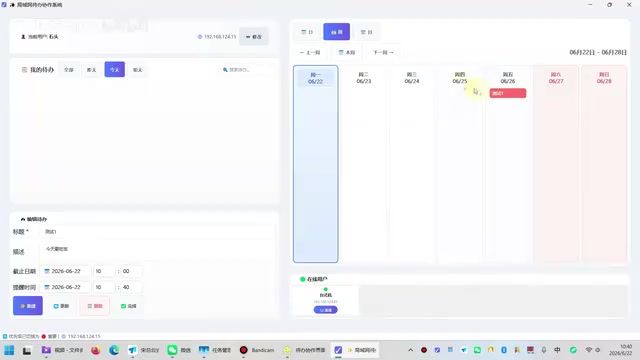
In the month view, Saturdays and Sundays are highlighted in red, and to-do items can be dragged to any date position. Completed tasks turn green, and incomplete ones can be filtered using checkboxes. The overall interaction logic is clear — for someone who is "making software for the first time," the level of completion is quite impressive.
Desktop Timed Reminder Function
The software has a built-in desktop reminder feature. After setting a reminder time, a desktop notification pops up at the specified moment. Users can choose "Complete," "Delete," or "Remind Later" (which defaults to reminding again in 10 minutes). The reminder mechanism is based on Windows system notifications, with custom sound effects on Windows 11 and fallback to default sounds on Windows 10.
LAN Multi-User Collaboration: The Biggest Highlight
The most interesting feature of this software is LAN multi-user collaboration. The interface has an "Online Users" area that displays all devices logged into the software within the same local network. Users can select a to-do item and send it to other users on the LAN.
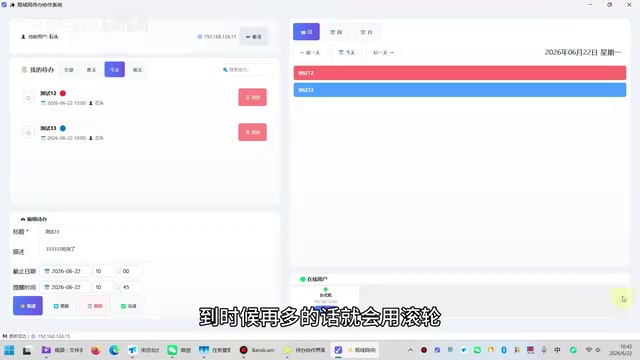
The recipient automatically receives the to-do item and will also get a desktop notification when the reminder time arrives. This essentially functions as a task distribution system without chat — you assign a task to a colleague, and they receive a reminder when the time comes.
However, the author admits that the collaboration feature is only half-complete: reverse synchronization of task completion status hasn't been implemented yet. In other words, when you send a task to someone and they complete it, you don't receive feedback. The author says this feature will be added later.
Real-World Testing of DeepSeek Free Version's Code Generation Capabilities
From Zero to Finished Product: How DeepSeek Helped Complete the Entire Project
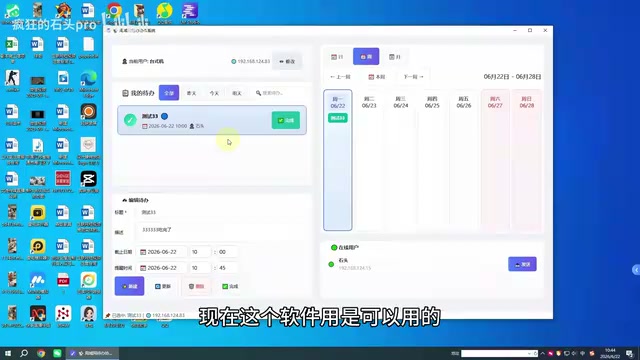
The author explicitly stated that they "don't really understand code," and the entire software development relied primarily on the code generation capabilities of DeepSeek's free web version. Judging from the final product, DeepSeek helped write code for multiple modules including the frontend interface, database operations, LAN communication, and timed reminders.
The author specifically mentioned DeepSeek's advantage over other AI coding tools: no strict limit on code length. Tools like Doubao and Tongyi Qianwen restrict output at around 400-500 lines of code, while DeepSeek can continue generating. Although you need to manually click "Continue generating code" after a certain length, it picks up where it left off and can ultimately produce a complete code document in one go.
Packaging, Deployment, and Future Plans
The software has been packaged as an exe executable file with a custom icon. Upon running, it automatically generates a db database file, with all data stored locally. It supports auto-start on boot, which can be enabled via the system tray right-click menu.
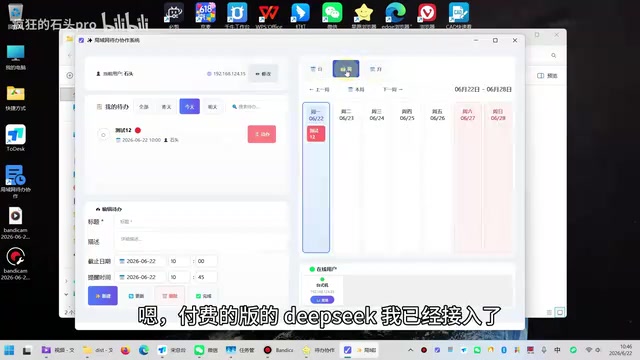
The author mentioned plans to integrate DeepSeek's paid API in the future, currently using the free version to validate feasibility. From the perspective of "what can be achieved," the free version is already sufficient to support the complete development of a small desktop application.
Lessons Learned: Possibilities and Limitations of AI Programming
Is It Really Feasible for Non-Professional Developers to Build Software with AI?
The value of this case isn't in how polished the software is — the author admits it's "rather rough," with some UI details like dropdown arrows still unfinished. The real value lies in validating a trend: with current AI code generation tools, non-professional developers can already independently complete desktop application development with practical value.
From task management, multi-view switching, and timed reminders to LAN communication, these feature modules span multiple technical domains including frontend UI, databases, network programming, and system API calls. Two years ago, it would have been nearly impossible for someone who "doesn't really understand code" to implement these features. But now, through conversational collaboration with AI, it has become feasible.
What Types of Projects Is DeepSeek Free Version Suitable For?
From this case, we can see that DeepSeek's free version already has considerable practical value for personal small-scale project development. Its core advantages are:
- No strict limit on code generation length, suitable for complete project development
- Supports continuous generation, allowing expansion based on previous context
- Completely free, enabling zero-cost experimentation with AI programming
Of course, for more complex projects, integrating the paid API provides a more stable experience. But for ordinary users who want to try AI-assisted programming, the free version is already an excellent starting point.
Final Thoughts
Although this LAN collaborative to-do tool still has plenty of room for improvement, it represents an emerging software development paradigm: users propose requirements, AI generates code, users test and provide feedback, AI modifies and optimizes. In this cycle, "whether you can write code" is no longer the decisive factor — "whether you can clearly describe requirements" and "whether you can effectively debug issues" become far more important.
For readers with similar ideas, why not try using DeepSeek's free version to build your own small tools — you might find that the barrier to AI programming is much lower than you imagined.
Related articles

The Truth Behind Codex 'Build a Website in 5 Minutes': AI Isn't Creating Sites—It's Helping You Copy Them
Exposing the truth behind viral Codex 5-minute website videos: creators aren't building original sites with AI—they're copying shared prompts or scraping others' work. Learn AI coding tools' real limits.

Getting Started with AI Agent Development: A Complete Guide from Concept to Practice
A comprehensive guide to AI Agent architecture and development, covering automated marketing, intelligent customer service, and investment analysis scenarios with single and multi-agent collaboration.

The Truth Behind Codex 'Build a Website in 5 Minutes': AI Isn't Creating Sites — It's Helping You Copy Them
Exposing the truth behind viral Codex 5-minute website videos: creators aren't building original sites with AI — they're copying shared prompts or scraping others' work.