Coze for Beginners: A Complete Guide to Templates and Workflow Building

A beginner's guide to building AI apps on Coze using templates, workflows, and nodes — no coding required.
Coze (扣子) is ByteDance's no-code AI app platform that lets anyone build AI applications visually. This guide walks beginners through the Template Store, explains the credits system, shows how to copy and customize templates, and breaks down workflow node logic — providing a clear four-step path from first-time user to independent AI app developer.
What Is Coze?
Coze is an AI application creation platform designed for the general public, available at coze.cn. After entering the platform, click "Developer Platform" to access the core workspace. Its purpose is straightforward: to let people without any programming background build a wide variety of AI applications through a visual interface.
Platform Background: Coze was launched by ByteDance in late 2023 and was among the first platforms in China to open large language model capabilities to everyday users via a no-code/low-code approach. It is built on ByteDance's in-house Doubao (Skylark) model as well as integrated third-party models, using a workflow engine to modularize complex capabilities such as AI inference, image generation, and video synthesis. The rise of such platforms reflects a broader trend of "capability democratization" following the maturation of AI infrastructure — AI feature integrations that once took algorithm engineers weeks to complete can now be configured visually by ordinary users in just a few hours.
The scope of "AI applications" here is quite broad, ranging from Q&A bots like a middle school math tutor, to novel and screenplay generators, AIGC video creators, and intelligent customer service assistants — all scenarios that Coze can handle. For beginners, Coze's biggest value lies in drastically lowering the barrier between having an idea and having a working product.
No coding or model deployment required. As long as you understand the process logic, you can get an AI feature up and running. This is the core reason it has quickly gained popularity among AI creators in China.
Getting Started Quickly with the Coze Template Store
For newcomers, the easiest starting point is the Template Store. Coze's official team and community have published a large number of ready-made AI application templates here, covering areas such as math tutoring, novel generation, video cover creation, and viral short-video script writing.
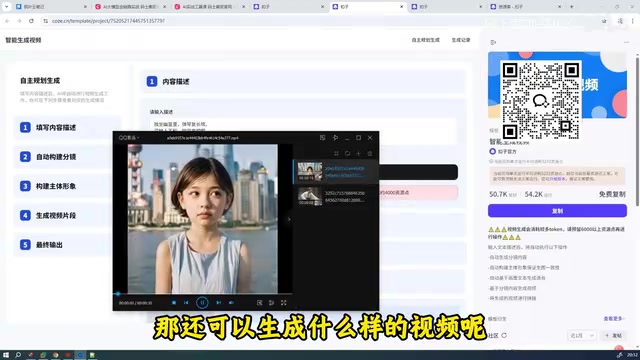
Take video-generation apps as an example: you simply enter a piece of copy or a prompt, and the system automatically builds a storyboard, generates images for each scene, and then synthesizes everything into a complete video. In one demo, just four lines of a classical Chinese poem were entered, and the system produced a short video with matching visuals. In another case, a static image was uploaded and a smooth animated video was output directly.

The whole process is remarkably smooth — and this is simply the result of using two ready-made applications on the platform.
The Credits System: Free Quota and Paid Packages
Before using Coze, there's one thing you must understand — the credits system. Running AI features (especially image and video generation) consumes credits. Individual users receive approximately 500 free credits per day, but a single video generation task can consume over 5,000 credits.
Why Video Generation Is So "Expensive": The credits (resource points) mechanism is a billing model commonly used by AI platforms. Since tasks like image generation and video synthesis require high-performance GPU computing power, their cost far exceeds that of pure text generation. Generating a 10-second video, for instance, typically involves a chain of model calls: text understanding → storyboard planning (LLM call) → per-frame image generation (diffusion model) → frame sequence synthesis (video encoding). Each step incurs its own computing cost. This is fundamentally why writing an article with AI costs only a few dozen credits, while synthesizing a video costs thousands.
In other words, the free quota is sufficient for experiencing and learning basic features, but if you need to generate videos or run other heavy tasks frequently, you'll need to purchase a credits package. This is a cost item you should plan for before you start.
How to Choose Quality Templates
The Template Store contains both officially recommended apps and templates published by third-party developers, with varying quality. Each template displays real user reviews — always read them carefully before choosing one. Some templates have been flagged by users as "deleted and no longer usable" — skip those without hesitation.

Templates with strong reputations, like "Comic Video Generation," are safe to try and make an ideal foundation for further customization.
From Coze Templates to Custom Development
Coze's real power goes beyond "plug and play" — it also allows you to copy any existing template into your own workspace for modification and customization.
The process is simple: click "Copy" on the template page you like, and the application will appear in your personal project space. Using the "Comic Video Script Generator" as an example, once copied you can explore its internal structure and see exactly how the application was built.
The "copy first, then modify" approach is extremely beginner-friendly. Instead of starting from a blank slate, you're building on top of a solution that already works — significantly lowering the learning curve. In the open-source software community, this approach is known as "Fork & Modify." Coze brings this developer culture to everyday users, enabling valuable AI application solutions to continuously iterate and spread throughout the community.
Understanding Coze Workflows and Nodes
Open a copied application and you'll find that its core is a workflow with a visual interface. A workflow is made up of individual "nodes" connected in sequence, with each node responsible for a specific task.
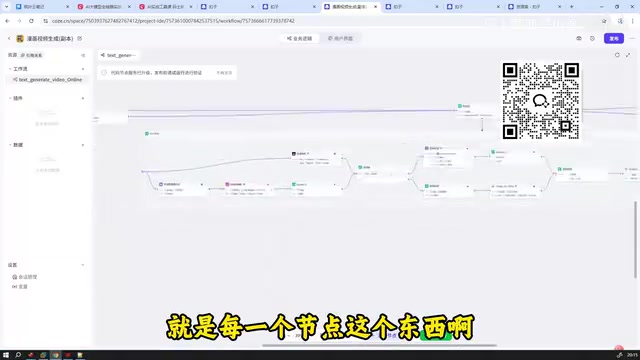
The Technical Nature of Workflows: A workflow is a technical paradigm that organizes multiple processing steps into a directed acyclic graph (DAG), widely used in areas like RPA (Robotic Process Automation) and data pipelines. In AI applications, each node in a workflow can be a different type of operation unit: an LLM call, code execution, conditional branching, loop iteration, or an external API request. Coze visualizes this concept — originally the domain of engineers — so that users can connect natural language processing, image generation, data querying, and other capabilities like building blocks, ultimately forming a complete multi-step AI task pipeline. Understanding the basic node model of "input → processing → output" is the key to mastering workflow logic.
Coze workflow nodes are divided into many types, including basic nodes and business logic nodes, offering a rich variety. To build or modify a complex application, the key is understanding what each node does — what input it receives, what processing it performs, and what output it produces.
Only by understanding node functions can you organize them into a coherent, effective workflow. Many beginners who struggle to get results from their AI agents aren't failing because the tools are inadequate — they simply haven't internalized the node logic.
The User Interface Is Customizable Too
Beyond the back-end workflow, Coze also lets you configure the application's user interface. Clicking the UI options reveals the interactive page that end users will see. This means you can customize not just the functional logic, but also design a complete, deliverable product appearance.
Nodes or UI elements you don't need can be deleted directly. However, keep in mind that nodes often have interdependencies — technically referred to as "upstream/downstream dependencies," where one node's output serves as another node's input. The system may warn you about these connections when you delete a node; proceed with care to avoid breaking the overall flow.
A Four-Step Path for Learning Coze from Scratch
For beginners, here is a clear and practical path to getting started with Coze:
Step 1: Experience templates. Browse the Template Store and use highly rated applications directly. Build an intuitive understanding of what AI applications can do, while getting a feel for how credits are consumed.
Step 2: Copy and modify. Copy a template you like into your own workspace, explore its workflow structure, and try making small adjustments — changing parameters or swapping out nodes — to observe how the results change.
Step 3: Understand nodes. Systematically learn the functions of basic and business logic nodes. This is the critical step in transitioning from a "user" to a "developer." Common node types include: LLM nodes (calling a language model to generate text), plugin nodes (invoking external capabilities like image generation or search), code nodes (executing custom logic), and conditional nodes (implementing branching logic) — each with its own specific use cases.
Step 4: Build independently. Once you're comfortable with node logic, you can organize workflows from scratch, configure user interfaces, and create AI applications that are truly your own.
Coze's overall design philosophy is to package complex AI capabilities into draggable, reusable modules — a concept in software engineering known as "abstraction layer" design, which hides the underlying complexity of model calls, API integrations, and data processing inside each node, letting users focus purely on business logic. It doesn't require you to know how to code, but it does require you to understand process. For beginners who want to get hands-on in the world of AI application creation, Coze is an entry-level tool with a low enough floor and a high enough ceiling to take you far.
Key Takeaways
Related articles

The Truth Behind Codex 'Build a Website in 5 Minutes': AI Isn't Creating Sites—It's Helping You Copy Them
Exposing the truth behind viral Codex 5-minute website videos: creators aren't building original sites with AI—they're copying shared prompts or scraping others' work. Learn AI coding tools' real limits.

Getting Started with AI Agent Development: A Complete Guide from Concept to Practice
A comprehensive guide to AI Agent architecture and development, covering automated marketing, intelligent customer service, and investment analysis scenarios with single and multi-agent collaboration.

The Truth Behind Codex 'Build a Website in 5 Minutes': AI Isn't Creating Sites — It's Helping You Copy Them
Exposing the truth behind viral Codex 5-minute website videos: creators aren't building original sites with AI — they're copying shared prompts or scraping others' work.