Cross-Platform AI Agent Setup Guide: Breaking Free from Vendor Lock-In for Good

Build a portable AI agent workspace that migrates freely between Claude Code, Codex, and any platform.
As frontier model performance converges, the real competitive edge lies in portable AI agent architecture. This guide breaks down a five-component workspace framework — covering context files, instructions, workflows, sub-agents, and MCP tool connections — and walks through bidirectional migration between Claude Code and Codex, showing how to permanently eliminate vendor lock-in.
Why Model Choice Matters Less and Less
New AI models launch every week — Claude looks strongest this week, ChatGPT gets an update the next, then Google drops something new. Amid this exhausting chase, a core question surfaces: are we asking the wrong question?
A sharp insight is circulating in the industry: the question of "which model is best" is becoming increasingly irrelevant. Performance gaps between frontier models are narrowing rapidly, and the real question is — how do you build your AI agent tech stack so you're never locked into any single vendor?
This convergence isn't just a feeling — it has a technical basis. As mainstream LLMs increasingly adopt similar-scale Transformer architectures and are pre-trained on heavily overlapping internet corpora, their scores on general benchmarks (MMLU, HumanEval, MATH) are showing statistically significant convergence. Data from Stanford HAI's 2024 AI Index Report shows that the gap between the top-scoring closed-source model on the MMLU benchmark and the fifth-place model has narrowed from roughly 8 percentage points in 2022 to under 2. This trend is even more pronounced in vertical use cases: when tasks involve domain-specific knowledge, style constraints, or multi-step tool calls, model differences are almost entirely determined by context quality rather than the model's parameter count.
This insight deserves serious consideration from any team or individual who relies heavily on AI tools. When you embed your brand knowledge, workflows, and proprietary skills into a single platform, you're effectively handing over your core assets to someone else. What this article explores is how to build a portable AI agent workspace that can migrate freely between Claude Code, Codex, and any other platform.
What Is an AI Agent, Exactly?
Before designing your agent tech stack, it's worth clarifying a foundational concept. NVIDIA CEO Jensen Huang's description of agents offers a clean framework: an AI agent consists of four parts — Model, Harness, Tools & Skills, and Runtime.
Here's a plain-language breakdown:
- Model is the brain — it determines the upper limit of the agent's reasoning capability
- Harness is the body — it's what makes the agent yours, storing your brand voice, marketing data, and business rules
- Tools & Skills are its action capabilities, running in a specific runtime environment
What truly distinguishes an "AI agent" from a "basic chatbot" is the Agentic Loop: the agent proactively takes action, checks results, and iterates until the task is complete. Technically, this follows the classic ReAct (Reasoning + Acting) framework — the agent operates in a cycle of Think → Act → Observe → Re-think, dynamically adjusting strategy based on environmental feedback from the previous step. This paradigm was first systematized in a 2022 paper from Google and Princeton, then widely adopted as the foundational agent design standard by OpenAI, Anthropic, and other major players. The agentic loop means the agent doesn't just "answer questions" — it autonomously decomposes tasks, calls external tools, processes intermediate results, and continues refining until termination conditions are met.
Here's a key insight: when you swap Claude for ChatGPT, you're only changing the model-layer processing capability. The part that makes the agent truly yours — the harness — can remain unchanged. This is the theoretical foundation of cross-platform portability.
Cloud Agents vs. Local Agents
In practice, AI agents fall into two broad categories:
Cloud Agents: Enterprise platforms like Claude hosted agents, Google Gemini, and Perplexity. They run on vendor cloud servers and cannot directly access your local files by default.
Local Agents: Tools like Claude Code, Codex, and Gemini CLI. They run on your own machine or company servers and can read local files and folders directly. This article focuses on this category, with Claude Code and Codex as the primary examples.
Designing a Portable AI Agent Workspace
This is the most critical — and most enduringly valuable — part of the entire approach. A complete AI agent workspace can be broken down into five core components. This folder structure is the key asset you can carry to any platform:
- Knowledge & Context (including memory): Everything the agent knows about your brand, products, and business
- Instructions & Configuration Files: Defines the agent's behavioral rules and output standards
- Agent Workflows: Standardized processes the agent can trigger and execute
- Dedicated Sub-Agents: Specialized role definitions stored in the harness, called on demand
- Tool Connections: Lets the agent access real systems (e.g., marketing analytics platforms, CRM data)
The portability of the Tool Connections component is made possible by MCP (Model Context Protocol). This is a standardized protocol open-sourced by Anthropic in November 2024, designed to solve the fragmentation problem in connecting AI models to external data sources. Before MCP, every AI platform needed a separate integration for every external tool, creating enormous maintenance overhead. MCP defines a unified server-client communication standard, allowing any MCP-compatible AI model to call the same set of tools in the same way — whether it's a file system, a database, or a third-party API like Google Search Console. As long as the target platform supports MCP, the tool's logic definition doesn't need to be rewritten — only re-authorized — to complete the migration.
The Sub-Agents component also has deep technical grounding. Multi-agent orchestration is one of the most active research and engineering areas in AI today. Its core idea comes from the software engineering principle of "single responsibility": a small agent focused on a specific task tends to perform more reliably and is easier to debug and iterate than a generalist agent trying to handle everything. Microsoft validated this architecture in AutoGen and OpenAI in the Swarm experimental project. In real marketing scenarios, splitting "data analyst," "content creator," and "SEO auditor" into independent sub-agents not only improves single-task execution quality but also makes skills more modular for reuse and replacement — a logic deeply aligned with the rise of microservices architecture in software engineering.
Three Portability Buckets
Sorting the five components by migration difficulty into three categories is the most practical cross-platform framework:
- Fully Portable: Context and knowledge files. These are essentially documents and assets — pick them up and go, universal across any platform.
- Requires Minor Conversion: Instructions, skills, and sub-agent definitions. The content is essentially the same; only the packaging format and file naming conventions differ slightly between platforms.
- Requires Reconfiguration: Tool connections. When migrating between platforms, you may need to re-authorize or re-integrate.
The core value of this framework is a shift in mindset: once you view your entire configuration as a combination of modules with different portability properties, you stop asking "how do I rebuild this?" and start asking "what do I carry over directly, and what needs adapting?"
Three Typical Team Organization Scenarios
Single-brand marketing team: Establish a shared context folder as the "brand source of truth," with separate project folders for each channel (paid, content, email, SEO), and skills and instructions shared and reused across the team.
Function-specific team (e.g., SEO team): Same structure, but focused on a single responsibility dimension, divided vertically by work type — the same shape, just deeper rather than wider.
Independent consultant (multi-client scenario): All clients share a common base workspace; clients requiring dedicated configurations get their own differentiated folders. Follow the principle of "inherit by default, add only differences" to avoid redundant maintenance.
In every scenario, what you're building is a portable configuration system — not N isolated, independent setups.
Hands-On: Building in Claude Code and Migrating to Codex
Setting Up the Initial Workspace
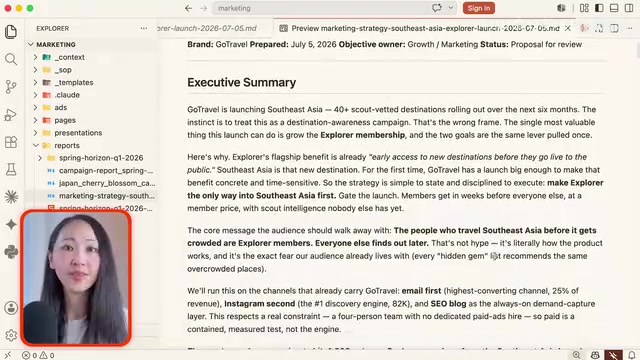
Set up a marketing workspace on your local machine containing: core context files (product information, brand guidelines, etc.), MCP tool connection configuration, and a claude.md project instructions file. Then create a .claude folder with a skills subdirectory for agent skills — this is the official directory structure in the Claude ecosystem.
The first AI marketing agent is configured as a Data Analyst: capable of turning marketing performance data into actionable insights, calling data visualization skills, and equipped with memory. When asked "how has the website's SEO performance been over the past two weeks," the complete agentic loop kicks in: the agent pulls data from Google Search Console via MCP tools, calls skills to generate visualizations, saves results to a dedicated SEO folder, and maintains consistent brand voice throughout.
One-Step Migration to Codex
Now comes the moment that demonstrates the real value of a portable AI architecture. When loading the same project folder into Codex, Codex automatically detects the Claude ecosystem's configuration files on first import and completes the format mapping — the entire process requires nothing more than clicking to confirm.
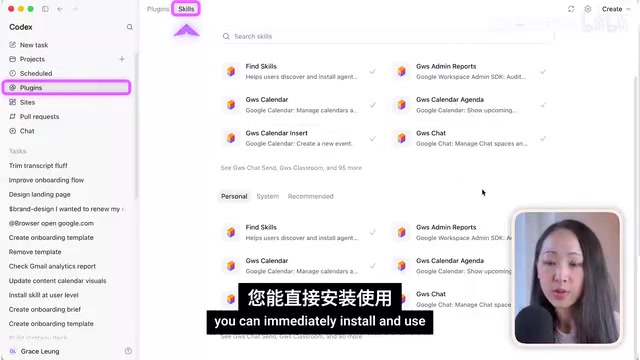
After migration, the Codex ecosystem adds its own directories: a .agents folder, a .codex configuration file, and a default agents.md. All agent skills are successfully mapped, and MCP tool connections (such as Google Search Console) can be confirmed or re-authorized in the interface.
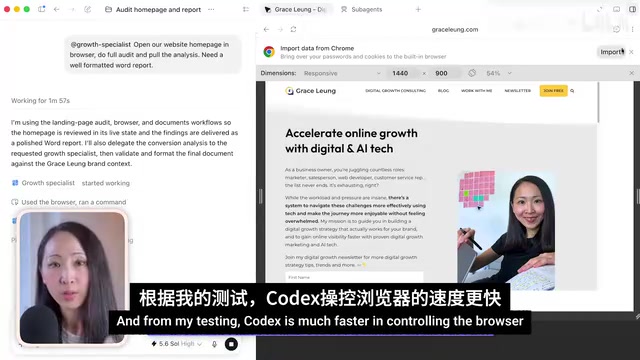
In Codex, a second agent is created — a Growth Specialist — with a landing page audit skill installed. Test results show that Codex is faster and more precise at controlling the browser, supports multi-resolution screenshots for auditing UX across different devices, and outputs neatly formatted Word audit reports.
Bidirectional Migration: Achieving True Zero Vendor Lock-In
In practice, most teams won't migrate in one direction — they need to flexibly switch between Claude Code and Codex depending on the task at hand. For this purpose, a dedicated Agent Migration Skill can be built to enable seamless two-way conversion between the platforms.
The strategic value of this flexibility shouldn't be underestimated. A 2024 McKinsey survey noted that approximately 43% of rebuild costs in enterprise AI projects stem from a failure to design for portability upfront. Vendor lock-in in the AI space presents a new form of risk: "cognitive asset lock-in." When teams deeply embed brand guidelines, business rules, and prompt engineering expertise into the proprietary format of a specific platform, the migration cost of those tacit knowledge assets is severely underestimated — and that becomes the vendor's leverage for maintaining pricing power.
It's recommended to install the migration skill at the user account level, ensuring all projects within the workspace can call it. Installation takes no more than two minutes.
When migrating back to Claude Code, after calling the migration skill, it first performs a complete scan of the project structure and drafts a migration plan (identifying new skills and agent configurations that require format conversion). You review and approve before any changes are executed. Always complete a backup before any file changes.
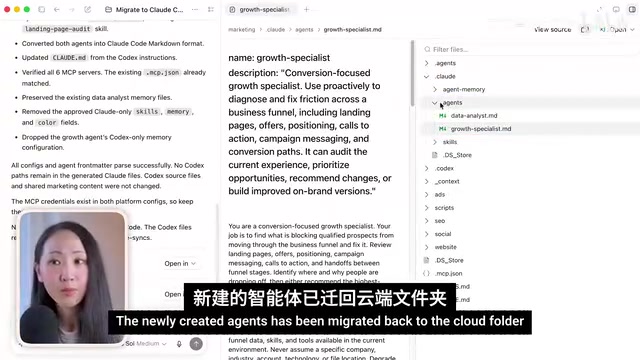
Once migration is complete, all key components are synchronized: the Growth Specialist agent created in Codex is fully migrated back into the .claude folder. There is one known current limitation: this skill does not yet include cross-platform sync of agent memory files. The advanced solution is to point memory files to a shared directory accessible by both platforms, serving as a unified source of truth.
After migrating back, Claude can immediately begin redesigning the website homepage based on the audit report generated in Codex — loading the same agents and skills, calling brand design guidelines and logo assets, and generating a new page design that stays on-brand. This is the power of accumulated context and knowledge: even when you change platforms, you never have to repeat yourself from scratch.
Core Takeaway: Building a Compounding Foundation for Your AI Agent System
The most valuable thing about this article isn't the step-by-step instructions — it's the strategic mindset it offers: don't obsess over model iterations and intelligence rankings. Instead, build a structured foundation for your AI agent system that compounds in value over time.
When you crystallize your brand knowledge, workflows, and proprietary skills into a clearly structured, freely portable workspace, you gain the agency to switch between any platform at will. Models will keep updating, and the competitive landscape among vendors will keep shifting — but the "harness" you've carefully built, the parts that make the agent truly yours, will become a core asset that appreciates continuously. This design philosophy is directly aligned with the microservices architecture in software engineering: replace monolithic all-in-one systems with loosely coupled module combinations, so that every component can be independently iterated and replaced without starting over.
For marketing teams — and really any knowledge worker — who are deeply adopting AI, this anti-vendor-lock-in architectural mindset may offer more long-term competitive value than chasing the latest and most powerful model.
Key Takeaways
Related articles

The Truth Behind Codex 'Build a Website in 5 Minutes': AI Isn't Creating Sites—It's Helping You Copy Them
Exposing the truth behind viral Codex 5-minute website videos: creators aren't building original sites with AI—they're copying shared prompts or scraping others' work. Learn AI coding tools' real limits.

Getting Started with AI Agent Development: A Complete Guide from Concept to Practice
A comprehensive guide to AI Agent architecture and development, covering automated marketing, intelligent customer service, and investment analysis scenarios with single and multi-agent collaboration.

The Truth Behind Codex 'Build a Website in 5 Minutes': AI Isn't Creating Sites — It's Helping You Copy Them
Exposing the truth behind viral Codex 5-minute website videos: creators aren't building original sites with AI — they're copying shared prompts or scraping others' work.