Cursor & Claude Code Enterprise Training: AI Coding Tool Division of Labor and Practical Methodology

A practical enterprise training methodology for using Cursor and Claude Code effectively in real engineering projects.
This article examines an enterprise AI coding training program built around Cursor and Claude Code. It explains how the two tools complement rather than replace each other, introduces a three-layer capability model covering mindset, methodology, and reusable assets, and outlines a practical eight-step workflow for tackling real projects — including legacy codebases.
Why R&D Teams Don't Need Generic AI Training
Hongshu AI's R&D team recently launched an enterprise-focused AI coding training program built around two leading AI programming assistants: Cursor and Claude Code. The program makes a clear statement: generic AI productivity training — like "how to use AI to make PowerPoint slides" — offers almost no value to engineering teams.
What R&D teams actually need is the ability to use Cursor and Claude Code effectively in real projects — quickly making sense of unfamiliar legacy codebases, and driving a feature all the way from requirement to delivery. These skills can't be acquired by clicking through tool menus. They require repeated practice in real engineering environments until they become muscle memory.
This framing cuts to the heart of a widespread pain point in enterprise AI adoption: everyone can install the tools, but teams that actually integrate them into their development workflow and achieve multiplied productivity gains are the minority. The gap isn't in the tools themselves — it's in the methodology.
The Division of Labor Between Cursor and Claude Code
On tool selection, the program offers a core insight: Cursor and Claude Code are not substitutes for each other — they each have distinct use cases.
Cursor is an AI-native code editor built on a deep customization of VS Code, developed by Anysphere. It embeds large language models (LLMs) directly into the editor workflow, supporting code completion, conversational editing, and multi-file awareness. Unlike plugin-based solutions such as GitHub Copilot, Cursor redesigns the human-computer interaction paradigm from the ground up, allowing developers to describe intent in natural language and have AI directly manipulate code files. Its core strength lies in "local context awareness" — precisely understanding the semantic meaning of code near the current cursor position — making it ideal for high-frequency inline edits and function-level refactoring.
Claude Code is a command-line AI coding Agent from Anthropic, built on the Claude family of large language models. Unlike editor plugins, Claude Code operates in Agent mode — autonomously executing terminal commands, reading and writing files, invoking toolchains, and performing cross-file reasoning across multiple modules. It excels at tasks requiring a "global perspective," such as cross-module refactoring, dependency mapping, and automated test generation. Claude Code's context window is far larger than typical completion tools, enabling it to "understand" the overall structure of tens of thousands of lines of code in a single pass — which is the fundamental reason it outperforms lightweight editors in large-scale refactoring scenarios.
Based on these characteristics, the two tools map cleanly to different use cases:
- Cursor: Best for everyday coding and localized edits — high-frequency, lightweight editing scenarios;
- Claude Code: Best for large-scale cross-file refactoring involving changes across multiple modules.
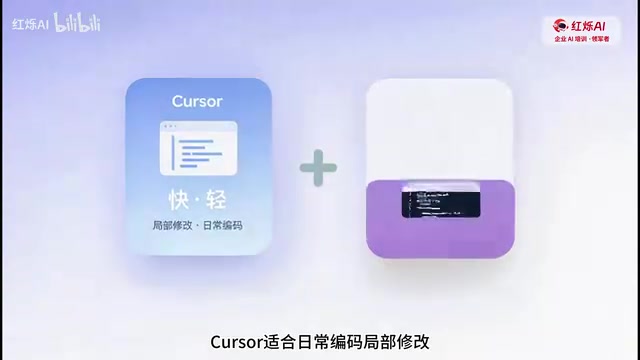
The program emphasizes that knowing "which tool to use when" can make the difference of several times in efficiency — something many developers overlook. Forcing a refactoring task into a local editing tool, or using a heavyweight Agent for simple inline changes, both waste efficiency. This kind of tool-selection judgment is something that has to be developed through real projects, not memorized from a feature list.
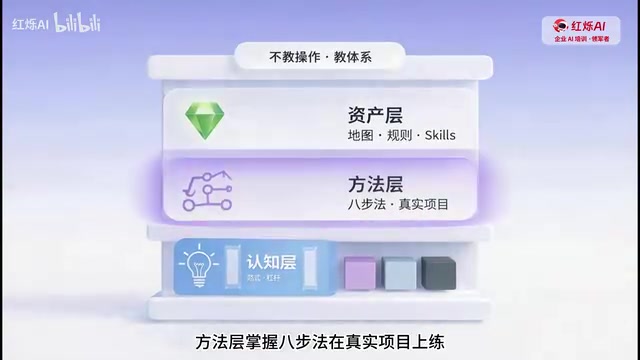
A Three-Layer Capability Model: Mindset, Method, and Assets
The most valuable part of this training program is that it doesn't focus on teaching tool operations. Instead, it builds a complete methodological framework across three layers.
Layer 1 — Mindset: Understanding the Paradigm Shift
The mindset layer addresses the conceptual foundation — understanding the paradigm shift that AI-assisted programming represents, and what the "leverage model" means in practice. AI is not a typing machine that writes code for you; it's a lever that amplifies engineering judgment. The developer's role is shifting from "the person who writes code" to "the person who directs AI to write code and ensures quality."
Layer 2 — Method: The Eight-Step Framework
The method layer centers on an "eight-step framework" that teams practice repeatedly on real projects. At a high level, it covers the complete loop from understanding a codebase and decomposing requirements, to selecting the right tool, generating code, and validating delivery.
It's worth noting that legacy codebases are one of the most common and difficult challenges in enterprise software development. They typically share these characteristics: missing or severely outdated documentation, original developers who have left, aging tech stacks, and high coupling between modules. According to Stack Overflow's annual developer surveys, "maintaining legacy code" has consistently ranked among the top three most frustrating developer problems. Traditional code reading relies on manual, line-by-line review — a project with hundreds of thousands of lines can take a new team member weeks to develop even a basic understanding. This is precisely where AI tools deliver value: by rapidly generating a "project map" that compresses this onboarding period from weeks to hours or even minutes.
Layer 3 — Assets: Making AI More Effective Over Time
The asset layer is one of the more distinctive elements of this program. It advocates building up "project maps" and "rule navigation" artifacts so that AI becomes more effective the longer it's used.

The effectiveness of AI coding tools is highly dependent on context. This area is increasingly being called "Context Engineering" in the industry — considered a more systematic AI collaboration methodology that goes beyond prompt engineering. Context includes: project architecture documentation, team coding standards, historical decision records, and the business background of the current task. If every AI invocation starts from scratch, the model can only rely on general knowledge to make inferences, which frequently produces code that "looks correct but doesn't follow project conventions." By pre-building structured context assets (the "project map" and "rule navigation"), teams are effectively giving AI a persistent "project memory," enabling its outputs to increasingly align with real engineering requirements. This is essentially turning AI collaboration knowledge into a reusable, compounding asset.
A Typical Hands-On Workflow
The program outlines a concrete hands-on path that's worth referencing:
- Open a real legacy project from the team — one with hundreds of thousands of lines of code;
- Use approximately ten minutes to have AI generate a "project map" and flag risk areas;
- Build rule navigation to establish the context foundation for future AI collaboration;
- Pick a low-risk requirement and walk through the full eight-step framework all the way to actual delivery.
The design logic is clear: establish a global understanding first, then build confidence and experience through low-risk tasks before touching core modules. For teams facing a massive legacy codebase and unsure where to start, approaches like "generate a project map in ten minutes" can dramatically lower the barrier to AI involvement.
Tiered Course Design and Deliverables
The program offers differentiated course lengths based on team experience:
- Teams with some experience but lacking methodology: two days;
- Teams just getting started with the tools: three days;
- Teams looking to build a complete engineering system: five days.
Courses are run in small cohorts of three to eight people, customized around the team's own real projects. At the end of training, teams walk away with four things:
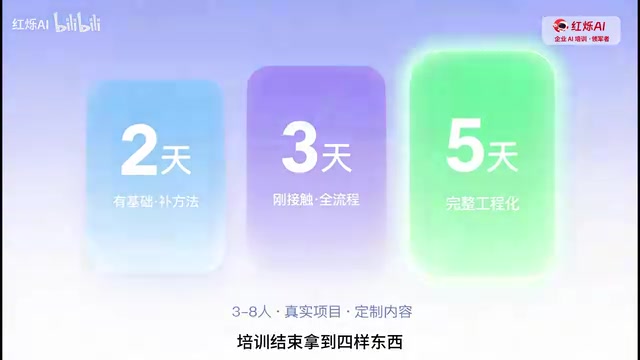
A methodology framework, a project asset package, a real delivery case study, and muscle memory for tool usage. Compared to training that leaves behind only a few slides, this format — "practice on your own project, walk away ready to use it" — better matches what enterprises actually expect from training ROI.
Effectiveness Data and Rational Assessment
According to the program, Hongshu AI has served over a hundred teams, with a post-training tool adoption rate of 95% and efficiency improvements of five to eight times.
On the topic of AI coding tool efficiency gains, several relatively credible third-party studies are available for reference. McKinsey's 2023 research found that AI-assisted programming can improve completion speed by 30–50% on specific tasks such as code documentation generation and unit test writing. GitHub's official Copilot research report found that developers using Copilot completed tasks approximately 55% faster on average. The "five to eight times" improvement figure typically appears in highly repetitive, pattern-driven task scenarios — such as bulk-generating CRUD endpoints or migrating similarly structured code modules — and cannot be taken as representative of overall development efficiency.
It should be noted that the figures above come from the service provider's own reporting and lack third-party verification. Readers should exercise independent judgment. Evaluating such data rationally requires attention to two dimensions: the type of task and the measurement methodology — rather than treating the numbers as universal conclusions. By comparison, the 95% tool adoption rate is arguably the more meaningful metric — it indicates that tools are actually being used continuously after training, rather than becoming shelf-ware. And that, more often than not, is the biggest failure mode in enterprise AI adoption.
Summary
Setting aside the marketing framing, the core ideas this program conveys are relevant to any team looking to adopt AI-assisted programming: tools are easy to get; methodology is hard to build. Rather than debating whether Cursor or Claude Code is superior, teams are better served by first establishing a clear mental model of tool division, building reusable project assets, and developing real-world judgment through practice on actual projects. The path from AI as a "shiny new toy" to AI as a "team productivity asset" has never been primarily about the tools themselves.
Key Takeaways
Related articles

The Truth Behind Codex 'Build a Website in 5 Minutes': AI Isn't Creating Sites—It's Helping You Copy Them
Exposing the truth behind viral Codex 5-minute website videos: creators aren't building original sites with AI—they're copying shared prompts or scraping others' work. Learn AI coding tools' real limits.

Getting Started with AI Agent Development: A Complete Guide from Concept to Practice
A comprehensive guide to AI Agent architecture and development, covering automated marketing, intelligent customer service, and investment analysis scenarios with single and multi-agent collaboration.

The Truth Behind Codex 'Build a Website in 5 Minutes': AI Isn't Creating Sites — It's Helping You Copy Them
Exposing the truth behind viral Codex 5-minute website videos: creators aren't building original sites with AI — they're copying shared prompts or scraping others' work.