Cursor in Action: A Practical Guide to Avoiding Pitfalls When Shipping a Commercial Interactive Product in 8 Hours

How one developer used Cursor AI to ship a commercial interactive installation in 8 hours.
An interactive developer used Cursor AI to deliver a commercial installation featuring a 3D fluid dry-ice Shader, background gradients, and LiDAR TUIO multi-touch in just 8 hours. The article shares ten practical lessons covering precise AI Rules configuration, project management strategy, conversation alignment, and debugging techniques like "subtract before you add" and "understand before you solve" — exposing common pitfalls such as instruction drift and code omissions in AI-assisted development.
Introduction: Can AI-Assisted Coding Really Deliver a Commercial Project in a Day?
One day. One AI-assisted developer. One medium-complexity commercial interactive product — it sounds like marketing hype, but an interactive developer actually validated this possibility using Cursor AI. In 8 hours, they shipped a complete interactive installation featuring a 3D fluid dry-ice Shader, dynamic background color gradients, and LiDAR TUIO multi-point signal processing. The result was both a leap in productivity and a collection of hard-learned lessons.
This article systematically breaks down the strategies, pitfalls, and efficiency methodology behind using Cursor AI on a real-world project.
Project Overview: The Full Development Workflow of a Dry-Ice Shader Interactive Product
The core features of this project included a 3D fluid dry-ice Shader interactive effect, dynamic background color gradients, and LiDAR TUIO multi-point signal processing. The development process was divided into four stages:
- Port the dry-ice Shader and integrate it into Processing
- Integrate TUIO multi-touch functionality
- Camera angle adjustment, background gradients, mouse interaction tied to TUIO, and dry-ice thickness tuning
- Overall debugging and optimization
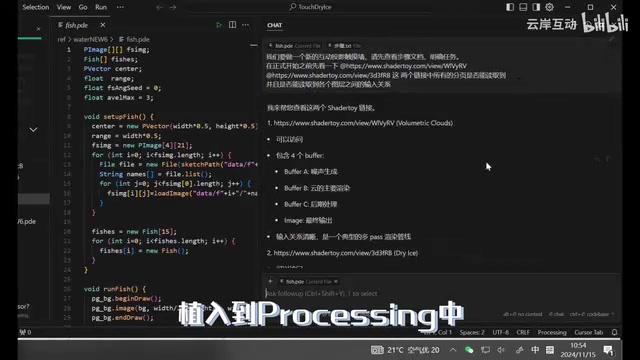
3D Fluid Dry-Ice Shader: The Real-Time Challenge of Volumetric Rendering
A Shader is a small program that runs on the GPU and is responsible for computing the color and lighting of each pixel or vertex. A 3D fluid dry-ice Shader is an application of volumetric rendering technology — it simulates the scattering and absorption of light through a semi-transparent medium to reproduce the visual appearance of dry-ice smoke. These Shaders are typically based on the Ray Marching algorithm: a ray is cast from the camera and "marches" through 3D space in fixed steps, sampling a density field built from 3D Perlin or Simplex noise at each step, then applying the Beer-Lambert law to calculate light attenuation, ultimately compositing a volumetric smoke effect.
The computational complexity far exceeds that of standard surface shading: step counts typically need to be kept between 32–64 to maintain 60fps in real time, while Jittered Sampling is used to reduce visible banding artifacts. Processing, as a Java-based creative coding framework, natively supports GLSL Shaders, allowing interactive developers to achieve complex GPU effects without diving deep into graphics APIs — which is a core reason it has remained popular in interactive installation work.
TUIO Protocol and LiDAR Multi-Touch
TUIO (Tangible User Interface Objects) is an open protocol designed specifically for multi-touch and tangible user interfaces. It was proposed by Martin Kaltenbrunner and others in 2005 during the Reactable project and has since become the de facto standard in interactive installation work. Built on top of the OSC (Open Sound Control) protocol, it transmits touch point IDs, positions, velocities, and accelerations via UDP network packets to client applications.
LiDAR (Light Detection and Ranging) sensors build spatial point clouds by emitting laser pulses and measuring reflection time. In interactive installations, they are commonly used for multi-person touch detection across large floor or table surfaces. Compared to camera-based solutions, LiDAR is immune to ambient light interference, offers higher accuracy, and has lower latency. The LiDAR sensor packages detected touch point data as TUIO messages and sends them to clients like Processing, where developers use a TUIO library to parse the messages and enable simultaneous multi-user interaction — widely used in exhibitions, commercial installations, and immersive experience projects.
A classic problem emerged in the very first stage: the AI Rules included the instruction "prioritize building the overall functional framework first," which caused Cursor to proactively introduce features from later stages into the initial code, creating chaos and wasting significant time. The lesson was clear: the wording of AI Rules directly shapes the boundaries of AI behavior — vague instructions cause the AI to "overstep."
In the second stage, even when a clean reference implementation was provided, Cursor still exhibited common omission issues. The takeaway was blunt: for simple, straightforward functionality, just do it yourself. AI excels at generating and modifying complex logic, not at mechanically copying simple code.
The third stage turned out to be the smoothest. The key insight: have Cursor first understand the code structure and locate the relevant sections, then attempt adjustments and modifications. Asking AI to make changes directly, without that orientation step, frequently leads to confusion.
Ten Practical Lessons from Using Cursor AI in Production
Project Management and Conversation Strategy
On configuring AI Rules: the core principle is to clearly specify your preferred programming language, project hierarchy, file structure, and coding conventions. This is not a one-time setup — it needs to be iteratively refined as the project progresses.
It's worth understanding what AI Rules actually are: the .cursorrules file is essentially a user-facing wrapper around the system prompt of the underlying large language model. Cursor injects these rules into the front of each conversation's context to constrain the model's behavior. Because LLMs have an inherent fuzziness in how they interpret instructions, the precision of your Rules wording directly affects model behavior. Overly broad descriptions trigger the model's "completion tendency," causing it to proactively introduce code outside the current task's scope — a phenomenon known in prompt engineering as "instruction drift," and one of the most common sources of loss of control in AI-assisted coding.

On project management: all files for a given project should live in the same folder. Select that folder before starting a conversation to ensure the dialogue stays anchored to the same project. This allows Cursor to better understand the context. Cursor supports codebase-level context understanding and can index an entire project directory — a fundamental difference from earlier AI coding tools that only handled single files. Proper project structure organization lets this capability shine.
The starting point of a conversation matters enormously. At the very beginning of a project conversation, give Cursor the complete final goal, a functional overview, and the overall development steps. At the same time, provide accurate reference materials with your instructions and actively ask Cursor to flag any information it's missing. This "alignment + preparation" strategy dramatically reduces communication overhead down the line.
Three Key Debugging Techniques
First: subtract before you add. Cursor sometimes introduces reference content beyond the scope of your instructions, causing bugs. When this happens, first distill the parts of the reference material you actually need, remove the rest yourself or ask AI to simplify it, verify the isolated functionality works, and only then feed it back to Cursor as reference.
Second: understand before you solve. Cursor's responses sometimes omit critical sections, even when you repeatedly emphasize "give me the complete response for all relevant locations." A more effective approach: ask Cursor to first mark all code locations relevant to the current instruction, review them yourself to confirm nothing is missing, and then ask it to make the changes. This "mark first, modify second"
Related articles
 Tutorials
ChatGPT Plus Subscription Guide: Are GPT-5.5, image-2, and Codex Worth the Upgrade?
A detailed look at ChatGPT Plus features — GPT-5.5, image-2, and Codex — with a Plus vs Pro comparison and a complete step-by-step subscription guide for users outside the US.
 Tutorials
Harness AI Engineering in Practice: Using Claude Code to Master Enterprise-Level E-Commerce Development
Deep dive into Harness AI Engineering: master enterprise e-commerce development with Claude Code using the Rules, Skills, Wiki, and Changes framework.
 Tutorials
Cursor + Codex Dual-IDE Collaboration: A Practical Methodology for Open-Source Project Customization
A complete methodology for open-source project customization based on real-world experience, detailing the Cursor+Codex dual-IDE workflow, seven-stage process, MVP validation, and AI source code reading techniques.