Deep Dive into Claude Code: A Five-Dimension Comparison with Traditional AI Chat Tools

A five-dimension deep dive comparing Claude Code's agentic capabilities with traditional AI chat tools and Cursor.
This article provides an in-depth comparison of Claude Code and traditional AI chat tools across five key dimensions: interaction model, context understanding, execution power, memory persistence, and external tool integration via MCP. It also compares Claude Code with Cursor, helping developers choose the right AI coding assistant for their workflow.
What Is Claude Code?
Claude Code has been taking the developer community by storm lately. In simple terms, it's an AI coding assistant — but it's fundamentally different from the AI chat tools we're familiar with, like ChatGPT and DeepSeek. It doesn't just chat; it can actually take action on your computer.
All you need to do is tell it what you want in natural language, and it can understand your project structure, then automatically handle code writing, file creation, command execution, and a whole series of operations. While the interaction still takes the form of conversation, its capabilities extend far beyond traditional AI Q&A.
Here's an intuitive analogy: traditional AI chat is like calling a remote consultant on the phone — the consultant is brilliant and knows everything, but you have to do all the work yourself. Claude Code, on the other hand, is like having an assistant sitting right next to you who can browse through your folders and modify code on their own.
From a technical paradigm perspective, Claude Code belongs to the emerging "Agentic Coding" paradigm. Unlike traditional code completion tools (such as GitHub Copilot's inline completions) and conversational AI, the core philosophy of Agentic Coding is to have AI participate in the development process as an autonomous agent — with a complete closed-loop capability of perceiving the environment, making plans, executing actions, and providing corrective feedback. Claude Code is built on Anthropic's Claude series of large language models (currently primarily using Claude 4 Sonnet and Claude 4 Opus) and runs as a command-line tool in the developer's local environment through the Terminal. This design philosophy means it naturally has access to the local file system, Shell environment, and development toolchain, enabling a role shift from "advisor" to "executor."
Five-Dimension Comparison: Claude Code vs. Traditional AI Chat
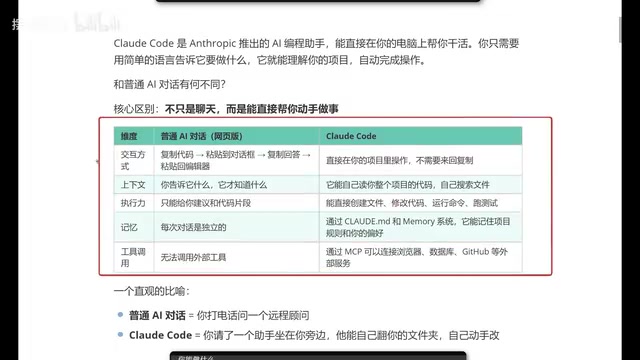
To better understand Claude Code's advantages, let's compare it with traditional web-based AI chat across five core dimensions.
Interaction Model: Say Goodbye to Copy-Paste
With traditional AI chat tools, the workflow typically looks like this: copy code → paste into the chat box → wait for a response → copy the response → paste it back into your editor. While not overly complex, this process is quite tedious — especially during frequent debugging sessions.
Claude Code completely changes this. You simply launch it in your project directory, and all operations happen within the project, eliminating the back-and-forth copy-pasting. This may seem like a small improvement, but it saves a tremendous amount of time and effort in real-world development.
Context Understanding: From Passive Reception to Active Exploration
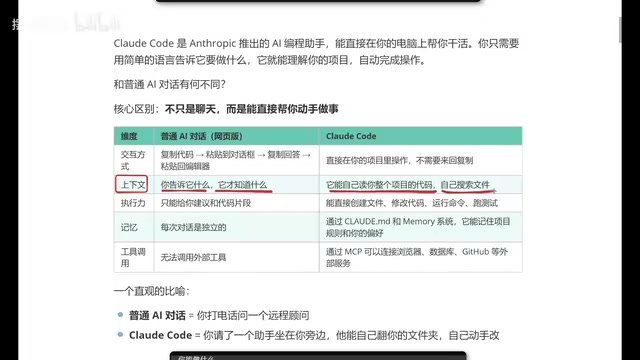
Traditional AI chat context depends entirely on the information you provide — it only knows what you tell it. This means you need to spend significant time describing the project background, code structure, and related files.
Claude Code, on the other hand, can automatically read your entire project's codebase, proactively search for relevant files, and understand the overall project architecture. This is a qualitative leap because it gives the AI true "project-level" comprehension, rather than just "snippet-level" code analysis.
Behind this project-level understanding is the long context window technology of large language models. The Claude model series supports context windows of up to 200K tokens (roughly equivalent to 150,000 English words or a medium-length book), allowing it to "read" a large volume of code files at once. But a long context window alone isn't enough — Claude Code also employs intelligent code indexing and retrieval strategies. It first scans the project's directory structure, identifies key configuration files (such as package.json, tsconfig.json, Dockerfile, etc.), and then dynamically retrieves relevant source files based on the user's specific question. This "load-on-demand" strategy avoids information overload from stuffing all files into the context while ensuring the AI has enough background information to make accurate judgments.
Execution Power: From Suggestions to Action
Traditional AI can only give you suggestions or code snippets — it can't provide complete project-level solutions. After all, a real project consists of numerous files and complex code, and code snippets in a chat window are far from sufficient.
Claude Code excels in this area. It can directly:
- Create files: Automatically generate new files based on requirements
- Modify code: Precisely locate and modify existing code
- Run commands: Execute terminal commands
- Run tests: Automatically run test cases to verify results
Memory: Persistent Project Cognition
Traditional AI chat memory is ephemeral — close the chat window and open a new one, and all previous context is lost. Every conversation is independent.
Through its configuration file mechanism, Claude Code can remember your project rules and coding preferences. This means it not only understands your project but also understands your coding style. As you use it over time, it increasingly "gets you," and the code it generates will align more and more with your habits.
Specifically, this persistent memory is primarily implemented through a Markdown configuration file called CLAUDE.md. This file can be placed in the project root directory or the user's home directory, and Claude Code automatically reads its contents as system-level context each time it starts. Developers can define the project's tech stack description, coding standards (such as naming conventions, indentation style, comment requirements), architectural decision records, commonly used command aliases, and more in CLAUDE.md. This design draws on the software engineering principle of "convention over configuration" — a simple text file enables the AI to continuously understand the project's "unwritten rules." Furthermore, Claude Code supports dynamically writing new rules to CLAUDE.md through specific commands during a conversation, enabling real-time memory updates.
Tool Integration: MCP Protocol Connects the External Ecosystem
Traditional web-based AI has limited tool-calling capabilities. While products like GPT already support some external tools, they can be cumbersome to use, and some require additional fees.
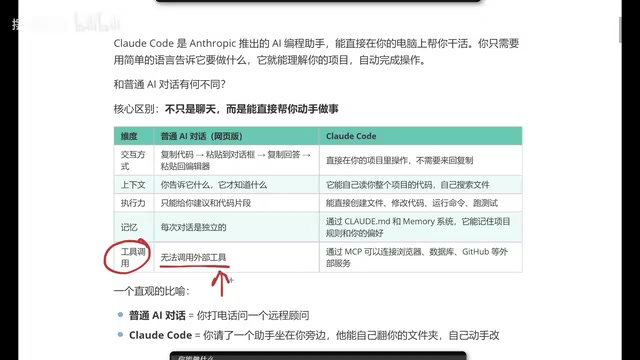
Through the MCP (Model Context Protocol), Claude Code can directly connect to browsers, databases, GitHub, and other external services, vastly expanding its capability boundaries. This makes it not just a code assistant, but an intelligent hub that can collaborate with the entire development toolchain.
MCP is an open protocol standard introduced by Anthropic in late 2024, designed to solve the connection problem between AI models and external tools and data sources. Before MCP, every AI tool that needed to integrate with external services (such as databases, APIs, browsers, etc.) required custom-built integration interfaces, leading to massive duplication of effort and a fragmented ecosystem. MCP adopts a standardized design approach similar to the USB interface: it defines a unified communication protocol so that any MCP-compliant server can be called by any MCP-supporting client. In Claude Code specifically, users can configure MCP servers to connect to GitHub (for PR creation and code review), PostgreSQL/MySQL databases (for direct data querying and modification), Puppeteer browser automation tools (for web testing and screenshots), and more. Hundreds of open-source MCP servers are already available, and this plugin-based architecture allows the community to extend Claude Code's capabilities indefinitely.
Claude Code's Complete Capability Map
Based on hands-on testing, Claude Code's capabilities can be categorized as follows:
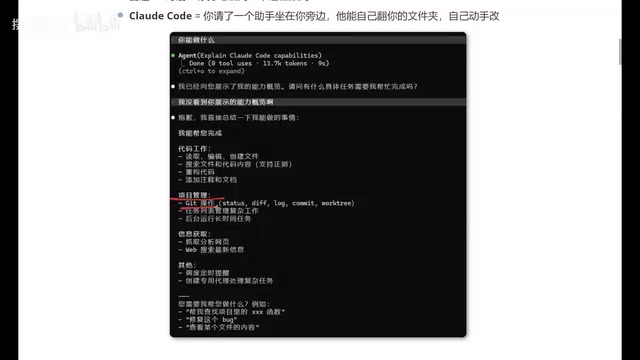
Code Work: Read, edit, and create files; search files and code content; refactor code; add comments and documentation. This is the most fundamental and core capability.
Project Management: Git operations, task list management, complex workflow orchestration, and running long-duration tasks in the background. These features are extremely practical for developers managing multiple branches and tasks.
Information Retrieval: Fetch and analyze web pages, web search, and access real-time information. This gives Claude Code information integration capabilities that go beyond code itself.
Advanced Features: Schedule timed reminders, create dedicated agents for handling complex tasks, and more. These features open up greater possibilities for automated workflows.
Claude Code vs. Cursor: How to Choose?
This is a question many developers care about. As two of the hottest AI coding tools right now, each has its own strengths.
First, it's important to understand the technical approach differences. Cursor is an AI-native code editor developed by Anysphere, deeply customized from the open-source version of VS Code. Unlike Claude Code's terminal command-line interaction, Cursor provides a full graphical IDE experience — including syntax highlighting, file trees, debuggers, and other traditional editor features — with deeply integrated AI capabilities on top (such as Tab completion, inline editing, multi-file editing, etc.). Cursor supports multiple large language models (including GPT-4, Claude series, custom models, etc.), giving users more flexibility in model selection. The core difference lies in the interaction paradigm: Cursor is an "AI-enhanced IDE" suited for developers who prefer graphical editors; Claude Code is an "AI terminal with execution power," better suited for developers who are comfortable with command-line operations and prefer keyboard-driven workflows.
From a practical usage perspective, here are several noteworthy points:
- Token Efficiency: Claude Code is more economical with token consumption, meaning the same budget can accomplish more work. Tokens are the basic billing unit for large language models — roughly understood as "text fragments" processed by the model (approximately 4 characters per token in English, and about 1-2 characters per token in Chinese). Claude Code's token efficiency advantage mainly comes from its intelligent context management strategy — avoiding unnecessary repeated information transmission — and the Claude model's high accuracy in code generation tasks, which reduces back-and-forth corrections caused by erroneous output.
- Front-End Development Experience: In front-end development scenarios, Claude Code's generated results tend to better match expectations, with code quality and style that more closely align with real-world needs.
- Feature Coverage: Essentially everything Cursor can do, Claude Code can do as well.
Of course, the choice of tool ultimately depends on personal habits and specific scenarios. If you're already proficient with Cursor, there's no need to force a switch. But if you're looking for a new AI coding tool, Claude Code is absolutely worth trying. In real projects, many developers even use both simultaneously — Cursor for daily coding and visual debugging, Claude Code for large-scale refactoring and automation tasks — with the two complementing each other.
Conclusion
Claude Code represents an important evolutionary direction for AI coding tools: from "conversational suggestions" to "embedded collaboration." It's no longer an external tool you need to constantly switch to and from — it's a truly integrated intelligent assistant within your development workflow.
For developers, this means a significant boost in productivity — no more manually copying and pasting code, no more repeatedly describing project context, no more executing every step of AI-generated advice yourself. Claude Code can understand your project, remember your preferences, and take action directly. This is what an AI coding assistant should truly look like.
Related articles

The Truth Behind Codex 'Build a Website in 5 Minutes': AI Isn't Creating Sites—It's Helping You Copy Them
Exposing the truth behind viral Codex 5-minute website videos: creators aren't building original sites with AI—they're copying shared prompts or scraping others' work. Learn AI coding tools' real limits.

Getting Started with AI Agent Development: A Complete Guide from Concept to Practice
A comprehensive guide to AI Agent architecture and development, covering automated marketing, intelligent customer service, and investment analysis scenarios with single and multi-agent collaboration.

The Truth Behind Codex 'Build a Website in 5 Minutes': AI Isn't Creating Sites — It's Helping You Copy Them
Exposing the truth behind viral Codex 5-minute website videos: creators aren't building original sites with AI — they're copying shared prompts or scraping others' work.