Dify 1.8 Complete Beginner's Guide: Build 20+ AI Apps Fast

A hands-on Dify 1.8 guide: deploy, integrate MySQL, build agents and workflows, and publish AI apps fast.
This guide covers everything you need to get started with Dify 1.8 — from three deployment options (Docker, cloud, source code) and MySQL integration, to the five core app types (Chatbot, Text Generator, Agent, Chatflow, Workflow). It also covers model selection strategies and how to publish your apps publicly or via API.
What Is Dify — And Why Should You Learn It?
Dify is a low-code platform for AI application development — think of it as an "AI app factory." Whether you're building enterprise-grade intelligent customer service tools, internal utilities, or personal chat assistants and text generators, Dify lets you ship something fast without writing complex backend logic or model-calling code from scratch.
Dify was born out of the growing complexity of large language model (LLM) application development. The low-code/no-code concept originally emerged in traditional software, but the commercialization of models like GPT-4 and Claude dramatically raised the engineering bar for AI apps — creating demand for AI-specific low-code platforms. After going open source in 2023, Dify quickly amassed a large user base. Built on top of frameworks like LangChain, it provides a more complete engineering abstraction that dramatically shortens the path from idea to working product.
Dify's core value is speed — it wraps LLM calls, workflow orchestration, knowledge base retrieval, and tool invocation into visual modules, letting developers (and even non-technical users) assemble functional AI apps in very little time. This guide is based on Dify 1.8 and walks through its core features and learning path to help you get up to speed systematically.
Three Ways to Deploy Dify
Dify offers flexible deployment options to fit different scenarios.
1. Official Cloud Version
The easiest way to get started is to use Dify's hosted online platform — no setup required. The cloud UI and feature set are nearly identical to self-hosted versions. One caveat: if your AI app needs to access a local database or on-premise environment, you'll need an intranet tunneling tool to expose your local machine's IP to the public internet so the cloud service can reach it.
Intranet tunneling exposes services running on a local network to the public internet. Common tools include frp, ngrok, and Cloudflare Tunnel. They work by establishing a persistent tunnel between a public server and your local machine, forwarding external requests to your internal services. For scenarios where the Dify cloud version needs to access a local database, tunneling is the critical bridge between the cloud and your local environment — just make sure to configure proper authentication to avoid unintended data exposure.
2. Docker Deployment (Recommended)
Windows + Docker is the recommended deployment method for most real-world use cases. Docker is a containerization tool that packages an application and its dependencies into an image, ensuring environment isolation and consistent deployments. Dify's Docker setup uses docker-compose to orchestrate multiple service containers (web server, worker, database, vector database, etc.), with containers communicating over a virtual network bridge — which is exactly why it integrates so smoothly with a host machine's MySQL. Once deployed via Docker, Dify can communicate seamlessly with MySQL on your local machine, inside another Docker container, or inside a VM (like a VMware environment).
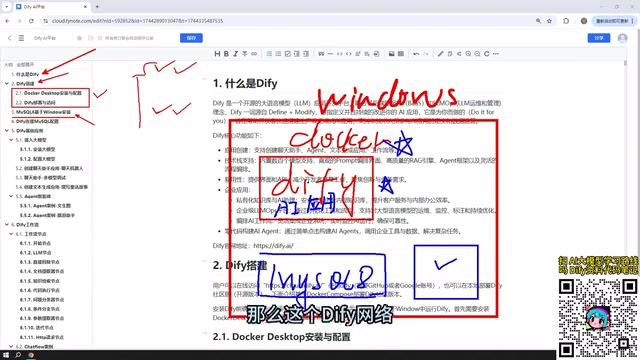
For production environments, it's recommended to self-host Dify on your own machine or company server for better control and convenience within enterprise deployments.
3. Source Code Deployment
Developers with customization needs can deploy directly from source for maximum flexibility and extensibility.
MySQL Integration: Connecting AI Apps to Your Database
Many practical AI apps need to interact with a database. It's recommended to install MySQL 8 on Windows, since AI apps built in Dify often need to read database data to power AI interactions.
MySQL can be deployed in several ways: installed natively on Windows, run via Docker, or hosted inside a VMware VM. Thanks to Docker's strong network connectivity, MySQL "works wherever you put it." After installation, you'll need to configure the corresponding database connection parameters in Dify so your AI apps can successfully read data.
Dify's Five Core Application Types
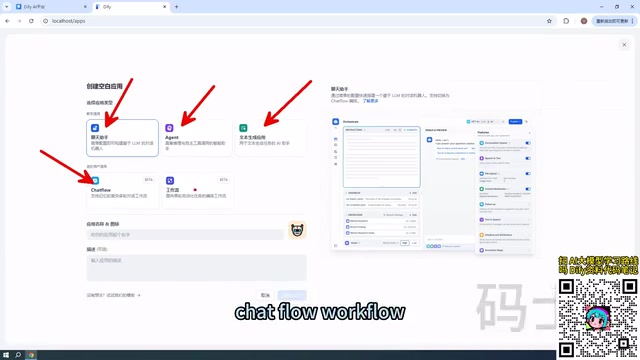
Dify is feature-rich, but all apps fall into five types when you create them. Understanding the differences is fundamental to mastering Dify.
Basic Apps: Chatbot, Text Generator, and Agent
Chatbot is the simplest application type — essentially multi-turn conversational interaction with a large language model.
Text Generator focuses on content production, suited for one-shot tasks like writing articles, generating documents, or drafting creative content.
Agent is the most capable of the three. The key difference from the other two: an Agent can proactively call tools to complete complex instructions. The underlying mechanism comes from the ReAct (Reasoning + Acting) framework — the model alternates between "reasoning" and "acting" as it executes tasks. The LLM analyzes the user's instruction, autonomously decides which tools to call (e.g., web search, database query, code execution) and in what order, and dynamically adjusts its plan based on each step's results. For example, you can instruct an Agent to first scrape a webpage and then analyze the content — it will plan the steps and use tools systematically to achieve the goal. This capability makes Agents far more powerful than simple Q&A, enabling multi-step, cross-system complex tasks.
Advanced Apps: Chatflow and Workflow
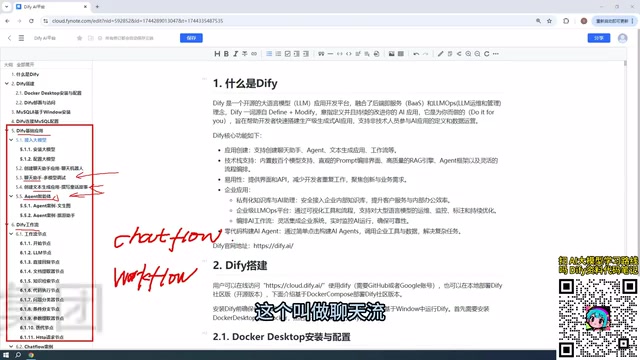
Workflows represent Dify's advanced capabilities and come in two forms: Chatflow and Workflow. Workflow orchestration is an engineering pattern that chains multiple discrete task nodes together according to business logic. In the AI context, this means combining LLM calls, data processing, conditional branching, and other steps into a complete business process. Dify's node-based design draws inspiration from the DAG (Directed Acyclic Graph) model used in automation tools like n8n and Zapier — each node's inputs and outputs are connected via variable references, forming a visual data-flow diagram.
The core difference in plain terms:
- Chatflow: Supports multi-turn conversational interaction within the workflow;
- Workflow: One-shot execution — takes an input, produces an output, with no ongoing dialogue.
Dify's workflow functionality is now quite stable and can be confidently used in real projects.
Workflow Nodes: The Building Blocks of AI Apps
Both Chatflow and Workflow are composed of individual nodes. Each node represents a functional module in the workflow — a model call, conditional logic, code execution, knowledge retrieval, and so on. Connecting and combining these nodes creates a complete business process. Nodes pass data to each other via directed connections and support complex logic including parallel branches and conditional routing — no routing code required. You just drag, drop, and connect on the canvas.

Dify's official documentation covers a wide range of common nodes, each with hands-on examples. The workflow nodes section alone includes over a dozen practical cases, and each of the five application types has its own set of examples — making the overall learning material quite comprehensive.
Model Selection: Prioritize Value for Money
All AI apps need to interact with a large language model, so choosing the right model is an important prerequisite for using Dify effectively.
Recommended: Paid Online Models
Domestic Chinese LLMs are extremely affordable — "paid" doesn't mean expensive. Token is the basic billing unit for LLMs; roughly 1 Chinese character corresponds to 1.5–2 tokens. With DeepSeek, for example, a ¥10 top-up can last quite a long time — its pricing is an order of magnitude lower than OpenAI's GPT-4 series, partly due to intense domestic market competition and policy-driven inclusivity strategies. Other options include:
- Baidu ERNIE Bot: Provides free tokens after registration;
- Alibaba Qwen: Offers millions of free tokens — enough to support tens of thousands of ordinary conversations, more than sufficient for everyday use.
Not Recommended: Local Small Models for Production
Dify supports integration with locally deployed models via Ollama. Ollama is an open-source framework for running quantized open-source models (like LLaMA, Mistral, DeepSeek, etc.) on consumer hardware. Quantization techniques (such as 4-bit quantization in GGUF format) can compress a model to roughly 25% of its original size, enabling ordinary PC GPUs to run models in the 7B–13B parameter range — but the precision loss leads to noticeably degraded reasoning ability. This is the core reason local small models are not recommended for production environments.
That said, if you have high-performance hardware or an enterprise-grade cluster capable of running billion-parameter models (such as the open-source version of DeepSeek, whose largest version exceeds 400 GB), you can absolutely build enterprise-level AI applications with local models and achieve excellent results.
Publishing Your App: From Local to Public
Apps built in Dify can be served to the outside world in several ways:
- Publish as a public web app: Generate a shareable link accessible to anyone (use with intranet tunneling if needed);
- Embed in a website: Integrate the app as a component within your own web pages;
- API access: Connect your Dify app to other systems via API or Python SDK.
This flexible publishing model means Dify works equally well for quickly validating personal ideas and for powering enterprise-facing services.
Summary
Dify 1.8's visual approach dramatically lowers the barrier to AI application development. Mastering it comes down to three key threads: the five application types (Chatbot, Text Generator, Agent, Chatflow, Workflow), flexible deployment and data integration (Docker + MySQL), and a smart model selection strategy (prioritize cost-effective paid online models).
With solid hands-on practice through real cases, "building 20+ AI apps quickly" is absolutely within reach — Dify is making AI application development genuinely accessible.
Key Takeaways
Related articles

WebMCP in Practice: How MakeMyTrip Is Reshaping the Travel Booking Experience
India's largest OTA platform MakeMyTrip uses WebMCP to standardize AI Agent interactions with web apps, replacing fragile DOM scraping with natural language-driven test automation and simplified complex booking scenarios.

Deep Dive into the EYG Programming Language: A New Portable Programming Paradigm Designed for Humans
Deep analysis of the EYG programming language's core design, including algebraic effects, program state persistence, and cross-platform portability, exploring how it addresses modern software fragmentation.

WebMCP in Practice: How MakeMyTrip Is Reshaping the Travel Booking Experience
India's largest OTA platform MakeMyTrip uses WebMCP to standardize AI Agent interaction with web apps, solving DOM scraping fragility, enabling natural language test automation, and simplifying complex international flight bookings.