Dify for Beginners: A Complete Guide to Building AI Applications

A hands-on guide to building AI applications with Dify, from Docker setup to publishing.
This guide walks beginners through the full Dify workflow: Docker-based deployment, MySQL configuration, connecting cloud or local LLMs, and building all five application types — Chatbot, Text Generation, Agent, Chatflow, and Workflow. It also covers how to publish apps via public links, website embedding, or REST API integration.
What Is Dify?
Dify is a low-code platform designed for AI application development. Its core value lies in helping developers and enterprises rapidly build all kinds of large language model applications. Whether it's a small personal utility or an enterprise-grade production system, Dify's visual interface dramatically lowers the development barrier.
Dify belongs to the emerging LLMOps (Large Language Model Operations) toolchain — an extension of the MLOps concept tailored to large language model scenarios, focusing on the full lifecycle management of models from development and testing to deployment and monitoring. Through its visual interface, Dify abstracts complex capabilities like Prompt engineering, RAG (Retrieval-Augmented Generation), and tool calling into modular building blocks, enabling even non-ML engineers to build production-grade AI applications.
In short, Dify packages large model capabilities into composable modules. You don't need to write complex integration code from scratch — you can build chatbots, text generation tools, or even sophisticated Agent applications. It bridges the gap between "understanding what LLMs can do" and "actually shipping something useful," which is precisely why it has gained popularity so quickly.
For developers with no prior experience, Dify's value is clear: you don't need to understand the underlying model mechanics to bring AI capabilities into real business scenarios through simple drag-and-drop configuration.
Three Ways to Deploy Dify
Dify offers multiple deployment options to flexibly suit different use cases.
Choosing the Right Deployment Path
Option 1: Docker Deployment (Recommended)
This is the approach recommended in this guide. On Windows, for example, you simply install Docker, pull the Dify image, and you're up and running — the local interface is nearly identical to the official online version.
Docker is a containerization platform built on Linux container technology. By packaging an application and all its dependencies into an "image," it achieves "build once, run anywhere." Dify's Docker deployment essentially runs the official pre-built image, which internally uses docker-compose to orchestrate multiple service containers (including the web frontend, API service, Worker processes, etc.). This is far less complex to set up than manually deploying from source code.
Option 2: Source Code Deployment Best for developers who need deep customization. Offers maximum flexibility but requires stronger technical expertise.
Option 3: Official Online Version No installation required — just sign up and start building. However, there's a limitation: if your AI application needs to access a local database or local environment, you'll need to use a tunneling tool to expose your local IP to the public internet.
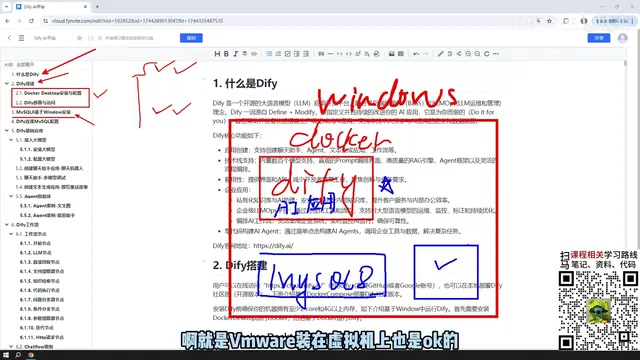
From a production standpoint, local Docker deployment is generally preferred. It allows Dify to directly access your local MySQL and other middleware, and provides better control for internal enterprise use.
Database and MySQL Configuration
Why Configure MySQL?
Many AI applications built in Dify need to interact with business data — reading records from a database, writing interaction logs, and so on. Configuring your database connection is therefore a critical step in making your AI application work in the real world.
This guide uses MySQL 8 on Windows as an example. If you're already familiar with this step, feel free to skip ahead.
MySQL Deployment Is Flexible
- Install directly on the Windows host machine
- Deploy via a Docker container
- Run inside a VMware virtual machine
Regardless of where MySQL is deployed, Dify can access it as long as the network is reachable. A Docker-deployed Dify instance can communicate with MySQL 8 on the Windows host or connect to a database running inside a virtual machine.
Once the database is deployed, you'll need to configure the connection in Dify so that your AI applications can read from and write to the database, enabling real data interaction.
Dify's Five Core Application Types
Understanding Dify's five application types is key to mastering the platform.
Three Basic Application Types
Chatbot is the simplest application type — essentially a multi-turn conversational interface with a large model. It has the lowest learning curve.
Text Generation focuses on content output, suited for one-time generation tasks like writing articles, producing documents, or creating scripts.
Agent is the most capable of the three. The key difference from the others is that an Agent can actively call tools to systematically complete complex instructions. Its core is the ReAct (Reasoning + Acting) framework: the model first reasons about which tool to call, executes it, observes the result, then continues reasoning until the task is complete. This "think–act–observe" loop gives Agents autonomous planning capabilities. For example, you can instruct an Agent to scrape a webpage and then analyze its content — it will autonomously orchestrate the tool calls without any manual intervention. Dify packages search engines, code executors, database queries, and more as standardized tools for Agents to use, so developers don't need to write tool-calling logic by hand.

Two Workflow Application Types
Beyond the three basic types, Dify also offers more powerful Workflow capabilities, available in two forms: Chatflow and Workflow.

The key difference between the two lies in their interaction model:
- Chatflow: Supports multi-turn conversation within the workflow, ideal for scenarios requiring ongoing interaction.
- Workflow: Executes once — you provide input and get output directly. Best suited for batch processing and automation tasks.
Both workflow types are composed of nodes. Dify's workflow engine uses a DAG (Directed Acyclic Graph) structure to organize nodes, ensuring clear data flow with no circular dependencies. Common node types include: LLM nodes (calling large models), Knowledge Retrieval nodes (RAG), Code nodes (executing Python/JavaScript), Conditional Branch nodes, HTTP Request nodes, and more. Data is passed between nodes via variables, and the entire flow is visually rendered — making it easy to debug and maintain complex business logic. Mastering the most common node types is the foundation for building sophisticated AI applications.
Model Integration and Cost Considerations
Every AI application depends on a large model, so connecting a model is a prerequisite for using Dify.

Start with Paid Cloud Models
It's recommended to start with paid cloud models like DeepSeek or ChatGPT. Don't be put off by "paid" — cloud models are billed by Token, the basic unit large language models use to process text (roughly corresponding to word fragments in English or characters in Chinese, where 1 Chinese character ≈ 1.5–2 Tokens). DeepSeek, for example, costs as little as ¥0.1 per million input tokens — a ¥10 top-up goes a long way. Some platforms like Baidu's ERNIE Bot even offer millions of free tokens just for signing up, more than enough for personal learning and small-scale projects. By comparison, GPT-4o costs roughly 10–20× more than DeepSeek, so choose based on your performance needs and budget.
When to Use Local Models
Dify also supports locally deployed models (such as open-source models run via Ollama). Ollama is a runtime tool designed specifically for running open-source large models locally — it supports mainstream models like Llama, Mistral, and Qwen, lets you pull and run models with simple commands, and provides a REST API compatible with the OpenAI format, which Dify integrates with seamlessly. The main advantage of local models is that data never leaves your machine, making them suitable for data-sensitive industries like finance and healthcare. However, they have high GPU VRAM requirements (a 7B model needs ~8 GB VRAM; a 70B model requires a multi-GPU setup). Consumer-grade hardware can only run smaller models, which typically underperform compared to cloud alternatives.
If your hardware is powerful enough — or you're running an enterprise-grade cluster — deploying large local models (such as the full open-source DeepSeek, which can exceed 400 GB) to build private enterprise applications is absolutely viable and can deliver excellent results. The right choice depends on your hardware capabilities and data security requirements.
Publishing and Integrating Your Applications
Applications built in Dify aren't limited to use within the platform — there are three flexible ways to publish them externally.
Three Publishing Options
Public Web Site: Dify can generate a public access link for your application so anyone can use it. For locally deployed setups, you'll again need a tunneling tool to expose the service to the public internet.
Embed in Your Own Website: Embed the AI application as a component into an existing website for seamless integration.
API Calls: Dify provides a standard REST API interface — REST (Representational State Transfer) is the most widely used web API design standard, based on HTTP and using standard GET/POST/PUT/DELETE methods to operate on resources. Dify's REST API follows the OpenAI-compatible format, meaning code originally written to call GPT can be switched to any Dify-hosted model or workflow with minimal changes. You can call it from Python or any other language to integrate AI capabilities into existing systems like CRM, ERP, or customer service platforms, enabling broad reuse of AI capabilities.
This flexible publishing mechanism transforms Dify from a "development platform" into an "application delivery platform" — whether you're rapidly validating an idea or deploying to production, there's a path that fits.
Summary: A Complete Learning Path for Dify
Putting it all together, the Dify onboarding journey can be summarized as: understand the platform → complete Docker deployment → configure database connections → integrate a large model → practice each of the five application types → master publishing and integration options.
For developers looking to go from zero to one in LLM application development, Dify offers a practical path with a low barrier to entry and fast results. With this overall framework in place, every technical detail that follows will feel clear and approachable.
Key Takeaways
Related articles

WebMCP in Practice: How MakeMyTrip Is Reshaping the Travel Booking Experience
India's largest OTA platform MakeMyTrip uses WebMCP to standardize AI Agent interactions with web apps, replacing fragile DOM scraping with natural language-driven test automation and simplified complex booking scenarios.

Deep Dive into the EYG Programming Language: A New Portable Programming Paradigm Designed for Humans
Deep analysis of the EYG programming language's core design, including algebraic effects, program state persistence, and cross-platform portability, exploring how it addresses modern software fragmentation.

WebMCP in Practice: How MakeMyTrip Is Reshaping the Travel Booking Experience
India's largest OTA platform MakeMyTrip uses WebMCP to standardize AI Agent interaction with web apps, solving DOM scraping fragility, enabling natural language test automation, and simplifying complex international flight bookings.