Dify + MCP in Practice: Build a Multi-Function AI Agent Workflow in Four Steps

Build a multi-function AI agent workflow with Dify and MCP Servers — no coding required.
This guide walks through building a multi-function AI agent workflow using ModelScope's MCP Plaza and the Dify platform. By combining a question classifier with four specialized Agent branches — covering dietary recommendations, LeetCode algorithm practice, news updates, and travel planning via Amap — you can create a powerful AI assistant with zero coding through visual drag-and-drop orchestration.
Introduction
With the rapid growth of the MCP (Model Context Protocol) ecosystem, more and more developers are exploring how to integrate various external tools and services into AI agents. This article provides a detailed guide on how to leverage MCP Plaza resources from the ModelScope community, combined with the Dify platform, to build a multi-function AI Agent workflow that integrates dietary recommendations, algorithm practice, news updates, and travel planning — all in one place. The entire process requires no complex coding, making it accessible even for beginners.
What Is MCP? The Universal Plug for the AI World
MCP stands for Model Context Protocol, an open standard protocol designed to simplify interactions between large language models and external tools or data sources. Through MCP, developers can integrate different services and tools into a unified framework, enabling AI models to intelligently invoke these resources to accomplish complex tasks.
MCP was officially introduced and open-sourced by Anthropic in late 2024, drawing design inspiration from the "separation of concerns" principle in software engineering. Before MCP, every AI application that needed to interface with external tools (such as databases, APIs, or file systems) required custom integration code, resulting in massive duplication of effort and a fragmented ecosystem. MCP borrows from the USB protocol concept — defining a standard interface that allows any protocol-compliant tool to be plug-and-play. The protocol uses JSON-RPC 2.0 as its communication format and supports two transport methods: stdio and SSE. The former is suited for local inter-process communication, while the latter is designed for remote service calls.
The MCP Server ecosystem is growing at an impressive pace. The MCP.so marketplace already hosts over 13,000 MCP Servers, and major tech companies like Baidu and Alibaba Cloud have launched their own MCP Server marketplaces. The ModelScope community has also launched its MCP Plaza, currently offering over 3,000 MCP Servers covering maps, search, recipes, coding problem banks, and many other domains.
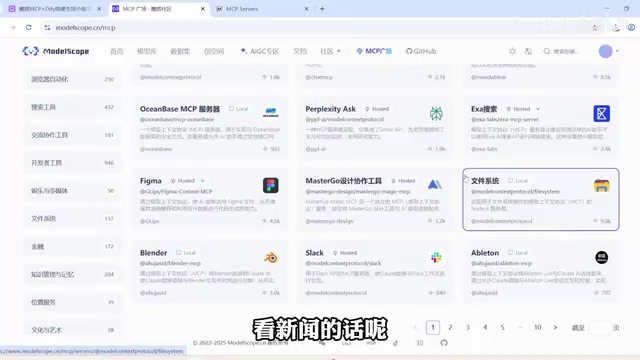
In simple terms, MCP is like a "universal plug" for the AI world — with it, large models can easily connect to various external capabilities, and developers don't need to write custom adapter code for each tool.
Preparation: Selecting and Configuring MCP Servers
Choosing Four Core MCP Servers
This hands-on project requires the following four MCP Servers, each corresponding to a real-life scenario:
| Scenario | MCP Server | Description |
|---|---|---|
| Travel Planning | Amap (Gaode Maps) | Provides traffic routes and geographic information queries |
| Algorithm Practice | LeetCode | Provides algorithm problems and coding exercises |
| Dietary Recommendations | "What to Eat Today" | Recommends recipes based on preferences |
| News & Information | Zhisou (Smart Search) | Delivers the latest news and industry updates |
Detailed MCP Server Configuration Process
Using the Amap MCP Server as an example, here are the configuration steps:
- Obtain an API Key: Go to the Amap Open Platform, register an account, create a Web application, and obtain your API Key
- Fill in the Configuration: Return to the MCP Plaza on the ModelScope community, navigate to the Amap MCP Server configuration page, enter the Key you obtained, and save
- Generate the SSE URL: After saving, the system will automatically generate an SSE (Server-Sent Events) connection address, which you'll need later in Dify
SSE (Server-Sent Events) is an HTTP-based server push technology that allows the server to continuously send data streams to the client through a unidirectional long-lived connection. Unlike WebSocket's full-duplex communication, SSE is unidirectional (server → client), but it's simpler to implement, has better compatibility, and natively supports automatic reconnection. In the MCP context, SSE serves as the transport layer for remote MCP Servers — the client subscribes to the MCP Server's response stream via an SSE connection, and the server pushes tool invocation results back as an event stream. This approach is particularly well-suited for cloud-deployed MCP Servers, requiring no local dependencies on the client side.
Zhisou also requires obtaining a Key in advance (free registration available), while LeetCode and "What to Eat Today" require no authorization — you can simply create them to generate the SSE request URL.
Verifying Configuration in the MCP Playground
After completing the configuration, it's strongly recommended to test each MCP Server individually in the ModelScope community's MCP Playground to ensure they all work properly.
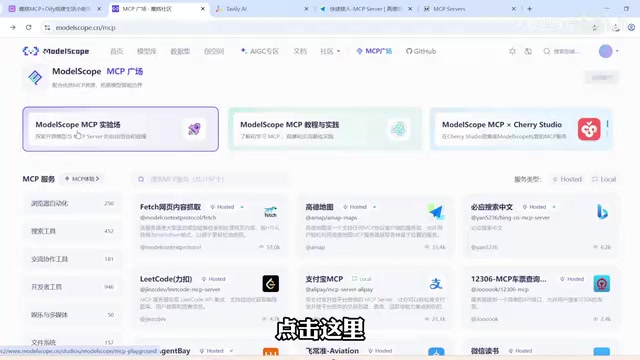
Testing method: Enter the Playground → Click Configure → Add MCP Server → Select JSON mode → Paste the SSE address → Confirm and add.
Important Note: You need to disable the platform's built-in Amap and Time Fetch tools to avoid conflicts with your own configured MCP Servers.
Actual test results:
- Input: "Breakfast recipes suitable for early morning commuters" — successfully invoked the How to Cook MCP Server and returned recipes
- Input: "Bus route from Changsha Railway Station to Meixi Lake BuBuGao" — successfully returned transit route information
Building the Dify Chatflow Multi-Agent Workflow
Introduction to the Dify Platform
Dify is an open-source LLM application development platform that provides visual workflow orchestration capabilities. Its Chatflow mode is specifically designed for conversational scenarios, supporting multi-turn interactions, conditional branching, and Agent node orchestration. Compared to traditional code-based development, Dify's drag-and-drop interface significantly lowers the barrier to building AI applications. Dify supports integration with multiple large models (OpenAI, Qwen, locally deployed models, etc.) and extends tool invocation capabilities through a plugin mechanism — the MCP plugin being one of them.
Overall Architecture Design
The overall workflow structure is very clean, adopting the classic question classification + multi-Agent branching architecture:
Start Node → Question Classifier → Four Agent Branches → Direct Reply
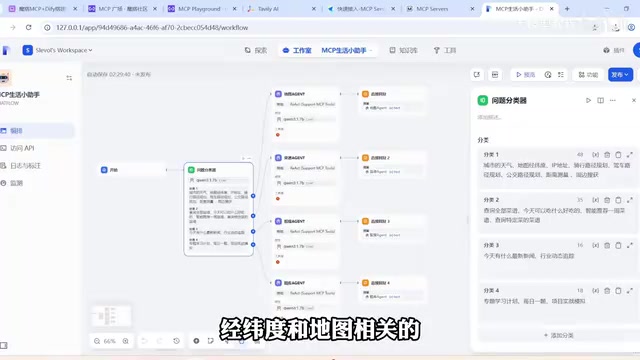
The advantage of this architecture is: after a user inputs a question, the system first determines the question type, then routes the request to the corresponding Agent for processing, and finally returns the result. This "routing-dispatch" pattern is very common in enterprise-level AI systems, similar to an API gateway in microservice architecture. Each downstream Agent only needs to focus on handling problems in a specific domain, reducing the complexity of individual Agents and minimizing the possibility of tool invocation conflicts. Compared to having a single all-purpose Agent loaded with all tools simultaneously, the classification-routing approach typically delivers better accuracy and response speed.
Question Classifier Configuration
The question classifier uses a locally deployed Qwen3 large model, with the input variable being the user's request content. Qwen3 is a next-generation large language model series from Alibaba Cloud's Tongyi Lab, released in 2025, spanning parameter sizes from 0.6B to 235B, with support for tool invocation, multilingual understanding, and long-context processing. Smaller versions (such as Qwen3-8B) can be deployed locally on consumer-grade GPUs using inference frameworks like Ollama, making them ideal for individual developers building local AI applications. Qwen3 excels particularly in Chinese language understanding and tool invocation, which is why it was chosen as both the question classifier and Agent reasoning engine in this article.
Based on the characteristics of the four MCP Servers, user questions are classified into four categories:
- Category 1: Map-related questions such as city weather, map coordinates, and traffic routes
- Category 2: Food-related questions such as recipe recommendations and meal planning
- Category 3: Information-related questions such as today's news and industry trend tracking
- Category 4: Learning-related questions such as study plans and daily algorithm problems
Key Points for Agent Node Configuration
The configuration method for all four Agents is essentially the same. Here are the key steps:
1. Install the MCP Tool Plugin
Search for "agent" in Dify's plugin marketplace and install the Agent plugin that supports MCP tools.
2. Select the Agent Strategy
It's recommended to choose the ReAct strategy rather than Function Calling, as Function Calling showed some compatibility issues during testing. Select Qwen as the model.
ReAct (Reasoning + Acting) is an Agent strategy that allows large models to alternate between reasoning and action, proposed by Google and Princeton University in 2022. In ReAct mode, the model first thinks in natural language about what it should do (Thought), then executes a tool call (Action), and continues reasoning based on the returned result (Observation), cycling through this loop until reaching a final answer. Function Calling, proposed by OpenAI, is a more structured approach where the model directly outputs function call instructions in JSON format, which the system executes and returns results to the model. Function Calling is more efficient but places strict requirements on the model's function calling capabilities. Some open-source models don't have ideal compatibility, so ReAct tends to be more stable and reliable in local deployment scenarios.
3. Configure the Tool List
Each Agent needs a "get timestamp" tool added, as every node in the Chatflow is time-dependent.
4. Fill in the MCP Service Configuration
Enter the SSE address generated by the ModelScope community into the MCP service configuration. For example, the Amap Agent's instruction is:
Please use amap_maps to perform queries based on the user's input
Here, amap_maps is the service name for the Amap MCP, and the query content is the user's input.

Adding Direct Reply Nodes
Add a "Direct Reply" node at the end of each branch, with each direct reply corresponding to the preceding Agent's output. At this point, the entire Dify Chatflow workflow is complete.
Demo and Verification
Once the workflow is built, click the preview button in the upper right corner to test:
Test 1: Dietary Recommendations
- Input: "Recommend a weekly meal plan and shopping list"
- The workflow automatically routes to the recipe Agent branch, invoking the How to Cook MCP Server
- Successfully returns a complete weekly menu recommendation with a corresponding shopping list
Test 2: Algorithm Practice
- Input: "Give me an algorithm problem and answer in Chinese"
- The workflow routes to the LeetCode branch, returning the "Peak Element in Array" algorithm problem
- Since LeetCode defaults to English, specifying Chinese in the instruction resolves this
The same approach can be used to test news queries and travel route planning, with overall satisfying results.
Summary and Ideas for Extension
The solution presented in this article is based on ModelScope MCP Plaza + Dify Platform, implementing a multi-function AI Agent workflow. The solution has several noteworthy highlights:
- Low barrier to entry: No complex coding required — the entire workflow can be built through visual drag-and-drop
- High extensibility: With 3,000+ services available on MCP Plaza, you can add new Agent branches anytime based on your needs
- Strong practicality: Covers four major daily life scenarios — eating, learning, reading news, and traveling
If you want to further extend this AI agent, consider integrating more MCP Servers such as weather forecasts, calendar management, translation services, and more to create a truly "all-in-one life assistant." Additionally, you can explore adding a "fallback branch" in the question classifier to handle unclassifiable questions, or implement collaborative calls between Agents (for example, checking the weather first, then recommending outfits and travel plans), further enhancing the agent's comprehensive capabilities. The MCP ecosystem is growing rapidly, and now is the perfect time to start experimenting.
Related articles

Disaster and Glory of the Apollo Program: The History We Must Revisit Before Returning to the Moon
From the fatal Apollo 1 fire to Apollo 8's daring lunar orbit to Apollo 11's successful landing—revisiting the disasters, fears, and compromises of the Apollo program and their lessons for today's return to the Moon.
Netflix Trust Exercise Turns Into Firing Trap: Where Are the Boundaries of Corporate Trust?
A Netflix employee was fired after sharing private info in a trust exercise. We analyze the risks of corporate trust exercises and how employees can protect themselves.

AMD CDNA5 Architecture Deep Dive: Technical Evolution and the AI Computing Competition Landscape
Deep analysis of AMD's CDNA5 architecture covering Chiplet packaging upgrades, HBM memory evolution, and low-precision compute optimization, examining how AMD challenges NVIDIA's AI chip dominance.