Feishu-Style Docs + AI Knowledge Base in Practice: A Complete Guide to RAG and TipTap Editor Development

Build a Feishu-style doc editor with AI completion and RAG knowledge base using TipTap.
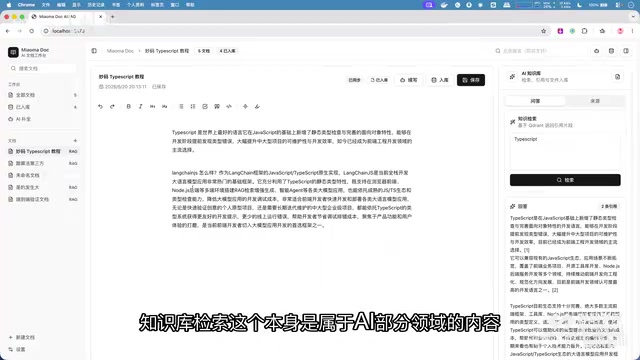
This article walks through building a Feishu-style document system combining a TipTap rich text editor with AI-powered auto-completion, document continuation, and RAG-based knowledge base Q&A. It covers the full pipeline from document chunking and Embedding vectorization to vector database storage and retrieval-augmented generation, offering practical insights into editor-AI integration engineering.
Editor + AI: The New Standard for Enterprise Development
As the AI wave sweeps across every industry, a clear trend is emerging: document editors are becoming the core vehicle for delivering AI capabilities. Whether it's intelligent code completion in editors (like Cursor or VS Code Copilot) or AI writing assistants in Feishu Docs, the deep integration of editors and AI has become a standard feature in enterprise products.
This article walks through a complete hands-on project, breaking down how to build a "Feishu-style document + AI knowledge base Q&A" system from scratch. The project covers three core modules: TipTap rich text editor development, AI auto-completion and document continuation, and RAG-powered knowledge base Q&A — a three-in-one practice combining frontend deep expertise with AI engineering.
Project Overview: A Three-in-One Architecture
The overall project architecture can be divided into three layers:
- Frontend Layer: A TipTap-based rich text editor providing a Feishu-like document editing experience
- AI Layer: Auto-completion and document continuation features at the cursor position
- Backend + Vector Store Layer: Document chunking, vectorized storage, and RAG-enhanced Q&A
The collaboration logic between these three layers is very clear: users create content in the editor while AI assists with real-time completion; meanwhile, all document content can be ingested into a knowledge base, enabling intelligent Q&A based on private knowledge through the RAG mechanism.
Why Is Editor Development So Important?
Here's a thought-provoking perspective: if you can't build editors, you're naturally excluded from the AI wave. The reason is simple — AI's core capability is generating text, images, and video, and all of this content needs a visual editor for presentation and interaction. While tools like Codex and Cloud Code exist as console-based interfaces, for most users, a software-based editor is the real entry point.
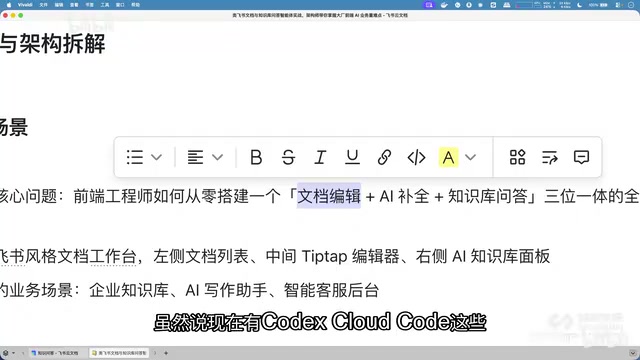
Whether it's internal enterprise knowledge management or user-facing content creation platforms, editors are indispensable infrastructure. This is why document editors are often called the "deep end of frontend development" — technically complex, but equally high in business value.
Building a Rich Text Editor with TipTap
TipTap is a modern rich text editor framework built on ProseMirror, offering high extensibility that makes it ideal for building Feishu-style document editing experiences.
The Technical Lineage of ProseMirror and TipTap
To understand TipTap's power, you first need to understand its foundation: ProseMirror. Developed by Marijn Haverbeke (the creator of CodeMirror), ProseMirror is a low-level rich text editing framework that uses a unique document model — representing documents as a structured node tree (rather than traditional HTML DOM), where each node has clearly defined types and attributes. This model allows every document change to be precisely described as a Transaction containing a series of Steps, providing a solid foundation for collaborative editing, undo/redo, and AI content insertion. TipTap builds on this with a friendlier API layer and Vue/React integration, so developers don't need to deal directly with ProseMirror's complex low-level APIs while retaining full extensibility.
In this project, the editor serves not just as a basic text editing tool, but as the "host" for AI capabilities. Specifically, the TipTap editor needs to meet the following requirements:
- Standard rich text editing capabilities: Headings, paragraphs, lists, code blocks, and other basic formatting
- Cursor position exposure: So AI knows the user's current editing context
- Streaming content insertion: AI-generated content needs to be rendered in real-time via streaming
- Structured document export: For subsequent knowledge base ingestion and chunking
TipTap's plugin-based architecture allows all these requirements to be implemented through custom Extensions without modifying the editor's core logic. This extension mechanism is a significant advantage of TipTap over other rich text editor solutions (such as Slate.js, Quill, Draft.js, etc.).
AI Writing Assistant: Implementing Auto-Completion and Continuation
This is the most user-visible feature module in the entire project and best demonstrates the value of AI-editor integration.
Auto-Completion: Cursor-Style Intelligent Suggestions
The interaction logic for AI auto-completion is very similar to code completion in Cursor or VS Code:
- After the user stops typing, the system detects the cursor position
- The context before the cursor is sent to the LLM
- The model returns completion suggestions, displayed as gray (dimmed) text after the cursor
- The user presses Tab to accept the completion
In practice, when a user writes some content and pauses, the system automatically analyzes the context and provides continuation suggestions. While response times on the web may be slightly slower due to the lack of caching optimizations, the overall experience is already very close to professional editor standards.
Document Continuation: Intelligent Generation of Full Paragraphs
Unlike line-by-line completion, document continuation analyzes the entire document content and generates complete follow-up paragraphs. Implementing this feature requires:
- Extracting the full document content as context
- Designing effective prompts to guide the LLM in understanding the document's topic and style
- Rendering generated content in real-time via streaming output
SSE Streaming: Real-Time Rendering of AI Output
Both document continuation and completion features rely on streaming technology for real-time rendering. SSE (Server-Sent Events) is a unidirectional communication protocol based on HTTP, where the server can continuously push data streams to the client. Unlike WebSocket's full-duplex communication, SSE is unidirectional (server → client), but its advantages include simple implementation, native support for automatic reconnection, and being based on standard HTTP without additional handshakes. In AI scenarios, since LLM tokens are generated one at a time, SSE allows each token to be pushed to the frontend immediately upon generation, creating a typewriter effect where text appears character by character instead of waiting for the entire response. This not only improves user experience but also significantly reduces Time to First Byte (TTFB), making perceived latency much shorter.
The core technical challenge of these two features lies in: how to efficiently manage the asynchronous interaction between editor state and AI inference. This involves TipTap's Transaction mechanism, SSE stream handling, and conflict resolution strategies between user operations and AI output. For example, if the user moves the cursor or makes edits while AI is streaming content, the system needs to decide whether to interrupt the AI output or insert AI content at the new cursor position — handling these edge cases directly determines the quality of the product experience.
RAG Knowledge Base Q&A: Complete Implementation of Retrieval-Augmented Generation
This is the most technically demanding part of the entire project and the most frequently tested topic in interviews.
Core Principles of RAG
The core idea of RAG (Retrieval-Augmented Generation) is straightforward: instead of having the LLM answer from scratch, first retrieve relevant materials from a knowledge base, then generate answers based on those materials. RAG was first proposed by Facebook AI Research (now Meta AI) in a 2020 paper, aiming to address two core pain points of large language models: outdated information due to knowledge cutoff dates, and factual errors caused by model "hallucinations." By introducing an external knowledge retrieval step, RAG gives the model evidence-based answers, significantly improving accuracy and trustworthiness.
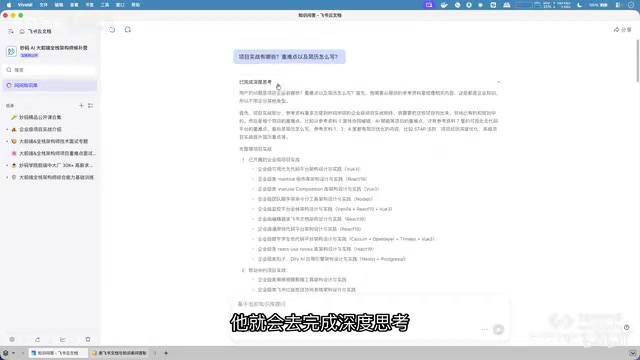
The benefits are obvious — compared to directly asking AI "What is TypeScript?", a RAG-based answer grounded in enterprise private documents will be more precise and relevant to actual business scenarios. Because the model's response is based on existing document content rather than relying on general knowledge from training data.
Complete RAG Implementation Workflow
Building the entire RAG knowledge base is divided into two phases: ingestion and retrieval.
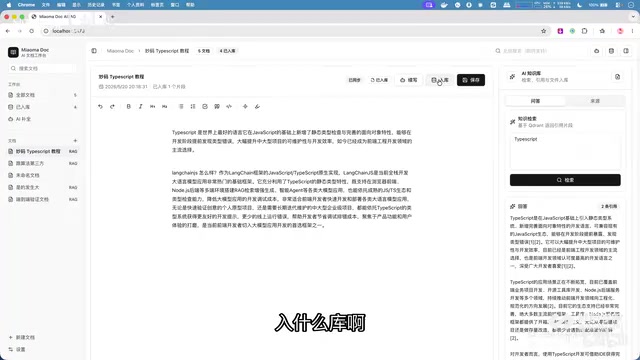
Ingestion Phase:
- Export document content from the editor
- Perform document chunking — split long documents into appropriately sized segments
- Vectorize each segment via Embedding — convert text into vector representations
- Store vectors in a vector database
How Embedding Vectorization Works
Embedding is the process of mapping discrete text data into a continuous high-dimensional vector space. Taking OpenAI's text-embedding-ada-002 model as an example, it converts a piece of text into a 1536-dimensional floating-point vector. In this vector space, semantically similar texts are mapped to nearby positions — for instance, "JavaScript is a programming language" and "JS is a scripting language" have different surface forms but very close vector distances. Common similarity metrics include Cosine Similarity and Euclidean distance. Vector databases (such as Pinecone, Milvus, Chroma, Weaviate, etc.) are specifically optimized for Approximate Nearest Neighbor (ANN) search on high-dimensional vectors, enabling millisecond-level retrieval across millions or even billions of vectors.
Deep Considerations for Document Chunking Strategies
Document chunking is one of the most underestimated yet impactful components in a RAG system. Common chunking strategies include: fixed-length chunking (e.g., cutting every 512 tokens), semantic boundary chunking (splitting at natural paragraph or section breaks), sliding window chunking (maintaining overlap between adjacent chunks to preserve context continuity), and recursive character chunking (LangChain's RecursiveCharacterTextSplitter, which splits hierarchically by delimiter levels). In practice, chunk size must match the Embedding model's context window — if the model supports a maximum of 8192 tokens, chunks exceeding this length will be truncated, causing information loss. You also need to consider the retrieval-time context window: if the LLM's prompt needs to include multiple retrieved chunks, each chunk can't be too long, or it will exceed the model's context limit.
Retrieval Phase:
- The user asks a question
- The question is also vectorized via Embedding
- A similarity search is performed in the vector store to find the most relevant document chunks (controlled by the Top-K parameter)
- The retrieved document chunks are sent to the LLM as context along with the user's question
- The LLM generates a final answer based on this contextual information
Top-K Retrieval and Reranking Mechanisms
Top-K is a core parameter in vector retrieval, representing the K most similar document chunks returned from the vector store. However, ranking by vector similarity alone is often not precise enough, so production-grade RAG systems typically introduce a reranking mechanism: first, vector retrieval recalls a larger set of candidates (e.g., Top-20), then a more precise Cross-Encoder model performs fine-grained matching and scoring between these candidates and the original question, ultimately selecting the most relevant Top-K (e.g., Top-5) chunks to feed into the LLM. Additionally, there are Hybrid Search strategies that combine traditional keyword retrieval (e.g., BM25 algorithm) with vector semantic retrieval, balancing exact matching and semantic understanding to further improve retrieval quality.
Demo Results in Practice
In the demo, the knowledge base stores various types of documents including project introductions, interview questions, project challenges, and job-seeking guides. When a user asks "What are the key challenges in project practice and how should I write my resume?", the system:
- Retrieves 7 relevant document chunks from the knowledge base
- The LLM performs deep analysis based on these chunks
- Generates a structured response
- Simultaneously displays matched source materials, ensuring answer traceability
The generated answer can be directly inserted into the editor, creating a complete closed-loop experience from "Q&A → content creation."
Technology Choices and Engineering Considerations
Frontend Tech Stack
- TipTap: A ProseMirror-based rich text editor framework with strong extensibility
- Streaming Rendering: SSE (Server-Sent Events) for real-time display of AI output
- State Management: Coordination between editor state and AI interaction state
Backend and AI Tech Stack
- Vector Database: For storing Embedding vector representations of documents
- Embedding Model: Converts text into high-dimensional vectors
- Large Language Model: Handles final content generation and knowledge base Q&A
Key Engineering Challenges
- Document Chunking Strategy: Chunks that are too large reduce retrieval precision; chunks that are too small lose contextual information — this requires iterative tuning based on actual scenarios
- AI Completion Latency Optimization: Web-based AI completion needs caching, prediction, and other optimization techniques to improve response speed. Common strategies include: local caching for high-frequency context patterns, using lighter models for initial predictions refined by larger models, and implementing request debounce to avoid frequent API calls during continuous user input
- Top-K Tuning for Vector Retrieval: Returning too many chunks introduces noise; too few may miss critical information — a balance between recall and precision must be found
- Concurrency Conflict Handling Between Editor and AI: When AI is streaming output while the user edits, TipTap's Transaction queue mechanism and Operational Transformation (OT) principles are needed to ensure document state consistency, preventing content corruption or cursor jumping
Conclusion: A Three-in-One Practice of Editor + AI + Knowledge Base
The value of this project lies not just in the technical implementation itself, but in demonstrating a complete "Editor + AI + Knowledge Base" three-in-one product paradigm. This paradigm is becoming the standard configuration for an increasing number of enterprise products — from Notion AI to Feishu Smart Docs, from Confluence's AI assistant to Yuque's intelligent writing, all leading products are evolving in this direction.
As the project author states: In the AI era, "knowing" outweighs "doing". The accumulation of solution design, theoretical understanding, and business experience has become more important than pure technical implementation. Once you understand RAG principles, master TipTap editor architecture design, and grasp the interaction logic of AI completion, the actual code implementation becomes a natural outcome.
For frontend developers, the combination of editor development and AI engineering capabilities will be one of the most competitive technical directions in the coming years. This isn't just about expanding your tech stack — it's a role transformation from "UI developer" to "AI application builder."
Related articles

Disaster and Glory of the Apollo Program: The History We Must Revisit Before Returning to the Moon
From the fatal Apollo 1 fire to Apollo 8's daring lunar orbit to Apollo 11's successful landing—revisiting the disasters, fears, and compromises of the Apollo program and their lessons for today's return to the Moon.

Netflix Trust Exercise Turns Into Firing Trap: Where Are the Boundaries of Corporate Trust?
A Netflix employee was fired after sharing private info in a trust exercise. We analyze the risks of corporate trust exercises and how employees can protect themselves.

AMD CDNA5 Architecture Deep Dive: Technical Evolution and the AI Computing Competition Landscape
Deep analysis of AMD's CDNA5 architecture covering Chiplet packaging upgrades, HBM memory evolution, and low-precision compute optimization, examining how AMD challenges NVIDIA's AI chip dominance.