Five Core Concepts of AI Programming: A Complete Guide from Prompt to Harness Engineering

A layered guide to the five core AI programming concepts, from Prompt Engineering to Harness Engineering.
This article systematically covers five layered AI programming concepts: Prompt Engineering for single-task expression, Context Engineering for managing project context via agents.md, Agents for looped task execution with tool calls, Skills for reusable capability modules, and Harness Engineering for building a complete framework with automated acceptance tests and CI/CD. The author advises indie developers to adopt a lightweight setup and scale up only as projects grow.
As AI programming tools evolve rapidly, a wave of new concepts has emerged — from the early days of Prompt Engineering, to Context Engineering, Agents, Skills, and now the recently trending Harness Engineering. What's the relationship between these concepts? What problem does each one solve? This article walks through all five core concepts with real-world development scenarios to help you build a clear mental model.
Prompt Engineering: Where It All Begins
Prompt Engineering is the earliest and most foundational concept in AI programming. When ChatGPT first launched, getting AI to write good code came down to one thing: describing your requirements clearly.
For example, if you just say "help me build a tidal app," the AI will likely go off the rails — it has no idea what you actually want. But if you add constraints — "iOS 17+, using such-and-such third-party library, with these tabs at the bottom" — the AI can understand your intent much more accurately, and the generated code will be much closer to what you had in mind.
The essence of Prompt Engineering is: using carefully crafted prompts to help AI accurately understand your needs. It works very well for single-turn conversations and one-off tasks, but its limitations become apparent as projects grow and conversations get longer.
The reason Prompt Engineering became an "engineering" discipline in the first place comes down to how large language models (LLMs) work — at their core, they are probability-based next-token predictors. The model doesn't truly "understand" your intent; it searches for the most likely output within the probability distribution formed by its training data, given the input token sequence. As a result, the wording, structure, and order of your input all significantly affect output quality. Common Prompt techniques the industry has developed include: Few-shot (providing a few examples for the model to imitate), Chain-of-Thought (asking the model to reason step by step), and role-setting (e.g., "You are a senior iOS developer"). These techniques are essentially manipulating the model's attention distribution, guiding it into a probability space more conducive to high-quality output.
Context Engineering: Solving AI's "Amnesia" Problem
As projects iterate, a frustrating problem emerges: AI forgets what came before. It might help you establish a consistent code style early on, then completely abandon it later. Things you explicitly told it not to do? Forgotten entirely.
Context Engineering was born to solve exactly this problem. Rather than a single prompt, it involves systematically providing AI with a set of critical information:
- Project directory structure: giving AI an understanding of the overall architecture
- Backend API and field definitions: ensuring accurate interface integration
- Design style guidelines: maintaining UI consistency
- List of files not to be modified: preventing AI from accidentally changing core code
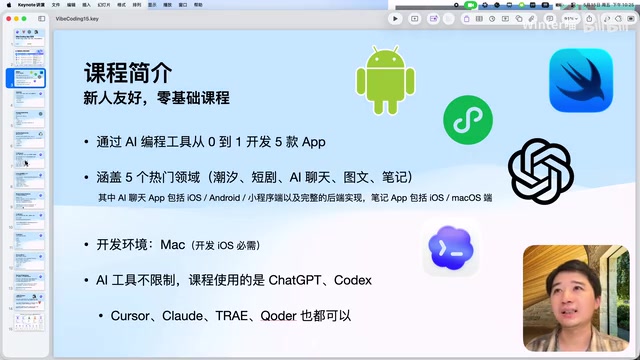
A key file here is agents.md — the most important carrier in Context Engineering. In Codex, for example, this file is automatically included in every session with the model, acting as the project's "constitution." You can define technical constraints, third-party library choices, API addresses, design guidelines, development principles, and all other critical information inside it.
The key insight is: you can't stuff an entire codebase into the AI every time (the context window won't fit), so you must carefully select the most critical information — that's the core idea behind Context Engineering.
To understand why, you need to know about the technical limitations of the context window. The context window is the maximum number of tokens a model can process in a single inference pass. Early GPT-3.5 had a context window of only 4K tokens (roughly 3,000 English words); even GPT-4 Turbo tops out at 128K tokens, while Claude 3.5 supports 200K tokens. While windows keep expanding, a mid-sized project's codebase can easily run into hundreds of thousands of lines — far beyond any model's context capacity. More critically, research has shown that models suffer from a "Lost in the Middle" phenomenon — even when information fits within the context window, content in the middle tends to be overlooked. This is why Context Engineering emphasizes "carefully selecting key information" rather than "stuffing everything in" — the filtering, ordering, and structured organization of information matters just as much.
Agent: AI That Can Execute Tasks in a Loop
The Fundamental Difference Between Agents and Regular Chat Models
A regular ChatGPT conversation follows a "one question, one answer" pattern — you ask something, it responds, and that's it. An Agent (intelligent agent) is fundamentally different: it can execute tasks in a continuous loop.
The concept of an Agent didn't originate in AI programming — it comes from classical AI research. As far back as the 1990s, AI scholars Stuart Russell and Peter Norvig defined the "rational agent" in Artificial Intelligence: A Modern Approach as a system that perceives its environment, makes decisions, and takes actions to maximize goal achievement. Modern AI programming Agents rely on a paradigm called ReAct (Reasoning + Acting), proposed by Google and Princeton University in 2022. ReAct has the model alternate between "thinking" and "acting" during its reasoning process: first reason about what to do next, then call an external tool to execute it, then continue reasoning based on the result. The Agent modes in OpenAI's Codex, Anthropic's Claude Code, and Cursor are all engineering implementations of this paradigm.
You can understand an Agent with this formula:
Agent = Model + Goal + Context + Tools + Execution Loop + Feedback Mechanism
When you give Codex a task, here's how it works:
- Decompose the problem: break the large task into smaller steps
- Execute step by step: organize the context for each step, pass it to the model to get instructions
- Call tools: run terminal commands, invoke the browser, run Xcode Build to compile the project, etc.
- Check feedback: did the build pass? Did the tests succeed? Feed the results back to the model
- Iterate in a loop: if something failed, keep fixing it until the task is complete
What Context Does an Agent Read?
Using Codex as an example, the context an Agent reads each session includes:
- Current task description and conversation history (automatically compressed if too long)
agents.mdproject rules file- Project structure and file tree
- Code snippets read on demand
- Error logs and debugging information
- Tool methods and Skill definitions exposed by MCP Servers
MCP (Model Context Protocol) mentioned here is an open standard released by Anthropic in late 2024, designed to standardize communication between AI models and external tools. Before MCP, every AI tool had to write separate integration code for every external service, creating M×N complexity. MCP reduces this to M+N by defining a standardized client-server protocol — any MCP-compatible AI client can connect to any MCP Server. An MCP Server can expose three types of capabilities: Tools (callable functions), Resources (readable data sources), and Prompts (predefined prompt templates). Common MCP Servers in AI programming include: database query tools, Figma design file readers, Jira task managers, and browser automation tools. This allows an Agent's tool-calling capabilities to expand indefinitely.
Tool-calling capability is an Agent's core competitive advantage. It doesn't just "think" — it can "act": run commands, read files, call APIs, take screenshots for comparison, forming a complete action loop.
Skill: Reusable Capability Packages
A Skill can be thought of as an Agent's reusable capability module — similar to a utility function a developer encapsulates: write it once, call it whenever needed.
Skill File Structure
The standard structure of a Skill looks like this:
skill-name/
├── skill.md          # Required core description file
├── scripts/          # Optional script files
└── assets/           # Optional asset files
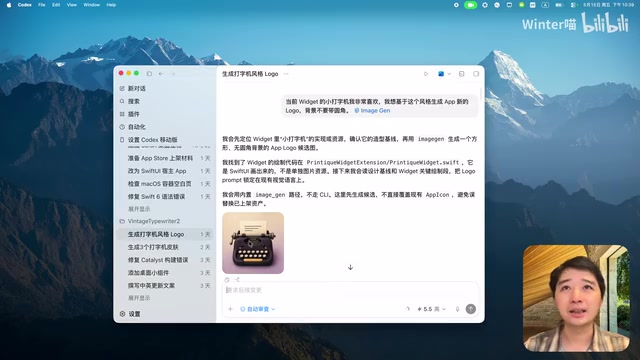
Take Codex's built-in imggen Skill as an example: its skill.md file defines the name and description. Each Codex session only brings the Skill's name, path, and summary into the context (not the full content), which saves tokens while still letting the model know which Skill to call when needed.
Two Ways to Trigger a Skill
There are two ways to trigger a Skill:
- Explicit invocation: type
$imggenin Codex to directly specify which Skill to call - Implicit triggering: just say "generate a cute cat image for me" — the model detects that the task description matches the Skill's description and triggers it automatically
A practical tip: using Skills to generate images in Codex is especially convenient because the Agent already has the project's context. You don't even need to describe the style in detail — it can infer it automatically from the project information.
Harness Engineering: A Framework for Stable, Long-Running AI Work
What Is Harness Engineering?
Harness Engineering is the hottest AI programming concept of the past two months. "Harness" literally refers to the equipment used to control a horse — the LLM is a powerful horse, and the Harness is everything around it.
The core problem it solves is this: LLMs are already capable enough to write code without much trouble, but they require a lot of human intervention. If you hand AI a large task that would take a day or two to complete and walk away, it will inevitably go off track.
Harness Engineering goes beyond Context Engineering — it's a complete operational framework that includes:
- agents.md: project rules and index directory
- design.md: UI design guidelines
- Test scripts: automated acceptance mechanisms
- Build commands: compilation and packaging configuration
- MCP configuration: external tool integration
- Git worktree, CI/CD, and other supporting infrastructure

Git worktree is a feature introduced in Git 2.5 that allows multiple working directories to be checked out simultaneously from the same Git repository, each corresponding to a different branch. In Harness Engineering, the value of Git worktree lies in supporting multiple Agent instances working in parallel — each Agent develops a different feature branch in its own independent worktree, without interfering with the others. This is similar to a team of developers each working on their own branch and merging via Pull Requests. Combined with CI/CD (Continuous Integration/Continuous Deployment) pipelines, code submitted by each Agent automatically triggers builds and tests, and only code that passes all checks can be merged into the main branch. This model evolves AI programming from "single-threaded conversation" to "multi-threaded parallel engineering," dramatically improving development efficiency.
What Does a Well-Structured Harness Project Look Like?
In a well-structured Harness project, agents.md no longer contains task descriptions directly — instead, it becomes an index directory that tells AI "which file to consult for which guidelines." The project's docs directory contains iteration plans, design guidelines, technical constraints, release configurations, and other documentation; the scripts directory contains various acceptance test scripts.
Every time AI completes a small task, it runs through these acceptance scripts. For example, a "smoke test" — running through all the pages in the simulator to check for crashes. If something crashes ("a component is smoking"), fix it before moving on.
"Smoke test" is a classic software engineering concept, with a name borrowed from hardware engineering — when a newly assembled circuit board is powered on for the first time, if a component starts smoking, it indicates a serious defect. In software, a smoke test is the most basic acceptance test: it only verifies that core functional paths work, without deeply testing edge cases. In the context of Harness Engineering, smoke tests typically include: whether the build succeeds, whether the app launches without crashing, and whether core pages render correctly. A more complete acceptance system also includes unit tests, integration tests, UI snapshot tests, and more. These automated test scripts serve as the AI's "quality inspector," ensuring delivery quality even when no human is watching.
How Should Independent Developers Approach This?
Here's a very practical recommendation: for indie developers and new projects, don't rigidly follow the full Harness workflow. The reason is simple — it's too slow. Something you could handle in five minutes might take an hour to get through the full acceptance pipeline. Change a single button, and AI has to run five or six minutes of scripts to validate it.
A recommended lightweight approach:
- One
agents.md(project rules) - One
design.md(UI guidelines) - One smoke test script (basic acceptance)
Only when a project has grown large and gone through many iterations does it make sense to build out a full Harness system. The advantage of a complete Harness is stability during long-running tasks — every change goes through acceptance testing, so the final deliverable has minimal drift.
Summary: How the Five Concepts Relate
These concepts don't exist in isolation — they build on each other in a layered progression:
| Concept | Problem It Solves | Core Elements |
|---|---|---|
| Prompt Engineering | Expressing requirements for a single task | Precise prompts |
| Context Engineering | Managing context across project iterations | agents.md, docs, API definitions |
| Agent | Automated execution of complex tasks | Execution loop + tool calls + feedback |
| Skill | Reusability and modularization of capabilities | skill.md + scripts + assets |
| Harness Engineering | Stable, long-term automated development | Complete framework and acceptance system |
From Prompt to Harness, this is fundamentally the evolution of AI programming from "conversational assistance" to "autonomous engineering." Understanding the core ideas behind these concepts matters far more than memorizing their definitions. In practice, choosing flexibly based on your project's scale and stage is the most pragmatic approach.
Related articles
Deep Dive into AI Agent Skill Design: …
Deep Dive into AI Agent Skill Design: Engineering Practices from Anthropic and Perplexity
A deep dive into Skill design philosophy from Anthropic's Claude Code team and Perplexity's Agent team, covering the Tax Test, Gotchas Flywheel, progressive disclosure, and Eval-First practices for building high-quality AI Agent skill systems.
Deep Dive into OpenAI's Official GPT-5…
Deep Dive into OpenAI's Official GPT-5.6 Prompting Guide: The Shift from Manual to Automatic
A deep dive into OpenAI's official GPT-5.6 Sol prompting guide: conciseness-first, outcome-oriented design, autonomy boundaries, tool routing, and reasoning intensity tuning.
 Deep Dives
Deep Dive into How OpenClaw (Open-Source Crayfish) AI Agent Works
Deep analysis of OpenClaw AI Agent internals: System Prompt, tool calling, SubAgents, Skill system, memory, and Context Engineering explained.