Flow Review: 3D AI Studio's ComfyUI-Style Node System for 3D Creation

Flow is 3D AI Studio's web-based, ComfyUI-style node system for the complete 3D creation pipeline.
3D AI Studio's new node system Flow brings ComfyUI's modular, reusable workflow philosophy to 3D creation. Fully web-based with no local setup, it covers image-to-3D, part splitting, batch export, and includes an AI Agent that auto-builds pipelines and acts as a guide—spanning the full path from Blender to UE5.
A Dedicated ComfyUI Rival for 3D Has Arrived
Anyone who has used ComfyUI knows the pain: missing nodes, endless dependencies, and workflows that break with a single update. ComfyUI is an open-source graphical workflow tool developed by the Stable Diffusion community, and its core design philosophy stems from the Dataflow Programming paradigm—breaking down complex AI processing pipelines into independent functional nodes, with data passed between nodes via connections. This design allows each step to be debugged, reused, and shared independently, greatly improving the portability of AI generation workflows. However, ComfyUI's power comes with a steep learning cost: users must manage their own Python environments, CUDA versions, download paths for various model weights, and frequently occurring dependency conflicts. While the community offers a wealth of plugins (Custom Nodes), compatibility issues between them often cause entire workflows to fail after an update. This "high capability, high maintenance" nature has driven the continuous emergence of simplified alternatives targeting specific vertical domains.
Now, 3D AI Studio has released a brand-new node system called Flow, which you can think of as a purely 3D-focused, web-based "ComfyUI."
It integrates 3D image generation, logic nodes, part splitting, batch export, and more, and even includes a built-in AI Agent that can automatically build workflows for you. According to hands-on tests by Bilibili/YouTube creators, this Agent isn't just for show—it can genuinely connect nodes and run a complete pipeline end to end. Based on these real-world tests, this article walks through Flow's complete creation pipeline from Blender to UE5.
Why This Update Deserves Attention
ComfyUI's greatest value lies in its node-based mindset of being "reusable, re-runnable, and modular." Flow migrates this entire logic into the realm of 3D production while solving the hassle of local deployment—it's purely web-based, with no environments to install and no dependencies to manage. For 3D creators, this means they can focus their energy on the creative work itself rather than wrestling with the toolchain.
Flow's Core Interface and Node System
Flow lives inside 3D AI Studio and is essentially a brand-new node canvas. Creating a workflow is very simple: pick an icon, give it a name, and you can start building. The platform provides preset templates and public templates, and you can also generate a workflow from scratch directly using AI.
The top of the canvas offers sync status, light/dark mode toggle, drag/select modes, and two node rendering quality options—"fast" and "sharp" (you can switch to fast mode when performance is limited, while still being able to zoom in to view any image). On the right is the AI Agent entry point, and all generated results (images or 3D models) are archived to the output area.

A Rich Variety of Node Types
Flow's node library covers the complete range of 3D creation needs and can be roughly divided into the following categories:
- Text nodes: text input, prompt composition, variable substitution, splitting text by delimiter into arrays
- LLM nodes: can call large language models like ChatGPT and Claude
- Image processing: generation, editing, style reference, background removal, part splitting, pose adjustment, upscaling, multi-view generation
- Advanced nodes: mood board, combine to grid (which merges multiple views into a single image as input)
- 3D nodes: image-to-3D, multi-view-to-3D, texturing, topology conversion, rendering—and you can also upload your own models
- Logic and utility nodes: used to build more complex, re-runnable automated workflows
The "split to parts" node deserves special mention: it performs semantic analysis on an image, automatically identifying different body parts, and supports parameters such as the number of parts, whether to include the torso, and whether to avoid symmetrical parts.
Hands-On: From Style Reference to a Reusable Character Pipeline
In testing, the creator used a dark aesthetic based on the "Alice in Wonderland" theme to build a complete character production line, fully demonstrating Flow's modular capabilities.
Workflow Construction Logic
The first step is the mood board: drag multiple reference images into the mood board node. Next, connect a style reference node and select a model, letting the character inherit the overall aesthetic style. To make the process reusable, the creator created a prompt template—the main prompt stays unchanged, with only "character" and "weapon" used as substitutable variables, so switching characters next time only requires changing the variables.

After the style reference generates an image, it connects to a pose adjustment node to put the character into a T-pose, then generates multi-views. Here the combine to grid node is used to merge the multi-views into a single image as input for split to parts—providing more information makes part splitting more accurate. At the same time, a branch is split off from the style reference to extract the weapon separately using an image editing node.
Part Splitting and Batch Generation
Once all parts are gathered in a batch node, you can batch-generate 3D models. The image-to-3D node offers several options: Prism (reportedly an optimized configuration of Tripo 3.1), Hunyuan 3.1 Pro, and Tripo 3.1 Game Ready.
The Tripo 3.1 and Hunyuan 3.1 Pro integrated into Flow represent two mainstream approaches in current image-to-3D technology. The Tripo series is based on diffusion models trained on large-scale 3D data, capable of reconstructing 3D meshes with reasonable geometry from one or more images; Hunyuan 3D is Tencent's open-source multi-view consistency generation solution, which excels at maintaining structural consistency across viewpoints. The core challenge of Multi-view to 3D lies in inferring the geometry of occluded regions from limited viewpoints, and in ensuring texture consistency across different views. Flow's "combine to grid" node merges multiple views into a single image as input, essentially leveraging these models' ability to understand multi-view input, providing richer geometric cues for subsequent part identification.
After selecting the highest quality, you can also do fine-tuning on each part.
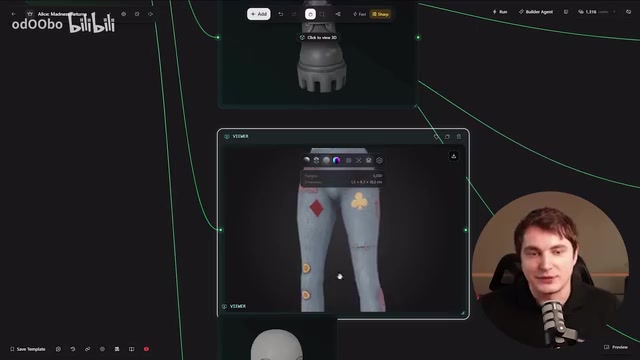
One pleasant surprise in testing was that Flow includes automatic polygon count control, which can predict an appropriate face budget based on the specific object. Polygon Count is one of the most critical performance metrics in game 3D asset production—a game engine's real-time rendering must process the geometry data of all visible objects in the scene within each frame, and an excessively high polygon count directly causes frame rate drops. By industry convention, the main character model in next-gen games is typically kept between 50,000 and 150,000 polygons, while background props are compressed to anywhere from hundreds to thousands. Flow's "smart poly count" can automatically estimate a reasonable face budget based on object type, relying behind the scenes on statistical learning from a large volume of game asset data—a capability that in traditional 3D modeling tools requires artists to set manually based on experience. For indie developers and small teams, it can significantly reduce the workload of later retopology.
Flexible Segmented Execution
Flow supports three ways to run: run the entire workflow with one click, start/end at a specific node, or run just a single segment. You can mark any node as "workflow output" or set it as a start/end point, which is extremely convenient for debugging individual steps or reproducing a specific step (for example, re-running only image generation without regenerating models).
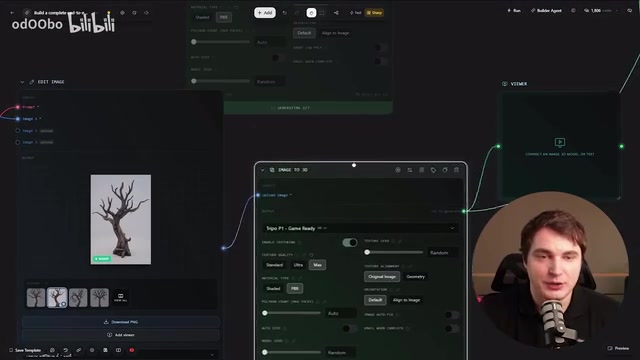
If you're unhappy with a particular part image, you can regenerate it or do image editing (such as rotating a boot), then connect the new variant back into the batch output and simply disable the versions you don't need. The entire process offers a high degree of flexibility.
AI Agent: Automatically Building 3D Workflows
Flow's most eye-catching feature is its built-in AI Agent. The creator fed the official documentation to Claude to help write a prompt, with the request being: use one image as a reference to automatically extract and generate multiple scene assets (benches, houses, trees, etc.).
After receiving the instruction, the Agent automatically adds nodes and completes connections, and once done, it even automatically beautifies the layout—the whole process has a rather ceremonial animated effect. Even more practical is that the Agent can also act as a workflow navigation guide—when you get lost among the complex nodes, you can ask it "where should I start," and it will explain the role of each node one by one and tell you where to drag in images. For beginners, this is essentially a built-in contextual assistant.
In testing, the Agent generated two houses and eight scene assets, with the houses created via a multi-view process and simple assets generated directly using Tripo 3.1, all meeting expectations. All results are neatly organized in nodes in a ComfyUI style, and ultimately everything can be connected to an export node, packaged into a zip archive with one click, complete with a description file and all the models.
The Complete Pipeline from Blender to UE5
The creator demonstrated the complete process of bringing generated results into a game engine:
- Blender assembly: The character is generated in separate parts, then first assembled into a complete character in Blender. Keeping the parts separate helps areas like the hands maintain better topology, and it's also more flexibly modular.
- Texturing and rigging: After confirming textures, use Accurig to complete rigging. Rigging is the process of associating a static 3D character model with a skeletal system, and it's a prerequisite step for character animation. Traditional manual rigging requires artists to define joint positions one by one, do weight painting (Skinning), and set up bone hierarchies—a complete rig for a standard humanoid character can take hours or even days. Accurig recognizes the model's semantic structure (head, torso, limbs), automatically infers joint positions, and generates weight maps, compressing this process to just a few minutes, essentially reaching production-ready quality for standard humanoid characters. Just set markers and process with one click to complete the rig.
- Importing into UE5: Use the third-person template to replace the character, with support for configuring physics effects such as cloth.
- Placing scene assets: Tripo-generated assets can be dragged directly into UE5, and if you use a toon shader they can even work out of the box.
In the end, a complete character plus a full set of scene assets were all created within a single platform. And the greatest value of this workflow lies in its reusability—swap in a different reference image (say, switching to a papercraft aesthetic) and re-run with one click to produce a brand-new character and scene assets with a consistent style.
Conclusion: A Paid but Time-Saving 3D AI Node Tool
The creator also candidly pointed out: ComfyUI can run for free locally, and Flow can't fully replace it. But the reality is "you either pay with money or pay with time"—for efficiency-focused 3D creators, Flow integrates the complete pipeline from concept art to game assets into a single platform, and combined with an AI Agent that can automatically build workflows and serve as a guide, it genuinely lowers the barrier to entry for 3D AI creation significantly.
As its first official release, Flow still has plenty of room to expand in terms of node count and computation modes. As template sharing and a community ecosystem develop, it has the potential to become a truly worthy "ComfyUI rival" in the realm of 3D production.
Key Takeaways
Related articles

Network Doctor: An Open-Source Terminal Tool for Network Fault Diagnosis
Network Doctor is an open-source terminal network diagnostic tool that integrates ping, dig, curl, and traceroute, automatically detecting connectivity in stages and outputting fault conclusions in natural language.

LangChain Guardrails Explained: Building Safe and Controllable AI Agents
A detailed guide to LangChain Guardrails covering layered ecosystem architecture, middleware implementation, deterministic and model-driven protection for building production-grade secure AI Agents.

Deep Dive into Microsoft's AI Security Tools: Does Performance Really Surpass the Competition?
Microsoft launches enterprise AI security tools claiming superior performance. This deep analysis examines core capabilities, ecosystem advantages, and risks to guide enterprise security decisions.