Foundry VTT Public Access Guide: The Right Way to Securely Expose Self-Hosted Services
A comprehensive guide to securely exposing self-hosted Foundry VTT to the public internet.
This guide explores how self-hosters can safely make Foundry VTT accessible to friends over the public internet. It compares port forwarding, Cloudflare Tunnel, and reverse proxy approaches, explaining the security trade-offs of each. The article recommends layered defenses including HTTPS encryption, network isolation via VLANs/DMZ, and containerized deployment to minimize attack surface.
From Local Self-Hosting to Public Access: The Turning Point
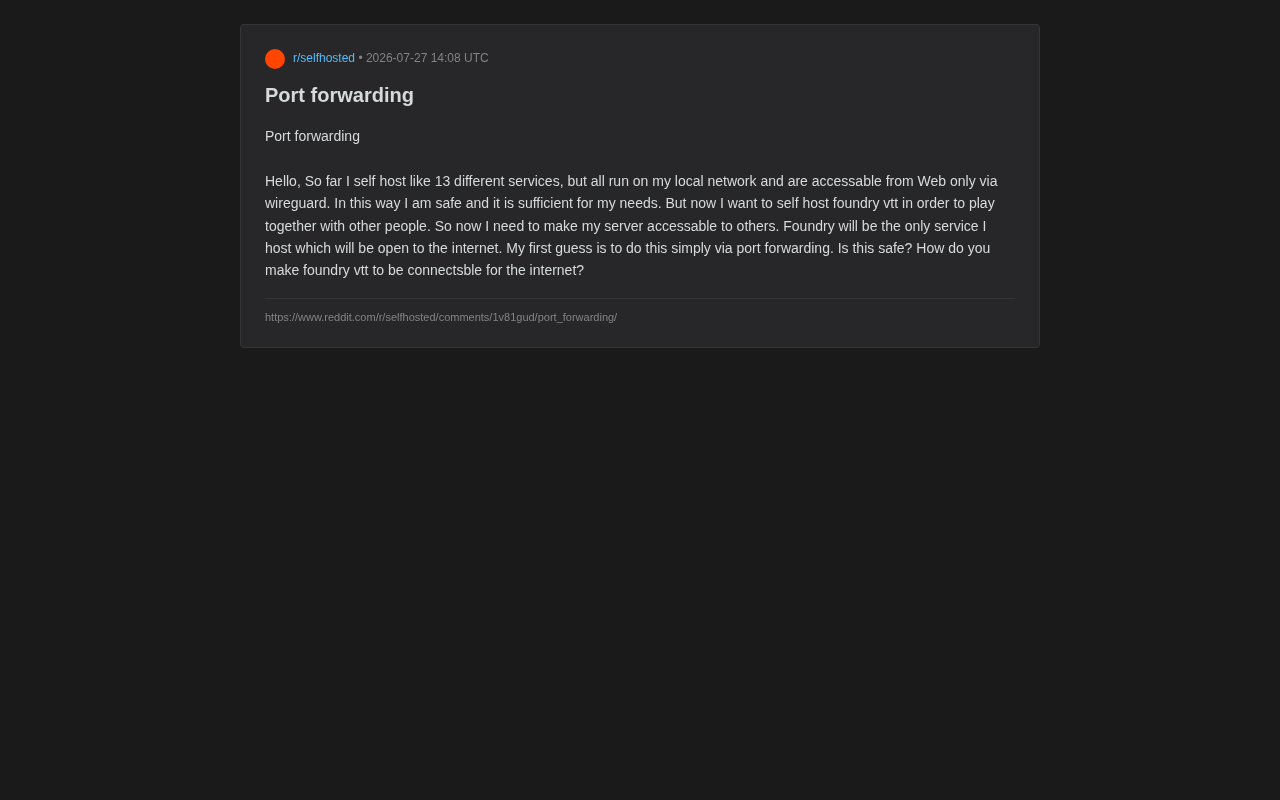
In the self-hosting community, a common growth path looks like this: first you set up a bunch of services on your local network, access them securely via VPN tunnels like WireGuard, and then eventually face a specific need that requires exposing a service to the public internet. A recent question from a self-hosting enthusiast on Reddit perfectly encapsulates this turning point.
WireGuard is a modern VPN protocol developed by Jason A. Donenfeld starting in 2015 and officially merged into the Linux kernel mainline (version 5.6) in 2020. Compared to traditional OpenVPN or IPSec, WireGuard has an extremely small codebase (approximately 4,000 lines of C code, versus over 100,000 for OpenVPN), making security audits far more feasible. It uses the Noise protocol framework for key exchange, ChaCha20 for symmetric encryption, Poly1305 for message authentication, and Curve25519 for key agreement. WireGuard's design philosophy is "Cryptokey Routing" — each peer has a public-private key pair, and the network interface routes packets based on public keys. For self-hosting users, WireGuard's low latency and high throughput make it an ideal choice for remotely accessing home services.
This user currently runs about 13 different self-hosted services, all deployed on their local network and accessed externally only through WireGuard. As they put it: "This is very secure and completely meets my needs." But now they want to set up Foundry VTT (a popular virtual tabletop platform for online tabletop RPGs and board games) to play with friends. This means the server must be accessible to others — Foundry would become their only internet-facing service.
Foundry VTT (Virtual Tabletop) is a self-hosted virtual tabletop platform developed by Atropos, built on Node.js and Electron. Its core architecture uses a client-server model: the server runs game logic and resource management, while clients (players' browsers) maintain real-time bidirectional communication via WebSocket. This architecture means Foundry needs not only HTTP/HTTPS ports to serve the web interface but also relies on WebSocket long-lived connections to synchronize map movements, dice results, character states, and other real-time data. By default, Foundry listens on TCP port 30000, handling both HTTP and WebSocket traffic. Its module system allows community developers to extend functionality, but this also means third-party modules may introduce additional security risks, especially in public-facing scenarios.
Their first instinct was: just set up port forwarding. But the follow-up question was: Is this safe? How should I make Foundry VTT publicly accessible?
Port Forwarding: The Most Direct but Highest-Risk Approach
How Port Forwarding Works and Its Risks
Port forwarding is the most primitive, most direct way to expose services to the public internet. You configure a rule on your router to forward traffic from a public IP port (e.g., Foundry's default 30000) to the corresponding port on your internal server. The configuration is simple, and virtually all consumer routers support it.
From a technical standpoint, port forwarding is essentially manual intervention in Network Address Translation (NAT) behavior. In a typical home network, the router performs Source NAT (SNAT), translating internal devices' private IP addresses to the ISP-assigned public IP. This process is unidirectional — externally initiated connection requests are dropped by the NAT table because the router doesn't know which internal device to forward them to. Port forwarding (also known as Destination NAT/DNAT) tells the router: "When a certain port on the public IP receives an inbound connection, forward it to a specified internal IP and port." This effectively punches a precise "hole" in the firewall. It's worth noting that many residential broadband connections in mainland China no longer assign true public IPv4 addresses, instead using carrier-grade NAT (CGNAT/NAT444), which makes port forwarding technically infeasible — this is one objective reason why tunnel solutions have become increasingly popular.
From a security perspective, port forwarding has several issues that cannot be ignored:
- Direct exposure of your real public IP: Anyone can see your home broadband IP, providing a target for potential DDoS attacks or targeted scanning.
- Direct access to application-layer vulnerabilities: Foundry VTT is a Node.js application — if vulnerabilities exist, attackers can reach them directly with no intermediate protective layer.
- Port scanning is ubiquitous: Automated scanners on the public internet probe open ports 24/7, and exposed services are discovered quickly.
Regarding the threat level of port scanning: once a port is exposed to the internet, it's discovered far faster than most people imagine. Search engines like Shodan, Censys, and ZoomEye continuously scan the entire IPv4 address space (approximately 4.3 billion addresses), and a full scan can take mere minutes to hours with sufficient bandwidth. Additionally, numerous botnets and automated attack tools (such as Mirai variants) constantly probe for open ports. According to security research statistics, a newly exposed SSH port (22) receives its first brute-force attempt within an average of 20 minutes. While Foundry VTT's port 30000 isn't a common attack target, the "obscurity" of non-standard ports should not be considered a security measure — this is merely "security through obscurity." Once discovered by a scanner, attackers won't give up just because the port number is non-standard.
If you insist on using port forwarding, at minimum you should: only expose the single port Foundry needs, configure HTTPS (via a reverse proxy with a TLS certificate), and keep Foundry and the underlying system promptly updated.
Safer Alternatives
Reverse Proxy + HTTPS Encryption
A step beyond bare port forwarding is placing a reverse proxy (such as Nginx, Caddy, or Traefik) in front of your server. A reverse proxy can centrally handle TLS encryption, request filtering, rate limiting, and more, hiding the Foundry application itself behind the proxy.
A reverse proxy sits between clients and backend application servers, receiving all external requests on behalf of the backend, then forwarding requests to internal services and returning responses. Unlike a forward proxy (which makes requests on behalf of clients), a reverse proxy represents the server side. Its security value manifests on multiple levels: first, it hides the backend service's real address and technology stack information; second, request filtering (blocking malicious payloads), rate limiting (preventing brute force and mild DDoS), and access control (based on IP, geolocation, or authentication) can be implemented at the proxy layer; finally, TLS termination happens at the proxy layer, so backend services only need to handle plaintext HTTP, reducing application complexity. Nginx is the most mature choice, Caddy is renowned for automatic HTTPS, and Traefik integrates deeply with container ecosystems (Docker, Kubernetes), automatically discovering and proxying newly deployed container services.
Caddy is particularly well-suited for home self-hosting scenarios — it can automatically request and renew Let's Encrypt certificates with minimal configuration. Users need only a single reverse proxy directive to make Foundry securely accessible via https://foundry.yourdomain.com while avoiding plaintext HTTP transmission.
Cloudflare Tunnel: Zero Port Exposure
If you don't want to open any ports on your router, Cloudflare Tunnel (formerly Argo Tunnel) is an extremely popular choice. It runs a lightweight client on your server that establishes an outbound tunnel to Cloudflare, exposing your service to the public internet — without opening any inbound ports or revealing your home IP.
Cloudflare Tunnel works on a "reverse connection" model. Traditional service exposure requires the server to passively wait for inbound connections, but Tunnel has the server actively initiate outbound connections to Cloudflare's edge network (via the cloudflared daemon). This connection uses HTTP/2 or QUIC protocols, and once established, Cloudflare's global Anycast network becomes the service's entry point. When external users access the configured domain, requests first reach the nearest Cloudflare edge node, pass through security checks (DDoS mitigation, WAF rules, Bot management), and are then relayed to the origin server through the established tunnel. Since the entire process involves only outbound connections, no inbound ports need to be opened on the router, and the home IP address is completely invisible to the outside — DNS resolves to Cloudflare's IPs. The free tier includes basic Tunnel functionality, which is sufficient for personal self-hosting scenarios.
Cloudflare can also provide DDoS protection, WAF rules, and access policies at its edge nodes. For a scenario where only a few friends need to connect to Foundry, this is nearly the optimal balance of security and ease of use. Similar solutions include Tailscale Funnel, frp, ngrok, and others.
Tailscale Funnel is a public exposure feature provided by the Tailscale VPN platform. Tailscale itself builds an overlay network on top of the WireGuard protocol, assigning each device a stable internal IP in the 100.x.x.x range. The Funnel feature allows services within the Tailscale network to be exposed to non-Tailscale users. Similar to Cloudflare Tunnel, it doesn't require opening inbound ports, but traffic is relayed through Tailscale's relay servers (DERP servers). frp (Fast Reverse Proxy) is an open-source intranet penetration tool that requires a server with a public IP as a relay node — offering more flexibility but higher operational overhead. ngrok provides ready-to-use tunnel services suitable for temporary demos, but the random subdomains and connection limits of its free version make it less suitable for long-running game services.
Separate Subnet and Network Isolation
Regardless of which exposure method you choose, it's recommended to network-isolate the "public-facing server" from your other 12 internal services. Through VLANs, separate subnets, or deploying Foundry in a DMZ, you can ensure that even if Foundry is compromised, attackers cannot laterally move to other sensitive services.
VLAN (Virtual Local Area Network) is a technology that divides a physical network into multiple logical broadcast domains using tags (802.1Q standard) on Layer 2 switches. In self-hosting scenarios, you can place the public-facing server in a separate VLAN, isolated from your NAS storing personal data, home automation devices, etc. Communication between VLANs must pass through a Layer 3 router/firewall, allowing administrators to precisely control cross-VLAN access policies. DMZ (Demilitarized Zone) is a classic network security architecture concept — placing public-facing servers in an intermediate zone that belongs neither fully to the internal network nor to the external network, typically protected by two firewalls: the outer one allows limited traffic from the public internet to the DMZ, while the inner one strictly limits communication from the DMZ to the internal network. Even if a DMZ server is compromised, attackers still face the second firewall. For home users, many consumer routers' "DMZ host" feature actually forwards all ports to a single device, which is fundamentally different from a true DMZ architecture — this distinction is important to understand.
Containerized (Docker) deployment combined with the principle of least privilege can further reduce the attack surface. Docker containers leverage Linux kernel namespaces and cgroups to provide processes with isolated filesystem views, network stacks, PID spaces, and more. This means that even if an application within a container is compromised, the attacker faces a minimal container environment rather than the full host system. Combined with least privilege principles — running container processes as non-root users, read-only mounting volumes that don't need writes, using --cap-drop ALL to remove unnecessary Linux capabilities, and limiting container network access scope (Docker custom networks) — the attack surface can be significantly reduced. However, it's important to note that Docker's isolation is not equivalent to virtual machine-level hardware virtualization isolation; kernel vulnerabilities can still lead to container escapes. Therefore, container security should be one layer in defense-in-depth rather than the sole dependency.
Practical Recommendations for Foundry VTT Public Deployment
Foundry VTT's official documentation actually provides multiple connection methods worth referencing:
- Port Forwarding + Domain: The officially supported standard approach, combined with Dynamic DNS to handle home IP changes. Dynamic DNS (DDNS) services monitor your public IP changes and automatically update DNS records to point to the new IP. Common services include DuckDNS, No-IP, and self-built scripts using the Cloudflare API.
- Reverse Proxy Deployment: The official documentation explicitly supports running Foundry behind Nginx/Apache and provides key configuration points for WebSocket forwarding (Foundry relies on WebSocket for real-time game state synchronization, which is easily overlooked when configuring a proxy). In Nginx, you need to properly set the
proxy_set_header Upgrade $http_upgradeandproxy_set_header Connection "upgrade"directives to support WebSocket protocol upgrades; otherwise, real-time communication won't work correctly. - Cloud Hosting Services: If you don't want to deal with the complexity, you can choose Foundry's official or third-party cloud hosting, though this departs from the self-hosting philosophy.
For this user's specific situation, given their familiarity with WireGuard and emphasis on security, a Cloudflare Tunnel + Caddy reverse proxy combination is likely the most hassle-free path: no router changes needed, no IP exposure, automatic HTTPS, and the ability to implement access control for friends.
Summary: A Layered Approach to Securely Exposing Self-Hosted Services
Moving from local self-hosting to public-facing services is essentially a redefinition of your "security boundary." This Reddit user's confusion represents a threshold that countless self-hosters encounter. The core principles can be summarized as:
- If you can avoid opening ports, don't open them: Prioritize tunnel solutions (Cloudflare Tunnel, Tailscale Funnel).
- When exposure is necessary, implement layered protection: Reverse proxy + HTTPS + network isolation — all are essential.
- Minimize the exposure surface: Only open necessary services and ports; keep everything else behind VPN.
- Maintain continuously: Services exposed to the public internet must stay updated, with anomalous access monitored.
These principles embody the information security concept of "Defense in Depth" — not relying on any single security measure, but building multiple layers of protection so that failure at any single layer doesn't result in complete system compromise.
Port forwarding itself isn't a sin, but "bare" port forwarding without additional protection is indeed insufficiently secure. Spending a little time introducing a reverse proxy or tunnel service allows you and your friends to confidently embark on a tabletop RPG adventure in Foundry VTT without sacrificing convenience.
Related articles

The Truth Behind Codex 'Build a Website in 5 Minutes': AI Isn't Creating Sites—It's Helping You Copy Them
Exposing the truth behind viral Codex 5-minute website videos: creators aren't building original sites with AI—they're copying shared prompts or scraping others' work. Learn AI coding tools' real limits.

Getting Started with AI Agent Development: A Complete Guide from Concept to Practice
A comprehensive guide to AI Agent architecture and development, covering automated marketing, intelligent customer service, and investment analysis scenarios with single and multi-agent collaboration.

The Truth Behind Codex 'Build a Website in 5 Minutes': AI Isn't Creating Sites — It's Helping You Copy Them
Exposing the truth behind viral Codex 5-minute website videos: creators aren't building original sites with AI — they're copying shared prompts or scraping others' work.