Getting Started with Claude Code: A Beginner's Guide to Installation, Configuration, and Model Selection

A beginner's guide to installing Claude Code and choosing the right AI model for the best value.
This guide explains what Claude Code is, how it differs from conversational AI coding, and walks through its full installation and configuration. It also compares mainstream AI coding tools and analyzes the cost and performance of models like Sonnet, Haiku, and DeepSeek V4 Pro to help you balance capability and budget.
What Is Claude Code?
For many developers, Claude Code may sound unfamiliar, but it's actually one of the most beginner-friendly AI coding tools available today. You don't need to understand any obscure technical principles—just install it and integrate it directly into your development environment.
Claude Code is an AI coding assistant developed by Anthropic. Its biggest feature: no need to log in through a web interface. You install it locally, and once installed, it embeds directly into your development tools to assist you throughout the process of writing project code.
How Is It Fundamentally Different from Conversational AI Coding?
Many people ask: isn't writing code by chatting with DeepSeek or ChatGPT the same thing? In reality, there's a fundamental difference between the two.
Limitations of Conversational Tools
When using conversational tools like DeepSeek or ChatGPT, the model can only provide scattered code snippets. You still have to manually copy them back into your project, run tests, and go back and forth in the conversation to make adjustments—which is highly inefficient. More importantly, it can't read the full context of your project. If your project has hundreds of files, the model simply can't see them; you'd have to feed them in piece by piece manually.
The Core Advantages of Claude Code
Claude Code is different. It can read through all the files in your project, providing the entire codebase as context to the large model to generate business logic. It can also automatically identify and fix errors, ultimately producing a runnable version of the code. This is an automated coding workflow, not just a simple question-and-answer conversation.
A Side-by-Side Comparison of Mainstream AI Coding Tools
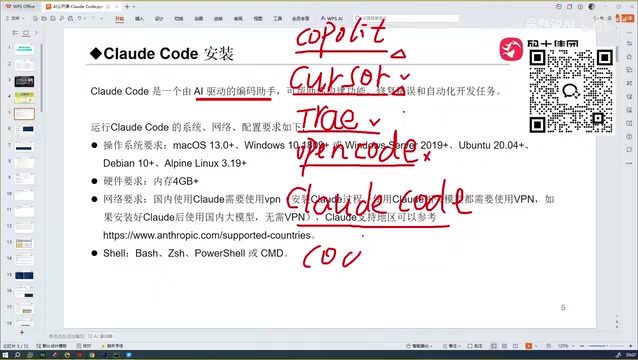
AI coding assistants have been around for a while now, and the mainstream tools each have their own focus:
- GitHub Copilot: The earliest code auto-completion plugin, which pioneered this category
- Cursor: Offers stronger automated coding capabilities and drew widespread attention
- Trae: Has both international and domestic (China) versions; the domestic version understands Chinese quite accurately (the international version is paid)
- OpenCode: Slightly inferior in user experience compared to other tools
- Codex: Paired with GPT-5, its coding capabilities rival those of Claude Code

Before encountering Claude Code, many people considered Trae the most user-friendly coding tool due to its accurate Chinese comprehension and free availability. But in a head-to-head comparison, Claude Code performs a cut above the rest—the root cause being the different capabilities of the underlying models. The Sonnet model that Claude Code relies on offers higher accuracy, which is especially evident when handling complex tech stacks, whereas Trae is somewhat less stable in such scenarios.
Full Step-by-Step Claude Code Installation and Configuration
Claude Code Is Not an IDE
This point is important: Claude Code is not an IDE itself. Cursor and Trae are standalone editors based on VS Code that you can use right after downloading; Claude Code, however, is more like a plugin that embeds into other tools. It supports integration into mainstream development environments such as Cursor, Trae, IDEA, PyCharm, and VS Code.
System and Hardware Requirements
Claude Code supports the three major operating systems—macOS, Windows, and Linux—and on the hardware side requires at least 4GB of RAM.
Important note: When installing within mainland China, you must enable a VPN, otherwise the installation process will fail. However, once installation is complete, if you're using a domestic model, you don't need to enable a VPN for daily use.
Installation Steps
- macOS: Run the corresponding installation command in the terminal
- Windows: Run the installation command in CMD or PowerShell
Windows users also need to install Git separately, which allows Claude Code to update its version automatically—from the installed version to the latest version—with no manual intervention required.
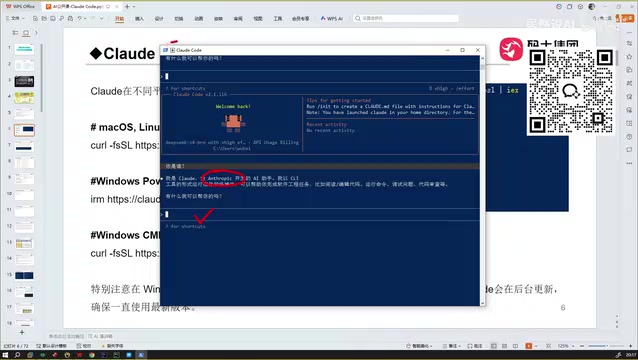
Once installed, simply type claude in the terminal to launch it. On first run, you'll need to select a project directory, and all subsequently generated code files will be saved in that directory.
Model Selection: How to Balance Capability and Cost
Since Anthropic doesn't allow registration from mainland China or Hong Kong, domestic users need to configure alternative models or use relay services to use Claude Code normally.
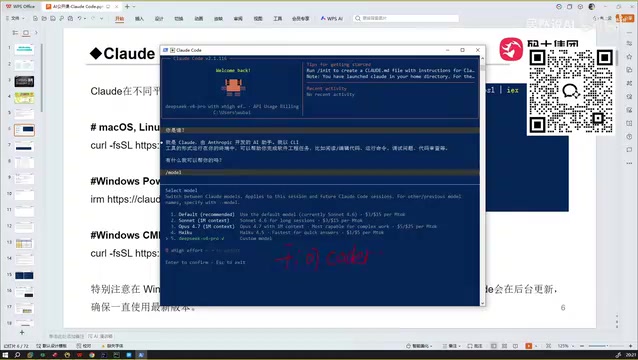
Anthropic's Three Official Models
- Opus: The most capable, suited for complex business logic and in-depth coding tasks, but with slower response times
- Sonnet (default is version 4.6): A balanced option—fast responses, moderate reasoning depth, and the default recommended choice
- Haiku: The relatively weakest of the three, but still superior to locally self-hosted models, with a context window of 200K
Both Opus and Sonnet support ultra-long contexts of up to 1M (1024K), offering powerful capabilities but at a considerable price. Based on official pricing, Opus costs around $5 per million tokens for input and $25 for output; Sonnet is $3 for input and $15 for output; Haiku is roughly 5 times cheaper.
Real-World Usage Cost Reference
I ran an illustrative test using the Qwen Coder (Tongyi Qianwen Coder) model: with about 37 yuan of balance in the account, just two conversations on moderately large projects instantly wiped out the balance and even left me in the negative.
Qwen Coder uses tiered pricing at around 24 yuan per million tokens, making it a fast-consuming option. If you plan to use it frequently, I recommend prioritizing the Coding Plan packages offered by various platforms. For example, on some platforms, the Coding Plan costs 200 yuan per month and allows 6,000 calls every 5 hours, with the quota automatically refreshing every 5 hours once used up—which is more cost-effective in the long run.
DeepSeek V4 Pro: The Best Value-for-Money Option Right Now
After comprehensive testing, DeepSeek V4 Pro is currently the standout choice in terms of value for money. The model supports a 1M context and is currently on promotion: output pricing has dropped from 24 yuan to 6 yuan per million tokens, with input around 3 yuan per million tokens.
In real-world testing, topping up 12 yuan is enough to fully write about two medium-scale projects, while simple conversations cost just a few cents—making daily usage costs extremely low. However, the promotion has an expiration date, and costs will rise significantly once regular pricing resumes, so it's worth keeping an eye on this in advance.
For the Sonnet model, domestic users are better off connecting through a reliable relay service, since direct connections are difficult and directly-connected pricing on Taobao tends to be high. Relay services incur a slight performance loss compared to direct connections, but the daily user experience is acceptable, and a complete conversation to write a single project typically costs 1 to 2 yuan.
Conclusion
With its outstanding project context comprehension and automatic error-fixing mechanisms, Claude Code is one of the most worthwhile AI coding tools to try right now. For beginners, the installation barrier is quite low—just install it and integrate it into your usual IDE to get started. What really requires careful consideration is model selection and cost control: for the best value, choose DeepSeek V4 Pro; for stable, high-quality output, choose Sonnet or Opus; and heavy users are advised to purchase a Coding Plan package directly. These tools aren't free, so planning your costs in advance is key to using them efficiently and worry-free.
Related articles

The Truth Behind Codex 'Build a Website in 5 Minutes': AI Isn't Creating Sites—It's Helping You Copy Them
Exposing the truth behind viral Codex 5-minute website videos: creators aren't building original sites with AI—they're copying shared prompts or scraping others' work. Learn AI coding tools' real limits.

Getting Started with AI Agent Development: A Complete Guide from Concept to Practice
A comprehensive guide to AI Agent architecture and development, covering automated marketing, intelligent customer service, and investment analysis scenarios with single and multi-agent collaboration.

The Truth Behind Codex 'Build a Website in 5 Minutes': AI Isn't Creating Sites — It's Helping You Copy Them
Exposing the truth behind viral Codex 5-minute website videos: creators aren't building original sites with AI — they're copying shared prompts or scraping others' work.