Getting Started with Cursor: A Complete Guide to the Core Features of AI-Native Programming Tools

Cursor is an AI-native code editor built on VS Code, integrating top LLMs for smart coding.
Cursor is an AI-native programming tool deeply rebuilt on VS Code, integrating top large language models like Claude and DeepSeek. This guide covers Cursor's four core features, its fundamental differences from traditional IDEs, and practical tips for both beginners and experienced developers.
What Is Cursor: An Upgraded Version of VS Code
For developers just getting into AI programming, Cursor is a tool you simply can't ignore. In short, Cursor is a code editor with a built-in AI assistant—essentially, you can think of it as an "upgraded version of VS Code."
Most developers familiar with coding have used VS Code—Microsoft's free editor that supports Python, front-end development, Java, and many other languages, and is extremely popular among developers. Since its release in 2015, VS Code has risen rapidly thanks to its open-source strategy (MIT license) and powerful extension ecosystem. According to Stack Overflow's 2023 Developer Survey, its usage rate exceeded 73%, topping the list of most popular editors for multiple consecutive years. Built on the Electron framework (combining Chromium and Node.js), it supports cross-platform operation and has more than 40,000 community plugins. Cursor is a deeply modified version based on the open-source fork of VS Code, fully inheriting VS Code's plugin ecosystem, keyboard shortcut system, and interface layout. From its icons to its UI, Cursor bears the mark of VS Code, so developers hardly need to readjust.
However, it's important to emphasize that Cursor is not a simple upgrade of VS Code or merely a stack of plugins—it fundamentally rebuilds the way we interact with programming. Before Cursor emerged, developers typically added AI capabilities to traditional IDEs through plugin solutions like GitHub Copilot. Such plugins have inherent limitations: they can only access the currently open file and cannot perceive the dependencies and architectural design of the entire project. As an AI-native IDE, Cursor redesigns the editor's data flow from the ground up, providing structured information such as the abstract syntax tree (AST), project indexes, and Git history to the AI model in real time, giving it a "global perspective." It integrates the world's top large language models into the editor, allowing the entire workflow of writing code, debugging, error-checking, and refactoring to be handled with AI. In plain terms, it's a VS Code that "can write code and teach you programming."
Integrating Top Large Models with Free Multi-Model Switching
Cursor's core value lies in its model capabilities. It comes with several of the top-ranked large language models in the programming field, including the free DeepSeek and the widely acknowledged, powerful Claude series (such as 3.5, 3.7, and 4.0). In addition, Google's models are among those supported.
These large language models (LLMs) are neural networks based on the Transformer architecture, trained on massive amounts of code and text. Take Claude and DeepSeek as examples: during pre-training, they absorbed tens of billions of lines of open-source code from GitHub, enabling them to understand the syntax rules, design patterns, and business logic of programming languages. They are typically fine-tuned with RLHF (Reinforcement Learning from Human Feedback) to make their output better suited to real development scenarios. The Claude series, developed by Anthropic, is renowned for its accuracy in code generation and its ability to handle long contexts. DeepSeek, an open-source model developed by China's DeepSeek company, performs excellently in programming benchmarks and is free to use, offering developers a high-value option.
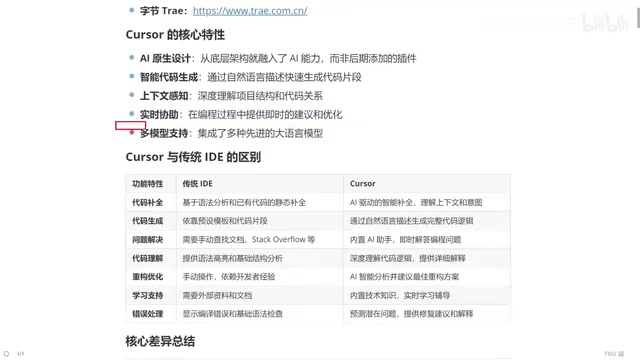
A detail worth mentioning: although the Claude series has outstanding programming capabilities, it is a paid model. Cursor's advantage is that users can freely switch between different models based on their task needs—use free models when seeking cost-effectiveness, and switch to Claude for complex tasks. This flexibility of multi-model support is an important feature that sets Cursor apart from single-model tools.
In terms of positioning, Cursor is a competitor to domestic products like ByteDance's Trae and Alibaba's Tongyi Lingma (in IDE form)—one focuses on overseas markets, the other cultivates the domestic market. In terms of feature integration and level of intelligence, Cursor currently maintains a relatively leading position.
The Four Core Features of Cursor
Why choose Cursor? It comes down to four core features:
AI-Native Design
Cursor isn't an AI plugin "bolted on" to a traditional editor—it's built for AI from the ground up. This native design means AI capabilities are deeply integrated with the editor, rather than being a disjointed add-on. The editor can proactively inject structured information about the entire codebase into the AI model. This is akin to equipping the AI with a senior architect who understands the entire codebase, rather than an outsourced programmer who can only see fragments.
Intelligent Code Generation
Describe your requirements in natural language—for example, "help me write a login API"—and Cursor can understand the context and automatically generate complete code, while also explaining the implementation principles. This breaks away from the rigid manual coding of traditional IDEs.
Context-Awareness Capability
This is a key bottleneck for current large language models. The context window refers to the maximum amount of text a model can process in a single conversation, measured in tokens. Early models had context windows of just 4K tokens, whereas modern models have expanded to hundreds of thousands of tokens. During long conversations, models tend to "forget" earlier information or produce hallucinations—generating content that seems reasonable but is actually incorrect. In programming, this may manifest as fabricating nonexistent APIs or generating logically flawed code. By proactively injecting information such as the project directory structure, file relationships, and variable definitions into the context, Cursor significantly reduces the likelihood of hallucinations. It can perceive the structure and variable relationships of the entire project, thereby offering more accurate suggestions.
Real-Time Assistance
Cursor can provide suggestions as you write code, becoming a real-time coding partner throughout the development process.
Core Differences from Traditional IDEs
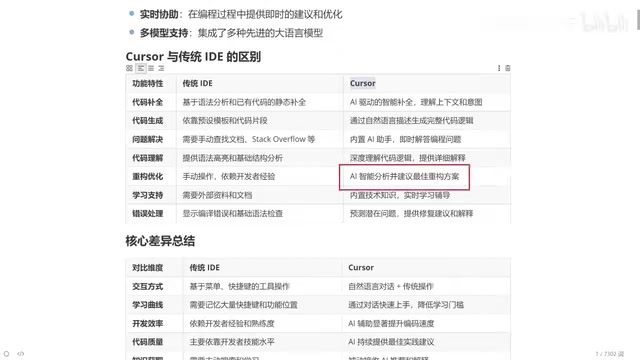
What's the fundamental difference between Cursor and traditional IDEs (such as VS Code)? We can compare them across multiple dimensions:
Code Completion and Generation
Traditional IDE code completion is based on syntax analysis—for example, if you've defined a function before, it will automatically suggest it when you use it again. Cursor, on the other hand, is based on context understanding and can "guess" what you're going to do next. In terms of code generation, traditional IDEs rely on preset templates and code snippets, while Cursor directly generates complete code that fits the business logic through natural language.
Problem-Solving and Error Handling
When encountering an unfamiliar API or an error, traditional IDE users can only look up documentation and troubleshoot on their own. This is also a pain point for novice programmers—the reason experienced developers can solve problems quickly is that they've accumulated experience by repeatedly stepping into pitfalls. Cursor's built-in AI assistant lets you simply tell it the error message, and it will analyze the cause, offer fix suggestions, and provide explanations—instantly giving beginners "veteran experience."
Code Understanding and Refactoring Optimization
Traditional IDEs can only provide syntax highlighting and basic structural analysis, and refactoring relies heavily on the developer's own experience. Cursor can deeply understand code logic and provide detailed explanations. For refactoring, a simple sentence like "help me optimize this function" is enough for the AI to offer an optimal solution. A junior programmer equipped with Cursor may be equivalent to having the development capabilities of someone with five years of experience.
Reshaping the Learning Curve and Code Quality
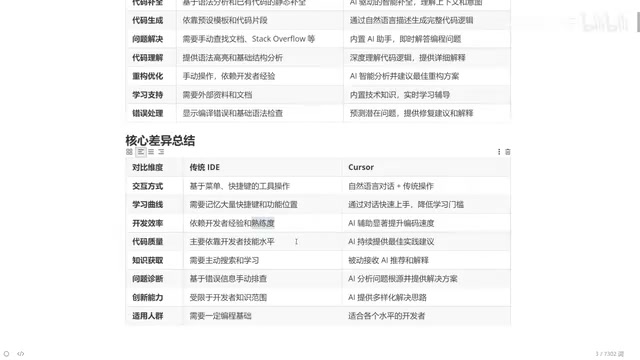
In terms of interaction, traditional IDEs require manually typing code and memorizing numerous shortcuts. Cursor, by contrast, completes interactions through a dialog box using natural language to express requirements, greatly lowering the learning barrier.
The change in code quality is particularly noteworthy. In the traditional model, junior programmers write junior-level code. But with the introduction of AI, this logic is rewritten—even a fresh graduate junior programmer, as long as they use Cursor well, can find optimization points with AI's help and write code approaching a senior level.
The deeper logic behind this shift lies in the rise of prompt engineering skills. Prompt engineering refers to the skill of guiding AI models to produce high-quality results through carefully designed input text. In programming scenarios, it means transforming vague business requirements into clear, structured technical descriptions—explicitly specifying input/output formats, exception handling logic, performance requirements, and more. Research shows that the same requirement described by prompts of different quality can result in AI-generated code that differs several times in quality. This means a developer's core competitiveness is gradually shifting from "proficiency in writing code" to "the ability to understand business requirements and craft prompts"—it's not that the technical barrier disappears, but that the form of the barrier undergoes a fundamental transformation.
Moreover, in terms of acquiring knowledge, the traditional approach is limited by a developer's personal accumulation and search efficiency, whereas Cursor can offer diverse solution approaches with significantly improved efficiency. Once you master AI programming, virtually any language—whether Java, Python, front-end, or Go—can be handled with AI assistance.
Target Audience: From Complete Beginners to Senior Developers
Cursor's range of applicability is quite broad:
- Senior programmers: Let Cursor generate repetitive, simple code and then fine-tune it, significantly boosting efficiency
- Programming beginners: Learn stricter coding standards by studying the AI's approach, treating Cursor as a portable programming tutor
- Non-technical users: Even with no programming knowledge at all, you can write runnable code with Cursor's help
Of course, having some programming foundation will make the experience even better and enable you to review and iterate on AI-generated results more effectively.
Overall, Cursor represents a paradigm upgrade from "traditional IDE programming" to "AI-native programming." It's not meant to replace developers, but to become a programming assistant on standby for everyone, lowering the barrier to code creation and boosting efficiency.
Key Takeaways
Related articles

WebMCP in Practice: How MakeMyTrip Is Reshaping the Travel Booking Experience
India's largest OTA platform MakeMyTrip uses WebMCP to standardize AI Agent interactions with web apps, replacing fragile DOM scraping with natural language-driven test automation and simplified complex booking scenarios.

Deep Dive into the EYG Programming Language: A New Portable Programming Paradigm Designed for Humans
Deep analysis of the EYG programming language's core design, including algebraic effects, program state persistence, and cross-platform portability, exploring how it addresses modern software fragmentation.

WebMCP in Practice: How MakeMyTrip Is Reshaping the Travel Booking Experience
India's largest OTA platform MakeMyTrip uses WebMCP to standardize AI Agent interaction with web apps, solving DOM scraping fragility, enabling natural language test automation, and simplifying complex international flight bookings.