Getting Started with Cursor: A Comprehensive Comparison of AI Coding Tools

Compare Cursor, Copilot, Windsurf, and more to find the best AI coding tool for your needs.
This guide introduces the concept of AI programming and compares leading tools including Cursor, GitHub Copilot, Windsurf, Trae, and Codeium. It covers each tool's strengths, weaknesses, and ideal use cases — helping developers and beginners alike choose the right AI coding assistant and understand why prompt engineering skills are key to maximizing productivity.
What Is AI Programming
Before diving into Cursor specifically, it's worth clarifying a more fundamental concept — what exactly is AI programming?
Traditional software development is a highly specialized discipline. Developers need to master at least one programming language (such as Python, Java, or C++), have a clear understanding of complex logic and algorithms, and then precisely instruct a computer through line after line of code. This process is rigorous, has a high barrier to entry, and involves long development cycles — shutting out many people who have great ideas but lack a technical background.
With the rapid advancement of artificial intelligence, the way we write code is undergoing a profound transformation. The rise of AI coding tools is fundamentally built on breakthroughs in large language model (LLM) technology. In 2020, OpenAI's GPT-3 first demonstrated the model's remarkable ability to generate code. The subsequent Codex model — fine-tuned specifically for programming tasks — became the technical foundation of GitHub Copilot, marking a pivotal turning point where AI moved from "understanding natural language" to "understanding and generating structured programming languages." Today, nearly every developer uses AI tools in some capacity — even if not Cursor, they'll turn to DeepSeek, ChatGPT, or similar models to ask questions, generate code, or find solutions. It has become a widespread, everyday behavior.
From "Generating Code Snippets" to "Intelligent Programming Assistant"
The demand for AI programming continues to evolve. Early on, we simply asked AI to generate a short block of code. Now, we want to have natural language conversations powered by capable large models, so that AI can truly act as a "programming assistant" — helping solve real problems and saving development time.

The efficiency gains from this shift are substantial. A project that traditionally took one or two weeks — or even months — can be compressed to a fraction of that time with AI tools. The goal is to shrink a month's worth of work into a week, or a year's work into three months. Of course, this requires the ability to communicate effectively with AI — in other words, mastering Prompt Engineering: carefully crafting input instructions to guide the model toward more accurate outputs. A good prompt doesn't just describe "what feature you want" — it also specifies the tech stack, code style preferences, and the structure of existing code, so the AI can accurately understand your full intent. This is precisely why even non-technical users can interact with large models and quickly generate the code they need, dramatically lowering the barrier to programming.
A Side-by-Side Comparison of Leading AI Coding Tools
Beyond Cursor, the market offers several other AI coding tools, each with its own strengths. Understanding their positioning and trade-offs will help you make a more informed choice.
GitHub Copilot: The Veteran Plugin, Great at Code Completion
Copilot is one of the earliest AI coding tools to achieve widespread adoption. At its core, it's an IDE plugin that works within popular environments like IntelliJ IDEA and VS Code. Its primary strengths are code completion and chat-based code editing, with support for models like GPT and Claude 3.5.
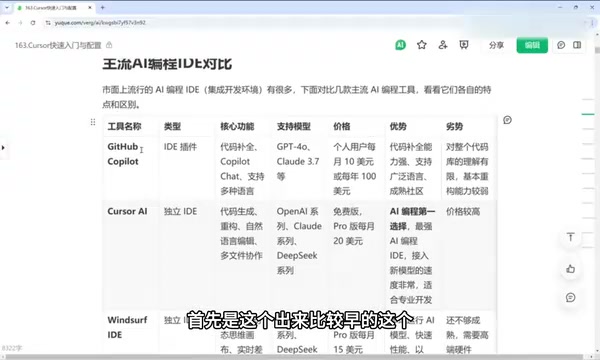
The architectural difference between IDE plugins and standalone IDEs is worth explaining here. A plugin works by layering AI capabilities on top of an existing editor. The advantage is a low migration cost and full compatibility with your existing workflow. However, because it's constrained by the host editor's architecture, its ability to understand the codebase holistically and integrate deeply is somewhat limited. Copilot is the quintessential example of this model — it excels at code completion, supports a wide range of languages, and benefits from GitHub's massive open-source community, which gives it a strong grasp of code itself. That said, its weaknesses include limited global understanding of a full codebase and relatively weak refactoring capabilities.
Cursor: The Most Capable All-Around AI Coding Tool
Cursor is currently the strongest all-around choice in the AI coding space. Unlike the plugin model, it's a standalone IDE that has been redesigned from the ground up to rethink human-computer interaction — file indexing, symbol navigation, and multi-file editing all natively understand AI context, enabling a far deeper intelligent experience. It excels at code generation, refactoring, natural language editing, and multi-file collaboration, with a more thorough understanding of the overall codebase.
Cursor also supports advanced capabilities like MCP (Model Context Protocol), which many free tools lack. MCP is an open standard protocol introduced by Anthropic in late 2024. Through it, developers can expose resources such as databases, file systems, and API interfaces to AI models in a standardized way, allowing the model to actively invoke external capabilities to complete more complex tasks. This means Cursor isn't just a code editor — it can serve as an execution environment for AI Agents, connecting to a much broader development ecosystem. The main downside is that its subscription cost is relatively high.
Windsurf: Runs Locally, Fast Response Times
Windsurf is a standalone AI coding IDE whose core highlight is the AI Flow workflow — a step-processing mechanism based on a "dynamic planning–execution–feedback" loop. Unlike the traditional "single request, single response" model, AI Flow allows the model to dynamically break down task steps during execution, invoke tools, evaluate intermediate results, and automatically course-correct — similar to a lightweight AI Agent orchestration framework. Combined with Real-time Diff Evaluation, the model compares changes before and after each code modification in real time and assesses quality, helping maintain code consistency across multi-step tasks. It uses locally-run AI models for faster performance and focuses on web development as its primary use case. However, its feature maturity still has room to grow, and it does require reasonably capable hardware.

Domestic Chinese AI Coding Tools: Free Is the Biggest Advantage
For cost-conscious users, domestic Chinese tools are worth considering. The recently updated Trae offers a quite solid experience — it's highly intelligent, capable of translating natural language into code effectively, supports mainstream models like Claude 3.5 and DeepSeek R1, and is currently free to use. Tongyi Lingma is also free and covers all the core functions you'd expect, including writing and editing code.
The overall strategy for these domestic tools is "free first," but compared to paid products, they still lag somewhat in terms of ecosystem completeness and community support.
Codeium: The Most Compatible IDE Plugin
Codeium is also an IDE plugin, supporting nearly every major development environment including VS Code, IntelliJ IDEA, and PyCharm. The biggest advantage of this plugin model is its exceptional compatibility — it integrates seamlessly into existing development workflows with virtually zero migration cost. Developers don't need to change any of their habits to gain AI-assisted capabilities.
How to Choose the Right AI Coding Tool for You
All things considered, your tool choice should be based on your actual needs:
- Want the strongest all-around capability: Cursor is the top pick, especially for developers who need multi-file collaboration and advanced features like MCP integration and Agent workflows — at the cost of a paid subscription.
- Value code completion and ecosystem: GitHub Copilot remains solid and reliable thanks to its community advantages.
- Concerned about cost: Free domestic tools like Trae and Tongyi Lingma are more than sufficient for most everyday development scenarios.
- Don't want to change your existing environment: Plugin-based tools like Codeium offer the most flexible integration with the lowest switching cost.
Regardless of which AI coding tool you choose, the true ceiling on your productivity still comes down to your ability to communicate effectively with AI. Learning to describe your requirements precisely, break down tasks sensibly, and provide sufficient context — in other words, truly mastering the core techniques of prompt engineering — is what allows these tools to deliver their full value. This is also the central focus for diving deeper into Cursor going forward.
Key Takeaways
Related articles

SeaTicket: An AI Agent That Automatically Resolves GitHub and Discord Issues
SeaTicket is an AI Agent that automatically resolves GitHub Issues and Discord questions. This article analyzes its architecture, use cases, challenges, and value for open-source maintenance.

Breaking Through CI/CD Storage Bottlenecks: Why Senior Engineers Are Returning to the Storage Domain
Exploring overlooked storage and caching bottlenecks in CI/CD pipelines, how Blacksmith redesigns storage architecture to accelerate builds, and why storage is a rebirth opportunity in cloud-native.

SeaTicket: An AI Agent That Automatically Resolves GitHub and Discord Issues
SeaTicket is an AI Agent that automatically resolves GitHub Issues and Discord questions. This article analyzes its architecture, use cases, challenges, and value for open-source maintenance.