Give Claude Code a Warcraft Voice Pack: Turning AI Coding into a Gaming Experience

Open-source plugin adds classic game voice packs to Claude Code for ambient AI workflow notifications.
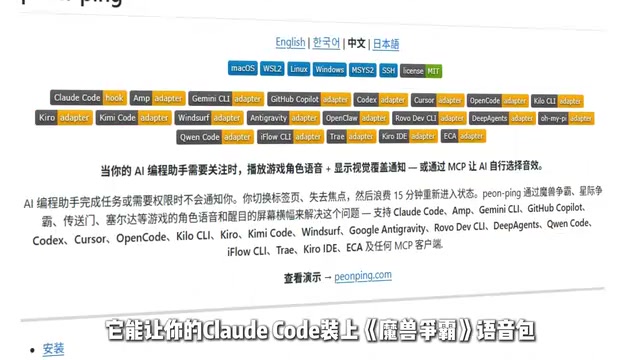
A viral open-source project integrates 43 classic game voice packs — including StarCraft, Red Alert, and Portal — into Claude Code, triggering audio cues on task completion, authorization requests, and errors. By leveraging Claude Code's Hooks mechanism, it turns AI coding's async workflow into an ambient, game-like experience.
When AI Coding Meets Game Audio
What if your AI coding assistant shouted at you when it finished a task — or announced "Command received" in a Warcraft goblin voice? A recently viral open-source project on Bilibili has turned this wild idea into reality. It lets Claude Code load classic real-time strategy game voice packs, instantly transforming a quiet coding session into a full-blown retro gaming atmosphere.
Claude Code is a command-line AI coding tool developed by Anthropic, built on the Claude large language model. It runs directly in the terminal and can handle complex tasks like writing code, debugging, and file operations. Unlike code-completion tools such as GitHub Copilot that embed within an IDE, Claude Code operates in "Agent" mode — it can autonomously plan multi-step tasks, invoke system tools, read and write files, and request user authorization when needed. A single execution can last anywhere from several minutes to tens of minutes. This long-running autonomous behavior makes "how to perceive AI status" a genuine user experience challenge — which is precisely what this sound-effect plugin project addresses.
The core concept is straightforward: bind audio notifications to various Claude Code events. As the AI works through a task, different key moments trigger different game sound effects, transforming cold command-line interactions into a nostalgic "match" straight out of your gaming past.
Three Trigger Scenarios for Sound Effects
What makes this project genuinely useful is how it maps key states in the AI coding workflow to audio cues — so even if you're not watching the screen, you can track progress just by listening. This is all made possible by Claude Code's "Hooks" mechanism — an extension interface that lets developers inject custom scripts at specific events. When Claude Code fires internal events like "task complete," "awaiting authorization," or "error occurred," it automatically calls pre-configured scripts that drive the system to play the corresponding sound. The design is similar to Git's pre-commit and post-merge hooks — lightweight and non-intrusive.
Task Completion Notification
When the AI finishes a task, it automatically plays a sound to let you know. This is especially handy for long-running coding jobs — you can walk away and do something else, and when you hear that familiar game audio, you know the AI is done.
Authorization Prompt
When Claude Code needs you to authorize an action, it plays a sound to call you back. This directly addresses a common pain point in AI-assisted development: the AI often stalls midway waiting for user confirmation, while you've already switched to another window. With an audio alert, you can respond immediately and never miss an authorization window again.
Error Warning
When something goes wrong, the project plays a warning sound so you immediately know there's a problem.

This three-part "complete–authorize–error" audio system essentially gamifies and sonifies the asynchronous waiting process in AI-assisted development, freeing developers from the fatigue of constantly staring at the screen. This reflects the design philosophy of Ambient Awareness — the same principle behind smart home status lights and production system alarms. By delivering information through a non-visual sensory channel, it reduces cognitive load and lets users freely switch between "supervising the AI" and "focusing on other work."
43 Voice Packs, 500+ Classic Lines
According to the Bilibili creator, this open-source project includes 43 voice packs spanning classic titles like StarCraft, Command & Conquer: Red Alert, Portal, and more — totaling over 500 iconic lines, all sourced from original in-game audio with strong rhythm and instant recognizability.
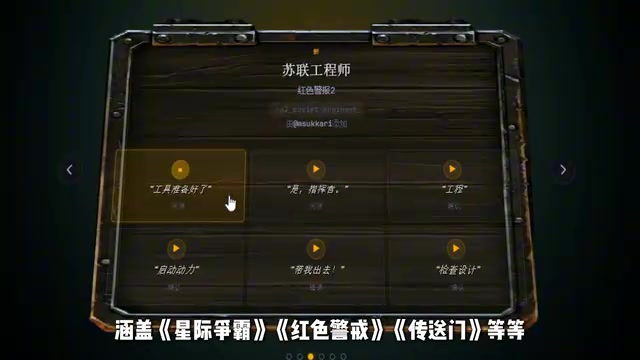
This means you can configure your AI coding environment to match your personal style:
- Let GLaDOS from Portal roast your code with her signature sardonic wit
- Have Terran unit voices from StarCraft announce task completion
- Let the Demoman from Team Fortress 2 reply "I got your order" when commands are received
It's worth noting that GLaDOS (Genetic Lifeform and Disk Operating System) is the iconic AI antagonist from Valve's Portal series, famous for her bureaucratic, sarcasm-laced "scientific" delivery — one of the most recognizable AI characters in gaming history. Using GLaDOS voice lines for an AI coding assistant creates a delightful double metaphor: in real life, the AI tool executes human instructions, while in the game, the AI is the one "testing" humans. That intertextual irony is part of what makes it so fun. The StarCraft Terran unit voices and Red Alert lines have stuck with players for decades precisely because they're punchy, rhythmic, and perfectly suited as action feedback cues.
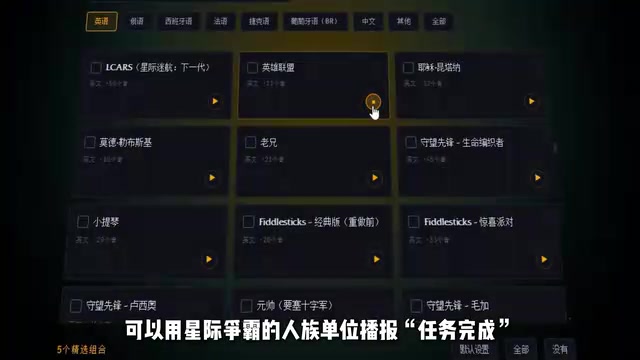
This level of customization lets every developer craft a coding experience that's uniquely their own. Which voice pack you choose becomes, in a way, a small expression of personal taste.
The Real Need Behind the Meme: AI Workflow State Awareness
While the Bilibili creator jokingly called this project "totally unhinged," from a product design perspective it actually nails a genuine pain point in AI-assisted development: state awareness.
As tools like Claude Code continue to grow more capable, AI can now independently execute long, multi-step complex tasks. The developer's role is gradually shifting from "hands-on coder" to "supervisor and authorizer." In this new paradigm, low-friction awareness of what the AI is currently doing becomes key to staying productive. The rise of AI coding tools is driving a broader shift in software development — from synchronous interaction to asynchronous delegation. In traditional workflows, the programmer is always the active operator, paying attention to every line of code in real time. In AI Agent mode, the developer is more like a project manager: hand off the task, redirect attention elsewhere, wait for results. Constantly switching back to the terminal to check progress is the old way — audio notifications offer an eyes-free form of ambient awareness.
As the creator jokingly put it, once you add the game voice pack, "the AI writing code feels more like a hardworking laborer grinding away." Behind that joke lies a quiet reflection of a real paradigm shift — AI is becoming the actual "labor" doing the concrete work, while humans step back into a directing and coordinating role.
Final Thoughts
Open-source projects like this — the ones that seem frivolous on the surface — often capture the most authentic and vibrant spirit of community exploration around new technology. Giving Claude Code a Warcraft voice pack looks like a meme project, but it cleverly solves a real state-awareness problem in asynchronous AI workflows, while making the daily grind of coding a lot more fun.
For developers who work with AI coding tools every day, this might just be a small tool worth trying — after all, who wouldn't want to hear a familiar game line while writing code?
Key Takeaways
Related articles

Network Doctor: An Open-Source Terminal Tool for Network Fault Diagnosis
Network Doctor is an open-source terminal network diagnostic tool that integrates ping, dig, curl, and traceroute, automatically detecting connectivity in stages and outputting fault conclusions in natural language.

LangChain Guardrails Explained: Building Safe and Controllable AI Agents
A detailed guide to LangChain Guardrails covering layered ecosystem architecture, middleware implementation, deterministic and model-driven protection for building production-grade secure AI Agents.

Deep Dive into Microsoft's AI Security Tools: Does Performance Really Surpass the Competition?
Microsoft launches enterprise AI security tools claiming superior performance. This deep analysis examines core capabilities, ecosystem advantages, and risks to guide enterprise security decisions.