GLM 5.2 Hands-On: An Open-Source, Low-Cost Model That Rivals Opus

GLM 5.2: an open-source model rivaling Opus 4.8 at one-tenth the price, with a 1M-token context.
GLM 5.2 is a 753B-parameter open-weight model with a 1M-token context that rivals Opus 4.8 at about one-tenth the price. This article covers its specs, pricing, and step-by-step setup in Claude Code and Cursor, plus connecting 9,000+ apps via Zapier MCP.
GLM 5.2: An Open-Source Model That Wins on Both Performance and Price
By popular demand from many viewers, this article takes a detailed look at one of the most talked-about open-source models right now — GLM 5.2. Released recently by Zhipu (Zed.ai), its biggest highlight is that it delivers performance nearly on par with Opus 4.8 and GPT 5.5, but at a fraction of the price of closed-source flagships.
For developers and heavy AI users, this opens up a new option: you no longer have to pay hefty subscription fees and put up with strict usage limits to get near-top-tier coding and long-task capabilities.
GLM 5.2 Core Specs at a Glance
The most important feature of GLM 5.2 is its open weights. This concept is often confused with "open source." Strictly speaking, open weights means that after the model is trained, its parameters (weights) are publicly released, allowing users to download them for local inference or fine-tuning. True full open source, on the other hand, should also include the training code, training data, data processing pipeline, and all other components. Most so-called open-source large models (such as the Llama, Qwen, and DeepSeek series) are actually just open-weight models, each accompanied by its own usage license that may impose restrictions on commercial use or deployment methods. The significance of open weights is that it breaks the monopoly closed-source vendors hold over capabilities — developers can audit model behavior, avoid vendor lock-in, and deploy in private environments to meet data compliance requirements.
In theory, you could deploy it entirely locally and use it for free. But the reality is that this is a massive model with 753 billion parameters — by comparison, most models that can run locally have only 30 to 40 billion parameters. This means local deployment requires extremely expensive hardware, so the vast majority of users will still choose to access it via API.
To understand the barrier to local deployment, you need to know the relationship between parameters and VRAM: model weights are typically stored in FP16 (half precision), with each parameter taking about 2 bytes, so 753 billion parameters alone require roughly 1.5TB of VRAM just for the weights. Even with INT8 or INT4 quantization compression, you'd still need hundreds of GB of VRAM — far beyond the capacity of a single consumer GPU (such as the RTX 4090's 24GB), requiring a cluster of multiple top-tier data-center GPUs (such as the H100, each around 80GB). It's worth noting, however, that many large models use a MoE (Mixture of Experts) architecture: although the total parameter count is enormous, only a portion of the expert networks is activated during each inference, which lowers the per-inference compute cost while maintaining capability — this is one of the technical foundations that allows today's ultra-large models to be offered at relatively low API prices.
Key specs are as follows:
- Parameters: 753 billion
- Context window: 1 million tokens
- Max output: 128K tokens
- Positioning: A coding and long-horizon task model, capable of working continuously for hours
It is positioned as a "long-horizon" model, meaning it can maintain stable performance over extended, continuous tasks — which is crucial for complex programming projects and automated workflows. A long-horizon task refers to a complex task where the model must maintain a consistent goal across dozens or even hundreds of consecutive reasoning steps and tool calls without drifting off course or forgetting, such as autonomously developing, debugging, and testing a software module. Traditional models are prone to "context drift" in long-chain tasks — gradually forgetting the initial goal or accumulating errors as the conversation grows longer. An emerging benchmark for measuring this capability is METR's "task time horizon," i.e., how many human work-hours' worth of tasks a model can reliably complete. Long-horizon capability and the massive one-million-token context window complement each other, together supporting the model's automation promise of "working continuously for hours."
Price Is GLM 5.2's Real Killer Feature
From a pure benchmark perspective, GLM 5.2 does trail slightly behind the latest models like Fable or GPT 5.6. But once you factor in price, its competitiveness becomes extremely compelling.
GLM 5.2 Price Comparison
GLM 5.2 is priced at:
- Output: just $4.40 per million tokens
- Input: just $1.40 per million tokens
This is cheaper than Haiku, cheaper than Sonnet 4.6, and far below Fable's staggering $50 per million tokens. In actual use, the author's experience is that GLM 5.2 performs almost on par with Opus 4.8, but faster, cheaper, and usable for longer — because you won't constantly hit usage caps the way you would with Anthropic's $20-per-month subscription.
For scenarios requiring long-running, high-volume calls, this "bandwidth" advantage is especially pronounced. You can run far more tasks on the same budget, which is a decisive factor in real production environments.
Configuring GLM 5.2 in Claude Code
Although you can run it locally, that's impractical for the vast majority of people, so using the API directly is recommended. The configuration process is relatively simple.
Getting a GLM 5.2 API Key
First, register an account at Zed.ai. You can choose direct API billing or purchase a coding plan. The author uses the $16-per-month lightweight plan, and in practice the usage allowance is quite ample — there's no need to buy an expensive plan from the start; you can upgrade later as your needs grow.
After registering, go to the API Keys page, create a new key, and copy it for later use.
One-Click Install Script
The setup process can be handled automatically with the official tool npx zed-ai-coding-helper. This requires that you already have Node.js and Claude Code installed. After running the command in your terminal, you'll enter a quick setup flow:
- Select "coding plan" (choose the global version, not the China region, unless you're in China)
- Update and paste your API key
- Select Claude Code and click "add configuration" to write the config automatically
- Go to MCP configuration and click to install all MCP servers
The MCP servers bundled with the plan include vision capabilities (viewing images and screenshots), web search and web reading, and a GitHub-related Zed Read MCP — all available for free with the coding plan.
It's worth explaining the technical background of MCP here. MCP stands for Model Context Protocol, an open standard introduced by Anthropic in late 2024, designed to establish a unified communication specification between large language models and external tools and data sources. Before MCP, every AI application connecting to an external service required custom interface development, resulting in severe fragmentation. MCP is like a "USB-C port for AI," allowing any tool that follows the protocol to be called by any MCP-supporting client. Precisely because of this, capabilities like vision and web search can be plugged in as standardized MCP servers.
Switching to the Correct GLM Model
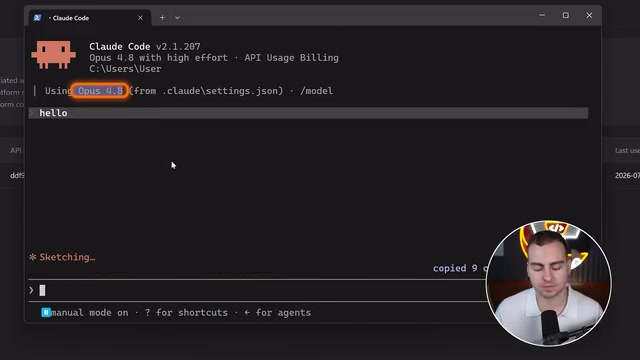
A common pitfall: after installation, when you launch Claude, the interface still shows Opus 4.8 as the active model. This is because Claude Code's UI hasn't updated, and you need to adjust a few environment variables.
The easiest approach is to just have Claude Code make the changes for you — paste in the configuration commands for your operating system from the "switching models" section of the official documentation and let it update the config automatically. Essentially, this maps Claude's default models to GLM models: Haiku maps to GLM 4.5 Air, and both Sonnet and Opus map to GLM 5.2.
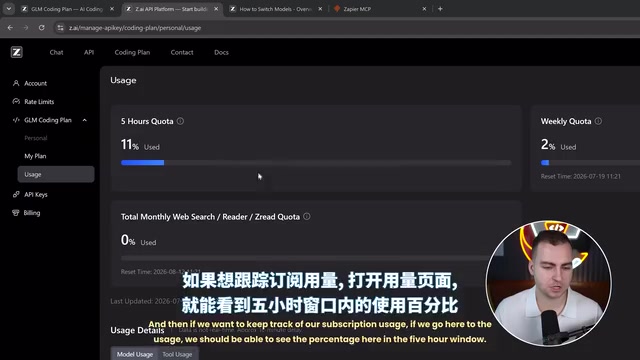
After restarting Claude, you can switch between GLM 5.2 and GLM 4.5 via /model. Additionally, GLM 5.2 offers two effort tiers, high and max, which you can toggle with the /effort command. You can also check the usage percentage for the five-hour window and your weekly quota on the usage page.
Zapier MCP: Making AI Do More Than Just Write Code
The author admits that they use Claude more for daily productivity and work than for pure programming. To truly integrate the tool into a workflow, you need to connect real applications like Notion, Asana, Monday, Gmail, and Google Drive — and this is exactly where the Zapier MCP server shines.
Why Use Zapier Instead of Connecting Each App Individually
Zapier MCP can plug over 9,000 apps directly into Claude Code or nearly any AI agent. The benefits are obvious:
- Unified management interface: All tools are configured in one central panel
- Cross-device reuse: Say you have 5 computers and 100 tools — connecting them individually would take 500 operations; with Zapier, you connect once, and other devices simply reuse the same MCP server to get the same tools and permissions
- Fine-grained permission control: You can set read mode, write mode, and adjust access permissions for each tool individually
This "package once, call everywhere" model is a direct dividend of MCP standardization. After Zapier packages its vast app ecosystem into a single MCP server, AI can drive thousands of real-world tools through a unified interface — this is also the key infrastructure that moves agents from "just chatting" to "getting real work done."

Hands-On Demo
Using Gmail and Google Calendar as examples: after adding the apps and authorizing the accounts in the Zapier panel, the author runs the claude mcp add command to connect the Zapier MCP to Claude Code, then completes browser authorization via /mcp.
Once done, a single natural-language command can drive real tools — for example, "Tell me the last five emails I received and my schedule on next week's calendar, and give me a brief summary." Claude then calls the Gmail and Calendar tools and returns a summary of your inbox and schedule. From there, you can build even more automated workflows.
Connecting GLM 5.2 in Cursor
Beyond Claude Code, configuring Cursor is just as simple. The core is leveraging the OpenAI-compatible protocol.
Cursor Configuration Steps
- Create a new API key at Zed.ai
- Go to Cursor's Settings → Models and scroll to the API Keys section
- Check "Override OpenAI Base URL" and enter the Base URL provided by Z.ai
- Paste the API key and enable it
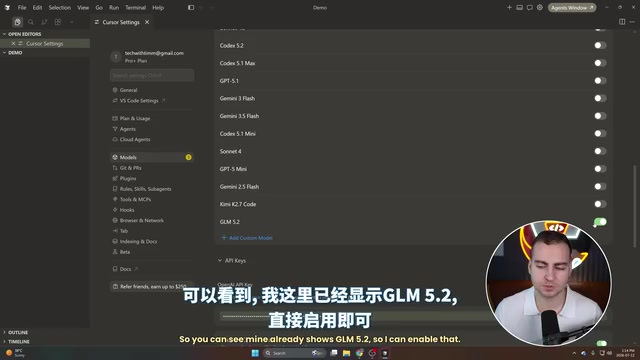
- Enable GLM 5.2 in the model list (some users will already have it listed)
Note that the documentation requires the GLM model name to be in all uppercase with hyphens. If the default GLM 5.2 version bundled with Cursor doesn't work, you can manually add the correct name with hyphens and enable it for testing.
GLM 5.2 Generation Results in Practice
The author tested it with the prompt "Build a simple HTML landing page about technology." GLM 5.2 generated nearly a thousand lines of code in about 40 seconds, successfully producing a usable landing page. While the design looked a bit "vibe coded" (that AI-thrown-together feel), considering it took only 40 seconds and the prompt was extremely simple, this is a very impressive result.
Likewise, Cursor can also connect more tools via Zapier MCP. The author demonstrated connecting Slack and Google Docs, then used the prompt "Send myself a Slack message summarizing this conversation" — successfully receiving an auto-generated summary DM in Slack.
Conclusion: Is GLM 5.2 Worth Trying?
GLM 5.2 represents a significant breakthrough for open-source large models in terms of cost-effectiveness. With Opus 4.8-level performance at roughly one-tenth the price, plus a million-token context and long-horizon capabilities, it offers a highly attractive alternative for developers and AI users.
Combined with native integration in Claude Code or Cursor, and layered with the 9,000+ app connectivity that Zapier MCP provides, GLM 5.2 can fully upgrade from a "coding model" into a general-purpose AI assistant woven throughout your daily workflow. For users seeking high cost-effectiveness who don't want to be constrained by subscription limits, it's well worth a try.
Key Takeaways
Related articles

The Truth Behind Codex 'Build a Website in 5 Minutes': AI Isn't Creating Sites—It's Helping You Copy Them
Exposing the truth behind viral Codex 5-minute website videos: creators aren't building original sites with AI—they're copying shared prompts or scraping others' work. Learn AI coding tools' real limits.

Getting Started with AI Agent Development: A Complete Guide from Concept to Practice
A comprehensive guide to AI Agent architecture and development, covering automated marketing, intelligent customer service, and investment analysis scenarios with single and multi-agent collaboration.

The Truth Behind Codex 'Build a Website in 5 Minutes': AI Isn't Creating Sites — It's Helping You Copy Them
Exposing the truth behind viral Codex 5-minute website videos: creators aren't building original sites with AI — they're copying shared prompts or scraping others' work.