GLM-5.2 Practical Guide: 1M Context Window, Token Costs, and Smart Switching Strategies Explained

A practical day-one guide to GLM-5.2: context setup, cost rules, and smart switching strategies.
GLM-5.2's 1M token context window is designed for code agent long-task mode, not for blindly stuffing entire repositories. This guide explains how to properly configure the context window, understand dynamic quota billing (up to 20× Lite), use Max Effort correctly, and apply a four-step model tiering strategy to maximize value while controlling costs.
Before You Switch: Three Things to Clarify First
GLM-5.2 just launched, and plenty of people in the community are already eager to migrate their entire coding workflow over in one go. But as one Bilibili creator noted in a day-one strategy breakdown: don't just fixate on the release news. The three things actually worth figuring out first are — how to properly enable the 1M context window, how token costs are actually calculated, and which tasks are genuinely worth switching over.
After going through the official docs, pricing pages, and quota deduction rules line by line, the conclusion was notably measured: GLM-5.2 is well-suited for long codebase and long-document tasks, but is not meant for blindly stuffing every file into the context. This is a "day-one usage strategy" — not a comprehensive benchmark — since API access and open-source model weights won't be fully available until a later stage.
Why a Full Benchmark Isn't Feasible Yet
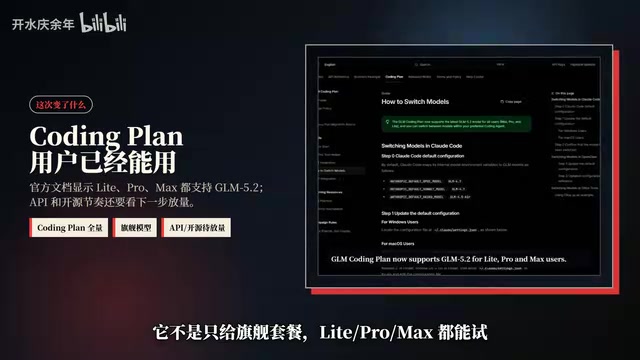
According to the official documentation, GLM Coding Plan now supports the latest GLM-5.2, and users on all tiers — Lite, Pro, and Max — can access it. However, the full API interface and open-source weights haven't been released yet, which means cross-model benchmarking is premature. The more practical approach right now is to get a feel for where it fits best — and where you should hold off.
GLM-5.2's 1M Context Window: The Configuration Detail Most People Miss
When switching over, the biggest trap is often the very feature that gets the most attention: the 1 million token context window. It's important to understand what this number actually means. A context window is the maximum number of tokens the model can process simultaneously in a single inference pass. Tokens are the basic unit of text processing — roughly 1–2 tokens per Chinese character, and 1–1.5 tokens per English word. One million tokens means the model can theoretically process around 500,000–750,000 Chinese characters in one go — roughly equivalent to a mid-length novel. That said, extremely large context windows come with a well-documented pitfall: the "Lost in the Middle" problem — information located in the middle of the context tends to be overlooked compared to content at the beginning or end. This is one of the technical reasons why blindly filling the context window is not recommended.
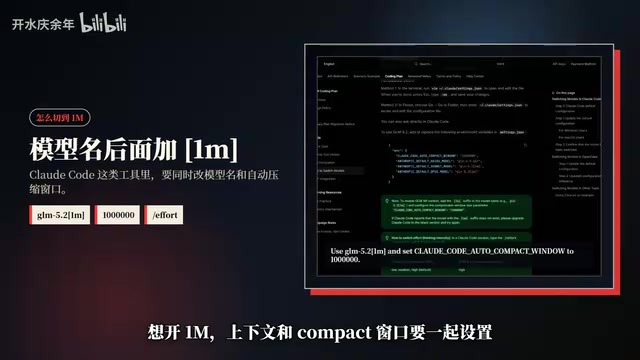
The author specifically points out that the model identifier in the docs isn't simply GLM-5.2 — you need to configure the model name exactly as shown in the official documentation examples, and set the auto-compression window to 1 million tokens to actually unlock the large-context capability.
There's another subtler detail: when selecting Low, Medium, or High effort levels in Claude Code, all three actually map to the same effective tier. Only Max Effort — or higher — maps to the model's full capability. These Effort tiers are essentially inference-time compute allocation strategies, corresponding to the concept of "Test-Time Compute Scaling" that has gained significant attention in recent AI research. By investing more computation during inference (e.g., chain-of-thought reasoning, self-reflection, multi-path sampling and verification), the model can meaningfully improve accuracy on complex tasks without changing its parameter count — at the cost of higher latency and greater token usage. For complex coding tasks, the official recommendation is to use Max Effort to ensure stable output quality.
In other words, if you overlook this mapping, you might think you've switched to "high-performance mode" when you're actually still in mid-tier — wasting the model's true potential without realizing it.
How GLM-5.2 Deducts Quota: The Large Window Isn't Meant to Be Maxed Out Every Time
Before doing a full migration, you need to do the math on costs. Based on the pricing page:
- Pro: quota consumption is 5× that of Lite
- Max: quota consumption is 20× that of Lite
- GLM-5.2 related models: approximately 5× the Lite quota
Even more worth noting is the dynamic billing mechanism for premium models (such as the Turbo tier): peak hours are billed at 3× quota, off-peak at 2×, with occasional limited-time promotions where off-peak usage drops to 1×. This dynamic pricing model reflects GPU compute supply and demand — server load is higher during peak hours, increasing inference latency, so platforms use price signals to encourage users to spread out their usage. Similar mechanics exist in OpenAI's Batch API discounts and Anthropic's off-peak pricing. For long-context tasks, input tokens are the primary cost driver: stuffing an entire code repository into the context window causes input token costs to accumulate rapidly, even if the vast majority of that content is irrelevant to the current task.
The author's core judgment is clear: the 1M context window isn't meant to be maxed out every time — it's a large room reserved for your hardest tasks. Indiscriminately dumping an entire codebase into context burns quota on irrelevant content and introduces more noise than signal.
GLM-5.2's Positioning: Built for Long-Running Code Agent Tasks
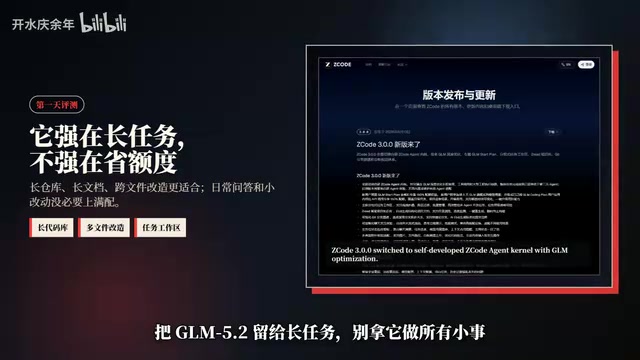
From a product positioning standpoint, GLM-5.2's value isn't in everyday chat — it's more precisely designed for code agent long-task mode. A Code Agent is an autonomous intelligent system that deeply integrates a large language model with a code execution environment, file system operations, and tool-calling capabilities. Unlike simple code completion, it can independently plan multi-step tasks: reading project structure, analyzing dependencies, generating code, running tests, and iterating based on error feedback — a complete loop that may involve dozens of tool calls. The agent needs to continuously "remember" prior analysis results, the state of modified files, and pending subtasks throughout the entire task lifecycle — which is exactly the core scenario where a large context window becomes critical.
Reading large codebases, analyzing lengthy documents, and orchestrating multi-file refactoring — these are the kinds of sustained engineering tasks where GLM-5.2 truly shines. The accompanying agent core also emphasizes autonomous execution and deep integration of task workspaces with knowledge bases. The author's conclusion: GLM-5.2 is competing on "engineering task completion rate" — not on making every response cheaper. This is the key to understanding its product positioning.
Four Practical Steps: Getting the Most Out of 1M Context
To actually leverage the large context window rather than burning quota on chaos, the author offers a four-step operational framework:
- Generate a task map first: Have the model read the directory structure and README to map out the project layout;
- Load only relevant modules: Include only the modules related to the current task — don't hard-dump the entire repository;
- Tier your calls by complexity: Switch to Max Effort for complex tasks, and continue using lower-cost models for routine Q&A;
- Keep a fallback plan: Retain GLM-4.x or another model as a backup if things go wrong.
The underlying logic of this workflow is Model Tiering — a cost-control strategy widely adopted by mature AI engineering teams, conceptually borrowed from the "cache tiering" approach in traditional software architecture. A typical tiered setup looks like this: use small models for simple intent recognition and routing; use mid-tier models for moderate-complexity code completion and doc generation; only call flagship large models for cross-file refactoring or complex algorithm design. This strategy can reduce token costs by 60–80%, while smaller models respond faster, actually improving the real-time interaction experience. The Fallback mechanism is also an indispensable safeguard for production environments: when a premium model hallucinates, times out, or produces inconsistent output, automatically downgrading to a more stable version preserves business continuity. Use high-tier large windows for hard tasks, low-cost models for routine ones — never mix them indiscriminately — and you'll keep both costs and quality within predictable bounds.
Who Should Try GLM-5.2 First
The author identifies three categories of users who should prioritize trying GLM-5.2:
- Developers who heavily use coding tools: Run a real long-form task and measure actual completion rates;
- Users who regularly handle long documents: Long contract review, report analysis, complex requirements documentation, and similar use cases;
- Teams evaluating model vendors: These users especially need to rigorously track and record test data.

For team evaluations, the author recommends tracking three core metrics: whether the task was completed in full, how many things were broken in the process, and how much quota was consumed for the same task. These three dimensions reveal far more about a model's real-world engineering value than simply rating "answer quality" — the combined assessment of "task completion rate" and "code breakage rate" is essentially evaluating the model's end-to-end reliability as a code agent, which directly aligns with GLM-5.2's stated focus on engineering task completion.
Conclusion: Worth Trying — But Don't Switch Blind
Overall, GLM-5.2 is genuinely worth exploring, especially for long codebases and complex engineering tasks. But the recommendation is clear: don't switch blind. Before diving in, at minimum prepare three things:
- How to properly segment context;
- How to carefully control your quota budget;
- Which model to fall back to when things go wrong.
A more comprehensive cross-model benchmark comparison will only make sense once the full API and open-source models are released. Until then, keeping the "three-item checklist" above on hand will help you avoid the most common pitfalls during migration — and that's the most practical takeaway from this day-one evaluation.
Key Takeaways
Related articles

The Truth Behind Codex 'Build a Website in 5 Minutes': AI Isn't Creating Sites—It's Helping You Copy Them
Exposing the truth behind viral Codex 5-minute website videos: creators aren't building original sites with AI—they're copying shared prompts or scraping others' work. Learn AI coding tools' real limits.

Getting Started with AI Agent Development: A Complete Guide from Concept to Practice
A comprehensive guide to AI Agent architecture and development, covering automated marketing, intelligent customer service, and investment analysis scenarios with single and multi-agent collaboration.

The Truth Behind Codex 'Build a Website in 5 Minutes': AI Isn't Creating Sites — It's Helping You Copy Them
Exposing the truth behind viral Codex 5-minute website videos: creators aren't building original sites with AI — they're copying shared prompts or scraping others' work.