GSAP in Practice: Build Stunning Landing Page Animations from Scratch

A hands-on GSAP guide covering ScrollTrigger, SplitText, Timelines, and infinite scroll with full code examples.
This article walks through building a complete F1-themed landing page using GSAP, now fully free thanks to Webflow. It covers core concepts like tweens, ScrollTrigger for scroll-driven animations, Timeline for multi-element orchestration, SplitText for character-level animations, and deltaRatio for frame-rate-consistent infinite scroll — with accessibility best practices throughout.
Why Now Is the Best Time to Pick Up GSAP
GSAP (GreenSock Animation Platform) is widely regarded as the go-to animation library in the front-end development community — but only those who've used it deeply truly understand why it's so beloved. This article walks through a complete, hands-on F1 racing-themed landing page to help you systematically master GSAP's core capabilities: from basic tweens to scroll-triggered animations, timeline orchestration, and frame-rate-consistent infinite scrolling.
The most important change in GSAP is this: it's now completely free. Following financial backing from Webflow, previously paid plugins (such as ScrollTrigger and SplitText) are now fully open to all developers at zero cost.
It's worth knowing that GSAP is not a newcomer — it's a mature framework with over 15 years of engineering behind it. Born in 2008 as a Flash animation library (ActionScript version), GSAP emerged at a time when Adobe Flash dominated rich media on the web. The GreenSock team accumulated deep experience building complex animation sequences within that ecosystem. Around 2010, as Apple announced that iOS devices would no longer support Flash and HTML5 rapidly took hold, GSAP made a smooth migration to the JavaScript ecosystem while preserving the core design philosophy of its original engine.
Compared to native browser CSS animations and the Web Animations API, GSAP's key advantage lies in its independent high-performance rendering engine — it bypasses the browser's batching limitations on CSS property changes by using requestAnimationFrame to precisely schedule per-frame property calculations, delivering outstanding performance for complex sequential animations. GSAP also manages transform properties internally in a unified way, avoiding the classic pitfall of multiple animations on the same element overwriting each other's transforms.
Installation is straightforward — you can either use npm install gsap or include it via CDN. In an Astro project, it's recommended to bundle the GSAP core and its plugins into a single shared file for easy reuse across components:
import { gsap } from 'gsap';
import { ScrollTrigger } from 'gsap/ScrollTrigger';
import { SplitText } from 'gsap/SplitText';

gsap.registerPlugin(ScrollTrigger, SplitText);

export { gsap, ScrollTrigger, SplitText };
Note: GSAP's core tween functionality works out of the box, but plugins must be registered via registerPlugin before use. This is by design — the plugin registration mechanism allows bundlers (like Webpack or Vite) to perform tree shaking, including only the plugins actually used in the final bundle.
Basic Animations: The Philosophy Behind from and to
Prefer from — Let CSS Define the End State
At the heart of GSAP animations is the tween — a concept rooted in traditional hand-drawn animation. In early studios like Disney, senior animators (Key Animators) drew keyframes defining a character's pose at critical action moments, while assistant animators (called In-betweeners, shortened to Tweeners) filled in the transition frames between keyframes to create smooth motion. In a classic hand-drawn film, keyframes might represent only 10–20% of total frames — at Disney's peak, a 90-minute feature could require hundreds of In-betweeners working simultaneously. Digital animation inherited this paradigm entirely: developers define a start state and an end state, and the animation engine calculates and renders all the in-between frames automatically. GSAP's from and to methods are a direct abstraction of this mechanism. from is often more intuitive — define the element's final state in CSS, then tell GSAP where to start from, and it handles the transition automatically.
Here's a card fade-in example:
gsap.from('.driver-card', {
  opacity: 0,
  y: 100,
  duration: 1,
  stagger: 0.5,
  ease: 'power4.out'
});
stagger is a clear advantage GSAP has over pure CSS animations — it staggers multiple elements so they appear one after another in an elegant cascading entrance. CSS can approximate this with animation-delay and :nth-child selectors, but requires manually specifying a delay for each child element and becomes a maintenance nightmare when element counts are dynamic. GSAP's stagger supports object syntax (e.g., stagger: { each: 0.1, from: 'center' }), allowing you to control the direction of the stagger (e.g., radiating outward from the center), with far more flexibility than CSS.
Scroll-Triggered Animations with ScrollTrigger
Browsers natively provide the Intersection Observer API to detect when elements enter the viewport. Introduced to Chrome around 2016, it solved the performance pain of calling getBoundingClientRect() repeatedly inside scroll event handlers — an expensive operation that forces synchronous layout. However, Intersection Observer is fundamentally a boolean event system — it tells you when an element enters or exits the viewport, but can't track continuous states like "scroll progress is at 30%" or "the element is 200px from the top of the viewport."
ScrollTrigger builds a complete scroll animation coordination layer on top of that idea. It supports scrub (syncing animation progress precisely with scroll position for parallax effects), pin (fixing an element in the viewport during scrolling, commonly used for full-screen horizontal scroll narratives), and snap (snapping scroll to key positions to prevent users from stopping at awkward midpoints), all with deep integration into GSAP Timelines. While the CSS Scroll-driven Animations spec (shipped in Chrome 115 in 2023) is beginning to fill this gap, Safari support remained incomplete and Firefox only partial as of late 2024 — making ScrollTrigger the more reliable choice for production environments:
gsap.from('.driver-card', {
  opacity: 0,
  y: 100,
  stagger: 0.5,
  scrollTrigger: {
    trigger: '.drivers-grid',
    start: 'top 85%'
  }
});
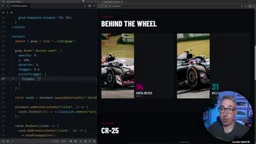
trigger specifies the element that triggers the animation. start: 'top 85%' means the animation fires when the top of the element reaches 85% down the viewport — preventing users from missing the animation before they've even scrolled to it.
Advanced Techniques: Independent Triggers and Custom Animations
Triggering Each List Item Independently
When you want each item in a list to trigger independently as it enters the viewport — rather than all at once — use querySelectorAll with forEach, setting each element as its own trigger:
document.querySelectorAll('.car-spec-row').forEach((row) => {
  gsap.from(row, {
    opacity: 0,
    y: 100,
    scrollTrigger: { trigger: row }
  });
});
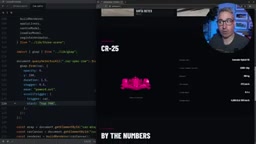
This kind of staggered "peek-in" entrance is the essence of good design — restrained motion often draws more attention than a flood of simultaneous animations.
Counting-Up Number Animations
To animate a statistic counting up from 0 to a target value, use gsap.to with an onUpdate callback to update the DOM in real time:
document.querySelectorAll('.stat-block-value').forEach((stat) => {
  const target = stat.dataset.target;
  ScrollTrigger.create({
    trigger: stat,
    start: 'top 80%',
    once: true,
    onEnter: () => {
      gsap.to({ val: 0 }, {
        val: target,
        duration: 5,
        ease: 'power4.out',
        onUpdate: function() {
          stat.firstChild.textContent = Math.round(this.targets()[0].val);
        }
      });
    }
  });
});
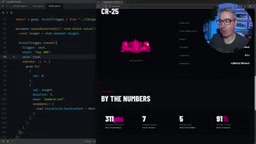
Two key details: once: true ensures the animation only plays once, preventing it from re-triggering on scroll-back; and you should also manually set the initial text content to 0, to avoid a flash of the final value on page load.
Notice that the target of gsap.to here is a plain JavaScript object { val: 0 } — not a DOM element. GSAP can interpolate any numeric property on any object. This means it's not limited to visual animations — it can drive audio parameters (e.g., GainNode.gain.value in the Web Audio API), physics simulation values, Three.js material properties (e.g., MeshStandardMaterial.roughness), WebGL uniform variables, and more. This is a key capability that sets GSAP apart from purely DOM-focused animation libraries. In this example, GSAP interpolates val from 0 to the target number, and the onUpdate callback writes the current value back to the DOM — a classic demonstration of this cross-domain interpolation capability.
Timeline and SplitText: Orchestrating Complex Animation Sequences
Coordinating Multi-Element Animations with Timeline
The Timeline is GSAP's core tool for coordinating multiple animations. If each individual gsap.from / gsap.to call is like a solo instrument, the Timeline is the conductor — defining the order, overlap, and overall rhythm of each animation. A Timeline itself can be controlled just like a single tween (paused, reversed, seeked to a specific progress point), which means complex animation sequences can be nested and composed to build cinematic, storyboard-style narratives.
Position parameters give you precise control over timing overlap:
const tl = gsap.timeline({ delay: 1.5 });
tl.from('.hero-title', { opacity: 0, duration: 5 })
  .from('.hero-rule', { scaleX: 0, duration: 2 }, '-=4')
  .from('.canvas', { scale: 0, opacity: 0 }, '<')
  .to('nav', { opacity: 1, filter: 'blur(0px)', duration: 1 });
'-=4' means start 4 seconds early (creating overlap); '<' means start at the same time as the previous animation. Position parameters also support absolute time values (e.g., 2 means at the 2-second mark on the timeline) and labels (add one with tl.addLabel('intro'), then reference it with 'intro+=0.5'), making complex sequences much more readable to maintain. This level of temporal precision is the core advantage of Timeline over independent tweens — and when aligning animation pacing with product managers or designers, Timeline's readable time semantics also drastically reduce communication overhead.
Per-Character Text Animations with SplitText
SplitText splits text into individual characters, each wrapped in its own element, enabling character-by-character animations. There's a subtle but important accessibility consideration here: screen readers (such as VoiceOver, NVDA, and JAWS) parse the DOM character by character when text is split into dozens of individual <span> tags — users would hear "L... e... w... i... s" instead of "Lewis," a terrible experience that violates the Understandable principle of WCAG 2.1. SplitText handles this by adding an aria-label attribute to the parent element to preserve the full text semantics, while adding aria-hidden="true" to each child element to hide them from assistive technologies. Additionally, in compliance with WCAG 2.1 criterion 2.3.3, it's recommended to pair this with the CSS media query prefers-reduced-motion: reduce to provide a static fallback for users who prefer reduced motion — these users may have vestibular disorders where large motion animations can cause nausea and dizziness.
const heroText = SplitText.create('.hero-title', { type: 'chars' });
tl.from(heroText.chars, {
  opacity: 0,
  x: 200,
  stagger: 0.05,
  ease: 'elastic.out',
  duration: 1
});
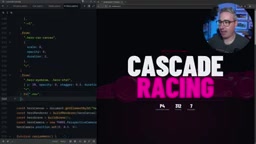
When animating position, use fixed pixel values (e.g., x: 200) rather than percentages — differing character widths make percentage-based offsets unpredictable.
On easing functions: power4.out is a fourth-degree polynomial ease, mathematically equivalent to 1 - (1-t)^4, producing a fast start that decelerates gradually — simulating a natural friction-based slowdown. elastic.out is based on a spring physics model (the damped oscillation equation from Hooke's Law), overshooting the target and bouncing back, giving text an energetic snap-in feel. The intuitive difference: power4.out is like a car braking, while elastic.out is like the aftershock of a slingshot. GSAP's official documentation includes an Ease Visualizer tool for previewing the mathematical shape of each easing curve and adjusting parameters in real time. For scenarios demanding maximum physical realism, GSAP also provides a spring configuration tool based on real spring parameters (mass, stiffness, damping) so animation behavior fully follows Newtonian mechanics.
Frame-Rate-Consistent Infinite Scrolling Marquee
The core challenge in building a draggable infinite scroll is frame rate consistency. Modern displays vary significantly in refresh rate (60Hz, 90Hz, 120Hz, 144Hz, even 240Hz) — a problem well understood in game development. If you simply move an element by N pixels per frame, users on 120Hz displays will see twice the speed of users on 60Hz displays, causing the animation to run out of control on high-refresh-rate devices (such as the iPad Pro's 120Hz ProMotion display or high-end gaming monitors).
Game engines universally use deltaTime (inter-frame interval) to solve this: record how long each frame actually took in milliseconds, then multiply movement by deltaTime rather than a fixed pixel value. For example, targeting a speed of "300px per second": at 60fps, deltaTime is ~16.67ms per frame, so each frame moves 300 × 0.01667 ≈ 5px; at 120fps, deltaTime is ~8.33ms, so each frame moves 300 × 0.00833 ≈ 2.5px — identical displacement per unit time. In Unity, Unreal Engine, and other major game engines, "always multiply speed by deltaTime" is the first rule written into coding standards.
GSAP's ticker provides deltaRatio for this normalization — using 60fps as the baseline (deltaRatio = 1), on a 120fps device this value is ~0.5, and on a 30fps device (e.g., a low-end phone under load) it's ~2. Multiplying speed by this ratio yields frame-rate-independent, consistent motion:
gsap.ticker.add(() => {
  const dr = gsap.ticker.deltaRatio();
  // Normalize speed with deltaRatio for consistent experience across devices
});
Combine this with pointer events (pointerdown / pointermove / pointerup) to handle grabbing, flicking, and post-release inertial deceleration — where deceleration is typically simulated by multiplying the velocity by a friction coefficient less than 1 (e.g., 0.95) each frame. This friction coefficient also needs to be normalized by deltaRatio: without normalization, high-refresh-rate devices would apply the friction coefficient more times per second, causing the marquee to nearly stop instantly after a flick on a 120Hz screen, while continuing to glide too long on a 30fps device — the final result is a smooth, cross-device-consistent interactive experience.
Conclusion: GSAP Earns Its Reputation
This landing page project illustrates why GSAP commands such loyalty across multiple dimensions:
- Intuitive API: Developers already familiar with CSS properties can get up to speed with almost no friction;
- Complete toolkit: Basic tweens, ScrollTrigger, Timeline, SplitText, and frame-rate control — all in one place;
- Attention to detail: SplitText handles accessibility automatically; deltaRatio solves cross-device frame-rate inconsistency;
- Completely free: Webflow's sponsorship has opened all plugins to developers at no cost.
For front-end developers who want to bring static pages to life, now is the perfect time to systematically learn and embrace GSAP.
Key Takeaways
Related articles

The Truth Behind Codex 'Build a Website in 5 Minutes': AI Isn't Creating Sites—It's Helping You Copy Them
Exposing the truth behind viral Codex 5-minute website videos: creators aren't building original sites with AI—they're copying shared prompts or scraping others' work. Learn AI coding tools' real limits.

Getting Started with AI Agent Development: A Complete Guide from Concept to Practice
A comprehensive guide to AI Agent architecture and development, covering automated marketing, intelligent customer service, and investment analysis scenarios with single and multi-agent collaboration.

The Truth Behind Codex 'Build a Website in 5 Minutes': AI Isn't Creating Sites — It's Helping You Copy Them
Exposing the truth behind viral Codex 5-minute website videos: creators aren't building original sites with AI — they're copying shared prompts or scraping others' work.