Hermes MoA Multi-Model Collaboration: A Real-World Test of Quality Leaps on Complex Problems

Hermes MoA lets multiple AI models collaborate as advisors with one model as the final decision-maker for dramatically better answers.
Hermes 0.18's MoA (Mixture of Agents) feature automates multi-model collaboration: advisor models independently answer a question, then a more powerful decision-maker synthesizes their responses. Real-world testing shows significant quality improvements on complex tasks, with practical guidance on configuration, speed trade-offs (~30–40s vs. a few seconds), cost (4–6x token usage), and when to use on-demand vs. persistent MoA mode.
One Model Not Enough? Bring in the Whole Team
When tackling complex problems, a single large model often falls short — reasoning may lack rigor, or coverage may be incomplete. The MoA (Mixture of Agents) feature introduced in Hermes 0.18 is designed to address exactly this pain point.
The core idea is straightforward: you designate several models as "advisors" (references) and one more capable model as the "decision-maker" (aggregator). When you ask a question, each advisor independently thinks through and answers the problem without any cross-interference. The decision-maker then receives all the advisors' responses, synthesizes them, and delivers a final answer.
In real-world testing by Bilibili creator MaiDong, this multi-model collaboration mechanism produced answers to complex problems that were "noticeably better than any single model — sometimes dramatically so." In essence, it automates the process of a human expert panel review and cross-validation.
The Theoretical Foundation of MoA: Ensemble Learning and Multi-Perspective Fusion
MoA's theoretical roots trace back to Ensemble Learning in machine learning. Ensemble methods combine multiple weak learners (like decision trees in a random forest) to achieve stronger generalization than any individual model, based on the core assumption that different models tend to fail in different directions, which cancel each other out when combined. TogetherAI formally brought this idea into the large language model domain in a 2024 research paper, demonstrating that aggregating outputs from multiple open-source models can yield results that surpass any single participating model.
There's a deeper reason behind this quality improvement: different LLMs, due to differences in training data, architecture, and alignment strategies, tend to excel in different dimensions — DeepSeek models shine in code and logical reasoning, Kimi models have stronger grasp of long documents and Chinese context, while GPT models lead in overall instruction-following and language fluency. When these models face the same complex problem, their "cognitive blind spots" don't overlap. The aggregator's role is fundamentally meta-cognitive — it's not re-solving the problem, but evaluating the credibility of multiple answers, identifying consensus and disagreements, and making more robust judgments in areas of uncertainty. This closely mirrors how a human expert review committee operates.
How MoA Works
One-Time Use: Invoke with a Slash Command
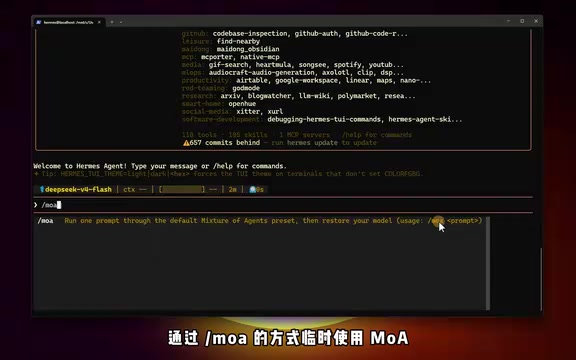
If you only occasionally want to use MoA in a conversation, it's extremely simple: type /moa followed by your question in the chat box and press Enter.
For example, "Help me design a Redis caching strategy" — Hermes will run the pre-configured MoA setup for that single round. It automatically reverts to the original model afterward. The action is one-time only and doesn't affect subsequent messages.
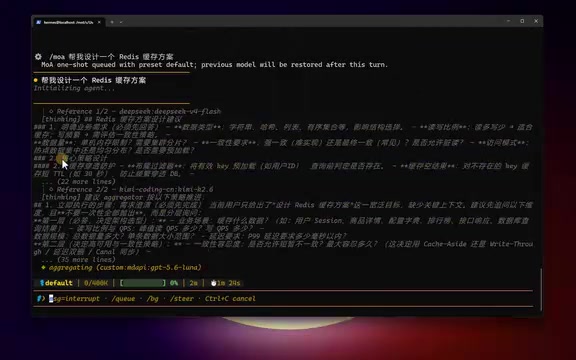
As seen in the test screenshots, two advisor models each provide their independent answers, after which the decision-maker synthesizes them into a final response. The quality of the final output is noticeably better than what any single model would produce on its own.
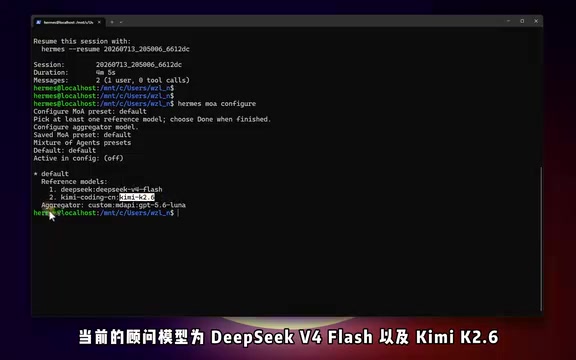
How to Configure Your Own MoA Preset
Basic Configuration Steps
Exit the chat interface, return to the terminal, and run hermes moa configure to launch the interactive configuration wizard:
- Select advisor models: You can choose two, three, or even four. In the example, DeepSeek V3 Flash and Kimi 2.6 were selected as advisors.
- Select the decision-maker model: It's recommended to choose a more capable model for the final synthesis. In the example, GPT 5.6 Luna was used.
After configuration, run hermes moa list to view all current presets, including preset names, advisor models, and the decision-maker model.
Creating Multiple Specialized Presets
MoA supports multiple presets tailored to different scenarios. For example, to set up a combination specifically for coding tasks, run hermes moa configure code and select a new model combination.
In the code-specific preset from the example, DeepSeek Coder Pro and Kimi 2.7 Code were chosen as advisors, with GPT 5.6's reasoning model as the decision-maker. This way, different tasks can call on different model combinations for precise matching.
Using MoA Throughout a Conversation
If you want the entire conversation to run through the MoA pipeline, simply type /model in the chat interface and press Enter, then select Mixture of Agents, and choose the relevant preset (such as Default or Code). Once switched, all messages will go through the multi-model collaboration process.
Three Key Things to Keep in Mind
Speed: Trading Response Time for Answer Quality
MoA must wait for all advisors to finish before aggregation can begin, so the actual response time is typically 30 to 40 seconds. A single model under normal conditions returns results in just a few seconds. For simple questions, there's no need to enable MoA — a single model is far more efficient.
Cost: Roughly Several Times That of a Single Model
MoA is essentially calling multiple models simultaneously, so token consumption and cost are multiples of what a single model would incur.
Why Does MoA Multiply Token Consumption?
A token is the basic unit LLMs use to process text — roughly 3–4 English characters or 1–2 Chinese characters. MoA's cost multiplication comes from two layers: First, all advisor models each need to independently process the full user query, generating parallel input token costs; Second, when the decision-maker aggregates responses, it must read all advisors' outputs as context, causing input token volume to stack proportionally. With a standard setup of 3 advisors + 1 decision-maker, total token consumption is approximately 4–6x that of a single model. This is why setting an output cap for advisors (e.g., 1000 tokens) can effectively control both cost and latency.
For this reason, the recommended approach is to use /moa in one-time mode — calling it on demand rather than keeping it on continuously.
Adjustable Speed: Set an Output Cap for Advisors
If the wait time feels too long, you can set a maximum output limit for advisor models in the terminal. For instance, limiting each advisor to 1000 tokens means less output to aggregate, which speeds things up. This value can be adjusted flexibly depending on the scenario to find the right balance between quality and speed.

An Easy-to-Miss Detail
Interestingly, when using the /moa one-time command, you cannot switch presets mid-conversation on the fly — it will always call the default preset. To change the default preset, exit the chat interface and specify the preset name (e.g., code) via a terminal command. Once configured, the /moa command will call your newly set preset going forward.
A Final Thought: Tools Change, Methodology Matters More
The value of MoA lies not in the specifics of any particular version's features, but in the fact that it automates what was previously a manual process — cross-validating and synthesizing answers across multiple models. This is cut from the same cloth as ensemble learning and expert panel reviews: by combining multiple independent perspectives, it cancels out the biases and blind spots of any single model.
For complex tasks where answer quality is paramount — such as architecture design, solution trade-off analysis, or tricky debugging — MoA offers a viable path to trading time and cost for quality. For everyday simple questions, a single model remains the more economical choice. Understanding the "collaborate on demand" mindset is more valuable in the long run than memorizing any specific command.
Key Takeaways
Related articles

The Truth Behind Codex 'Build a Website in 5 Minutes': AI Isn't Creating Sites—It's Helping You Copy Them
Exposing the truth behind viral Codex 5-minute website videos: creators aren't building original sites with AI—they're copying shared prompts or scraping others' work. Learn AI coding tools' real limits.

Getting Started with AI Agent Development: A Complete Guide from Concept to Practice
A comprehensive guide to AI Agent architecture and development, covering automated marketing, intelligent customer service, and investment analysis scenarios with single and multi-agent collaboration.

The Truth Behind Codex 'Build a Website in 5 Minutes': AI Isn't Creating Sites — It's Helping You Copy Them
Exposing the truth behind viral Codex 5-minute website videos: creators aren't building original sites with AI — they're copying shared prompts or scraping others' work.