How to Connect DeepSeek to Claude Code: A Complete 4-Step Setup Guide for Users in China

Connect DeepSeek to Claude Code in 4 steps — no VPN, no overseas payment required.
This guide walks you through connecting DeepSeek to Claude Code using CC Switch, a proxy adapter tool. In four steps — getting a DeepSeek API Key, installing Claude Code, configuring CC Switch, and building a demo webpage — you can run a powerful Agentic coding environment in China without a VPN or overseas payment, starting for as little as ¥10.
Why Connect DeepSeek to Claude Code
Claude Code is a command-line AI programming tool developed by Anthropic. Unlike earlier code completion tools such as GitHub Copilot, it operates in an "Agentic" mode — it doesn't just generate code snippets, but autonomously plans tasks, invokes tools, reads and writes to the filesystem, executes terminal commands, and maintains contextual continuity across multi-step workflows. Think of it less like an autocomplete tool and more like a junior engineer who can take on a task and see it through.
Agentic workflows represent a paradigm shift in AI-assisted programming. Traditional code completion tools follow a passive "single-turn input-output" model, while Agentic systems introduce a Perception-Planning-Action Loop: the AI actively breaks down complex goals into subtasks, interacts with its environment through tool calls (such as reading/writing files, running shell commands, or calling external APIs), and dynamically adjusts its plan based on feedback from each step. This architecture is closely related to the ReAct (Reasoning + Acting) framework proposed by Google Research in 2022, which demonstrated that alternating reasoning and action significantly improves task completion rates for language models. Claude Code's tool-calling capability is built on Anthropic's Tool Use API, which allows the model to invoke predefined system functions in structured JSON format — a key distinction from simple chat assistants. With the Claude 3 series, Anthropic significantly enhanced tool use and long-context understanding, enabling the model to handle complex engineering scenarios like cross-file refactoring and automated test generation. It has become a go-to tool for many developers.
For users in China, however, accessing the official Claude service involves two hurdles: network access restrictions and the need for overseas payment methods.
This guide is based on a hands-on tutorial from a Bilibili creator and introduces an alternative that requires no VPN: using a tool called CC Switch to connect the domestic model DeepSeek to Claude Code. This approach reduces costs and sidesteps network restrictions. The entire setup takes just four steps and can be completed in minutes, even by beginners.
The core idea is straightforward: Claude Code is essentially a client that can interface with different model APIs. CC Switch acts as an intermediary layer, allowing you to flexibly switch between underlying model providers. DeepSeek — a domestic model known for its low cost and strong performance — is an ideal alternative.
Step 1: Get Your DeepSeek API Key
The first step is obtaining a DeepSeek API key. Log in to the DeepSeek Open Platform, navigate to the key management page, and create a new API Key (you can give it a custom name like "AAA"). Once created, copy and save it immediately.
One critical note: the API Key is only shown in full once. After you close the page, it cannot be retrieved again, so store it somewhere safe.
This isn't an oversight on the platform's part — it reflects the "zero-knowledge storage" security principle followed by most major AI services. The technical implementation typically relies on one-way hash functions (such as bcrypt, Argon2, or PBKDF2): the server computes a hash of the key immediately upon receipt and discards the plaintext. All subsequent authentication is done by comparing hash values, so the original key is never stored or recovered. This means even if the provider's database is compromised, attackers cannot directly obtain usable keys. An API Key is functionally equivalent to a password — if leaked, anyone who holds it can impersonate your account and consume your credits. Best practices for API Key security cover three areas: for storage, use your system's native keychain (macOS Keychain, Windows Credential Manager) or a dedicated tool (such as 1Password or HashiCorp Vault); for transmission, ensure keys are only sent over HTTPS-encrypted channels; for permissions, follow the principle of least privilege by creating separate keys with limited scope for different use cases, and rotate them regularly. One of the most common leak scenarios is hardcoding an API Key into source code and accidentally pushing it to a public GitHub repository — never do this.
Once you have your key, you'll need to top up your account. The tutorial recommends starting with ¥10 RMB, which can be done through the platform's payment interface. DeepSeek's pricing is remarkably affordable. Its V3 and R1 series models, developed by DeepSeek AI, have demonstrated performance close to GPT-4 levels across multiple international benchmarks — including HumanEval for code generation, MATH for mathematical reasoning, and MMLU for general comprehension — while achieving dramatic cost reductions.
This cost advantage stems from several engineering innovations: the Mixture of Experts (MoE) architecture activates only a subset of model parameters during inference, significantly reducing per-call compute costs; the R1 series also incorporates reinforcement learning-based reasoning enhancement, making it particularly strong on tasks that require step-by-step reasoning, such as math and code. API call prices are a fraction of OpenAI's equivalent offerings, and DeepSeek also offers cache hit discounts — when the prefix of a request matches a prior request, it's billed at a lower rate. This is especially cost-effective for Agentic applications like Claude Code that frequently send long contexts. ¥10 gets you roughly several million tokens, enough to support dozens of complete code-generation conversations — more than sufficient for typical daily programming use. This is a big part of why the approach is so cost-effective.
Step 2: Install Claude Code
The second step is setting up the Claude Code runtime environment. Experienced developers can do this manually: install Node.js, configure a mirror source in PowerShell, and then install Claude Code via npm.
For convenience, the tutorial provides a one-click installation script. Right-click on the desktop icon menu, select "Run as Administrator" to open a terminal, paste the script command, and press Enter.
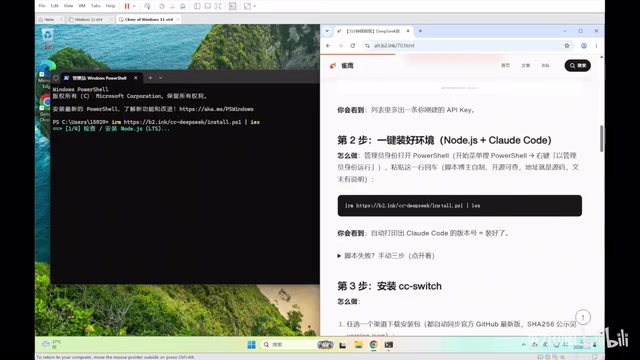
For users concerned about security, the creator specifically notes that the full source code of the script is open-sourced on GitHub and can be reviewed before execution. This is a good reminder: before running any script with administrator privileges, it's worth understanding what it does — admin rights mean the script can modify system files, install software, or change environment variables. Reviewing the source is basic self-protection.
Step 3: Configure the DeepSeek Model with CC Switch
CC Switch is the bridge tool that connects Claude Code to DeepSeek. It can be downloaded from Baidu Netdisk or GitHub (Baidu Netdisk tends to be faster for users in China). Install it somewhere easy to find, then launch it.
Technically, CC Switch functions as an API Adapter layer. There are two major API format standards in the industry: the OpenAI Chat Completions format (characterized by a messages array with role/content structure) has become the de facto industry standard; Anthropic has its own Messages API format (featuring a standalone system field and support for multimodal content blocks). CC Switch works in four stages: it first starts a local HTTP proxy server to intercept API requests from Claude Code; it then parses the Anthropic-format request structure to extract the system prompt, message history, and tool definitions; it re-serializes this information into DeepSeek's OpenAI-compatible format and sends it; finally, it converts the response stream back into the format Claude Code expects. This architecture follows the same design philosophy as open-source projects like LiteLLM and One API, and has become the mainstream approach for enterprise-grade multi-model gateways. Since the OpenAI API format is the industry de facto standard, most domestic models like DeepSeek provide OpenAI-compatible interfaces, making this kind of adapter tool relatively straightforward and reliable to implement.
This is the most critical configuration step in the entire tutorial and involves two sub-steps.
Adding the DeepSeek Configuration
Open CC Switch and click the first tab to create a new configuration. Under "Preset Provider," select DeepSeek and paste the API Key you saved earlier into the corresponding field.

Click "Fetch Model List" and check all models with million-token context windows. The context window refers to the maximum number of tokens a language model can process in a single inference pass — it directly determines the model's capacity to handle large codebases. Early models had context windows of only 4K–8K tokens (roughly 3,000–6,000 English words) and had to frequently truncate historical information. A million-token context window allows the AI to "see" an entire code repository in a single conversation — including all source files, configuration files, and documentation. This is especially valuable for cross-file refactoring and bug tracing (which requires understanding complete call chains). DeepSeek achieves this through techniques like Multi-head Latent Attention (MLA), which dramatically reduces the computational cost of the attention mechanism, making ultra-long context processing feasible. After selecting these models, enable the "Hide AI Signature" and "Team Mate Mode" options (the former filters out response text that might reveal the underlying model's identity, maintaining a consistent user experience), then click Add.
Verifying Connectivity
Once added, make sure the DeepSeek configuration is set to "In Use." Click the heartbeat icon (the wave symbol) to test connectivity — a positive result confirms the configuration is working.
Finally, type claude in the command line and press Enter, then say hello to test the response. If the AI responds normally, it means CC Switch, Claude Code, and DeepSeek are all successfully connected.
Step 4: Build Your First Webpage
With the setup complete, let's walk through a basic development workflow to help you get started with AI-assisted programming.
First, install the VSCode editor and add the Chinese language pack extension (search for "Chinese"). Restart when prompted to get the Chinese interface.
Establishing a Clean Project Structure
Building good development habits early matters. It's recommended to create a dedicated Code folder on your C: or D: drive to store all your code, with a separate subfolder for each project (e.g., Report). When you open the project folder in VSCode, the left-hand panel will reflect file changes in real time.
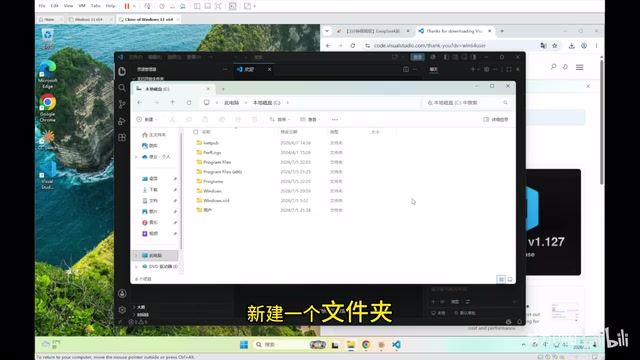
Using Bypass Mode for Efficient Development
Open a terminal from the top menu in VSCode and type claude to start. A useful trick when writing code is to enable Bypass Mode — just tell the AI "please configure Claude Bypass mode" and it will handle the setup automatically.
Bypass Mode is essentially an "auto-approve" state. By default, Claude Code pauses before performing sensitive operations like writing files or running commands, asking the user to confirm each action. This mechanism is designed to give users oversight of each step — consistent with the "Human-in-the-Loop" safety principle in Agentic system design. With Bypass Mode enabled, the AI can execute multiple steps consecutively without asking for individual confirmations, significantly improving efficiency for batch generation or complex tasks. Note that this mode is best suited for isolated project environments — when working in important production codebases, it's advisable to keep the default confirmation behavior.
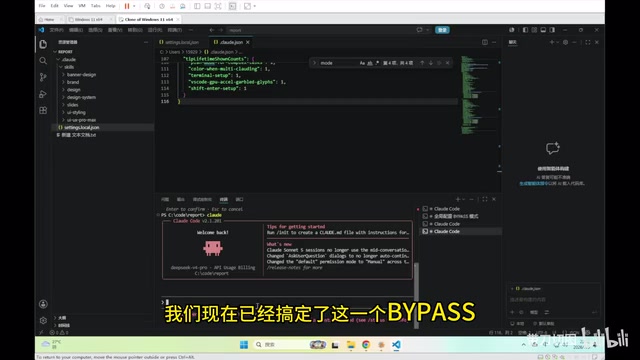
Once enabled, paste your prepared prompt into Claude Code and press Enter. It will automatically generate a complete webpage. The demo landing page covers core AI development concepts including base models, Harness, Skill, MCP, and AI Agents.
The style of the generated page can be freely customized — whether you want a clean SaaS look, a bold Neo-Brutalist aesthetic, or an enterprise design, just specify it in the prompt. Claude Code also has a built-in Skill feature, and you can find additional skill extensions in the GitHub community.
Is This Setup Worth It?
The biggest value of this DeepSeek + Claude Code approach is that it gives developers in China access to a top-tier Agentic programming tool at an extremely low cost. Compared to the official channel, it eliminates both the network and payment barriers, and ¥10 is all you need to get started.
That said, it's worth being realistic: DeepSeek's coding capability isn't on par with native Claude, and performance may differ on complex engineering tasks. It's also worth noting that ultra-long contexts come with a "Lost in the Middle" effect — research shows that current models are relatively weaker at retrieving information from the middle sections of very long contexts. This arises from a natural positional bias in the Transformer attention mechanism, which is more sensitive to the beginning and end of sequences. When working with very large codebases, be mindful of this limitation — you can partially mitigate it by splitting contexts into manageable chunks or explicitly highlighting the location of key information in your prompts. For learning AI-assisted programming or rapidly prototyping webpages, however, this combination is more than capable.
For beginners looking to get into AI-assisted development, this is an exceptionally low-barrier entry point. Feel free to share in the comments how long it took you to get everything running — community-driven validation helps confirm the reliability of this approach over time.
Key Takeaways
Related articles

Disaster and Glory of the Apollo Program: The History We Must Revisit Before Returning to the Moon
From the fatal Apollo 1 fire to Apollo 8's daring lunar orbit to Apollo 11's successful landing—revisiting the disasters, fears, and compromises of the Apollo program and their lessons for today's return to the Moon.
Netflix Trust Exercise Turns Into Firing Trap: Where Are the Boundaries of Corporate Trust?
A Netflix employee was fired after sharing private info in a trust exercise. We analyze the risks of corporate trust exercises and how employees can protect themselves.

AMD CDNA5 Architecture Deep Dive: Technical Evolution and the AI Computing Competition Landscape
Deep analysis of AMD's CDNA5 architecture covering Chiplet packaging upgrades, HBM memory evolution, and low-precision compute optimization, examining how AMD challenges NVIDIA's AI chip dominance.