Kman Plugin Review: Cut Claude Code Output Tokens by 65% and Save Big

Kman plugin uses prompt injection to cut AI output tokens by 65%, slashing coding costs.
Claude Opus 4 output costs $25 per million tokens, and LLMs are notorious for verbose, filler-heavy responses. Kman injects a system prompt that makes the model communicate like a senior engineer — direct and concise — reducing output tokens by an average of 65% without sacrificing technical accuracy. Some tasks see up to 87% savings, and the plugin supports Claude Code, Cursor, and 40+ other AI coding tools.
Kman Plugin Review: Cut Claude Code Output Tokens by 65% and Save Big
Claude Opus 4 output pricing runs $25 per million tokens — five times the input price. For developers who rely heavily on Claude Code, output token consumption directly determines how much you spend and how long your weekly quota lasts. A plugin called Kman claims to reduce output tokens by an average of 65% without sacrificing technical accuracy. How does it actually work?
The Verbosity Problem: You're Paying for Filler
Anyone who's used an AI coding assistant knows the feeling: large language models love to pad their responses. Transition phrases, pleasantries, restating your question, filler connectors, ellipses — none of this helps you ship code, but you're paying for every token of it.
To understand the problem, you need to understand how token pricing works. Tokens aren't simply characters or words — in English, one token is roughly 4 characters or 0.75 words; in Chinese, a single character typically maps to 1–2 tokens due to higher information density. Anthropic uses asymmetric input/output pricing for Claude Opus 4: output tokens cost five times more than input tokens. This reflects the actual compute cost of inference — generating each output token requires a full forward pass, while input tokens can be processed in parallel batches, making them far cheaper to handle.
At Claude Opus 4 pricing, that's $25 per million output tokens versus $5 for input. Every unnecessary sentence the model produces adds to your bill. For Pro plan users with weekly usage caps, this verbosity can drain your quota by Wednesday.
This "verbosity bias" isn't accidental — it's baked into the training process. During RLHF (Reinforcement Learning from Human Feedback), human evaluators tend to rate more detailed answers higher, which trains models to proactively add transition sentences, restate context, and insert disclaimers, even when none of that contributes to solving the problem.
Kman's core idea is simple: make the model talk like a senior engineer — get to the point, skip the fluff. It doesn't swap models, change settings, or touch config files. It changes the model's output style through a single slash command.
Technically, Kman is a carefully engineered system prompt injection. LLM output style is highly sensitive to contextual instructions — by injecting specific behavioral constraints at the start of a conversation, you can dramatically shift output patterns without modifying model weights. This is fundamentally different from fine-tuning or other approaches that alter the model itself. It's pure inference-time intervention, which is why it works across models and platforms.
Benchmark Results: 65% Average Output Token Reduction
The Kman repository includes official benchmarks based on 10 real-world coding tasks, and the numbers are striking:
| Task | Standard Output Tokens | Kman Output Tokens | Savings |
|---|---|---|---|
| React Re-render Bug | 1,180 | 159 | 87% |
| Set Up Postgres Connection Pool | 2,347 | 380 | 84% |
| Debug Postgres Race Condition | 1,200 | 232 | 81% |
| Refactor Callbacks to Async/Await | — | — | 22% |
| Average | — | — | 65% |
The React error debugging task dropped from 3,400 output tokens to 456 — an 87% reduction.
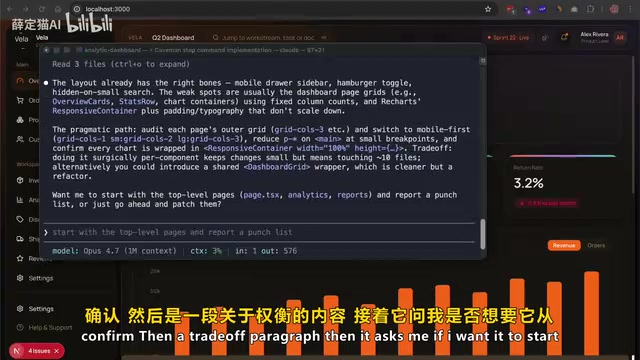
Same Question, Two Styles: Standard Mode vs. Kman Mode
The video author ran a comparison test using a Next.js e-commerce dashboard project. Same prompt — asking how to implement a fully responsive mobile layout using native code:
Standard mode (576 output tokens): The model opens by saying the layout foundation looks solid, then identifies weak spots, then writes a lengthy "practical path" analysis covering review, switching, trimming, and confirmation steps, plus a discussion of trade-offs. Technically fine, but reads more like a blog post.
Kman mode (337 output tokens): Also confirms the layout foundation is good, but lists the weak points directly as bullet items — calling out specific files, chart wrapper issues with responsive containers, navigation breadcrumb crowding — summarizes the trade-offs in two lines, then asks whether you want to go through each item or just fill in the gaps. 41% fewer tokens. Zero technical content lost.
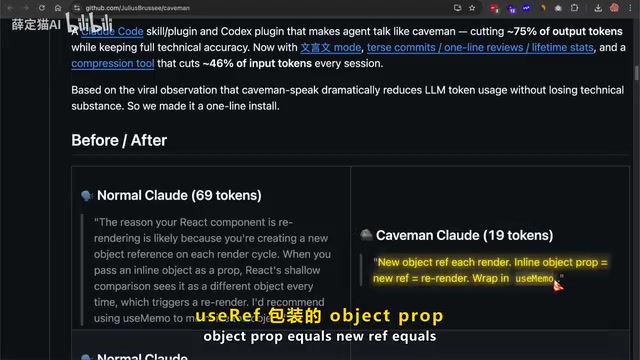
The React re-render bug comparison is even sharper: standard mode says "Your React component is likely re-rendering because you're creating a new object reference on every render cycle"; Kman compresses this to "New object ref on every render → wrap with useRef", going from 69 tokens to 19. Same fix, 75% fewer tokens.
Kman Installation Guide: Supports 40+ Coding Assistants
Installation by Platform
Kman works with virtually every major AI coding tool:
- Claude Code:
claude plugin marketplace add→claude plugin install kman - Codex: Search for Kman in the Plugins section
- Gemini CLI: Install the extension via GitHub URL
- Cursor / WindSurf / GitHub Copilot: Use the
npx skillscommand - OpenCode, RUAMP, Goose, Kiro, and 40+ other agent tools are all supported
How to Activate and Deactivate
Four trigger phrases work: /kman, Talk Like Kman, Kman Mode, or simply say "save tokens".
Related articles
 Product Reviews
The Programmer's Desk Setup Guide: Building a Workspace That Feels Like Home
Discover how programmers build productive, comfortable workspaces. From multi-monitor setups to ergonomic design, explore the desk philosophy that drives focus and flow.
 Product Reviews
Qoder vs Cursor Real-World Comparison: Which $20/Month AI IDE Is Better?
Hands-on comparison of Qoder vs Cursor AI IDEs: Agent autonomy, human interaction count, and architecture decisions. Qoder needed only 2 interactions vs Cursor's 8.
 Product Reviews
Cursor Cloud Agent Demo: Eliminating Bottlenecks Across the Entire Software Development Lifecycle
Deep analysis of Cursor's Cloud Agent demo showing how cloud VMs, automated test artifacts, and a full-chain control plane systematically eliminate human bottlenecks across the software development lifecycle.