MailOZ Virtual Email Review: A Complete Guide to Registering Cursor and Other AI Coding Tools

Hands-on review of using MailOZ virtual email to register AI coding tools like Cursor and Windsurf.
This article tests MailOZ virtual email for registering Cursor, Windsurf, and Augment to access free tiers. MailOZ is easy to use with reliable verification code delivery, making it useful for quick tool evaluations. However, the article also highlights risks including ToS violations leading to bans, account data loss, and hidden time costs — recommending it only for short-term trials, not long-term abuse.
The Free Tier Problem with AI Coding Tools
Cursor, Windsurf, Augment… these AI coding tools have quietly become part of every developer's daily workflow. But there's a very real problem: free tier limits run out fast, and once they do, you're either paying for a subscription or looking for a workaround.
These three tools represent three distinct approaches to AI-assisted development. Cursor is a deep fork of VS Code that embeds large language models like GPT-4 and Claude directly into the editor, offering code completion, cross-file editing, and natural language programming. Windsurf (formerly a Codeium product) centers on its "Cascade" agentic workflow, capable of autonomously completing multi-step programming tasks. Augment focuses on enterprise-grade code understanding, building a semantic index of entire repositories to deliver more context-aware completions. All three follow a freemium model — free tiers offer limited AI requests (Cursor's free plan, for example, includes roughly 2,000 completions and 50 premium requests per month), while paid subscriptions typically run $20–$40/month. These limits are exactly what's driving developers to look for creative alternatives.
As a result, using virtual email addresses to register multiple accounts and unlock additional free tiers has quietly become common practice in developer circles. One service that's been getting attention lately is MailOZ — people mention it for its simplicity and solid compatibility with mainstream AI tools.
This article puts MailOZ through its paces to see how well it actually works.
What Is MailOZ? An All-in-One Virtual Email Platform
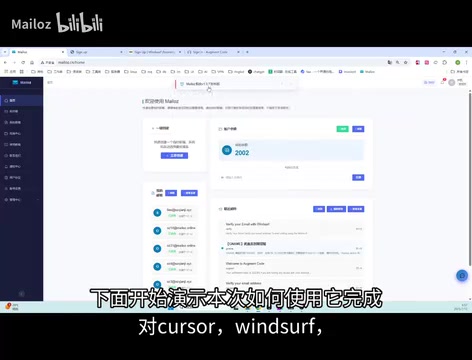
MailOZ is a platform for generating and managing virtual (also called temporary) email addresses. Its core features include:
- One-click email generation: No personal information required — just click and get a working email address
- Reliable verification code delivery: Supports receiving registration emails from Cursor, Windsurf, Augment, and similar platforms
- Unified dashboard: Email generation, inbox viewing, and account management all in one place
- Email history: Previously received emails and verification codes are saved and accessible anytime
From a technical standpoint, virtual email services aren't complicated to build. Providers register a set of domains and configure MX (Mail Exchange) records to point to their own mail servers, then apply a "Catch-All" policy — meaning any email address under that domain, regardless of prefix, will receive mail without needing to be individually created. When a user requests a new address, the system simply generates a random prefix string and pairs it with an existing domain. Unlike traditional email services, virtual inboxes typically don't support SMTP sending — they're receive-only and require no password or identity verification. MailOZ builds on this foundation by adding user-level inbox management and email archiving.
Apparently, MailOZ recently shipped a major update that consolidates previously scattered features into a single aggregated dashboard, significantly improving workflow efficiency.

Step-by-Step Tutorial: Register for Cursor, Windsurf, and Augment in Three Steps
Step 1: Generate a Virtual Email Address on MailOZ
The process is straightforward — open the MailOZ platform, click "Create Now," and the system will automatically assign you a virtual email address. The generated address will appear in the "My Mailboxes" list in the lower-left corner of the page for easy access later.
Step 2: Register for Multiple AI Coding Tools Simultaneously
With your virtual email address in hand, you can kick off registrations on multiple platforms in parallel:
- Cursor: Fill in the registration form with your virtual email and submit — don't wait for the verification code yet
- Windsurf: While waiting, switch over to Windsurf and complete the same registration flow
- Augment: Continue to Augment and submit the registration form using the same email address
Efficiency tip: Don't register one platform at a time. Submit all the registration forms first, then come back to collect all the verification codes at once — it saves a lot of time.
Step 3: Return to MailOZ to Collect All Verification Codes
Head back to MailOZ and click "Refresh" to pull the latest emails. Under normal circumstances, verification emails from all three platforms will appear in your inbox. Copy each code and return to the corresponding platform to complete verification.
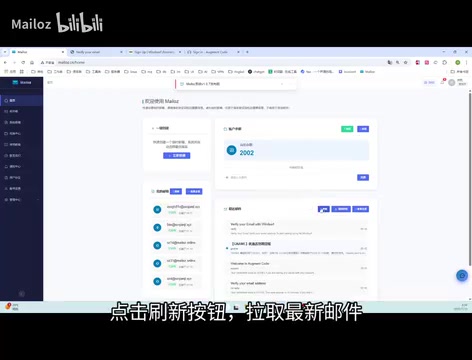
In testing, all three platforms delivered their verification codes successfully — no missing emails, excessive delays, or platform-side rejections.
Inbox Management: A Clear View of Your Email History
After completing registration, the "My Mailboxes" page in MailOZ shows every email received by that address, including sender, timestamp, and full content. If you've used the same address to register multiple services, this history feature becomes genuinely useful for ongoing account management.

Risk Warning: What You Need to Know Before Using Virtual Emails
Getting it to work technically is one thing. Whether you should do it is another. Here are several risks worth taking seriously.
Account Bans for Violating Terms of Service
The user agreements for Cursor, Windsurf, Augment, and similar tools almost universally prohibit creating multiple accounts per person. If a platform detects this, all associated accounts may be banned. These platforms are already deploying device fingerprinting, IP correlation analysis, and other anti-abuse measures — and their detection capabilities are only getting stronger.
It's worth understanding that modern SaaS anti-abuse systems go far beyond checking email domains. Device fingerprinting collects dozens of data points — browser type, screen resolution, GPU rendering characteristics, installed fonts, Canvas and WebGL fingerprints — to generate a highly unique device identifier. Even if you switch email addresses and clear cookies, device fingerprints can still link multiple accounts to the same physical machine. On top of that, IP reputation scoring flags registrations from VPNs, data centers, and proxy nodes, while behavioral analysis models detect anomalies like account creation timing patterns and usage similarity. Cursor and similar tools, being locally installed desktop applications, can also read machine-level hardware identifiers (such as motherboard serial numbers and MAC address hashes), making detection evasion significantly harder.
Account Security and Data Loss Risks
Accounts registered with virtual email addresses typically can't recover passwords. If you've accumulated important project configurations, code snippets, or conversation history in these tools, recovering that data after an account issue becomes extremely difficult.
The core problem here is that mainstream AI coding tools use email as the sole identity anchor. Password resets, login device change confirmations, and subscription management notifications all flow through the registered email. The fundamental risk of virtual email is its unpredictable lifecycle — providers can reclaim domains, purge historical emails, or change service policies at any time, leaving users with no way to recover account access. It's also worth noting that tools like Cursor store project indexes, AI conversation history, and personalized configurations locally, all tied to your account. If the account becomes inaccessible, even if your code itself is unaffected, the accumulated context and workflow configurations will be lost.
The Hidden Time Cost
Frequently creating new email addresses, registering new accounts, and migrating work environments all consume time. For developers who rely on AI coding tools as core productivity infrastructure, a paid subscription is often the better value. Virtual emails make more sense for product evaluation and side-by-side comparisons.
Conclusion: Useful, But Use It Wisely
MailOZ is genuinely good at what it does — simple to use, reliable for receiving verification codes, and the unified dashboard experience is smooth. For quickly trying out and comparing AI coding tools like Cursor, Windsurf, and Augment, it's highly efficient.
That said, using virtual emails to register multiple accounts carries real risk of violating platform terms of service. The right way to think about it is as a tool for product evaluation and short-term trials — not as a long-term strategy for gaming free tiers. If a tool is genuinely useful, it's worth paying for.
Related articles
 Tutorials
ChatGPT Plus Subscription Guide: Are GPT-5.5, image-2, and Codex Worth the Upgrade?
A detailed look at ChatGPT Plus features — GPT-5.5, image-2, and Codex — with a Plus vs Pro comparison and a complete step-by-step subscription guide for users outside the US.
 Tutorials
Harness AI Engineering in Practice: Using Claude Code to Master Enterprise-Level E-Commerce Development
Deep dive into Harness AI Engineering: master enterprise e-commerce development with Claude Code using the Rules, Skills, Wiki, and Changes framework.
 Tutorials
Cursor + Codex Dual-IDE Collaboration: A Practical Methodology for Open-Source Project Customization
A complete methodology for open-source project customization based on real-world experience, detailing the Cursor+Codex dual-IDE workflow, seven-stage process, MVP validation, and AI source code reading techniques.