Office CLI: The Open-Source Tool That Lets AI Agents Generate and Deliver Office Files

Office CLI lets AI Agents generate and deliver Office files end-to-end, no Microsoft Office needed.
Office CLI is an open-source tool that hit GitHub Trending, enabling AI Agents like Codex to directly create, edit, and deliver Word, Excel, and PowerPoint files without installing Microsoft Office. It supports render previews and automated layout checks, closing the gap between AI-generated content and workplace-ready deliverables.
A Pain Point More Common Than Writing Code
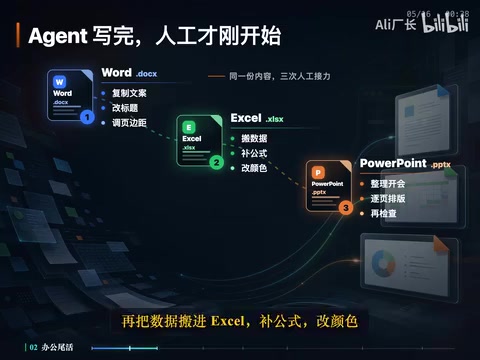
Codex writes your weekly report and analyzes your data — but what about the last step? You still have to open Word, Excel, and PowerPoint yourself and manually format everything page by page. The content and data are there, but you still have to paste them into Word, fix heading styles, and adjust margins. Then you move the data into Excel to add formulas and adjust colors. The boss says it needs to be ready for a meeting, so you compile it into a PowerPoint, arranging slides one by one.
The agent finishes its job, but the human grind isn't over — the most exhausting part is often not creating the content, but delivering it. That's exactly the problem the open-source project Office CLI — which recently topped GitHub Trending for the week — is designed to solve, gaining over 4,100 new stars in a single week.
At first glance, you might think this is just a niche tool for developers tinkering with Office files. But dig deeper and you'll find it targets a daily scenario that almost no working professional can escape.
Background: AI Agents and Office Automation
An AI Agent is an AI system capable of autonomously perceiving its environment, forming plans, and executing multi-step tasks. Unlike a one-shot large language model, an Agent can call external tools, read and write files, and iterate in loops until a complete goal is achieved. OpenAI Codex is a prime example, designed specifically for code generation and task automation. However, the office automation space has long suffered from a "last-mile" problem: AI can generate content, but cannot directly produce Office files that meet workplace standards. A gap requiring human effort has always existed between content generation and final deliverable.
What Office CLI Actually Does
One Set of Commands, Three Core Office File Types
Office CLI enables AI Agents like Codex to directly create, read, and modify three core office file types: Word documents, Excel spreadsheets, and PowerPoint presentations. Editing text, adjusting styles, writing formulas, adding charts — all handled through the same unified set of commands.
Two things make this especially notable:
- No Microsoft Office installation required — the project is open source and runs from a single downloaded file;
- Someone verified its complete independence by generating all three file types in a pure command-line WSL2 environment.
Background: OpenXML Format and the Technical Basis for Standalone Operation
Modern Office files (.docx / .xlsx / .pptx) are essentially ZIP archives conforming to the OpenXML standard, containing XML files and media resources. This standard was led by Microsoft, formally published by ECMA International in 2006, and became an ISO international standard (ISO/IEC 29500) in 2008. Because the file format is fully open, these files can be read and written without installing Microsoft Office — you just need a library that can parse the OpenXML specification. Python libraries such as
python-docx,openpyxl, andpython-pptxwork on exactly this principle. Office CLI builds a unified command-line interface on top of these libraries, enabling it to run independently on any operating system.
Background: WSL2 and the Significance of Headless Server Environments
WSL2 (Windows Subsystem for Linux 2) is Microsoft's technology for running a full Linux kernel inside Windows without a graphical interface, commonly used by developers for their toolchains. In WSL2 or remote server environments, traditional Office file generation methods either rely on heavyweight software like LibreOffice or are simply not possible. Office CLI's ability to independently generate standard-format files in pure command-line environments has significant engineering value for CI/CD pipelines (Continuous Integration/Continuous Delivery — the automated build and deployment processes in software development) and scheduled automated report generation.
This means that in servers, CI pipelines, WSL2, and other pure command-line environments, Agents can generate standard Office files without depending on bloated desktop software.
Giving AI Agents "Eyes" for Layout
Previously, when an Agent modified an Office file, it was a bit like rearranging furniture blindfolded. It knew the font size had increased, but couldn't see whether the heading had been pushed off the page or whether shapes were overlapping. After editing, it would just deliver — often with disastrous results.
One of Office CLI's core capabilities is rendering generated files as HTML or PNG preview images. This seems simple, but it fundamentally transforms the entire workflow.
Background: The Technical Value of Render Previews
Converting Office files to HTML or PNG previews technically requires parsing the OpenXML structure and mapping it to a browser-renderable DOM tree, or using a headless browser (a browser with no visual interface that can be programmatically driven to perform rendering tasks, such as Headless Chrome) to take screenshots. This capability is critical because it establishes the foundation for AI Agents to perform a "visual feedback loop": rather than relying solely on abstract XML structure to judge layout quality, Agents can programmatically inspect rendering results to identify issues like text overflow, element overlap, and insufficient contrast — problems that would normally require a human eye to catch. This enables a form of automated visual quality control, and represents a key technical milestone in moving from "generative AI" to "autonomous delivery AI."
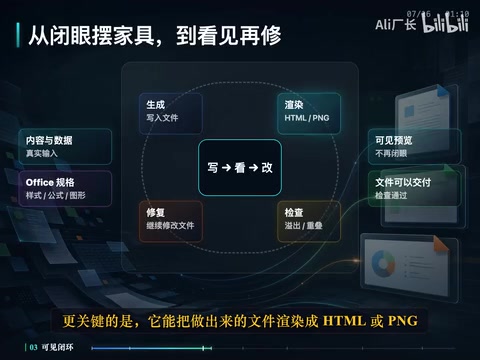
The full workflow can now run as a closed loop: write content → generate file → render preview → check result → fix issues and repeat until the file is ready to deliver. AI Agents go from "editing blind" to "editing with visibility" — and that's the prerequisite for them to truly handle layout work on behalf of humans.
Independent Testing: Error Detection, Math, and Precise Targeting
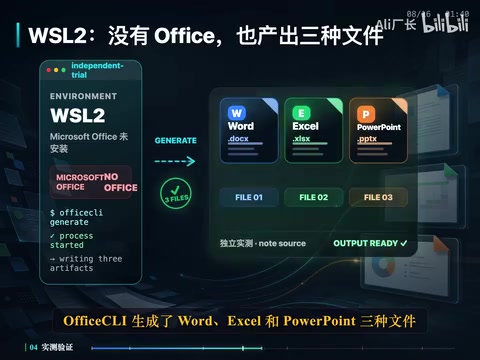
Someone recently ran an independent test in a WSL2 environment without Microsoft Office installed, and the results speak for themselves. Office CLI generated Word, Excel, and PowerPoint files, with the following outcomes:
- Word: Document style issues were automatically detected;
- Excel: SUM formulas actually calculated results rather than leaving empty shells;
- PowerPoint: Shapes could be located via stable IDs, enabling precise subsequent modifications;
- All three files passed structural validation and successfully generated HTML previews.
Further Detail: The Engineering Value of Stable IDs
In PowerPoint's OpenXML structure, every shape, text box, chart, and other element has a unique numeric ID (shape id). "Stable ID" means this ID remains unchanged across multiple edits, allowing an Agent to precisely target a specific element and modify it without risk of errors caused by changes in element order. This is the technical prerequisite for a "generate first, then edit locally" workflow, and is fundamental to Office CLI's support for iterative layout refinement.
Generating text content is often just the first step. That content still needs to become an Office file that colleagues can open directly, managers can annotate, and clients can review — only then is the work truly done. Office CLI fills in exactly that final, most tedious link.
Getting Started: Simpler Than You Think
Write Your Delivery Requirements Into the Prompt
The usage is straightforward: install Office CLI, have Codex read its built-in documentation, then hand over the raw data, company template, and delivery requirements to the Agent.
Your prompt can look something like this:
Read this month's sales data, use the existing report template, generate an eight-slide PowerPoint, and save it as "July Business Review." After generating, render a preview and check for text overflow, element overlap, or low-contrast issues. Fix any problems found, and only deliver the final file.
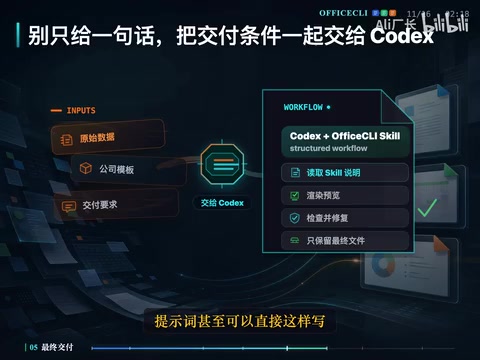
The most important part of that prompt isn't "generate eight slides" — it's "only deliver the final file." That instruction hands off all the intermediate layout work, checking, and revisions to the Agent. You only need to receive the result.
Further Detail: The Role of Prompt Engineering in Agent Tasks
In AI Agent workflows, a prompt (Prompt) is not just a content instruction — it's a task boundary definition. Termination conditions like "only deliver the final file" tell the Agent to keep cycling through "generate → check → revise" until quality standards are met, rather than stopping after the first generation. This "goal-oriented" rather than "step-oriented" approach to prompt writing is key to fully leveraging an Agent's autonomous looping capability, and represents the core mindset shift from "using an AI tool" to "delegating a task to AI."
Don't Want to Touch the Command Line? There's a GUI
If you'd rather avoid the command line, the project README also describes a companion graphical interface tool, AR. After all, most users don't care how many commands ran behind the scenes — they just want to receive a finished file.
Current Limitations: Not Quite "Eyes-Closed" Delivery Yet
Of course, Office CLI isn't yet at the stage where you can fully deliver with your eyes closed. The independent testing mentioned above honestly exposed a few known issues:
- Official documentation sometimes lags behind the version — features iterate quickly, and documentation may fall behind;
- Render screenshots depend on the local environment — a suitable browser and fonts are required, otherwise previews may be incorrect;
- Automated checks still have blind spots — testing found that low-contrast layout issues were missed.
Further Detail: The Root Cause of Font Dependency Issues
Font information in Office files is stored only as name strings (e.g., "Microsoft YaHei", "Arial"). During rendering, the system must locate the corresponding font file in the local font library to display text correctly. In Linux servers or WSL2 environments, Chinese fonts are typically not pre-installed, causing the rendering engine to substitute other fonts — resulting in different character widths, layout errors, or even garbled text. This is a challenge shared by all cross-platform Office rendering tools. Common solutions include pre-installing the required font packages or embedding font files in a Docker image.
For complex company templates or formal documents being sent to clients, it's still best to open the file in Microsoft Office or WPS for a final review before delivery.
That said, this is a completely different situation from before. Previously, when a human had to take over, they'd need to copy content, redo the layout, and fix formatting — essentially starting over. Now, you just open the file, see what's off, and decide what to fix. The workload drops from "full reformatting" to "final review."
Closing Thoughts: AI Agents Truly Entering the Office Workflow
When an AI Agent finishes writing code or analyzing data, it has only completed half the intellectual work. The other half is transforming those results into a deliverable artifact. The significance of Office CLI lies in reconnecting this broken chain.
AI Agents truly entering the office workflow starts here: after the Agent completes its analysis, an Office file you can actually deliver appears on your desktop — not a pile of text and data that still needs to be manually transferred. When AI no longer stops at "generating content" but goes all the way to "delivering a finished product," office automation finally addresses the real pain point.
Industry Background: The Evolution of Office Automation
The history of Office Automation (OA) dates back to macro recording and VBA scripting in the 1980s. Microsoft Office's COM automation interface made programmatic Office operations possible, but it was long confined to the Windows platform and required local installation. From the 2000s onward, open-source libraries like Apache POI (Java) and OpenPyXL (Python) enabled cross-platform file generation based on the OpenXML standard — but native AI integration was still missing. Office CLI represents a new generation paradigm: AI Agents as the central orchestrator, structured file operation tools as the execution layer, and visual rendering as the feedback mechanism. Together, these three components form a complete automation loop — the natural evolution of the office automation technology stack in the age of large language models.
Key Takeaways
Related articles

The Truth Behind Codex 'Build a Website in 5 Minutes': AI Isn't Creating Sites—It's Helping You Copy Them
Exposing the truth behind viral Codex 5-minute website videos: creators aren't building original sites with AI—they're copying shared prompts or scraping others' work. Learn AI coding tools' real limits.

Getting Started with AI Agent Development: A Complete Guide from Concept to Practice
A comprehensive guide to AI Agent architecture and development, covering automated marketing, intelligent customer service, and investment analysis scenarios with single and multi-agent collaboration.

The Truth Behind Codex 'Build a Website in 5 Minutes': AI Isn't Creating Sites — It's Helping You Copy Them
Exposing the truth behind viral Codex 5-minute website videos: creators aren't building original sites with AI — they're copying shared prompts or scraping others' work.