Paseo: A Unified Cockpit for Remotely Controlling Coding Agents from Your Phone

Paseo lets you monitor and control coding Agents like Claude Code from your phone via a local service.
Paseo is a locally deployed unified console that lets developers remotely monitor and control coding Agents (Claude Code, Codex, Copilot, etc.) from their phone, desktop, or command line. It solves the common pain point of Agents getting stuck waiting for human confirmation when developers step away. With 8,800+ GitHub stars, it validates real demand, though its remote code execution capability requires careful security evaluation before production use.
The Real Pain Point: What Happens to Your Coding Agent When You Leave Your Desk
Developers who've used coding agents like Claude Code, Codex, or Copilot have probably all encountered this scenario: you assign a task to the Agent, it's running in the terminal, and you need to step out for a meeting, grab lunch, or even just get a glass of water — only to come back and find the Agent has been stuck for ages, waiting for you to confirm something, wasting a good half hour.
What's even more frustrating is that these coding Agents can throw follow-up questions at you at any time, and not being at your computer means the entire development workflow grinds to a halt.
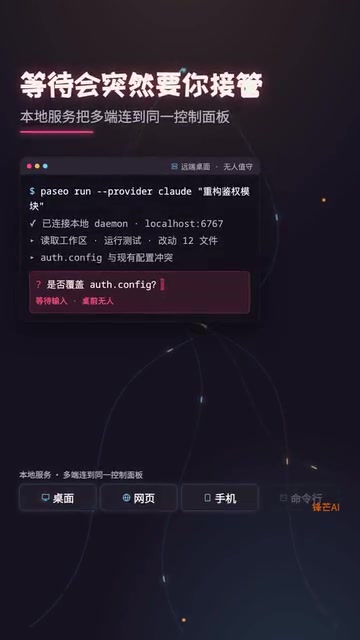
The root cause is that today's mainstream coding Agents are fundamentally code generation and execution systems built on large language models. They rely on a "Human-in-the-Loop" mechanism to ensure safety — requiring explicit developer confirmation before executing critical operations like file writes, command execution, or code commits. This design is a necessary safety guardrail, but it also means Agents can't run fully autonomously. Any node requiring human confirmation becomes a blocking point. As Agent capabilities grow stronger, the execution chains for individual tasks get longer, and the probability of blocking waits increases accordingly.
Paseo aims to solve this very specific problem: letting you monitor and control running coding Agents from your phone. It's not another AI model — it's a unified agent console that connects your existing Claude Code, Codex, Copilot, and other tools into a single interface accessible from desktop, mobile, and command line.
Paseo's Core Design: Local Service with Multi-Device Access
Architecture
Paseo's approach isn't complicated: it starts a local service on your development machine, then desktop browsers, mobile browsers, and the command line all connect to the same Agent control panel. The agents still run in your development environment, using your tools and credentials — Paseo simply provides a unified orchestration entry point.
From a technical perspective, this is essentially a lightweight web server running on the development machine, exposing Agent state queries and command dispatch interfaces via HTTP/WebSocket protocols. This architectural pattern is similar to Jupyter Notebook's server-side design — computation and execution happen locally, while the browser serves as a remote rendering and interaction frontend. In contrast, cloud-hosted solutions (like GitHub Codespaces or Gitpod) move the entire development environment to the cloud. Paseo's choice of a local approach is driven by a core consideration: keeping code and credentials within the developer's physical control while reusing existing local development environment configurations.

This means you can select different Agent backends within the same interface — Claude Code, Codex, Copilot, Open Code, or even Pi — switching flexibly based on task requirements. Mobile access is as simple as scanning a QR code, with no additional client installation needed.
Paseo's Industry Position as an Agent Orchestration Layer
The "Agent orchestration layer" that Paseo targets is a rapidly emerging new category in the current AI toolchain. As coding Agents evolve from standalone tools into multi-Agent collaborative ecosystems, the management complexity facing developers has surged — different Agents have different CLI interfaces, different configuration methods, and different output formats. Similar orchestration needs have long precedents in the DevOps world: Kubernetes orchestrates containers, Terraform orchestrates infrastructure, and their shared logic is providing a unified control plane on top of heterogeneous underlying resources. Paseo attempts to play a similar role in the coding Agent space, abstracting Claude Code, Codex, Copilot, and other backends into uniformly schedulable execution units.
What Paseo Doesn't Do
Understanding Paseo's capability boundaries is equally important:
- Not a new model: It doesn't replace any AI capability — it's purely an Agent orchestration layer
- Doesn't host code: Code and credentials always stay in your local environment
- Not a cloud service: At its core, it's a locally running service process
This design makes it more like a "remote cockpit" for coding agents, rather than yet another full-stack AI platform.
Why Paseo Is Worth Watching
Turning "Waiting" into a "Mobile Development Workflow"
Paseo's real highlight isn't just adding another client — it's changing the temporal model of how developers interact with coding Agents.

In the traditional model, launching tasks, viewing output, responding to follow-up questions, and continuing execution — these steps chain you to your computer. Paseo makes this workflow mobile: you can see on the subway that the Agent is stuck on a dependency installation issue, reply directly from your phone with "skip this, use the alternative approach," and the Agent continues running. By the time you arrive at the office, the task is already done.
The "asynchronous but not out of control" model that Paseo promotes actually reflects how coding Agents are changing the temporal structure of software development. Traditional coding is synchronous — developers write a line, execute a line, debug a line. Agent-driven development is closer to a "delegate-supervise" model, where developers issue high-level intent, Agents autonomously execute specific steps, and developers intervene at critical nodes. This model aligns with the philosophy of asynchronous collaboration in project management, similar to the asynchronous feedback mechanism in Code Review. The difference is that Agents execute far faster than human collaborators, which amplifies the cost of blocking waits — an unanswered confirmation request can mean dozens of minutes of idle spinning.
For developers who frequently run long tasks — such as large-scale code refactoring, batch code generation, or complex debugging — this "asynchronous but not out of control" experience improvement is very tangible.
GitHub Community Buzz Validates Real Demand

As of the time of data collection, Paseo has earned 8,805 stars and 838 forks on GitHub, with the repository maintaining active commits. These numbers indicate that the developer community genuinely resonates with the need for "remote Agent control."
However, GitHub stars as a metric for open-source project popularity need to be interpreted across multiple dimensions. 8,805 stars represents upper-mid-tier attention in the developer tools category, but star counts primarily reflect "interest" rather than "adoption." More meaningful indicators include: the number of bug reports in Issues and fix turnaround time (reflecting actual usage depth), contributor count and commit frequency (reflecting community health), and whether there are public enterprise-level use cases. For comparison, mature coding Agent tools like Aider typically have star counts in the tens of thousands with extensive production environment feedback. Paseo's star growth rate is worth watching, but it's still some distance from being a "battle-tested production-grade tool" — star counts shouldn't be simply equated with "stable and ready to use."
Security and Permissions: The Unavoidable Critical Issue
Being able to remotely control code execution from your phone — the appeal and the risk are two sides of the same coin.
Security Risks That Require Serious Evaluation
- Network exposure: If the local service is misconfigured, it could be accessible to other devices on the same network
- Credential security: The Agent uses your development credentials, and remote control means an expanded attack surface
- Accidental operations: The probability of accidentally confirming a dangerous operation (like deleting files or pushing code) is higher on a phone's small screen
- Session hijacking: Whether the QR code authentication mechanism is robust enough requires careful scrutiny
The security of QR code access deserves further explanation. QR code access essentially encodes a URL containing an authentication token and service address into a QR code graphic, which the phone scans to open an authenticated web session directly in the browser. The convenience is obvious, but the security concerns are worth noting. Common attack vectors include: the QR code being screenshotted or photographed for third-party use (replay attacks), tokens lacking time limits leading to long-lived session credential leaks, and man-in-the-middle attacks (if the connection doesn't use TLS encryption). Mature implementations typically combine one-time tokens, short-lived sessions, device binding, and TLS encryption to mitigate these risks. Developers should confirm which specific security measures Paseo employs before using it.
Before integrating Paseo into your production development workflow, it's advisable to first understand its network boundaries and permission model. At minimum, confirm: Does the service only listen on localhost or does it bind to all interfaces? Does the mobile connection have token authentication? What's the session timeout mechanism?
Who Is Paseo Best Suited For
If the following scenarios apply to you, Paseo is worth adding to your tool watchlist:
- You frequently let coding Agents run long tasks, only to come back and find they've been stuck
- You use multiple Agent tools simultaneously (Claude Code, Codex, Copilot, etc.) and need a unified management interface
- Your work requires frequently stepping away from your desk, but you don't want to interrupt Agent execution flows
- You prefer local deployment and don't want code and credentials passing through third-party cloud services
Conversely, if your Agent tasks typically finish in a few minutes, or your development environment has strict security compliance requirements, the benefits of introducing Paseo may not outweigh the additional complexity it brings.
Conclusion: Understand the Boundaries Before Deep Integration
Paseo has identified an overlooked but genuinely existing pain point: coding Agents are becoming increasingly powerful, but the way developers interact with them is still tethered to the desktop terminal. Its solution — local service with multi-device access — is clean and practical. The 8,800+ GitHub stars also validate the widespread demand for remote coding Agent control.
But "remotely controlling code execution" inherently carries security tension. The recommended strategy is: understand the permission and network boundaries first, then gradually move closer to your core workflow. Start by using it to monitor Agent progress on non-sensitive projects, confirm the security model is reliable, and then consider deeper integration.
Related articles

The Truth Behind Codex 'Build a Website in 5 Minutes': AI Isn't Creating Sites—It's Helping You Copy Them
Exposing the truth behind viral Codex 5-minute website videos: creators aren't building original sites with AI—they're copying shared prompts or scraping others' work. Learn AI coding tools' real limits.

Getting Started with AI Agent Development: A Complete Guide from Concept to Practice
A comprehensive guide to AI Agent architecture and development, covering automated marketing, intelligent customer service, and investment analysis scenarios with single and multi-agent collaboration.

The Truth Behind Codex 'Build a Website in 5 Minutes': AI Isn't Creating Sites — It's Helping You Copy Them
Exposing the truth behind viral Codex 5-minute website videos: creators aren't building original sites with AI — they're copying shared prompts or scraping others' work.