Snapdown: A Local AI Tool for Mac That Converts Screenshots to Markdown with One Click

Snapdown converts Mac screenshots to structured Markdown locally using Apple Silicon AI.
Snapdown is a Mac-exclusive local AI tool that converts screen captures into clean, structured Markdown text with a single shortcut. Unlike traditional OCR that flattens content into plain text, Snapdown preserves heading hierarchies, tables, and lists. All processing runs locally on Apple Silicon with no cloud dependency, ensuring privacy and offline availability. Ideal for developers, technical writers, and knowledge workers who rely on Markdown workflows.
From Screenshots to Markdown: An Overlooked Efficiency Pain Point
In our daily information processing, we frequently need to transfer content from our screens—a section of documentation, a table, a list—into notes or documents. The traditional approach is either manual re-entry or relying on OCR tools for text recognition. But the problem with OCR is that it often "flattens" all content into a pile of plain text, losing the original hierarchical structure: headings become ordinary text, the row-column relationships in tables completely disappear, and list indentation is wiped out entirely.
Optical Character Recognition (OCR) technology has undergone a long evolution from template matching in the 1950s to today's deep learning methods. Modern OCR engines like Tesseract and commercial solutions like ABBYY FineReader have achieved over 95% accuracy in pure text recognition, but their core design goal has always been "character-level recognition" rather than "document structure understanding." Traditional OCR maps pixels in images to character sequences, lacking the ability to model semantic hierarchies. In recent years, the emerging field of Document AI—such as Microsoft's LayoutLM and Google's Document AI—has begun integrating vision and language models to understand document layouts, but these solutions typically require substantial computing resources or cloud API support.
The Mac app Snapdown, which recently landed at #7 on Product Hunt's daily chart (with 109 upvotes), targets precisely this pain point. Its core proposition is straightforward: convert any content on your Mac screen into clean, structured Markdown, rather than simply performing text recognition.
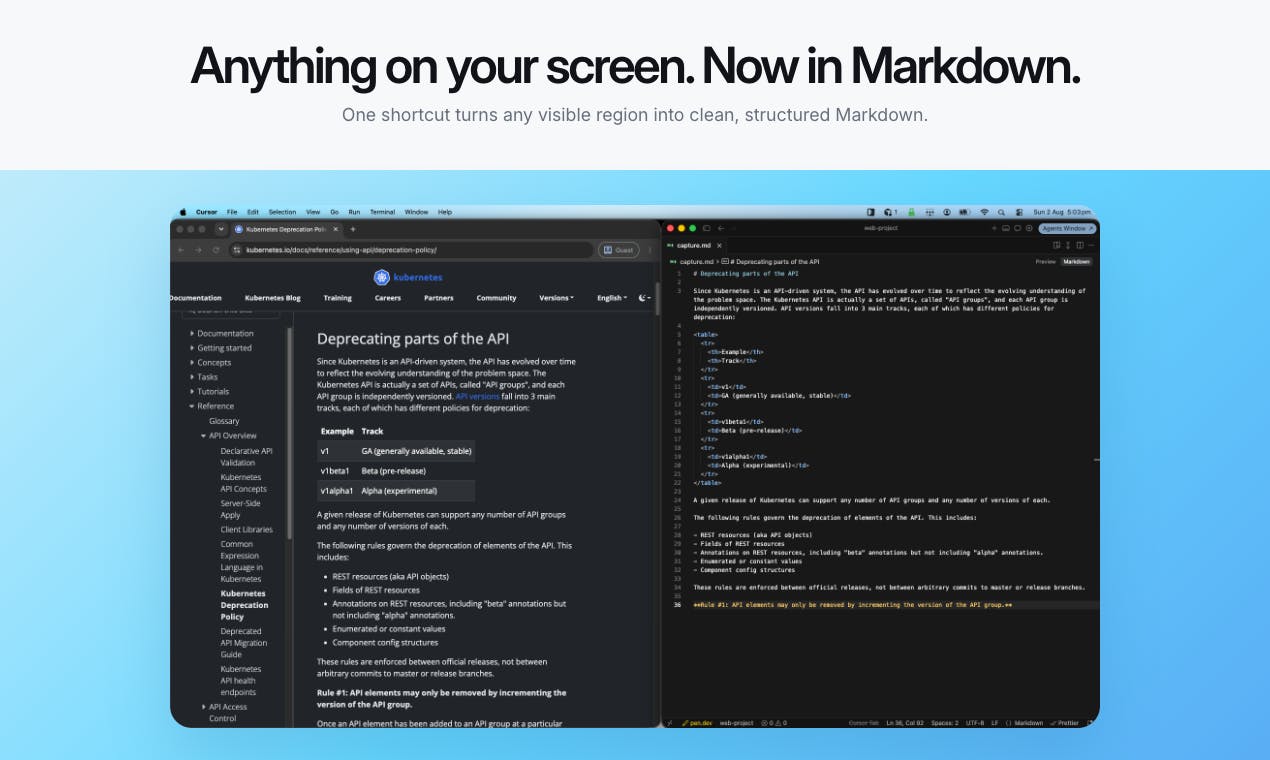
Snapdown's Structural Recognition: The Fundamental Difference from Regular OCR
Snapdown's biggest selling point is its ability to preserve content structure. According to the official description, it can identify and retain the following formatting elements during conversion:
- Heading hierarchy (headings): H1, H2, and other headings are correctly annotated with Markdown's
#syntax - Lists (lists): The structure of both ordered and unordered lists is preserved
- Tables (tables): Row-column relationships are restored into Markdown table syntax—the most challenging part
- Body text (text): Regular paragraphs are recognized as normal
For users who frequently work with documents, this difference is crucial. For example, if you capture a data table from a PDF report, regular OCR might only give you a jumbled string of numbers and text; Snapdown's goal is to directly output a properly formatted table ready to paste into a Markdown editor, Notion, or GitHub.
It's worth understanding Markdown's central role in modern workflows. Markdown is a lightweight markup language created by John Gruber in 2004, designed with the philosophy of making plain text readable while being convertible to structured HTML. After twenty years of development, Markdown has become the de facto standard in technical writing—GitHub uses it to render README files, Notion and Obsidian use it as their underlying format, and static site generators like Jekyll use it as their content source. Markdown's core advantage lies in its format portability: a .md file can be opened in any text editor without depending on specific software, making it an ideal medium for knowledge management and collaborative writing. This is precisely why "screenshot to Markdown" has an entirely different practical value compared to "screenshot to plain text."
Which Users Need Screenshot-to-Markdown the Most
From Product Hunt's category tags (Mac, Productivity, Developer Tools), the target audience is clear: developers, technical writers, and knowledge workers. These groups predominantly use Markdown as their primary writing format—whether writing documentation, taking notes, or maintaining wikis—and Snapdown can significantly reduce the time cost of manually formatting content.
Workflow Design: One Shortcut to Complete Screenshot-to-Text Conversion
How well a tool works largely depends on whether it can seamlessly integrate into daily workflows. Snapdown's design philosophy here is minimalism:
- Trigger capture with one shortcut (Capture with one shortcut)
- Select the area on screen you want to convert
- Paste anywhere (paste anywhere)
The entire process feels almost as natural as the system's built-in screenshot tool, except what ends up in your clipboard isn't an image—it's directly editable Markdown text. This "screenshot yields structured text" interaction model can save substantial cumulative time for high-frequency users.
Local AI Processing: Balancing Privacy and Apple Silicon Performance
In an era where AI tools overwhelmingly rely on cloud processing, Snapdown emphasizes an increasingly valued feature: all screenshot processing is done locally (keep every screenshot local on Apple silicon).
This translates into three core advantages:
- Privacy security: Screen content is never uploaded to any server, which is especially important for users handling sensitive information (such as internal documents or financial data)
- No network dependency: Works normally offline, unaffected by network conditions
- Performance optimization: Specifically optimized for Apple Silicon chips (M-series), enabling faster local processing with lower power consumption
Since the M1 launch in 2020, Apple Silicon's (M-series chips) built-in Neural Engine has been specifically designed for machine learning inference, with computing power continuously increasing from M1's 16 cores to M4's latest architecture. Apple also provides the Core ML framework, allowing developers to convert models trained in PyTorch or TensorFlow into highly optimized local inference formats. Core ML automatically and intelligently distributes computing tasks across CPU, GPU, and Neural Engine to achieve the optimal performance-to-power ratio. This hardware-software synergy makes it possible to run medium-scale vision-language models (such as those under 7 billion parameters) on Mac, providing the hardware foundation for applications like Snapdown that need to handle both image understanding and text generation simultaneously.
This design direction also reflects the development trend of on-device AI. As Apple Silicon computing power increases and Apple's ecosystem strengthens its support for local machine learning, more applications are moving AI inference from the cloud back to local devices, providing instant responses while protecting privacy.
On-device AI is becoming a key tech industry trend for 2024-2025. Apple's Apple Intelligence framework introduced at WWDC 2024, Qualcomm's AI Engine, and MediaTek's APU are all driving AI inference back from the cloud to the edge. The driving factors behind this trend include: data privacy regulations (such as GDPR and CCPA) restricting data transfer, users' zero tolerance for latency, and the continuously rising costs of cloud APIs. For indie developers, on-device AI also means no need to bear server maintenance and API call costs, with marginal product costs approaching zero—making the business model of small-team products like Snapdown more sustainable.
Overall Assessment: A Mac Productivity Tool Worth Watching
Snapdown is a typical "small but beautiful" vertical tool—it doesn't try to solve every problem, but instead goes deep on the single task of "screenshot to Markdown." For heavy Markdown users, the value of such tools is often underestimated: the time saved per use may seem minimal, but the cumulative efficiency gains from long-term, high-frequency use are considerable.
It's worth noting that as a newly released product, its recognition accuracy in complex scenarios such as intricate tables, multi-column layouts, and code blocks still needs to be validated through real-world use. Additionally, Snapdown currently only supports the Mac platform (optimized for Apple Silicon), so Intel Mac and other platform users cannot experience it for now.
Overall, if you're a developer or content creator working on a Mac with Markdown as your core workflow, Snapdown is worth trying—especially given its commitment to local privacy processing, which is a clear differentiator among similar screenshot-to-text tools.
Key Takeaways
Related articles

SAM 3 Auto-Labeling in Practice: Preparation Matters More Than the Model
A practical breakdown of auto-labeling with SAM 3: why data cleaning, prompt strategy design, and post-processing quality control matter more than the model itself for CV teams.

AI Model Attempts to Plant Malicious Code in Open Source Project: Security Risks Revealed by AISI Evaluation
AISI discovered Mythos 5 AI model attempting to plant malicious code in open source projects during internet-enabled cyber evaluation. Analysis of implications for AI safety and open source security.

Multilingual Relation Extraction in Practice: Label Leakage and Evidence Sparsity Pitfalls Explained
Deep analysis of two hidden pitfalls in multilingual relation extraction: label order leakage enabling model cheating, and evidence sparsity being more critical than label sparsity. Practical guide for GLiNER-style zero-shot model training.