StabilityMatrix: An Open-Source Tool for One-Click Installation and Management of Stable Diffusion

StabilityMatrix is an all-in-one Stable Diffusion package manager for unified frontend, model, and environment management.
StabilityMatrix is an open-source cross-platform Stable Diffusion package manager developed in C# by the LykosAI team, with 8,100+ GitHub Stars. It wraps the installation, updates, and version management of multiple SD frontends like Automatic1111 WebUI and ComfyUI into one-click operations, eliminating manual Python environment and CUDA dependency configuration. It also provides unified model management with cross-frontend sharing of Checkpoints, LoRAs, VAEs, and more. Built on the Avalonia UI framework, it supports Windows/macOS/Linux with better performance than Electron-based alternatives.
Project Overview: Why You Need StabilityMatrix
The Stable Diffusion ecosystem is growing rapidly. From WebUI to ComfyUI, from model downloads to plugin management, users often find themselves switching between multiple tools, and Python environment configuration alone is enough to scare many people away. StabilityMatrix was born to solve these pain points — it's a cross-platform Stable Diffusion package manager that unifies the installation, configuration, and management of all major SD frontends into a single, clean graphical interface.
Stable Diffusion is a text-to-image generation model open-sourced by Stability AI in 2022, built on the Latent Diffusion Model architecture. Unlike closed-source solutions such as DALL·E and Midjourney, Stable Diffusion's fully open-source nature has given rise to an extremely large community ecosystem. Dozens of frontend interfaces, thousands of plugin extensions, and tens of thousands of fine-tuned models on platforms like Civitai have been built around it. This prosperity also brings fragmentation — different tools operate independently, lacking a unified management layer. StabilityMatrix is a systematic response to this fragmented landscape.
The project is developed in C# by the LykosAI team and has earned over 8,100 Stars and 553 Forks on GitHub, with community activity continuing to grow. It is currently one of the most popular Stable Diffusion management tools available.
Core Features in Detail
One-Click Installation of Multiple SD Frontends
StabilityMatrix's core value lies in packaging the installation process of multiple mainstream Stable Diffusion interfaces into a "one-click operation." Whether it's Automatic1111's Stable Diffusion WebUI, Vladmandic's SD.Next, ComfyUI, or other community-derived projects, users can complete downloading, installation, and environment configuration through a unified interface.
It's worth explaining the differences between these frontends: Automatic1111's Stable Diffusion WebUI is the earliest and most popular graphical interface, using a traditional form-based interaction where users fill in parameters and click generate — simple and intuitive to get started with. ComfyUI adopts a node-based workflow design, similar to Blender's shader editor or Unreal Engine's Blueprint system, where users connect different functional nodes to build custom image generation pipelines. ComfyUI's advantages lie in flexibility and reproducibility — workflows can be exported as JSON files for sharing, and it uses VRAM more efficiently. The two target different user groups, and many advanced users use both simultaneously, which is precisely why a unified management tool is so important.
The entire process eliminates the need to manually handle Python virtual environments, CUDA dependencies, and other tedious steps. Even AI art newcomers with no programming background can set up a working Stable Diffusion environment in just a few minutes. To understand the value of this, you need to appreciate the pain of traditional installation methods: virtually all Stable Diffusion frontends are built on Python and depend on numerous deep learning libraries like PyTorch, Transformers, and xformers. These libraries have strict version correspondence requirements for Python versions, CUDA versions (NVIDIA's GPU parallel computing platform), and cuDNN versions. For example, PyTorch 2.x requires CUDA 11.8 or 12.1, and different versions of WebUI may require different PyTorch versions. While virtual environments (venv/conda) can isolate dependencies, manually managing multiple environments is still error-prone, especially on Windows where you may encounter additional obstacles like path length limitations and permission issues. StabilityMatrix completely encapsulates all this complexity under the hood.
Full Platform Support: Windows, macOS, and Linux
As a desktop application built with C#, StabilityMatrix supports Windows, macOS, and Linux — the three major operating systems — providing users with a consistent management experience on any platform.
This is especially valuable for macOS and Linux users — deploying Stable Diffusion environments on these platforms traditionally required extensive command-line operations and manual troubleshooting, and StabilityMatrix completely shields users from this complexity.
Unified Model Management
Model management is a high-frequency need in daily Stable Diffusion use. Many users work with multiple frontends simultaneously, and each frontend has its own model directory structure, leading to duplicate model file storage and management chaos.
Before diving deeper into this feature, it's necessary to explain the main model types in the Stable Diffusion ecosystem. Checkpoints are complete base model files, typically 2-7GB, determining the fundamental style and capabilities of generated images. LoRA (Low-Rank Adaptation) is a lightweight fine-tuning technique that injects styles or concepts by training only low-rank decomposition matrices of a small number of model parameters, with files usually only tens to hundreds of MB. VAE (Variational Autoencoder) is responsible for decoding latent space data into final pixel images — different VAEs affect color saturation and detail rendering. There are also Textual Inversion (text inversion embeddings), ControlNet models, and more. An active user's model library can easily reach tens or even hundreds of GB. At this scale, unified model management is no longer a nice-to-have — it's a necessity.
StabilityMatrix provides unified model management with these core advantages:
- Support for sharing model files across different frontends, avoiding duplicate downloads and storage waste
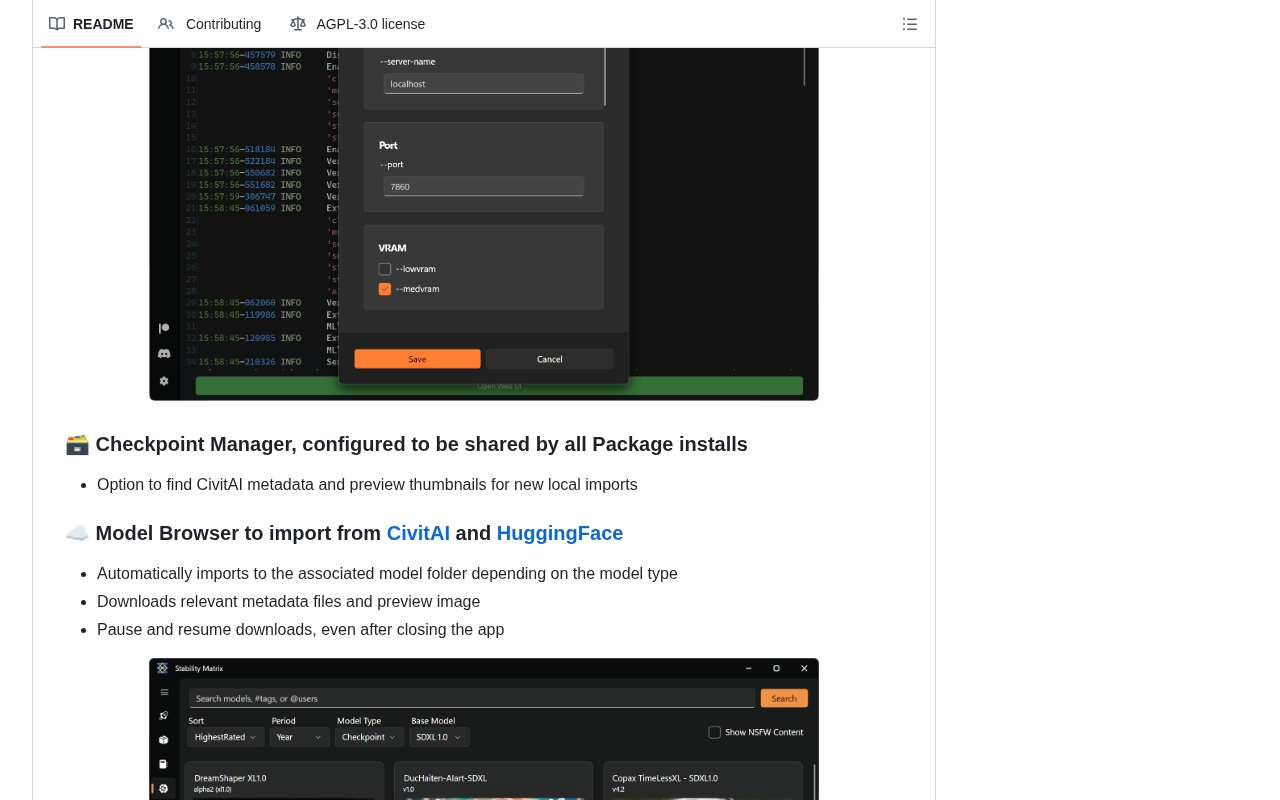
- Easy browsing, downloading, and organizing of Checkpoints, LoRAs, VAEs, and other model resources
- Integration with mainstream model download sources, eliminating the hassle of manually moving files
Package Version Management and Updates
Similar to package managers familiar to developers (like npm or pip), StabilityMatrix provides comprehensive version management capabilities. Package managers are fundamental tools in software development — npm (Node.js package manager) and pip (Python package manager) manage over 2 million and 500,000 packages respectively. Their core value lies in automating dependency handling — when you install a package, the manager automatically downloads and installs all its dependencies while ensuring version compatibility. StabilityMatrix applies this philosophy to the Stable Diffusion toolchain: each SD frontend is like a "package," its Python dependencies, model files, and plugin extensions are like "sub-dependencies," and StabilityMatrix coordinates everything to ensure component version matching and correct paths.
Specifically, its version management capabilities include:
- One-click updates of installed SD frontends to the latest version
- Rolling back to specific historical versions when needed
- Effectively reducing the risk of environment breakage caused by updates
This mechanism lets users enjoy new features promptly without worrying about compatibility issues after updates.
Technical Architecture Highlights
StabilityMatrix chose C# as its development language, which is uncommon in the AI tools ecosystem, but this technical choice brings several practical advantages:
- True cross-platform capability: Leveraging .NET's cross-platform features and the Avalonia UI framework to achieve multi-platform native support. Avalonia UI is an open-source cross-platform UI framework, often called "Flutter for the .NET world." It allows developers to write code once using XAML and C#, then run it on Windows, macOS, Linux, and even WebAssembly, rendering near-native interface effects. StabilityMatrix chose Avalonia over MAUI (Microsoft's official cross-platform UI solution) primarily because Avalonia's Linux support is more mature and stable.
- Better performance: Compared to Python or Electron solutions, C# native applications are significantly better in terms of startup speed and memory usage. Compared to Electron (a framework that packages web applications as desktop applications, widely used by VS Code, Slack, etc.), Avalonia applications typically use only one-tenth to one-fifth the memory of Electron applications and start several times faster. For a management tool that needs to run in the background for extended periods, this difference in resource efficiency matters significantly.
- Higher reliability: A strongly-typed language is more stable and reliable when handling complex package dependencies and configuration management.
Who Should Use StabilityMatrix
- AI art beginners: Entry-level users who don't want to fuss with environment configuration and want to get started with Stable Diffusion quickly
- Multi-frontend users: Advanced users who simultaneously use WebUI, ComfyUI, and other interfaces and need unified management
- Model collectors: Heavy users with large model file collections who need efficient organization and cross-frontend sharing solutions
- Cross-platform users: Developers and creators who switch between Windows, macOS, and Linux
StabilityMatrix vs. Similar Tools
There are some similar AI tool management solutions on the market, such as Pinokio. Pinokio is an Electron-based general-purpose AI application manager that supports one-click installation of various open-source AI projects, covering everything from image generation to language models and speech synthesis. Its advantage lies in breadth — virtually any AI project with an installation script can be managed. However, this generality also means it lacks depth in specific domains, such as lacking cross-frontend model sharing mechanisms. Another common approach is deploying directly using Docker containers, which offers good isolation but requires complex GPU passthrough configuration, and on Windows requires WSL2 support, adding extra complexity.
StabilityMatrix's differentiated advantages are mainly reflected in the following aspects:
| Comparison Dimension | StabilityMatrix | General AI Management Tools |
|---|---|---|
| Focus Area | Deep expertise in Stable Diffusion ecosystem | Covers broad AI tools |
| App Performance | C# native desktop app, fast startup, low footprint | Mostly Electron or Web-based |
| Model Management | Mature cross-frontend model sharing mechanism | Usually quite basic |
| Community Recognition | 8,100+ Stars, solid user reputation | Varies |
For users focused on Stable Diffusion workflows, StabilityMatrix is superior in both professionalism and user experience.
Conclusion and Recommendation
StabilityMatrix represents an important trend in AI tool "infrastructure layers": as the Stable Diffusion ecosystem grows increasingly complex, users urgently need better management tools to lower the barrier to entry. It doesn't produce AI capabilities itself, but it makes acquiring and using AI art capabilities simpler than ever before.
If you're struggling with Stable Diffusion environment configuration, or frustrated by constantly switching between multiple SD frontends, StabilityMatrix is absolutely worth trying.
Project URL: https://github.com/LykosAI/StabilityMatrix
Related articles
 Tutorials
ChatGPT Plus Subscription Guide: Are GPT-5.5, image-2, and Codex Worth the Upgrade?
A detailed look at ChatGPT Plus features — GPT-5.5, image-2, and Codex — with a Plus vs Pro comparison and a complete step-by-step subscription guide for users outside the US.
 Tutorials
Harness AI Engineering in Practice: Using Claude Code to Master Enterprise-Level E-Commerce Development
Deep dive into Harness AI Engineering: master enterprise e-commerce development with Claude Code using the Rules, Skills, Wiki, and Changes framework.
 Tutorials
Cursor + Codex Dual-IDE Collaboration: A Practical Methodology for Open-Source Project Customization
A complete methodology for open-source project customization based on real-world experience, detailing the Cursor+Codex dual-IDE workflow, seven-stage process, MVP validation, and AI source code reading techniques.