Superfile: A Complete Guide to the Modern Terminal File Manager

Superfile brings desktop-grade visual file management to the terminal with multi-panel interface and keyboard-driven speed.
Superfile is a modern open-source terminal file manager that combines the visual advantages of desktop file managers with the speed and keyboard-driven philosophy of the command line. Featuring multi-panel interface, built-in file previews, and deep customization, it targets heavy terminal users, server administrators, and efficiency-focused developers who want intuitive file management without leaving the terminal environment.
Terminal File Management Enters the Visual Era
For developers and system administrators who spend their days working in command-line environments, file management often means endlessly typing commands like ls, cd, and mv. While this workflow is efficient enough, when it comes to complex file browsing, multi-directory comparisons, and quick previews, the pure command-line experience can feel clunky. Superfile aims to deliver a visual experience approaching that of desktop file managers while preserving the speed and keyboard-driven advantages of the terminal.
The history of terminal file managers traces back to the birth of Norton Commander in 1986, which pioneered the dual-panel file management paradigm. Later, Midnight Commander (mc) became widely popular in the Linux world as its open-source successor. In recent years, with the rise of modern languages like Rust and Go, a new generation of terminal file managers has emerged: ranger (Python, Vim-style keybindings), lf (Go, minimalist philosophy), and nnn (C, pursuit of maximum performance). Superfile represents the latest evolutionary direction in this lineage—pushing visual expressiveness to new heights while maintaining the native terminal experience.
Superfile received 194 upvotes and 14 comments on Product Hunt, ranking 6th on its launch day, categorized under productivity tools and open-source projects. Built by developer Yorukot, the tool describes its positioning in one sentence: "A modern, visual file manager for the terminal."
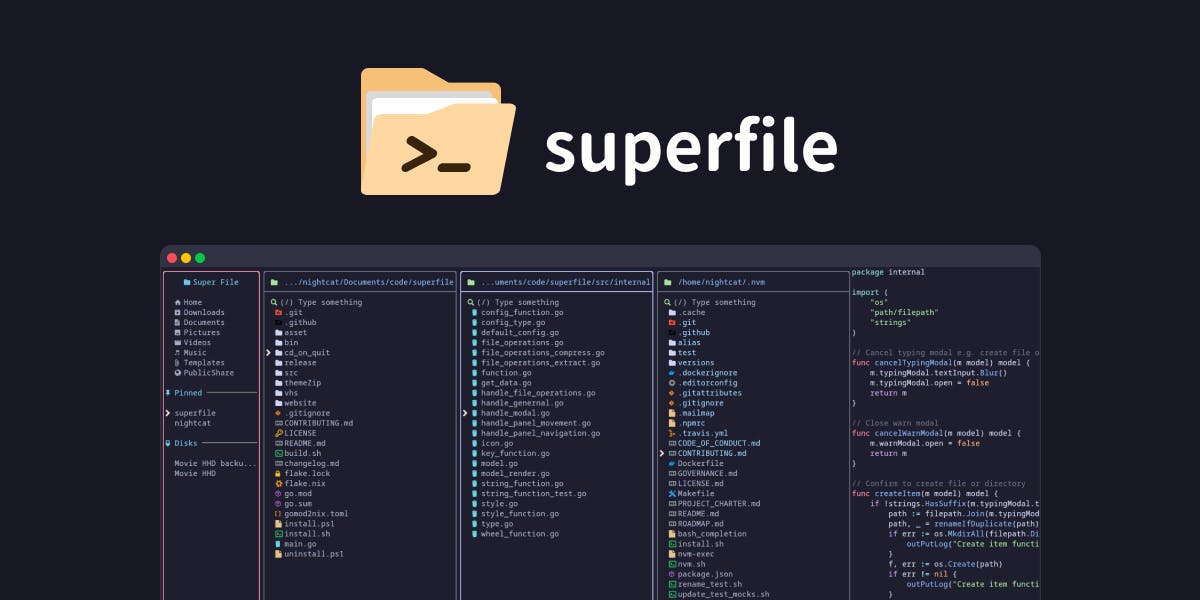
Superfile's Multi-Panel Interface: Desktop-Grade Operation Experience
Superfile's core differentiator is its carefully crafted multi-panel interface. In a traditional terminal, managing files typically requires frequent directory switching or manually splitting the screen using tools like tmux. Superfile has built-in multi-pane capability, allowing users to browse, preview, and move files across multiple panels—much like macOS Finder's column view or Windows Explorer's dual-window mode.
The core problem that multi-panel design solves in file management is "spatial reference." Cognitive psychology research shows that when performing file move/copy operations, humans need to simultaneously perceive contextual information about both the source and destination paths. Traditional single-window CLI forces users to keep path information in working memory, which consumes far more cognitive resources than visual presentation. While tmux can achieve split screens, the panes lack semantic connection—users must coordinate operations between two independent shells on their own. Superfile's multi-panel system operates within a single application context, enabling direct interaction between panels and greatly simplifying the workflow.
The value of this design lies in making "cross-directory operations"—a frequent yet tedious task—intuitive. For example, when copying files from one project directory to another, users no longer need to memorize full paths. Instead, they can move files between two panels in a drag-and-drop fashion, just like in a desktop environment. For users who frequently organize download folders or manage server directory structures, this visualization significantly reduces cognitive load.
Powerful File Preview Capabilities
Beyond multi-panel support, Superfile also emphasizes strong previews. Viewing images, text, and code files in the terminal typically requires calling external tools. Superfile integrates preview capabilities directly into its interface, allowing users to see file content overviews in real-time while browsing the file list, without opening new processes or windows. This is particularly useful for quickly locating target files and confirming file contents.
It's worth noting that implementing image preview in the terminal is a non-trivial technical challenge. Traditional terminals can only display text characters, so image preview relies on special protocols: Sixel (a revival of the 1980s DEC protocol), Kitty graphics protocol (transmitting pixel data via Base64 encoding), iTerm2 inline image protocol, or low-resolution rendering using Unicode half-block characters/Braille dot matrices. Support varies across terminal emulators—Kitty, WezTerm, and iTerm2 support native image rendering, while traditional Terminal.app or certain SSH scenarios require fallback solutions. Superfile's file preview capability needs to handle compatibility across these heterogeneous environments to provide users with a consistent experience.
Keyboard-Driven Operation and Deep Customization
It's important to emphasize that while pursuing visualization, Superfile hasn't sacrificed the most valuable characteristic of terminal tools—being fully keyboard-driven with speed. Rather than heading in a GUI direction, it ensures all operations can be completed via keyboard, guaranteeing that proficient users can still enjoy an efficient and fluid operational rhythm.
For experienced terminal users, mouse operations often mean interruptions to efficiency. Superfile's positioning is clear: it's not about bringing a desktop file manager into the terminal, but rather importing the visual advantages of desktop file managers into the terminal while preserving the terminal's operational philosophy.
From a technical implementation perspective, modern TUI tools like Superfile are typically built on mature TUI frameworks. TUI (Terminal User Interface) is an interface form between pure CLI and GUI, leveraging the terminal's character-drawing capabilities to build rich interactive interfaces. Underlying libraries like ncurses, tcell (Go), ratatui (Rust), or bubbletea (Go) provide foundational capabilities for window drawing, event handling, and color rendering, enabling developers to create complex UI components like scrolling lists, popup dialogs, and progress bars in the terminal—all while maintaining compatibility with SSH remote connections and low-bandwidth environments, scenarios that pure GUI applications cannot reach.
Deep Customization Configuration
Another major advantage of open-source projects is customizability, and Superfile has invested effort here as well. The official description mentions support for "deep customization." This means users can adjust the interface appearance, shortcut key mappings, and even workflow configurations according to their preferences. For the developer community that highly values personalized environments, this is often the deciding factor in whether to adopt a tool long-term.
Who Should Use Superfile
Superfile's target user profile is quite clear:
- Heavy terminal users: Developers who spend most of their day in command-line environments but have grown tired of pure command-line file operations.
- Server administrators: Those who need to manage large numbers of files in remote SSH environments where graphical interfaces are unavailable.
- Efficiency-focused power users: People who want the intuitiveness of visualization without giving up keyboard-driven speed.
As an open-source tool, Superfile's low barrier to entry is one reason it has quickly gained popularity. Users can try it without any cost, and community feedback and contributions continuously drive feature improvements.
The Direction of Terminal Tool Experience Innovation
Superfile represents a clear trend in terminal tool development in recent years—continuously absorbing GUI experience advantages while preserving CLI efficiency. From lazygit and lazydocker to the popularity of various TUI (Terminal User Interface) tools, all confirm developers' strong demand for "better-looking, more usable terminal tools."
lazygit and lazydocker are TUI tools created by developer Jesse Duffield, providing visual terminal operation interfaces for Git and Docker respectively. The success of these tools has spawned a complete TUI ecosystem: btop (system monitoring), k9s (Kubernetes management), posting (HTTP client), gobang (database client), and more. They collectively validate a product hypothesis: developers don't reject visualization—they reject leaving the terminal environment. The common characteristics of these tools are: keyboard-first, zero-configuration to use, theme customization support, and distribution via a single binary file. Superfile is the concrete manifestation of this wave in the file management domain.
Whether Superfile can become the benchmark in terminal file management still requires time and community validation. But judging from its reception on Product Hunt, it has at least precisely hit a real pain point. For users who interact with the terminal daily, spending a few minutes trying this tool might give their everyday file management experience a fresh new feel.
Key Takeaways
Related articles

Flyte 2 Goes GA: Goodbye DAG, Hello Pure Python-Native Orchestration in a Complete Rewrite
Flyte 2 goes GA with a complete architectural rewrite, removing DSL and DAG requirements for pure Python orchestration. Features environment abstractions and data lineage as a Kubeflow/Airflow alternative.

Why AI Guardrails Are Paper Tigers: Even Script Kiddies Can Bypass Them
Analysis of why AI guardrails are so fragile—from prompt injection to encoding tricks, even script kiddies can bypass LLM safety. Learn how to build defense in depth.

Maple-Preview: 20B Ternary MoE Model Achieves 120 tok/s On-Device Inference on iPhone
Maple-Preview achieves 120 tok/s inference of a 20B ternary MoE model on iPhone. We analyze ternary quantization, MoE sparse activation, and on-device inference challenges.