Tencent CodeBuddy Hands-On Review: Complete Guide to Installing and Using This Free AI Coding Assistant
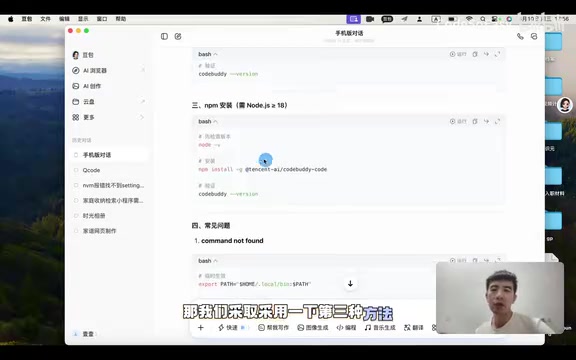
A complete hands-on guide to installing and using Tencent's free CLI-based AI coding assistant CodeBuddy.
This article provides a detailed hands-on review of Tencent's CodeBuddy, a free command-line AI coding assistant. It covers the full installation process (requiring Node.js 18+), account login configuration, basic capability testing, and an impressive demo of building a corporate portal website with a single natural language prompt. The review also shares practical tips on token conservation and using other AI tools to craft better prompts for CodeBuddy.
Introduction: Another Free Option in AI Coding Tools
In today's flourishing landscape of AI coding assistants, many developers have already tried products like Alibaba's TONGYI Lingma and iFlow AI. However, based on hands-on feedback from a Bilibili content creator, Tencent's CodeBuddy stands out in terms of usability and free quota. This article provides a detailed walkthrough of CodeBuddy's installation process, basic usage, and real-world performance in actual development tasks.
The domestic AI coding assistant market currently features multiple strong players. Alibaba's TONGYI Lingma is built on the Qwen large language model, offering code completion, generation, and explanation features, primarily available as VS Code and JetBrains plugins. Baidu's Comate and Huawei's CodeArts Snap are also actively expanding in this space. iFlow AI targets specific workflow-oriented AI development. CodeBuddy differentiates itself through its command-line native experience and free-tier strategy, closely tied to Tencent Cloud's developer ecosystem strategy—attracting developers into Tencent's tech ecosystem through free tools, laying the groundwork for future cloud service and enterprise product conversions.
What Is CodeBuddy? A Command-Line AI Coding Assistant from Tencent
CodeBuddy is an AI coding assistant from Tencent that runs directly in the command-line terminal. It understands natural language instructions and helps users complete development tasks such as file creation, code writing, and project scaffolding. Compared to similar products, one major advantage of CodeBuddy is that it offers a free usage quota, significantly lowering the barrier to entry for regular developers and programming beginners.
Command-line (CLI) AI coding assistants represent an emerging paradigm distinct from IDE plugin-based AI coding tools. Traditional AI coding assistants like GitHub Copilot and Cursor primarily exist as IDE plugins or standalone editors, while CLI-based tools run directly in the terminal environment, interacting with users through natural language to execute development tasks. The advantage of this approach is that it doesn't depend on a specific editor—it can directly manipulate the file system and execute system commands, staying closer to developers' low-level workflows. Similar products include Anthropic's Claude Code, and together they represent the trend of AI coding tools evolving from "code completion" toward "task execution."
CodeBuddy Installation Tutorial: Three Simple Steps
Requirements: Node.js 18+
CodeBuddy installation requires a Node.js environment with a version greater than 18. If you haven't installed Node.js yet, you'll need to download the appropriate installer for your operating system from the Node.js official website.
Node.js is a JavaScript runtime environment built on Chrome's V8 engine that enables JavaScript to run on the server side outside of browsers. Node.js 18 is an LTS (Long-Term Support) version released in 2022, introducing native fetch API, test runner, and other modern features. It's a stable version widely used in production environments. CodeBuddy's requirement for version 18+ indicates it uses some newer Node.js API features to ensure stable operation.
One-Command Installation via NPM
The installation process is straightforward—just run the NPM install command in your terminal. NPM (Node Package Manager) is the default package manager for Node.js and the world's largest open-source software registry, hosting over 2 million packages. CodeBuddy's distribution through NPM means it's essentially a Node.js application that developers can obtain as easily as any other NPM package.
The content creator demonstrated a practical tip in the video—using Doubao AI to get the installation commands. Simply tell Doubao your operating system (Windows or macOS), and it will provide the corresponding installation steps.
After installation, verify success by running the version query command. If the terminal correctly displays a version number, CodeBuddy is ready to use.
Launching CodeBuddy and Account Login
After launching CodeBuddy, the terminal presents four options. The first is to set the working directory (Trusted Folder), after which you'll need to log in. The login options include:
- Chinese Site: Choose this for domestic users
- International Site: For international access
- Enterprise Domain: Enterprise domain login
- IOA: For internal Tencent use, not available to regular users
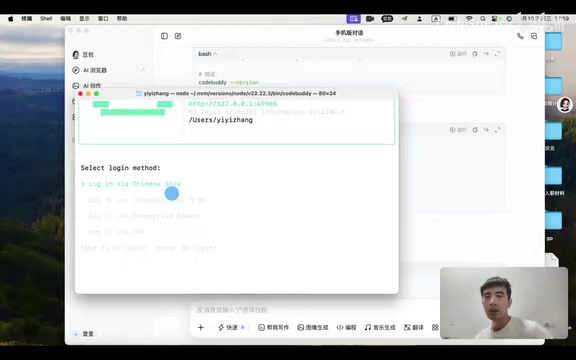
After selecting Chinese Site, the system automatically redirects to Tencent CodeBuddy's web login page. Once logged in, you can start using the tool. The Trusted Folder mechanism is a security design that restricts the AI tool to only perform file operations within directories explicitly authorized by the user, preventing the AI from accidentally modifying critical system files or accessing sensitive directories. This is a common security practice in command-line AI tools.
Hands-On Experience: From Simple Commands to Building a Website with One Sentence
Basic Capability Test: Folder Creation
After successful login, CodeBuddy interacts with users in a conversational format within the terminal. The creator first ran a simple test—asking it to create a folder.
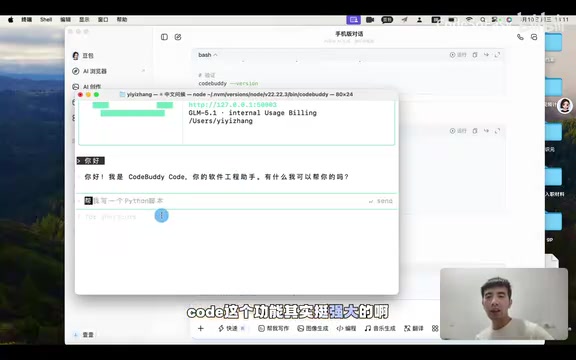
Before executing any operation, CodeBuddy proactively asks the user for confirmation. After typing "yes," the creation is completed. Verification with the ls command confirms the folder has appeared in the root directory. This interactive confirmation mechanism ensures both safety and gives users control over every step the AI takes. This "Human-in-the-Loop" design philosophy is increasingly valued in AI tools—the AI proposes suggestions and execution plans, but the final execution decision always remains with the user, avoiding the risk of irreversible operations from autonomous AI execution.
Advanced Task: Building a Corporate Portal Website with One Sentence
The creator then attempted a more challenging test: having CodeBuddy create a corporate portal website named "Siyuan Technology." For demonstration purposes, no frameworks like Vue were used—instead, a simple pure HTML/CSS approach was chosen.
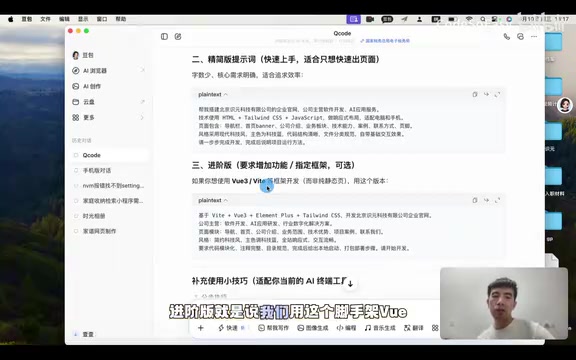
Throughout the process, CodeBuddy automatically completed the following tasks:
- Created the project folder
- Generated the index.html file
- Wrote complete webpage code
- Saved the file to the specified directory
The resulting webpage could be viewed directly in a browser, containing the basic structure and styling of a corporate portal. The creator commented "it's quite impressive" and emphasized that you can continue using natural language instructions to modify any content on the page. This end-to-end generation capability from natural language description to runnable code demonstrates significant advances in current large language models' code understanding and generation—the model needs to not only understand the user's business intent but also master HTML semantic structure, CSS layout rules, and front-end engineering file organization conventions.
CodeBuddy Usage Tips and Considerations
Watch Your Token Consumption
When executing complex tasks, CodeBuddy consumes a significant number of tokens. The creator specifically warned: try to conserve usage, especially when free quota is limited. It's recommended to think through your requirements before executing tasks, describe them precisely with well-crafted prompts in one go, and avoid unnecessary consumption from repeated modifications.
Tokens are the basic units that large language models use to process text. In natural language processing, one token doesn't equal one character or one word—it's a text fragment split by a tokenizer according to specific algorithms. For Chinese, one character typically corresponds to 1-2 tokens; for English, a common word might be 1 token, while uncommon words might be split into multiple tokens. In AI coding tools, both the user's input (Prompt) and the model's output (Response) consume tokens during each interaction. Complex tasks like generating complete webpage code might consume thousands of tokens in a single exchange. This is why precise prompts can significantly save costs—reducing unnecessary back-and-forth conversations means reducing token consumption.
Prompt Optimization Tips: Using AI to Help AI
The creator demonstrated a practical technique in the video: using AI tools like Doubao to generate prompts for CodeBuddy. First describe the functionality you want to Doubao, let it help organize your requirements into structured prompts, then paste them into CodeBuddy for execution. This "AI-assisted AI" workflow can significantly improve both the quality and efficiency of task completion.
This strategy is known in the industry as "AI chaining" or "AI orchestration," and it's an increasingly popular workflow pattern. The core idea is leveraging the respective strengths of different AI tools—for example, using conversational AI (like Doubao) to organize requirements and language, then using execution-oriented AI (like CodeBuddy) to complete the actual code generation and file operations. Prompt Engineering has become an important technical skill in its own right. A good prompt typically includes a clear task description, constraints, expected output format, and reference examples. Through this division of labor, even users who aren't skilled at crafting prompts can achieve high-quality AI output.
What Scenarios Is CodeBuddy Best Suited For?
Based on hands-on testing, CodeBuddy is suitable for the following scenarios:
- Rapid prototyping: Generate a runnable webpage or script with just a few sentences
- File and directory management: Manipulate the file system through natural language
- Code generation and modification: Common development tasks like Python scripts and HTML pages
- Programming learning aid: Beginners can use it to understand project structure and code logic
Particularly noteworthy is that for programming beginners, command-line AI tools offer an entirely new learning path. Traditional programming education requires mastering syntax and understanding frameworks before hands-on practice. With tools like CodeBuddy, beginners can first describe desired functionality in natural language, observe the code structure and logic generated by AI, and then work backward to understand what each line of code means. This "see results first, learn principles later" approach effectively lowers the psychological barrier to getting started with programming.
Conclusion: Is CodeBuddy Worth Trying?
As a command-line AI coding assistant from Tencent, CodeBuddy delivers solid performance in installation convenience, interaction experience, and free quota. Compared to Alibaba's TONGYI Lingma and iFlow AI, its natural language interaction in the terminal environment is smoother, and its code execution capabilities are satisfying. For developers looking to experience AI-assisted programming, CodeBuddy is a free option worth trying. However, be mindful of token consumption—plan your usage wisely and make the most of your limited free resources.
From a broader perspective, CodeBuddy's emergence also reflects the industry trend of AI coding tools evolving from "coding assistance" toward "autonomous execution." Future AI coding assistants may no longer be limited to code completion and suggestions but could understand complete project requirements and autonomously handle the entire process from architecture design to code implementation. In this rapidly evolving field, getting familiar with and mastering AI coding tools early is a worthwhile skill investment for every developer.
Related articles

The Truth Behind Codex 'Build a Website in 5 Minutes': AI Isn't Creating Sites—It's Helping You Copy Them
Exposing the truth behind viral Codex 5-minute website videos: creators aren't building original sites with AI—they're copying shared prompts or scraping others' work. Learn AI coding tools' real limits.

Getting Started with AI Agent Development: A Complete Guide from Concept to Practice
A comprehensive guide to AI Agent architecture and development, covering automated marketing, intelligent customer service, and investment analysis scenarios with single and multi-agent collaboration.

The Truth Behind Codex 'Build a Website in 5 Minutes': AI Isn't Creating Sites — It's Helping You Copy Them
Exposing the truth behind viral Codex 5-minute website videos: creators aren't building original sites with AI — they're copying shared prompts or scraping others' work.