The Complete Codex Guide: From Download & Installation to Real-World Practice

A comprehensive tutorial on OpenAI Codex — the super AI agent for coding, video generation, and computer control.
This article systematically covers how to download, install, and efficiently use OpenAI Codex. Codex is more than an AI chat tool — through its plugin system (Computer Use, Chrome, video generation, website building, etc.) and infinitely expandable Skill library, it handles programming, computer control, automation, and other complex tasks as a super AI agent. The article also shares practical tips on multi-conversation management, custom Skills, scheduled automation, and mobile remote control.
OpenAI's Codex is far more than just an AI chat tool — it integrates programming development, video generation, and computer control into one package, making it one of the most comprehensive super AI agents available today. An AI agent refers to an artificial intelligence system capable of autonomously perceiving its environment, formulating plans, and executing multi-step tasks, distinguishing it from traditional single-turn Q&A chatbots. Traditional AI can only passively respond to individual user commands, while AI agents possess capabilities for task decomposition, tool invocation, environment interaction, and autonomous decision-making. Since 2024, AI agents have become one of the hottest directions in the industry, with OpenAI, Anthropic, Google, and other companies rolling out their respective agent products — Codex is OpenAI's core strategic play in this space. This Codex tutorial covers everything from download and installation to efficient usage, helping you systematically master its core features and practical techniques.
Download & Installation: Get Started in Three Steps
The first step to using Codex is simple: search for "Codex Download" in your browser, making sure to verify that the URL belongs to OpenAI's official domain. On the page, you'll find the Open Codex App documentation — just select the version corresponding to your operating system (macOS, Windows, or Linux) and download it.
After logging in, you'll see a chat-like interface layout. The left sidebar is divided into two core areas: the Conversation area at the bottom and the Project area at the top. The conversation area is similar to what you'd find in ChatGPT or other chat tools, but the project area is where Codex's true power lies.
Project Area: Codex's Core Battlefield
The project area is Codex's most powerful feature module. You can create new projects and complete various tasks within them — developing apps, building websites, writing novels, creating videos — virtually anything. Codex is essentially not just an AI programming tool, but a super AI agent capable of handling multiple complex tasks.
Multi-Conversation Management Strategy
One crucial usage tip: always create multiple conversation threads within a single project. For example, you can name them "Project Development," "General Chat," "Server Configuration," etc., each serving its own purpose.
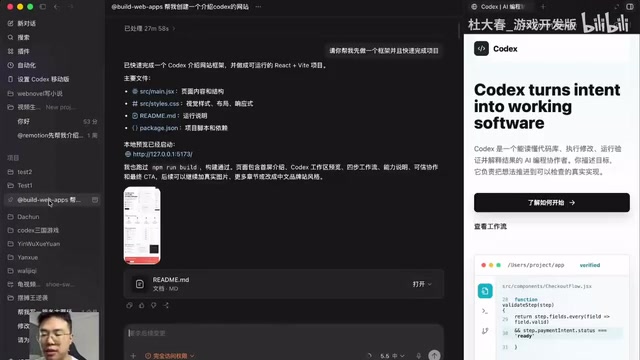
There are two key reasons for this approach:
- Clearer workflow: Different types of discussions are managed separately, preventing conversations from becoming chaotic
- Avoiding context limitations: Each conversation thread has a token limit, and even with compression support, long conversations will still hit the ceiling. To explain the concept of tokens — a token is the basic unit that large language models use to process text. One Chinese character typically corresponds to 1-2 tokens, while one English word corresponds to approximately 1-1.5 tokens. Every AI conversation has a token limit (i.e., context window), which determines how much content the model can "remember" in a single conversation. When conversation content exceeds the context window, the model loses earlier information, causing response quality to degrade or "forgetting" to occur. Although modern models have expanded their context windows from the early 4K tokens to 128K or even longer, in complex project development, the accumulated volume of code files, discussion records, and debug logs can still easily hit the limit. While information doesn't flow between conversation threads, they all share the same project folder — Codex can read Markdown files and code files within the project, maintaining high cross-thread comprehension efficiency.
Plugin System: The Key to Multiplying Codex's Capabilities
Codex plugins are one of its most imaginative features. Click on the plugin panel in the left sidebar, and you'll discover a series of powerful tools:

- Computer Use: Directly controls your computer and automates desktop operations. Computer Use is a cutting-edge technology that allows AI to directly operate computer graphical interfaces — the AI takes screenshots to "see" the current interface, then simulates mouse clicks, keyboard inputs, and other operations to complete tasks. This technology was first introduced by Anthropic in October 2024 alongside Claude 3.5 Sonnet, and OpenAI subsequently integrated similar functionality into Codex. Its significance lies in breaking the limitation of AI only working within chat windows, enabling AI to operate any desktop software — including traditional software without API interfaces — greatly expanding AI's practical application scenarios
- Chrome: Controls the Chrome browser for web automation
- Game Studio: A game development tool, extremely useful for gaming enthusiasts
- Hyperframe by Hedgen: A video generation plugin that can directly create video content for you
- Build Web Apps: Quickly build websites
Using plugins is straightforward: click the plus button in the conversation box and select the plugin you need. A more efficient approach is to set a default plugin in your project rules, so Codex automatically activates it with each conversation, eliminating the manual selection step.
Practical Example: Building a Website with Codex in 30 Minutes
As a demonstration, the author invoked the Build Web Apps plugin to have Codex create a website introducing Codex itself. Traditional website development requires mastery of frontend technologies like HTML, CSS, and JavaScript, as well as backend frameworks, database configuration, server deployment, and a whole series of complex skills — a complete website's development cycle is typically measured in weeks or even months. The Build Web Apps plugin compresses this process down to minutes by using AI to automatically generate frontend code and page structures. It typically generates code based on mainstream frontend frameworks like React or Vue, and supports real-time preview and iterative modifications. Similar AI-assisted website building tools include Vercel's v0, Bolt.new, and others, which collectively drive the popularization of the "natural language website building" paradigm. The entire process took only 30 minutes to complete a fully functional website.
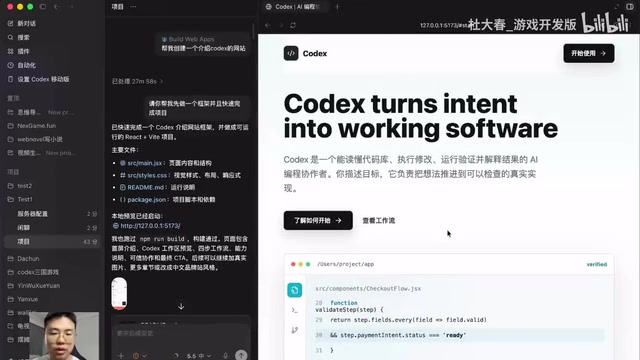
There are two ways to preview the website: one is through Codex's built-in preview window, and the other is by copying the local URL into your browser. Looking at the actual results, the quality of the generated website is quite impressive.
Skill System: An Infinitely Expandable Skill Library
Skills are another core capability of Codex. Type a forward slash / in the conversation box to bring up the Skill panel. Codex's Skill system is essentially a modular prompt engineering and toolchain encapsulation mechanism — each Skill presets domain-specific professional instructions, workflows, and output specifications, making the AI perform more professionally and consistently when executing specific tasks. This design philosophy is similar to ChatGPT's GPTs or open-source community Agent frameworks (like LangChain, AutoGPT), with the core idea being to "specialize" a general-purpose large model's capabilities through preset rules. Skills cover a rich range of functional domains:
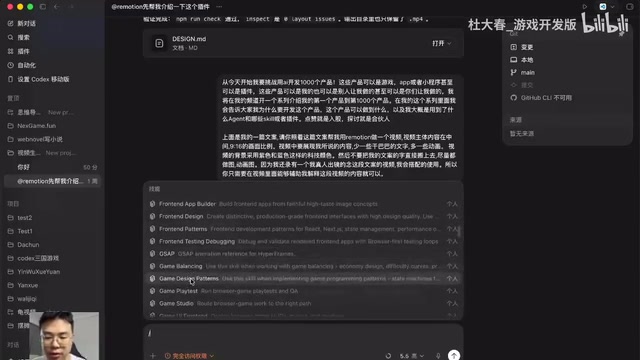
- Code Review: Helps you inspect and optimize code quality
- UI Design: Includes general UI and Game UI Frontend specialized skills
- Virtual Pet: The recently popular virtual pet feature — some users have used it to recreate QQ Pet
Using the author's "Hundred Bullet Pattern Counterattack" project as an example, eight or nine Skills plus one external software called Expirate were used — it's precisely this combination of Skills and plugins that makes the AI agent extraordinarily powerful.
Custom Skills: Extending Codex's Capability Boundaries
Even more exciting is that you can create your own Skills. Type /Skill Creator, create a new project dedicated to building Skills, describe your requirements to Codex, and it will help you create the custom Skill. The ability for users to create custom Skills embodies the "user as developer" philosophy — you don't need programming knowledge; simply describe your needs in natural language, and the AI will create new functional modules for you. This means Codex's capability boundaries can be continuously expanded by users — the bigger your needs, the greater its capabilities.
Automation & Mobile Remote Control
Codex also supports workflow automation. You can set up scheduled tasks, such as having it perform data scraping at 9 AM, generate reports at noon, and send emails at 5 PM — all by creating automation tasks through the new automation feature. Traditional automation tools like Zapier, IFTTT, or cron jobs require users to have certain technical configuration skills, while Codex's automation feature allows users to describe tasks and trigger conditions in natural language, significantly lowering the barrier to entry. This capability is enormously valuable in enterprise scenarios: routine work like monitoring competitor website changes, automatically generating daily/weekly reports, and periodic data backups can all be delegated to AI. Combined with the Computer Use plugin, Codex can even automatically operate desktop software to execute these tasks, achieving true end-to-end automation.
Additionally, Codex recently launched a mobile remote control feature, allowing you to control Codex on your computer remotely via your phone to execute tasks. While Claude Code has already pioneered similar functionality, Codex's follow-up demonstrates that remote control is an important development direction for AI agents.
Permission Settings & Beginner Tips
Regarding permission settings, there's an access permission option to the right of the plus button in conversation boxes. It's recommended to use the first two permission levels and avoid granting excessive permissions to ensure security.
For first-time Codex users, here's a recommended step-by-step approach:
- Familiarize yourself with the plugin panel first: Understand each Codex plugin's functionality and applicable scenarios
- Try basic conversations: Experience how Codex differs from ChatGPT and other tools
- Create an actual project: Think about which parts of your work could be optimized or standardized with Codex
- Develop personal tools: While using AI to develop commercial products still presents challenges, building small tools to boost personal productivity is already very mature
Conclusion
Codex's core value lies in the fact that it's not simply a chatbot, but a super AI agent that continuously expands its capabilities through plugins and Skills. From website building to video generation, from computer control to game development, it's redefining the boundaries of "what AI can do for you." Rather than just chatting with AI, let Codex truly become your productivity tool.
Related articles
 Tutorials
ChatGPT Plus Subscription Guide: Are GPT-5.5, image-2, and Codex Worth the Upgrade?
A detailed look at ChatGPT Plus features — GPT-5.5, image-2, and Codex — with a Plus vs Pro comparison and a complete step-by-step subscription guide for users outside the US.
 Tutorials
Harness AI Engineering in Practice: Using Claude Code to Master Enterprise-Level E-Commerce Development
Deep dive into Harness AI Engineering: master enterprise e-commerce development with Claude Code using the Rules, Skills, Wiki, and Changes framework.
 Tutorials
Cursor + Codex Dual-IDE Collaboration: A Practical Methodology for Open-Source Project Customization
A complete methodology for open-source project customization based on real-world experience, detailing the Cursor+Codex dual-IDE workflow, seven-stage process, MVP validation, and AI source code reading techniques.