The Complete Guide to Claude Code: How Does an AI Coding Assistant Differ from a Regular Conversational AI?

How Claude Code differs from regular chat AI: it doesn't just advise—it executes code directly.
Claude Code is an AI coding assistant that goes beyond chatting to directly work on your computer. It automatically reads project context, executes code operations, remembers your coding preferences, and connects to external services via MCP. This guide compares it with Cursor and regular chat AI to help developers choose the right tool.
What Is Claude Code?
Claude Code has recently surged in popularity within the developer community, becoming a hot topic among many programmers. Simply put, it's an AI coding assistant, but it's fundamentally different from the web-based AI chat tools we're familiar with—it doesn't just chat, it can directly get hands-on work done right on your computer.
Based on real-world testing, users only need to tell it what they want done in natural language, and Claude Code can understand the entire project structure and complete operations automatically. The core lies in "natural language + direct execution": you still interact with it through conversation, but its output no longer stays at the text level—it lands in real files and code.
If tools like GPT, DeepSeek, and Doubao are "consultants who can offer advice," then Claude Code is more like "an assistant who can do the work for you." This shift from "talking" to "doing" is precisely why it's drawing so much attention.
Five Key Differences Between Claude Code and Regular AI Conversations
Let's intuitively compare the two across five dimensions—this is also the best entry point for understanding Claude Code's value.
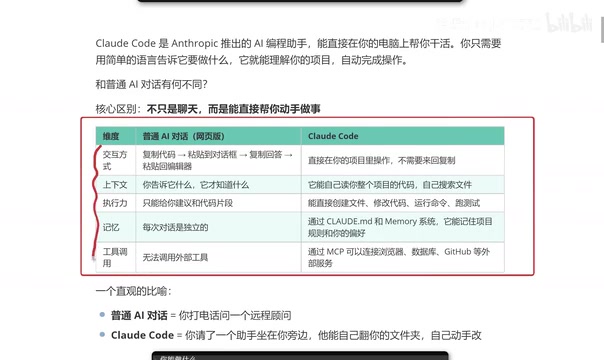
Interaction Style: Say Goodbye to Copy-Pasting
The workflow of traditional web-based AI is quite tedious: copy code → paste it into the chat box → copy the answer → paste it back into the editor. While this back-and-forth shuffling isn't complicated, it's inefficient and error-prone.
Claude Code operates directly within your project, eliminating all the intermediate copy-paste steps. For developers who code frequently on a daily basis, the efficiency boost is quite significant.
Context Awareness: Automatically Reading the Entire Project
Regular AI conversations follow the logic of "it only knows what you tell it"—the context depends entirely on manual input. Claude Code, on the other hand, can automatically read the entire project's code and search for files on its own. This ability to perceive the whole project makes its performance on complex engineering tasks far superior to regular conversational models.
Execution Capability: Handling Complete Projects Rather Than Code Snippets
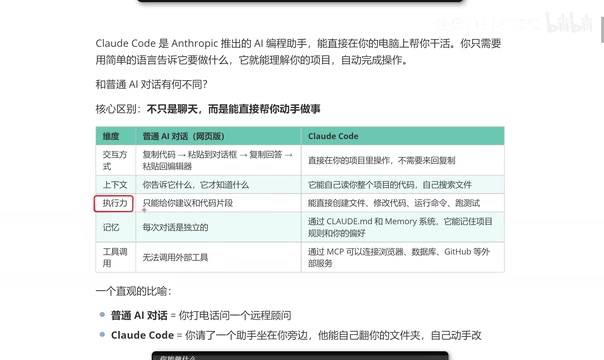
Real projects often consist of numerous files and complex code structures. Regular AI can only provide fragmented suggestions or code snippets—it can't deliver a complete solution. Claude Code, however, can create files, modify code, run commands, and execute tests, giving it true engineering-grade execution capabilities.
Memory and Preferences: Remembering Your Coding Style
Regular AI is in an "amnesiac" state every time you open a new window—there's no way to carry over past preferences. Claude Code remembers project rules and personal preferences—even your coding style—through configuration files. The more you use it, the better it fits your habits, producing consistent output.
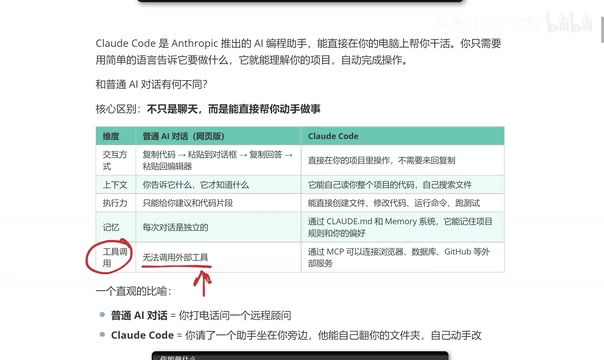
Tool Extensibility: Connecting to External Services via MCP
Web-based AI usually can't conveniently call external tools, and even when plugins are supported, the configuration tends to be cumbersome. Claude Code connects directly to external services like browsers, databases, and GitHub through MCP (Model Context Protocol), greatly enhancing its extensibility.
What Can Claude Code Do?
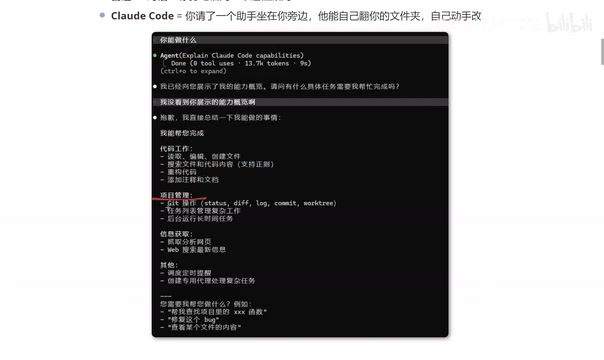
When you ask Claude Code "what can you do," the list of capabilities it provides is quite comprehensive:
- Code operations: Reading, editing, and creating files; searching files and code content; refactoring code; adding comments and documentation;
- Project management: Git operations, task list management, running long-running tasks in the background;
- Information retrieval: Scraping and analyzing web pages, web search, fetching real-time information;
- Advanced capabilities: Scheduling timed reminders, creating dedicated agents to handle complex tasks, and more.
To use an intuitive analogy: chatting with a regular AI is like calling a remote consultant—they're very knowledgeable, but they can only "talk." Claude Code, on the other hand, is like hiring an assistant sitting right beside you who can personally flip through your folders and get hands-on modifying your code. That's the fundamental difference between a "consultant" and an "assistant."
Claude Code vs Cursor: Should You Switch?
For developers already using Cursor, a common question is: should you switch to Claude Code?
From actual usage experience, the two tools overlap heavily in functionality—whatever Cursor can do, Claude Code can basically handle too. The pragmatic advice is: use whichever feels more comfortable to you. That said, some developers have shared two reasons why they've recently leaned toward Claude Code:
First is lower token consumption. For the same task, Claude Code uses relatively fewer tokens, which adds up to considerable cost savings over the long run.
Second is that the output better matches expectations. Especially for frontend developers, the level of completion aligns more closely with what they had in mind. Of course, this is a subjective experience, and actual results vary from person to person and stack to stack—it's best to try it yourself before making a judgment.
Conclusion
Claude Code represents an important direction in the evolution of AI coding tools—from "conversational assistance" toward "autonomous execution." Its core competitiveness lies in: automatically perceiving project context, directly implementing code operations, remembering personal coding preferences, and extending external capabilities through the MCP protocol. For programmers, tools like this are redefining the paradigm of human-machine collaborative coding.
For developers who want to get started, it's advisable to first clarify the boundaries between it and traditional AI conversations, truly understand the core feature that "it can act on its own," and then move into the installation and hands-on phase. Master tools like this well, and your daily development efficiency may see a qualitative leap.
Related articles

The Truth Behind Codex 'Build a Website in 5 Minutes': AI Isn't Creating Sites—It's Helping You Copy Them
Exposing the truth behind viral Codex 5-minute website videos: creators aren't building original sites with AI—they're copying shared prompts or scraping others' work. Learn AI coding tools' real limits.

Getting Started with AI Agent Development: A Complete Guide from Concept to Practice
A comprehensive guide to AI Agent architecture and development, covering automated marketing, intelligent customer service, and investment analysis scenarios with single and multi-agent collaboration.

The Truth Behind Codex 'Build a Website in 5 Minutes': AI Isn't Creating Sites — It's Helping You Copy Them
Exposing the truth behind viral Codex 5-minute website videos: creators aren't building original sites with AI — they're copying shared prompts or scraping others' work.