The Three-Stage Evolution of AI Coding Tools: From Copilot to Cursor to Claude Code

AI coding tools evolved from plugins to IDEs to CLI Agents, leaping from text generation to engineering action.
AI coding tools have gone through three evolutionary stages: GitHub Copilot as an IDE plugin was essentially a supercharged input method limited to local code completion; Cursor and similar AI IDEs turned AI into a pair programming partner with global code understanding and cross-file editing; Claude Code and other CLI Agents became system-level agents capable of autonomously executing complete engineering tasks. The best tools returning to the command line isn't regression—it's trading interface simplicity for capability elevation, as AI's output evolved from text suggestions to engineering actions.
From GitHub Copilot to Cursor to Claude Code, AI coding tools are undergoing a profound capability leap. An interesting phenomenon: the most powerful AI coding tools today have all returned to the "dark command-line terminal." This isn't a technological regression—it's a carefully designed dimensional upgrade in capability.
A Counterintuitive Phenomenon: Why Are the Best Tools Returning to the Command Line?
For the past few decades, software tools have consistently evolved from command line to graphical interfaces—more intuitive, lower barriers to entry. But with AI coding tools, things seem to have reversed. Claude Code, OpenAI Codex CLI, Gemini CLI—the most capable AI coding tools today are all command-line interfaces.
There's a key logic hidden here: The more primitive the interface, the greater the AI's underlying execution permissions, and the more freedom it has. The dimensional reduction of the interface is precisely what makes room for the dimensional upgrade of capability.
To understand this logic, we need to break the evolution of AI coding tools into three clear stages.
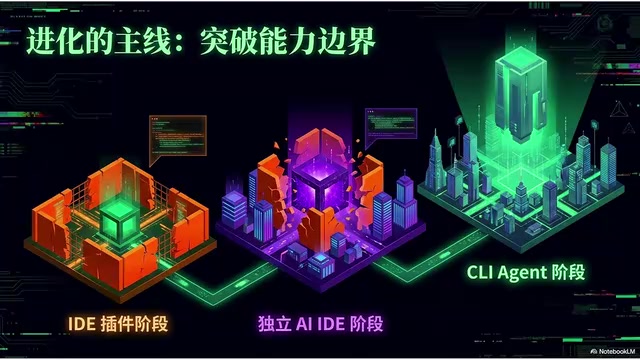
Stage One: IDE Plugin — A Supercharged Input Method
The quintessential representative of the first stage is GitHub Copilot. When it first appeared, the impact on developers was intense: no longer just traditional code snippet completion, but predicting your next block of code based on context, even generating entire functions from comments alone.
But its boundaries were also very clear—it was confined to a very small box. It could only perceive the editor's current window and open tab files, essentially a local world.
Technical Background: Copilot's "Fill-in-the-Middle" Principle
GitHub Copilot is built on OpenAI's Codex model, which itself is a code-specialized fine-tuned version of GPT-3, trained on tens of billions of lines of public code. Its core technology is "Fill-in-the-Middle" (FIM), which leverages code context both before and after the cursor to predict the missing middle portion, rather than simply continuing from left to right. This design makes it excel at function body completion and parameter filling. But FIM's fundamental limitation is that its perception window is hard-limited by token count—it cannot establish semantic relationships across file boundaries, nor understand project-level architectural intent. This is why AI in the Copilot era could only live within the small box of the "current file."

What was AI actually doing in the plugin era? To put it bluntly:
- You write a line, it completes a line
- You write a function name, it guesses the function body
- You ask a question in the editor, it gives you an answer snippet
It was essentially still helping you type—a supercharged input method. It could indeed speed up coding, but its role was crystal clear—it was just a tool, and the real thinking was still done by you.
In this stage, every key decision in the entire engineering workflow was labeled "Human": deciding what to do was you, locating where to change was you, running tests was you, committing code changes was still you. The developer was the driver; AI was just a better-performing control stick.
Stage Two: Standalone AI IDE — From Typist to Pair Programming Partner
The quintessential representative of the second stage is Cursor, along with later entries like Windsurf and Google's related products. Their most critical shift: AI was no longer just a plugin added to a traditional IDE, but was placed at the absolute center of the development experience.
This meant AI's capabilities suddenly broke free from that small box: it could modify across files, understand entire project structures, and generate a set of changes all at once based on your requirements.
Technical Background: How Cursor "Understands" an Entire Codebase
Cursor's ability to understand entire project structures relies on core technologies including Retrieval-Augmented Generation (RAG) and code vectorization indexing. It performs vector embedding on the entire codebase locally, converting every function, class, and module into high-dimensional semantic vectors stored in a local index. When you make a request, the system first retrieves the most relevant code snippets through semantic similarity search, then injects those snippets as context for the large model. This means even if a project has hundreds of thousands of lines of code, the AI can precisely locate relevant files rather than blindly stuffing the entire codebase into the context window. This is the key technical foundation for leaping from "local perception" to "global understanding."
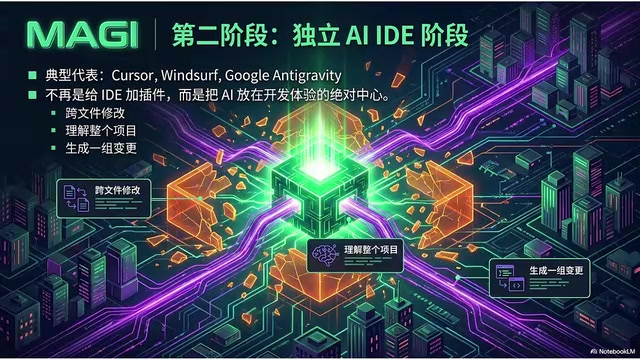
AI's role underwent a fundamental transformation. Previously it was a typist—you wrote comments, it helped you write a block of code, nothing more. Now it became your pair programming partner, beginning to participate in understanding requirements, locating files, planning modifications, generating diffs, and explaining changes. In one sentence: AI began taking on cognitive load, not just keyboard load.
Why Is an AI IDE Stronger Than a Plugin?
First, more complete context. Plugin-level AI could only access the current file and open tabs, while an AI IDE can integrate project-level global code, codebase semantic search, chat and iteration history, custom rule files, and terminal output with error messages. The more complete the context, the more AI operates like engineering rather than guessing the next line of code.
Second, larger scope of operations. This is a core leap. In the plugin era, AI merely handed you a code diff inside the editor for you to accept or reject. In the AI IDE era, it can run terminal commands, modify multiple files at once, and output success logs. AI is breaking free from the constraints of the text box—it's no longer just generating text, but beginning to execute tasks.
Stage Three: CLI Agent — A System-Level Agent That Speaks Natural Language
The quintessential representatives of the third stage are Claude Code, OpenAI's Codex CLI, and open-source tools like AIDER. Their common characteristic: AI is no longer pinned to some sidebar in an editor, but runs directly in the project directory as a system-level agent.

What you give it is no longer "complete this line of code," but task-level instructions:
- "Fix all failing tests"
- "Migrate this project to the new API"
You communicate the goal, no longer the steps.
Agent Loop: The Core Mechanism of the Engineering Closed Loop
The most core concept at this stage is the Agent Loop. You give it an initial instruction, and it starts spinning on its own: read files → modify code → run tests → check errors → go back and read files → modify code… round after round, until the task is truly complete.
Technical Background: The Underlying Implementation of Agent Loop — The ReAct Framework
The Agent Loop technically corresponds to the engineering implementation of the "ReAct Framework" (Reasoning + Acting). Its core idea: have the large model first perform reasoning (Thought) at each step, then decide what tool call to execute (Action), then observe the execution result (Observation), before entering the next round of reasoning. CLI Agents like Claude Code encapsulate operations like file read/write, terminal command execution, and code search into structured tool interfaces through the "Tool Use / Function Calling" mechanism, allowing the large model to invoke these capabilities like calling functions. The key breakthrough of this architecture is the introduction of "external state"—AI no longer relies solely on information within the context window, but can actively acquire new information by executing actions, forming a true perception-decision-execution closed loop. This is why Agents can "spin on their own" without human intervention at every step.
It's not just generating code—it's independently executing a complete engineering task. It truly begins to act like a programmer.
Three-Stage Comparison: The Leap from Text to Action
Looking at all three stages together, the main thread becomes crystal clear:
| Dimension | GitHub Copilot | Cursor | Claude Code |
|---|---|---|---|
| Interface | Sidebar | Full IDE | Command Line |
| Role | Typist | Pair Partner | Agent Executor |
| Context | Local World | Global Network | System-Level |
| Output Nature | Text Suggestions | Controlled Changes | Engineering Actions |
| Core Technology | FIM Completion | RAG + Vector Indexing | ReAct + Tool Calling |
From helping you type, to helping you edit code together, to completing tasks on your behalf—what's truly changing behind this progression isn't the interface, but AI's capability boundary.
Before, AI's output was text. Now, AI's output is action.
Final Thoughts
Understanding these three stages of evolution, we can answer the counterintuitive question from the beginning: Why do the most powerful AI coding tools return to the command line?
Because graphical interfaces were designed to constrain complexity for humans. But when the operator becomes an AI agent, those constraints become shackles. The command line gives AI the most direct access to the system—file operations, process management, environment configuration, network requests—all become first-class capabilities. Interface reduction is the price paid for capability elevation.
Related articles
Deep Dive into AI Agent Skill Design: …
Deep Dive into AI Agent Skill Design: Engineering Practices from Anthropic and Perplexity
A deep dive into Skill design philosophy from Anthropic's Claude Code team and Perplexity's Agent team, covering the Tax Test, Gotchas Flywheel, progressive disclosure, and Eval-First practices for building high-quality AI Agent skill systems.
Deep Dive into OpenAI's Official GPT-5…
Deep Dive into OpenAI's Official GPT-5.6 Prompting Guide: The Shift from Manual to Automatic
A deep dive into OpenAI's official GPT-5.6 Sol prompting guide: conciseness-first, outcome-oriented design, autonomy boundaries, tool routing, and reasoning intensity tuning.
 Deep Dives
Deep Dive into How OpenClaw (Open-Source Crayfish) AI Agent Works
Deep analysis of OpenClaw AI Agent internals: System Prompt, tool calling, SubAgents, Skill system, memory, and Context Engineering explained.