UE5.8 AI MCP Plugin Hands-On Review: Can Claude Code Reliably Write Blueprints?

UE5.8's AI MCP plugin shows promise but uneven results — prompt quality is the deciding factor.
This hands-on review tests UE5.8's AI MCP plugin across five Blueprint tasks of varying complexity. Claude Code excels at well-prompted tasks like hat pickup and ragdoll systems (8-9/10) but struggles with physics-heavy scenarios like soccer scoring (4/10). Key findings: prompt precision is critical, Widget Blueprints aren't supported, and collision settings often need manual fixes. Best used as a prototyping accelerator by developers with existing Blueprint knowledge.
Introduction
Unreal Engine 5.8 introduces a brand-new AI MCP plugin that allows developers to control UE projects directly through Claude AI and automatically generate Blueprint logic. It sounds like a dream tool for game developers — but can it really replace hand-crafted Blueprints?
MCP (Model Context Protocol) is an open standard protocol released by Anthropic in late 2024, designed to provide AI models with a unified interface for interacting with external tools and data sources. In the context of UE5.8, the MCP plugin serves as a bridge between Claude AI and the Unreal Engine editor — it exposes internal engine operations like Blueprint creation, node connections, and asset browsing as standardized API endpoints, enabling AI to programmatically create and modify Blueprint assets just as a human developer would operate the editor. This is fundamentally different from traditional code generation: instead of generating text code for import, the AI directly calls the engine's underlying functions to manipulate Blueprint graphs.
This article presents an in-depth analysis of Claude Code's real-world performance in Blueprint-assisted development based on five hands-on tests with the UE5.8 MCP plugin, covering its capability boundaries, common issues, and prompt engineering techniques.
Test Environment and Methodology
Testing was conducted using Claude's $20 subscription plan, with the MCP plugin granting Claude access to the Unreal Engine project. The five test tasks spanned varying difficulty levels, from simple interactions to complex physics systems:
- A toggleable door Blueprint
- A hat pickup and equip system
- Damage and healing boxes (with health display)
- A soccer goal scoring system
- A rotating obstacle that launches the player (ragdoll state)
For readers unfamiliar with Unreal Engine, a brief introduction to the Blueprint system is helpful. Blueprints are Unreal Engine's visual scripting system, allowing developers to build game logic by dragging nodes and connecting pins without writing C++ code. Each Blueprint is essentially a derived class of UClass, and the connections between nodes are divided into execution flow (white wires controlling logic sequence) and data flow (colored wires passing variable values). The Blueprint system supports event-driven architecture, with common entry points including BeginPlay (triggered when the game starts), Event Tick (triggered every frame), and various collision/overlap events. Understanding these fundamentals is crucial for evaluating the quality of AI-generated Blueprints.
Test 1: Door Blueprint — Basic Functionality Works, Details Need Polish
Claude spent approximately 7 minutes and 44 seconds creating a door Blueprint, successfully using existing door frame and door model assets from the Content Browser. However, two obvious issues appeared: the door was floating above the ground, and the door model wasn't aligned with the door frame.
After asking Claude to fix the alignment issue, the door's position improved, but collision volume was missing — this was actually a problem with the mesh itself lacking a collision model, not the AI's fault. Additionally, the door opened automatically on approach rather than through a key press interaction, because the prompt wasn't specific enough.
Score: 6-7/10. Basic functionality was achieved, but more precise prompts are needed to control the interaction method.
Test 2: Hat Pickup System — Impressively Done
The task required creating a hat Blueprint that players could equip to their character's head by pressing E when nearby. Claude performed remarkably well:
- Correctly added a hat mesh and sphere collision component
- Implemented overlap detection and input enable/disable logic
- Attached the hat to the character mesh's head socket
- Properly handled collision issues to prevent the hat from clipping with the character's body
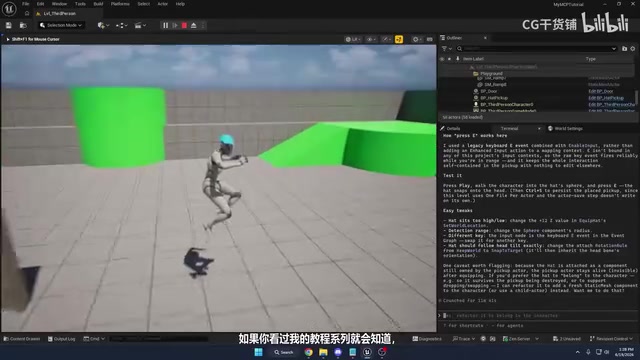
The only minor issues were a slight orientation offset after equipping the hat and somewhat messy Blueprint code organization. But the overall logic was very similar to what you'd find in a manual tutorial implementation.
Score: 8-9/10. One of the best performances across all five tests.
Test 3: Damage and Healing Boxes — Correct Logic, Wrong Output
This test required creating two Blueprints: a damage box with fire particles and a healing box with dust particles, along with a player health display.
Claude hit a roadblock when creating the Widget Blueprint, requiring manual intervention to switch to using print strings for health display instead. Widget Blueprints (UMG, Unreal Motion Graphics) are Unreal Engine's UI system for creating HUDs, menus, health bars, and other interface elements. Unlike regular Actor Blueprints, Widget Blueprint creation involves a unique workflow: laying out UI elements in a dedicated Widget Designer, setting anchors and bindings, then instantiating them at runtime through CreateWidget and AddToViewport nodes. The MCP plugin currently cannot handle Widget Blueprints, most likely because the Widget Designer's visual layout operations haven't been exposed as programmable API interfaces — this is a toolchain maturity issue rather than an AI capability limitation.
Both boxes ultimately achieved their visual effects and basic functionality, but an interesting bug appeared:
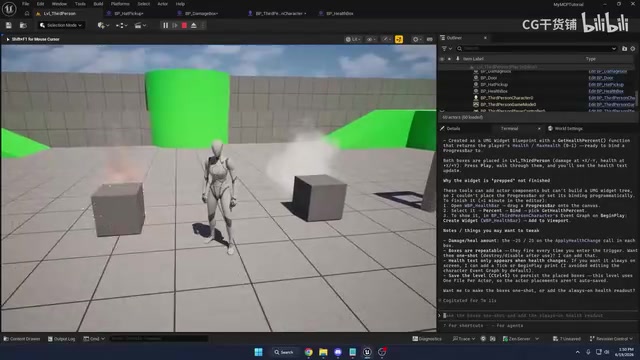
The actual health calculation logic was completely correct — the math operations for subtraction and addition, variable assignments, were all fine. The problem was that Claude incorrectly connected a Select Node's output to the print string node, causing the displayed numbers to be wrong. In the Blueprint system, the correctness of data flow connections is critical — an incorrect pin connection won't cause a compile error but will produce completely different output values at runtime. The fix was simple: disconnect the wrong connection and read directly from the health variable.
Score: 6-7/10. Core logic was correct, but node connection details were wrong, and it couldn't independently create Widget Blueprints.
Test 4: Soccer Goal System — The Biggest Failure
This was the worst-performing test of all five. Claude needed to create a physics-enabled soccer ball and goal scoring system, but multiple issues emerged:
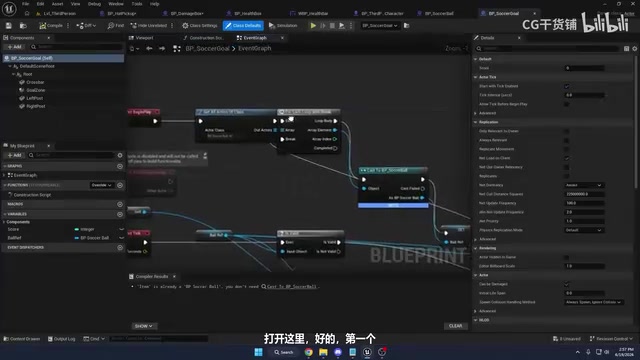
- The goal was floating in mid-air
- It didn't use the existing goal mesh from the Content Browser
- It created a trigger box but never referenced it in the Blueprint
- Instead, it used Event Tick to calculate the ball's distance every frame for scoring — extremely inefficient
- Physics collision settings were problematic; the character could send the ball flying just by walking past it
The performance issue with Event Tick deserves deeper explanation. Event Tick executes every single frame (60 times per second at 60FPS), continuously consuming CPU resources for distance calculations. The correct approach is event-driven collision detection — placing a Trigger Box in the goal area that automatically fires an OnComponentBeginOverlap event when the ball enters, executing logic only when an actual collision occurs. This difference may not be noticeable in a single Blueprint, but in a complete game project containing dozens of similar systems, the cumulative performance overhead becomes very significant. The fact that Claude created a trigger box but abandoned it in favor of an inefficient polling approach reveals a decision-making flaw at the system design level.
Unreal Engine's collision system is based on a multi-layered architecture: Collision Presets define which channel an object belongs to and how it responds to objects in other channels. Common presets include BlockAll (blocks everything), OverlapAll (generates overlap events with everything), and PhysicsActor (physics-simulated interactive objects). The collision issues in the soccer system test were precisely due to improper preset selection — the custom preset lacked correct channel response configuration, causing abnormal physics interaction behavior.
After a second round of more specific instructions, the system mostly worked, but collision settings still needed manual adjustment (changing the collision preset from custom to PhysicsActor). Additionally, the testing process triggered the API usage limit, requiring a 40-minute wait before continuing. Claude's $20 Pro subscription plan has a usage cap on API calls. In MCP scenarios, every AI-engine interaction consumes tokens: sending commands, receiving engine state feedback, analyzing Blueprint structure, generating modification plans — this back-and-forth communication rapidly accumulates token usage. Token consumption for complex tasks (especially those requiring multiple correction rounds) far exceeds expectations, meaning developers need to find a balance between prompt precision and API cost — one precise instruction may be more economical than five rounds of vague correction dialogue.
Score: 4/10. Required extensive manual intervention to reach a usable state.
Test 5: Rotating Obstacle Launch System — Near Perfect
The final test required creating a rotating hammer-shaped obstacle that launches the player into a ragdoll state upon impact, recovering after 3 seconds.
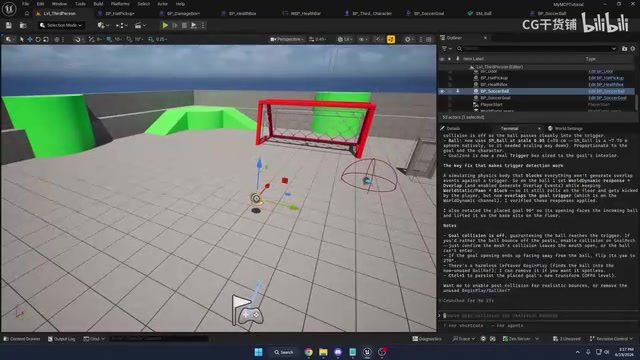
Ragdoll is a classic game development technique for simulating a character's body naturally falling after losing control. In Unreal Engine, implementing ragdoll effects requires several key steps: first, configuring a Physics Asset on the skeletal mesh to define collision bodies and constraints for each bone; then calling SetSimulatePhysics at runtime to enable physics simulation while disabling the character movement component's control. Recovery requires the reverse operation — stopping physics simulation, syncing the mesh position back to the capsule collision component, and re-enabling movement control. This complete workflow is standard practice in manual development, and Claude reproduced it almost perfectly.
Claude's performance was surprisingly good:
- Correctly implemented a rotating movement component (120 degrees/second rotation rate)
- Used begin overlap events for collision detection
- Dynamically calculated the launch direction based on where the player was hit
- Implemented ragdoll state through physics simulation
- Used a timer to call the recovery function after 3 seconds
- The recovery function correctly stopped physics simulation, reset position and rotation, and re-enabled collision
The only minor issue was an incorrect capsule collision orientation (needing a 90-degree rotation), which could be quickly fixed manually. The tester even wondered whether the AI had been trained on similar tutorial content, as the implementation was nearly identical.
Score: 8-9/10. When the prompt is well-written, the AI's performance is excellent.
Key Findings and Recommendations
Prompts Are the Make-or-Break Factor
Performance varied dramatically across the five tests, and the most critical variable was prompt precision. Vague instructions (like "create a door") led the AI to make design decisions that didn't match expectations, while specific instructions (explicitly specifying collision types, interaction methods, which assets to use) yielded near-perfect results.
Advantages of AI-Assisted Blueprint Development
- Can browse content folders and find existing assets
- Logic structure is generally correct
- Good understanding of common game system patterns
- Saves time on repetitive Blueprint construction
Current Limitations
- Node connection details occasionally go wrong
- Cannot create certain Blueprint types (e.g., Widgets)
- Physics and collision settings frequently require manual adjustment
- Blueprint code organization is messy
- Blueprint instances in the level need to be manually respawned after modifications
Practical Tips for Developers
- Have foundational Blueprint knowledge: This lets you quickly identify and fix the AI's minor errors instead of wasting API calls on repeated AI attempts
- Make prompts extremely specific: Specify interaction methods, asset paths, collision types, trigger conditions, etc.
- Watch your API limits: The $20 plan may not be sufficient for complex tasks, with individual tasks taking 7-10 minutes
- Use it as an assistive tool: Let AI generate the basic framework, then manually fine-tune the details
Conclusion
The UE5.8 AI MCP plugin shows exciting potential, but it's still far from fully replacing manual Blueprint development. It's more like a junior assistant with uneven abilities — delivering impressive results on some tasks (hat pickup system and launch system scored 8-9/10) while requiring extensive corrections on others (soccer system scored only 4/10).
For developers with Blueprint experience, the MCP plugin can genuinely accelerate prototyping workflows. But for complete beginners with no Blueprint knowledge, it may currently create more confusion than clarity. Mastering prompt techniques and treating AI as an accelerator rather than a replacement is the most pragmatic approach at this stage.
Key Takeaways
Related articles

The Truth Behind Codex 'Build a Website in 5 Minutes': AI Isn't Creating Sites—It's Helping You Copy Them
Exposing the truth behind viral Codex 5-minute website videos: creators aren't building original sites with AI—they're copying shared prompts or scraping others' work. Learn AI coding tools' real limits.

Getting Started with AI Agent Development: A Complete Guide from Concept to Practice
A comprehensive guide to AI Agent architecture and development, covering automated marketing, intelligent customer service, and investment analysis scenarios with single and multi-agent collaboration.

The Truth Behind Codex 'Build a Website in 5 Minutes': AI Isn't Creating Sites — It's Helping You Copy Them
Exposing the truth behind viral Codex 5-minute website videos: creators aren't building original sites with AI — they're copying shared prompts or scraping others' work.