Unity Custom MCP Tool Development Guide: Enabling AI Agents to Precisely Control the Editor

Reuse Unity's built-in MCP relay to build custom tools that let AI agents precisely control the editor.
This guide shows how to reuse the MCP relay bundled with Unity's AI Assistant package to build custom tools, enabling coding agents like Cursor to directly control the Unity editor. It covers environment setup, tool construction, parameter validation with enum constraints, structured responses, and a comparison with Unity MCP Pro.
From Generic Commands to Specialized Tools: The Core Value of Unity MCP
Unity's recently released official AI tools are still in beta, and their functionality remains somewhat rough. Yet among all these features, the MCP Relay Server is gradually revealing its true practical value. The core idea of this article is: you don't need to build an MCP server from scratch—simply reuse the MCP relay bundled with Unity's AI Assistant package, then focus on building custom tools so that any coding agent (such as Cursor) can interact directly with the Unity editor.
Here, MCP (Model Context Protocol) acts as a bridge: it exposes the Unity editor's capabilities as "tools" that external AI agents can invoke. Developers can thus step outside Unity's built-in AI Assistant interface and let AI directly read console logs, execute menu commands, and manipulate assets—all within their preferred coding environment.
Background: The Origins of the MCP Protocol
MCP was officially released and open-sourced by Anthropic in November 2024, aiming to solve the fragmentation problem of integrating AI large language models with external tools and data sources. Before MCP existed, each AI application had to develop separate integration adapters for different tools, forming an "N×M" complex integration matrix—assuming N AI applications and M external tools, you'd need to maintain N times M sets of adapter code, and as the ecosystem expanded, maintenance costs grew exponentially. MCP simplifies this into an "N+M" standardized connection model by defining a unified client-server communication protocol: each AI application only needs to implement one MCP client, and each external tool only needs to implement one MCP server, and the two can then interoperate.
The protocol's core includes three types of primitives: Tools (executable actions, such as calling APIs or running scripts), Resources (readable data sources, such as files or databases), and Prompts (preset interaction templates used to guide model behavior). On the communication layer, MCP supports two transport methods—standard input/output (stdio) and server-sent events (SSE)—accommodating different scenarios of local process communication and remote network services. MCP is now natively supported by mainstream AI development tools such as Cursor, Claude Desktop, and VS Code Copilot, and has spawned a large ecosystem of community-driven third-party MCP servers, becoming an important infrastructure standard for AI tool interoperability.
Notably, MCP's design philosophy is closely aligned with the Unix Pipe idea: each tool focuses on a single responsibility and combines freely through standardized interfaces, thereby forming flexibly orchestrated automation pipelines. This design approach also explains why "fine-grained decomposition of tool granularity" is a core principle in MCP engineering practice—overly coarse-grained tools make it difficult for AI agents to precisely match intent, while overly fine-grained ones increase the agent's planning complexity. Balancing the two is an eternal challenge in tool design.
Environment Setup: Enabling the Unity MCP Relay
The first step is to install Unity's AI Assistant package. It's worth emphasizing that we don't intend to use the AI Assistant itself—we want to use the MCP relay functionality bundled with it. After installation, go to the AI category in Project Settings, and you'll find the Unity MCP Server option.
After agreeing to the terms and enabling it, when you see a green light appear beneath "Unity Bridge" showing "Running," the relay is working properly. At this point, the page lists all available tools—some enabled by default, others requiring manual activation. Under the "Integrations" option, click the configuration button for Cursor, and the system will automatically complete all connection settings; if you have non-standard requirements, you can also manually write a custom JSON configuration.
Once configured, a green light appears next to Cursor, indicating a successful client connection. On the first connection, the editor will pop up an authorization prompt—just select "Allow."
Background: The Communication Architecture of the Unity MCP Bridge
The Unity MCP Relay Server plays the role of a "protocol translation layer" in the architecture: it runs as a local HTTP service inside the Unity editor process, mapping the Unity Editor API's invocation capabilities to MCP-compliant Tool Endpoints. When an external AI client (such as Cursor) initiates a tool invocation request via the MCP protocol, the relay server decodes and forwards the request to Unity editor's C# API execution layer, then serializes the execution result into MCP response format and returns it. This "in-process proxy" design means external AI tools don't need to understand Unity's internal implementation details—they only need to follow the MCP protocol specification to complete bidirectional communication. Compared to requiring developers to set up a standalone MCP server process themselves, this embedded relay approach significantly reduces environment configuration complexity and avoids common cross-process communication deployment issues such as port conflicts and permission management.
Verifying the Connection: Letting AI Read the Console Logs
Back on the Cursor side, in the Tools & MCP section of Preferences, you can see that "Unity MCP Official" has a green light. Expand it, and you'll see all the commands bridged over from Unity.
A never-fail connectivity verification trick: have the AI read the console logs. Just a simple instruction—"Read the console and tell me whether the project compiled successfully"—and the AI will invoke the corresponding tool and return the results. When the output shows "zero errors, zero warnings," it both confirms the project's healthy state and verifies that the MCP connection is indeed working—extremely low cost yet very reliable.
Background: Console Logs as the AI Agent's "Perception Channel"
In the collaboration mode between AI agents and the Unity editor, the Console Log plays the core role of "environment state feedback," analogous to the Observation phase in the ReAct loop that corresponds to a human developer's "observation" action. Unity console output falls into three categories: regular Log, Warning, and Error, with each log accompanied by Stack Trace information. For AI agents, accessing console logs means being able to programmatically perceive the editor's current health state, code compilation results, and runtime exceptions—an indispensable source of information for building an "execution-verification" closed loop. From an engineering practice standpoint, it's recommended that custom MCP tool implementations proactively return relevant post-operation log summaries to the agent, rather than relying on the agent to passively issue a separate log query request after invoking the tool. This merges two tool invocations into one, effectively compressing the total number of iterations needed to complete a task while reducing token consumption and latency.
The Limitations of Generic Tools: Why Custom MCP Tools Are Needed
Before diving into custom development, let's examine the capabilities and shortcomings of MCP's built-in "Run Command" tool. Take "convert all built-in materials to a new render pipeline" as an example: even with a vague instruction that doesn't specify a particular tool, the AI can autonomously identify materials using the built-in render pipeline and fix them one by one.
Background: The Evolution of Unity's Render Pipelines
Unity's render pipelines have undergone a significant architectural evolution from the Built-in Render Pipeline to the Scriptable Render Pipeline (SRP). The Built-in Render Pipeline is Unity's traditional default solution—comprehensive in functionality but limited in extensibility, unable to meet modern games' needs for fine-grained control over performance and visual quality. Developers cannot deeply customize the rendering process and can only rely on the engine's built-in fixed logic.
Starting in 2018, Unity introduced two SRP branches: the Universal Render Pipeline (URP) focuses on cross-platform performance optimization, suitable for a wide range of mobile, console, and PC projects; the High Definition Render Pipeline (HDRP) targets professional-grade needs for high-fidelity visuals on PC/console, providing advanced effects such as volumetric lighting and physical cameras. Because the two pipelines have fundamental differences at the Shader architecture level—the built-in pipeline uses traditional CG/ShaderLab shaders, while URP/HDRP rely on node-graph-based Shader Graph and their respective dedicated Lit and Unlit material systems—built-in pipeline materials cannot be used directly in new pipeline projects and must be converted one by one via dedicated migration tools. In large projects, this migration process often involves dozens or even hundreds of material assets, making the need for batch automation a typical application scenario for custom MCP tools.
It's worth adding that Unity provides an official assist tool for SRP migration, the "Render Pipeline Converter," accessible via the menu path Window > Rendering > Render Pipeline Converter. This tool can batch-scan materials, shader graphs, and post-processing configurations in a project and automatically complete format conversion—it's the underlying execution entry point for AI agents to perform material migration by invoking
ExecuteMenuItem. Understanding this tool's operational boundaries—it handles recognized built-in material assets but cannot handle material instances dynamically generated at runtime—helps developers reasonably define applicable scenarios when designing MCP tools and explicitly declare them in the tool description.
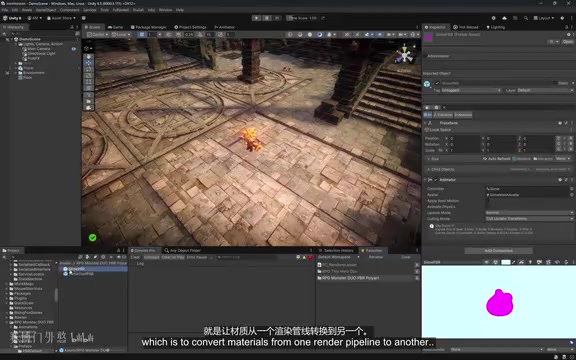
The AI found 10 built-in materials but then began handling some operations "manually." As a general-purpose fallback, Run Command is very powerful—it can do almost anything in the editor—but the problem is precisely that it's "not specific enough": the AI may go off track and modify things it shouldn't touch, such as the skybox.
Background: AI Agent Autonomous Decision-Making and Tool Boundary Issues
What distinguishes an AI Agent from a regular LLM conversation is its autonomous "plan-execute-verify" loop capability, which academia calls the ReAct (Reasoning + Acting) paradigm. When an agent receives a task, it first decomposes the goal into a sequence of subtasks, selects an appropriate tool and executes it, then observes the execution result (Observation), and adjusts its plan and decides the next action based on the observation—this loop iterates continuously until the overall task is complete or a termination condition is reached.
While this autonomy improves efficiency, it also introduces the risk of "Tool Misuse": during the tool selection phase, the agent matches based on the semantic similarity between tool descriptions and the current task intent. When a tool description is too broad, it can easily select a tool that is semantically similar but contextually inappropriate. The case of mistakenly modifying the skybox is a typical manifestation—the generic "Run Command" description is too broad in scope and cannot constrain the agent's behavior at the semantic level to the specific intent of "material migration," leading the agent to make decisions that are "reasonable from its own reasoning perspective but wrong from the task context." This is precisely the fundamental reason why the precision of Tool Descriptions is repeatedly emphasized in MCP engineering practice.
From a broader perspective, this problem reflects the current LLMs' inherent limitations in two dimensions—"intent understanding" and "scope delimitation": models tend toward "over-generalization" when understanding user intent, extending local instructions to a broader semantic domain. There are two solution paths: one is to explicitly constrain agent behavior through carefully designed System Prompts; the other is to establish "structural boundaries" through the tool design itself—the latter is generally more robust than the former, because prompt constraints depend on the model's ability to follow instructions, while tool boundaries are hard restrictions at the protocol level, immune to the model's reasoning drift.
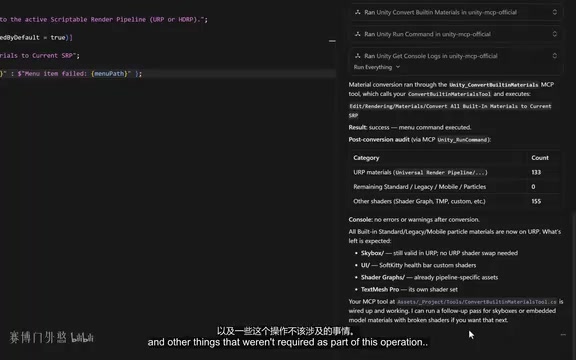
This is exactly the significance of building specialized MCP tools: constraining the workflow within clear, controllable boundaries.
Hands-On Practice: Building a Material Conversion MCP Tool
Basic Version
Create a Tools folder in your project and create a script named ConvertBuiltinMaterialsTool. The key structure includes:
- Import the
Unity.AI.MCP.Editor.HelpersandToolRegistrynamespaces;Helpersis used to return standardized responses to the agent, andToolRegistryprovides support for various attributes; - Define a static class containing a public static method that returns an object and is annotated with the
[MCPTool]attribute; - Within the attribute, pass in the tool name and description, optionally assign it to a group, and set Default Enabled to True.
Background: The Registration Mechanism of the
[MCPTool]AttributeThe
[MCPTool]attribute is essentially a declarative metaprogramming mechanism. Under the hood, it relies on C#'s Reflection system to automatically discover and register all static methods annotated with this attribute via Assembly Scanning at editor startup. This "Convention over Configuration" design philosophy avoids the tedium of manually adding tool entries to a central registry—developers only need to focus on the tool logic itself, while the framework handles discovery and registration.At the same time, by embedding the tool's semantic information—including name, purpose description, parameter descriptions, and value constraints—directly into the source code via auxiliary attributes such as
[MCPDescription], it achieves "Code as Documentation" self-documentation: there's no need to maintain separate tool documentation, as the code comments serve as the invocation guide for AI agents. During the initialization phase, the AI agent reads this metadata to build a list of available tools, and during the reasoning phase, it decides "when to invoke which tool and how to fill in the parameters" based on semantic matching. Therefore, the quality of the wording and semantic precision of parameter descriptions directly determine the accuracy of AI invocations—this is the core aspect of custom MCP tool design most worthy of careful consideration, often influencing actual results more than the tool's functional implementation itself.Adding a note from the C# language mechanism perspective: assembly scanning typically occurs within the
[InitializeOnLoad]or[InitializeOnLoadMethod]lifecycle hooks, ensuring that tool registration completes immediately after the Unity editor finishes Domain Reload. This guarantees that newly added tools take effect after recompilation without restarting the editor. This "hot update" feature greatly shortens the development and debugging iteration cycle for custom tools.
The most basic implementation logic: define a constant path pointing to the target menu command, use EditorApplication.ExecuteMenuItem to execute that menu item, then return an object containing a Success flag and a message so the agent knows whether the command succeeded.

After reloading assets, the new tool appears in the Unity MCP Server tab. Return to Cursor and enter "Use the MCP tool to update the materials in the project," and the agent will read the tool information, assess its applicability, and execute. After successful execution, the AI will also proactively invoke Run Command and Get Console Logs to verify the results and check for exceptions, forming a complete execution-verification closed loop.
Advanced Version: Parameter Design and Robustness
The basic tool works, but there's room to improve its professionalism further:
1. Introduce input parameters: By creating a Params object and using a Scope string to distinguish between "convert all materials" and "convert only selected materials." Add the [MCPDescription] attribute to parameters to provide readable descriptions, declare whether they're required, and even bind an enum type—ensuring that parameter values can only be selected from the enum, preventing the AI from passing invalid values. Constraining parameters to enums is especially critical: it builds a Type-Safe Barrier at the protocol level, effectively preventing misoperations caused by parameter ambiguity even when facing models with weaker reasoning abilities. Enum constraints essentially compress an "open-ended semantic space" into a "finite discrete set," fundamentally eliminating the ambiguity of parameter parsing.
Background: The Engineering Significance of Type Constraints in AI Tool Invocation
In MCP tool parameter design, enum type constraints are not only a Defensive Programming measure but also an "Intent Alignment" mechanism. When an AI agent passes parameters to a tool, the underlying process maps the results of natural language understanding to structured function call parameters—this mapping is essentially a "semantics-to-syntax" compression transformation that inevitably involves information loss and ambiguity risk. Enum constraints, by declaring an
enumfield at the JSON Schema level, directly expose the list of legal parameter values to the model's tool invocation reasoning module, enabling the model to select from a clear set of candidates when generating parameters rather than freely generating in an unbounded string space. Experimental data shows that enum-based parameterization can typically reduce the tool invocation parameter error rate by more than 60%, with the most significant effect when handling options that are semantically similar but behaviorally different, such as range-limiting parameters like "ALL/SELECTED/ACTIVE."
2. Add validation and fault tolerance:
- Check whether required parameters are null; if missing, use the static factory method
Errorto return a failure response with a custom error code; - Check whether the editor is in Play Mode, since this command cannot execute at runtime; in that case, return a message informing the agent of the next step;
- Use the
Response.SuccessandResponse.Errorfactory methods instead of manually assembling objects, making the return structure more standardized.

The data structure returned to the agent can be far richer than "success/failure": on error, return operational hints; on success, return render pipeline information. This structured data can significantly improve the quality of the AI's subsequent decisions—the agent's next action depends on its understanding of the current state, and the more precise the returned information, the shorter the decision chain and the fewer iterations needed to complete the overall task.
Background: The Impact of Structured Responses on the Agent Decision Chain
In Multi-Step Agent Tasks, the response content of each tool invocation directly constitutes the Context Input for the next round of reasoning, and its information quality has a multiplier effect on overall task performance through the utilization efficiency of the Context Window. A well-designed structured response typically contains three layers: a status layer (whether the operation succeeded, error type and error code), a data layer (the core data of the operation result, such as the number of converted materials and path lists), and a suggestion layer (recommended follow-up actions based on the current state, such as "3 material conversions failed; recommend invoking GetConsoleLogs to obtain detailed error information"). Among these, the "suggestion layer" is the most easily overlooked yet most impactful part: it can effectively guide the agent to advance the task along the expected path, reducing "reasoning drift" caused by insufficient information, thereby compressing the average completion rounds of multi-step tasks by 30% to 50%. This design concept is referred to as the "Guided Response" pattern in Function Calling best practice documents.
When testing, giving the explicit instruction "only convert the materials on the Slime prefab," the AI precisely located the Slime material in the scene and executed—no longer boundless like the generic command—fully demonstrating the core advantage of specialized tools being "precise and controllable."
An Extended Solution: The Unity MCP Pro Plugin
For developers who want an out-of-the-box, more comprehensive solution, the Unity MCP Pro plugin is another third-party option worth evaluating. Its core differences from the official solution are:
- Over 280 built-in tools, covering almost all common functionality, with extremely fast onboarding;
- Uses a command structure to handle complex tasks and supports full undo/redo;
- Comes with its own standalone MCP server, not dependent on the MCP Bridge of Unity AI Assistant, and must be downloaded and installed separately from the official website;
- Priced at about $5.
Background: Technical Architecture Differences Between Official and Third-Party Solutions
The official Unity MCP Bridge and the third-party MCP Pro represent two different engineering philosophies in architectural design. The official solution follows the principle of "minimal intrusion": the MCP relay is embedded within the AI Assistant package, runs on the Unity editor process, keeps the toolset lightweight, and leaves extension capabilities for developers to implement via custom tools. The advantage of this design is officially maintained, guaranteed version compatibility, but the toolset coverage is relatively limited, and the pace of feature iteration is constrained by Unity's version release cycle. Third-party solutions (such as MCP Pro) adopt a "standalone server" architecture: the MCP server runs as a separate process and interacts with the Unity editor through a specific communication protocol, allowing it to iterate independently outside Unity's package management system and rapidly expand its toolset. Another advantage of the standalone process architecture is the ability to achieve more complete command history management—full undo/redo support is underpinned by deep integration with Unity's
Undosystem, which is technically difficult to implement in an embedded relay solution. When making a selection, developers should comprehensively consider project scale, tool coverage needs, and long-term maintenance costs. For small projects, using the official solution with a few custom tools is usually the optimal choice, while large teams with extensive tool needs may benefit more from the breadth of coverage offered by third-party solutions.
Of course, there are other Unity MCP tools on the market, and actual effectiveness varies by project—it's recommended to evaluate and choose based on specific needs.
Conclusion: The Right Approach to AI Agent and Unity Editor Collaboration
This article reveals a pragmatic development paradigm: don't expect generic AI commands to solve everything; instead, use custom MCP tools to encapsulate key workflows into specialized capabilities with clear boundaries, explicit parameters, and standardized feedback. This both harnesses the automation advantages of AI agents and constrains their unpredictability through tool design. For Unity developers, the MCP relay lowers the barrier to entry, allowing coding agents like Cursor to truly become efficient collaborative partners within the editor.
The MCP protocol is reshaping how developers collaborate with AI: evolving from "asking AI questions" to "letting AI operate tools," and the quality of tool design—the precision of descriptions, the constraints on parameters, and the information density of feedback—determines how far this collaboration can go. Mastering the ability to develop custom MCP tools means you can transform any repetitive editor workflow into precise, AI-schedulable instructions—precisely one of the core levers of next-generation game development efficiency.
Outlook: The Evolutionary Direction of the MCP Ecosystem
From a longer-term perspective, the "tool-based AI integration" paradigm that MCP represents is giving rise to a brand-new branch of software engineering—AI Tool Engineering. As more and more development teams encapsulate core workflows into MCP tools, tool version management, testing frameworks, security auditing, and permission control will gradually become important components of the engineering system. It's foreseeable that in future game development workflows, the "Tool Library" will stand alongside the "Code Repository" as a core component of team assets, and the semantic quality of tool descriptions will be incorporated into the Code Review process as one of the standard metrics for measuring the robustness of AI collaboration infrastructure. Unity MCP's current exploration is precisely an early practice of this larger paradigm shift.
Key Takeaways
- Reuse rather than rebuild: Use the MCP relay built into the Unity AI Assistant package directly, without building an MCP server from scratch, and concentrate your energy on custom tool logic.
- Tool descriptions determine invocation quality: The wording of the semantic descriptions in the
[MCPTool]and[MCPDescription]attributes directly affects the accuracy of the AI agent's tool selection—the design aspect worthy of the most investment in the entire system. - Enum constraints beat free string input: Constraining parameters to enum types eliminates parameter ambiguity at the protocol level and is the most effective structural means of preventing AI misoperation.
- Structured responses compress iteration rounds: Tool return values should not stop at "success/failure." A three-layer response structure of status layer + data layer + suggestion layer can significantly guide the agent to advance along the expected path and reduce unnecessary tool invocation rounds.
- Specialized tools beat generic commands: While the generic "Run Command" is versatile, it has blurred boundaries and easily leads the AI to operate beyond expected scope; specialized tools lock the agent's behavior within a clear semantic domain through the triple constraints of name, description, and parameter enums.
Related articles

GrowthRail Review: A Quick Integration Guide to the Recommendation System SDK for Developers
GrowthRail is a developer-first referral system platform offering Drop-in SDK and Referral API for SaaS, web, and mobile apps. This review covers its positioning, use cases, integration benefits, and early-stage risks.

AI Thirst Traps: How Fake AI-Generated Beauties Are Flooding Social Networks
An in-depth analysis of how AI-generated fake beauty photos (AI thirst traps) infiltrate social platforms, their industrial pipeline, detection challenges, and practical identification tips.

LiveKit Agents: A Comprehensive Guide to the Open-Source Framework for Building Real-Time Voice AI Agents
Deep dive into the LiveKit Agents open-source framework for building real-time voice AI agents using STT, LLM, and TTS modules with production-ready deployment capabilities.